

Product
About





ClickVillagers
ClickVillagers is a simple quality of life plugin/mod that makes working with villagers much easier by allowing you
to pick villagers up into your inventory, claim and protect them, change their biomes, and much more!

- 🎥 Trailer: https://youtu.be/19qup8i3IyU
Features & How to Use
- Pick villagers up into your inventory by shift + right clicking them.
- Place them back by placing the villager head.
- You can place villagers directly into boats, minecarts, etc.
- Use dispensers to place villagers back automatically. (On Paper/Spigot 1.21+)
- Reset Villager trades directly in the trading menu! (Disabled by default, enable in config. Paper/Fabric Only!)
- Click on the
Reset Tradesrecipe to reset the trades of the villager. - Clean messages, sound effects and particle effects.
- Language support: German & English (Paper/Spigot only)
See Trades at a Glance
- See picked up villagers' trades in their description!
- For each profession, only relevant trades will be shown. (i.E: only enchanted books for librarians)
- Relevant trades will be formatted with colors and emojis.
- The villager's owner, trade status and anchor status will also be shown.

Anchor Villagers
- Anchor villagers by shift + right clicking with SHEARS.
- Anchored villagers cannot move on their own, but you can still push them around.
Claim & Protect Villagers
- Claim villagers by shift + right clicking with ANY SHOVEL.
- Claimed villagers won't take any damage by default.
- After claiming, access their menu by shift + right clicking with or without a shovel.
- Change a claimed villager's biomes.
- Open/close a claimed villager's trading.
- Add trading partners and only let your trading partners trade with your villagers.

Villager Hoppers
- Use Villager Hoppers to pick up villagers automatically.
- Baby villagers and claimed villagers won't be picked up by default.
- For Paper/Spigot, craft a villager hopper by combining 1 Hopper and 1 Emerald
- For Fabric, regular hoppers will pick up villagers instead, there is no custom item/recipe.
- Especially useful for villager farms.
Configuration Commands
Since version 1.6, there is a command interface to manage configuration options as well!.
- /clickvillagers config set <option> <value>: Sets a configuration option.
- /clickvillagers config get <option>: Gets the value of a configuration option.
- /clickvillagers config path: Prints the path to the configuration file.
- /clickvillagers config reload: Reloads the configuration file.
Configuration (File)
To find the configuration file, run the command /clickvillagers config path.
- For Paper/Spigot, you will find the configuration file at "plugins/ClickVillagers/config.yml".
- For Fabric, you will find the configuration file at ".minecraft/config/clickvillagers.json".
- WARNING: If you are using another client (i.E. Modrinth App), the config file will be located at the installation
directory instead.
- Make sure you save the config file after making changes and do the following:
- For Paper/Spigot, reload/restart your server or use the command "/clickvillagers reload".
- For Fabric, restart your game or server fully.
Licensing
- This project is licensed under the GPLv3 license.
Preview
Product images
Environment
Requirements & compatibility
Compatibility & requirements
BukkitFabricFoliaNeoforgePaperPurpurSpigot1.20 – 1.21.1126.126.1.126.1.226.2
Local host
Unknown
Hosting on services
Unknown
Terms
License
Terms for using, modifying and redistributing this product.
GNU General Public License v3.0 onlyModrinth
Release
Latest release
v1.6.7+1.21.1-fabric
25.06.2026 · Modrinth
- Added 26.2 support
- Fixed: Crash when attempting to pick up a villager with a job.
- Fixed: Unnecessary "Couldn't read villager data" errors.
Gallery
Project images
Screenshots and images from the original Modrinth page.
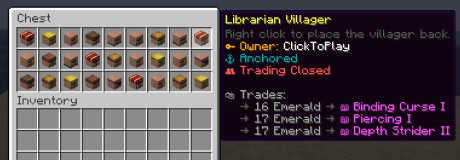
Lots of villagers in a chest
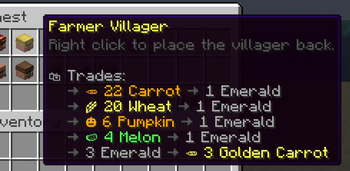
Picked up farmer villager
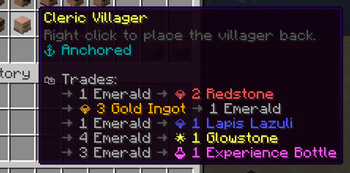
Picked up cleric villager

Resetting trades
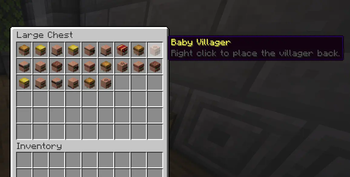
Villagers stored in a chest
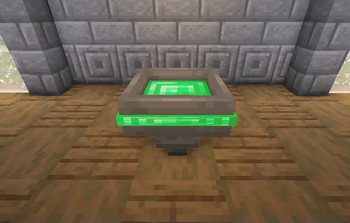
A villager hopper (Paper/Spigot)
History
Project versions
Published versions and original Modrinth files.
v1.6.7+1.21.1-fabricLatestRelease
25.06.2026 · 3 856 downloads
Fabric1.211.21.1
- Added 26.2 support
- Fixed: Crash when attempting to pick up a villager with a job.
- Fixed: Unnecessary "Couldn't read villager data" errors.
v1.6.7+1.21.11-fabricRelease
25.06.2026 · 12 030 downloads
Fabric1.21.11
- Added 26.2 support
- Fixed: Crash when attempting to pick up a villager with a job.
- Fixed: Unnecessary "Couldn't read villager data" errors.
v1.6.7+1.21.11-neoforgeRelease
25.06.2026 · 194 downloads
Neoforge1.21.11
- Added 26.2 support
- Fixed: Crash when attempting to pick up a villager with a job.
- Fixed: Unnecessary "Couldn't read villager data" errors.
v1.6.7+26.1-fabricRelease
25.06.2026 · 8 719 downloads
Fabric26.126.1.126.1.2
- Added 26.2 support
- Fixed: Crash when attempting to pick up a villager with a job.
- Fixed: Unnecessary "Couldn't read villager data" errors.
v1.6.7+1.21.1-neoforgeRelease
25.06.2026 · 1 513 downloads
Neoforge1.21.1
- Added 26.2 support
- Fixed: Crash when attempting to pick up a villager with a job.
- Fixed: Unnecessary "Couldn't read villager data" errors.
v1.6.7+26.2-fabricRelease
25.06.2026 · 11 284 downloads
Fabric26.2
- Added 26.2 support
- Fixed: Crash when attempting to pick up a villager with a job.
- Fixed: Unnecessary "Couldn't read villager data" errors.
v1.6.6+1.21.1-neoforgeAlpha
21.06.2026 · 452 downloads
Neoforge1.21.1
- Added 26.2 support
- Fixed: Can't place a villager from the off-hand
- Fixed: Can't open a boat with chest's inventory as error message "Couldn't read villager data" shows up
- Bumped Configured version to 0.3.2.
v1.6.6+1.21.11-neoforgeAlpha
21.06.2026 · 138 downloads
Neoforge1.21.11
- Added 26.2 support
- Fixed: Can't place a villager from the off-hand
- Fixed: Can't open a boat with chest's inventory as error message "Couldn't read villager data" shows up
- Bumped Configured version to 0.3.2.
v1.6.6+1.21.11-fabricAlpha
21.06.2026 · 2 277 downloads
Fabric1.21.11
- Added 26.2 support
- Fixed: Can't place a villager from the off-hand
- Fixed: Can't open a boat with chest's inventory as error message "Couldn't read villager data" shows up
- Bumped Configured version to 0.3.2.
v1.6.6+1.21.1-fabricAlpha
21.06.2026 · 288 downloads
Fabric1.211.21.1
- Added 26.2 support
- Fixed: Can't place a villager from the off-hand
- Fixed: Can't open a boat with chest's inventory as error message "Couldn't read villager data" shows up
- Bumped Configured version to 0.3.2.
v1.6.6+26.1-fabricAlpha
21.06.2026 · 1 899 downloads
Fabric26.126.1.126.1.2
- Added 26.2 support
- Fixed: Can't place a villager from the off-hand
- Fixed: Can't open a boat with chest's inventory as error message "Couldn't read villager data" shows up
- Bumped Configured version to 0.3.2.
v1.6.6+26.2-fabricRelease
21.06.2026 · 1 231 downloads
Fabric26.2
- Added 26.2 support
- Fixed: Can't place a villager from the off-hand
- Fixed: Can't open a boat with chest's inventory as error message "Couldn't read villager data" shows up
- Bumped Configured version to 0.3.2.
vpaper-1.6.3Release
12.06.2026 · 33 659 downloads
FoliaPaperPurpur1.211.21.11.21.21.21.31.21.41.21.51.21.61.21.7
- Fixed: File leak on Windows when handling language files or JSON configs.
- Fixed: Language files redeploying on every startup.
- Fixed: Baby zombie villagers having default villager textures and wrong names when picked up.
- Added new config option
claimed_zombies_passive: - When enabled, claimed zombie villagers won't take damage or attack.
- Config option
claimed_damageno longer applies to claimed zombie villagers. - Config option
claimed_damagewill now also update when config is updated via commands. - Added new permission
clickvillagers.change-biometo manage changing the biome of villagers via the menu.
v1.6.5+26.1-fabricRelease
19.04.2026 · 23 527 downloads
Fabric26.126.1.126.1.2
- Added 26.1.1 and 26.1.2 support
v1.6.4+26.1-fabricRelease
26.03.2026 · 4 349 downloads
Fabric26.1
- Added 26.1 support
v1.6.4+1.21.8-neoforgeRelease
25.02.2026 · 1 656 downloads
Neoforge1.21.61.21.71.21.8
- Fixed a crash when the game attempts to save a villager with the
"Reset Trades" recipe. (#65)
v1.6.4+1.21.8-fabricRelease
25.02.2026 · 1 943 downloads
Fabric1.21.61.21.71.21.8
- Fixed a crash when the game attempts to save a villager with the
"Reset Trades" recipe. (#65)
v1.6.4+1.21.5-fabricRelease
25.02.2026 · 591 downloads
Fabric1.21.5
- Fixed a crash when the game attempts to save a villager with the
"Reset Trades" recipe. (#65)
v1.6.4+1.21.5-neoforgeRelease
25.02.2026 · 46 downloads
Neoforge1.21.5
- Fixed a crash when the game attempts to save a villager with the
"Reset Trades" recipe. (#65)
v1.6.4+1.21.4-neoforgeRelease
25.02.2026 · 102 downloads
Neoforge1.21.21.21.31.21.4
- Fixed a crash when the game attempts to save a villager with the
"Reset Trades" recipe. (#65)
v1.6.4+1.21.4-fabricRelease
25.02.2026 · 972 downloads
Fabric1.21.4
- Fixed a crash when the game attempts to save a villager with the
"Reset Trades" recipe. (#65)
v1.6.4+1.21.11-neoforgeRelease
25.02.2026 · 1 218 downloads
Neoforge1.21.11
- Fixed a crash when the game attempts to save a villager with the
"Reset Trades" recipe. (#65)
v1.6.4+1.21.1-neoforgeRelease
25.02.2026 · 4 394 downloads
Neoforge1.21.1
- Fixed a crash when the game attempts to save a villager with the
"Reset Trades" recipe. (#65)
v1.6.4+1.21.10-neoforgeRelease
25.02.2026 · 123 downloads
Neoforge1.21.91.21.10
- Fixed a crash when the game attempts to save a villager with the
"Reset Trades" recipe. (#65)
v1.6.4+1.21.11-fabricRelease
25.02.2026 · 38 526 downloads
Fabric1.21.11
- Fixed a crash when the game attempts to save a villager with the
"Reset Trades" recipe. (#65)
v1.6.4+1.21.10-fabricRelease
25.02.2026 · 2 858 downloads
Fabric1.21.91.21.10
- Fixed a crash when the game attempts to save a villager with the
"Reset Trades" recipe. (#65)
v1.6.4+1.21.1-fabricRelease
25.02.2026 · 7 552 downloads
Fabric1.211.21.1
- Fixed a crash when the game attempts to save a villager with the
"Reset Trades" recipe. (#65)
vpaper-1.6.2Release
15.02.2026 · 74 491 downloads
FoliaPaperPurpur1.211.21.11.21.21.21.31.21.41.21.51.21.61.21.7
v1.6.3+1.21.5-fabricRelease
27.01.2026 · 929 downloads
Fabric1.21.5
- Fixed: Anchoring villagers would not work and always say "Removed anchor".
v1.6.3+1.21.10-fabricRelease
27.01.2026 · 1 522 downloads
Fabric1.21.91.21.10
- Fixed: Anchoring villagers would not work and always say "Removed anchor".
v1.6.3+1.21.1-fabricRelease
27.01.2026 · 1 763 downloads
Fabric1.211.21.1
- Fixed: Anchoring villagers would not work and always say "Removed anchor".
v1.6.3+1.21.11-fabricRelease
27.01.2026 · 10 064 downloads
Fabric1.21.11
- Fixed: Anchoring villagers would not work and always say "Removed anchor".
v1.6.3+1.21.8-fabricRelease
27.01.2026 · 839 downloads
Fabric1.21.61.21.71.21.8
- Fixed: Anchoring villagers would not work and always say "Removed anchor".
v1.6.3+1.21.4-fabricRelease
27.01.2026 · 413 downloads
Fabric1.21.4
- Fixed: Anchoring villagers would not work and always say "Removed anchor".
v1.6.2+1.21.8-fabricRelease
11.01.2026 · 1 264 downloads
Fabric1.21.61.21.71.21.8
- Added
NeoForgesupport. - Switched to mojang mappings for Fabric/Neoforge.
- This will make updating to 26.1 faster when it releases.
- You can now execute
/clickvillagerscommands in singleplayer without having cheats enabled.- You still need operator permissions on servers.
- You will now be notified of updates in singleplayer without having cheats enabled.
- You still need operator permissions on servers to be notified.
v1.6.2+1.21.5-neoforgeRelease
11.01.2026 · 40 downloads
Neoforge1.21.5
- Added
NeoForgesupport. - Switched to mojang mappings for Fabric/Neoforge.
- This will make updating to 26.1 faster when it releases.
- You can now execute
/clickvillagerscommands in singleplayer without having cheats enabled.- You still need operator permissions on servers.
- You will now be notified of updates in singleplayer without having cheats enabled.
- You still need operator permissions on servers to be notified.
v1.6.2+1.21.4-fabricRelease
11.01.2026 · 314 downloads
Fabric1.21.4
- Added
NeoForgesupport. - Switched to mojang mappings for Fabric/Neoforge.
- This will make updating to 26.1 faster when it releases.
- You can now execute
/clickvillagerscommands in singleplayer without having cheats enabled.- You still need operator permissions on servers.
- You will now be notified of updates in singleplayer without having cheats enabled.
- You still need operator permissions on servers to be notified.
v1.6.2+1.21.4-neoforgeRelease
11.01.2026 · 43 downloads
Neoforge1.21.21.21.31.21.4
- Added
NeoForgesupport. - Switched to mojang mappings for Fabric/Neoforge.
- This will make updating to 26.1 faster when it releases.
- You can now execute
/clickvillagerscommands in singleplayer without having cheats enabled.- You still need operator permissions on servers.
- You will now be notified of updates in singleplayer without having cheats enabled.
- You still need operator permissions on servers to be notified.
v1.6.2+1.21.5-fabricRelease
11.01.2026 · 122 downloads
Fabric1.21.5
- Added
NeoForgesupport. - Switched to mojang mappings for Fabric/Neoforge.
- This will make updating to 26.1 faster when it releases.
- You can now execute
/clickvillagerscommands in singleplayer without having cheats enabled.- You still need operator permissions on servers.
- You will now be notified of updates in singleplayer without having cheats enabled.
- You still need operator permissions on servers to be notified.
v1.6.2+1.21.10-neoforgeRelease
11.01.2026 · 73 downloads
Neoforge1.21.91.21.10
- Added
NeoForgesupport. - Switched to mojang mappings for Fabric/Neoforge.
- This will make updating to 26.1 faster when it releases.
- You can now execute
/clickvillagerscommands in singleplayer without having cheats enabled.- You still need operator permissions on servers.
- You will now be notified of updates in singleplayer without having cheats enabled.
- You still need operator permissions on servers to be notified.
v1.6.2+1.21.11-fabricRelease
11.01.2026 · 5 316 downloads
Fabric1.21.11
- Added
NeoForgesupport. - Switched to mojang mappings for Fabric/Neoforge.
- This will make updating to 26.1 faster when it releases.
- You can now execute
/clickvillagerscommands in singleplayer without having cheats enabled.- You still need operator permissions on servers.
- You will now be notified of updates in singleplayer without having cheats enabled.
- You still need operator permissions on servers to be notified.
v1.6.2+1.21.1-neoforgeRelease
11.01.2026 · 770 downloads
Neoforge1.21.1
- Added
NeoForgesupport. - Switched to mojang mappings for Fabric/Neoforge.
- This will make updating to 26.1 faster when it releases.
- You can now execute
/clickvillagerscommands in singleplayer without having cheats enabled.- You still need operator permissions on servers.
- You will now be notified of updates in singleplayer without having cheats enabled.
- You still need operator permissions on servers to be notified.
v1.6.2+1.21.10-fabricRelease
11.01.2026 · 1 221 downloads
Fabric1.21.91.21.10
- Added
NeoForgesupport. - Switched to mojang mappings for Fabric/Neoforge.
- This will make updating to 26.1 faster when it releases.
- You can now execute
/clickvillagerscommands in singleplayer without having cheats enabled.- You still need operator permissions on servers.
- You will now be notified of updates in singleplayer without having cheats enabled.
- You still need operator permissions on servers to be notified.
v1.6.2+1.21.1-fabricRelease
11.01.2026 · 1 262 downloads
Fabric1.211.21.1
- Added
NeoForgesupport. - Switched to mojang mappings for Fabric/Neoforge.
- This will make updating to 26.1 faster when it releases.
- You can now execute
/clickvillagerscommands in singleplayer without having cheats enabled.- You still need operator permissions on servers.
- You will now be notified of updates in singleplayer without having cheats enabled.
- You still need operator permissions on servers to be notified.
v1.6.2+1.21.11-neoforgeRelease
11.01.2026 · 290 downloads
Neoforge1.21.11
- Added
NeoForgesupport. - Switched to mojang mappings for Fabric/Neoforge.
- This will make updating to 26.1 faster when it releases.
- You can now execute
/clickvillagerscommands in singleplayer without having cheats enabled.- You still need operator permissions on servers.
- You will now be notified of updates in singleplayer without having cheats enabled.
- You still need operator permissions on servers to be notified.
vpaper-1.6.1Release
08.01.2026 · 18 562 downloads
FoliaPaperPurpur1.211.21.11.21.21.21.31.21.41.21.51.21.61.21.7
- Added Folia support.
- Note that this is an early implementation and there might
be some issues. Please report them on GitHub! - Updated the formatting of some configuration messages.
vfabric-1.6.1+1.21.4Release
08.01.2026 · 131 downloads
Fabric1.21.4
- Updated the formatting of some configuration messages.
- Fixed: Some sounds would not play.
vfabric-1.6.1+1.21.8Release
08.01.2026 · 188 downloads
Fabric1.21.61.21.71.21.8
- Updated the formatting of some configuration messages.
- Fixed: Some sounds would not play.
vfabric-1.6.1+1.21.5Release
08.01.2026 · 51 downloads
Fabric1.21.5
- Updated the formatting of some configuration messages.
- Fixed: Some sounds would not play.
vfabric-1.6.1+1.20.1Release
08.01.2026 · 5 224 downloads
Fabric1.20.1
- Updated the formatting of some configuration messages.
- Fixed: Some sounds would not play.
vfabric-1.6.1+1.21.10Release
08.01.2026 · 421 downloads
Fabric1.21.91.21.10
- Updated the formatting of some configuration messages.
- Fixed: Some sounds would not play.
vfabric-1.6.1+1.21.11Release
08.01.2026 · 1 403 downloads
Fabric1.21.11
- Updated the formatting of some configuration messages.
- Fixed: Some sounds would not play.
vfabric-1.6.1+1.21.1Release
08.01.2026 · 282 downloads
Fabric1.211.21.1
- Updated the formatting of some configuration messages.
- Fixed: Some sounds would not play.
vpaper-1.6Release
03.01.2026 · 3 080 downloads
PaperPurpur1.211.21.11.21.21.21.31.21.41.21.51.21.61.21.7
- Fixed: Placing a villager hopper sends a "hopper broken" message.
- Fixed: Villagers needed to be inside a villager hopper to be picked up.
- They will now be picked up if they are standing on top of the hopper as well.
- Fixed: Some messages were not playing sounds.
- Updated to Configured 0.3: Internal refactor and added command interface for configuration options!
/clickvillagers config set <option> <value>: Sets a configuration option./clickvillagers config get <option>: Gets the value of a configuration option./clickvillagers config path: Prints the path to the configuration file./clickvillagers config reload: Reloads the configuration file.- Removed the old reload command
cvalias.
vfabric-1.6+1.21.5Release
03.01.2026 · 92 downloads
Fabric1.21.5
- Fixed: Command/interaction sounds wouldn't play on 1.21.11.
- Updated to Configured 0.3: Internal refactor and added command interface for configuration options!
/clickvillagers config set <option> <value>: Sets a configuration option./clickvillagers config get <option>: Gets the value of a configuration option./clickvillagers config path: Prints the path to the configuration file./clickvillagers config reload: Reloads the configuration file.
vfabric-1.6+1.21.10Release
03.01.2026 · 767 downloads
Fabric1.21.91.21.10
- Fixed: Command/interaction sounds wouldn't play on 1.21.11.
- Updated to Configured 0.3: Internal refactor and added command interface for configuration options!
/clickvillagers config set <option> <value>: Sets a configuration option./clickvillagers config get <option>: Gets the value of a configuration option./clickvillagers config path: Prints the path to the configuration file./clickvillagers config reload: Reloads the configuration file.
vfabric-1.6+1.21.8Release
03.01.2026 · 303 downloads
Fabric1.21.61.21.71.21.8
- Fixed: Command/interaction sounds wouldn't play on 1.21.11.
- Updated to Configured 0.3: Internal refactor and added command interface for configuration options!
/clickvillagers config set <option> <value>: Sets a configuration option./clickvillagers config get <option>: Gets the value of a configuration option./clickvillagers config path: Prints the path to the configuration file./clickvillagers config reload: Reloads the configuration file.
vfabric-1.6+1.21.4Release
03.01.2026 · 136 downloads
Fabric1.21.4
- Fixed: Command/interaction sounds wouldn't play on 1.21.11.
- Updated to Configured 0.3: Internal refactor and added command interface for configuration options!
/clickvillagers config set <option> <value>: Sets a configuration option./clickvillagers config get <option>: Gets the value of a configuration option./clickvillagers config path: Prints the path to the configuration file./clickvillagers config reload: Reloads the configuration file.
vfabric-1.6+1.21.1Release
03.01.2026 · 431 downloads
Fabric1.211.21.1
- Fixed: Command/interaction sounds wouldn't play on 1.21.11.
- Updated to Configured 0.3: Internal refactor and added command interface for configuration options!
/clickvillagers config set <option> <value>: Sets a configuration option./clickvillagers config get <option>: Gets the value of a configuration option./clickvillagers config path: Prints the path to the configuration file./clickvillagers config reload: Reloads the configuration file.
vfabric-1.6+1.20.1Release
03.01.2026 · 202 downloads
Fabric1.20.1
- Fixed: Command/interaction sounds wouldn't play on 1.21.11.
- Updated to Configured 0.3: Internal refactor and added command interface for configuration options!
/clickvillagers config set <option> <value>: Sets a configuration option./clickvillagers config get <option>: Gets the value of a configuration option./clickvillagers config path: Prints the path to the configuration file./clickvillagers config reload: Reloads the configuration file.
vfabric-1.6+1.21.11Release
03.01.2026 · 1 836 downloads
Fabric1.21.11
- Fixed: Command/interaction sounds wouldn't play on 1.21.11.
- Updated to Configured 0.3: Internal refactor and added command interface for configuration options!
/clickvillagers config set <option> <value>: Sets a configuration option./clickvillagers config get <option>: Gets the value of a configuration option./clickvillagers config path: Prints the path to the configuration file./clickvillagers config reload: Reloads the configuration file.
vpaper-1.6Release
03.01.2026 · 139 downloads
PaperPurpur1.211.21.11.21.21.21.31.21.41.21.51.21.61.21.7
- Fixed: Placing a villager hopper sends a "hopper broken" message.
- Fixed: Villagers needed to be inside a villager hopper to be picked up.
- They will now be picked up if they are standing on top of the hopper as well.
- Fixed: Some messages were not playing sounds.
- Updated to Configured 0.3: Internal refactor and added command interface for configuration options!
/clickvillagers config set <option> <value>: Sets a configuration option./clickvillagers config get <option>: Gets the value of a configuration option./clickvillagers config path: Prints the path to the configuration file./clickvillagers config reload: Reloads the configuration file.- Removed the old reload command
cvalias.
vpaper-1.5.1Release
15.12.2025 · 7 884 downloads
PaperPurpur1.211.21.11.21.21.21.31.21.41.21.51.21.61.21.7
- Fixed exception thrown when registering the hopper recipe more than once, i.E. via the reload command.
- Not mentioned in the previous changelog:
- Added new command
/clickvillagers config_path: shows the path of the config file.
vfabric-1.5.1+1.21.8Release
15.12.2025 · 1 092 downloads
Fabric1.21.61.21.71.21.8
- For 1.21.11: Downgraded Fabric loader dependency to
0.18.0. - You can now place duplicated picked up villager items. (Matches behavior of the Paper version)
- Duplicated villagers will be assigned new UUIDs.
vfabric-1.5.1+1.21.5Release
15.12.2025 · 231 downloads
Fabric1.21.5
- For 1.21.11: Downgraded Fabric loader dependency to
0.18.0. - You can now place duplicated picked up villager items. (Matches behavior of the Paper version)
- Duplicated villagers will be assigned new UUIDs.
vfabric-1.5.1+1.21.1Release
15.12.2025 · 1 402 downloads
Fabric1.211.21.1
- For 1.21.11: Downgraded Fabric loader dependency to
0.18.0. - You can now place duplicated picked up villager items. (Matches behavior of the Paper version)
- Duplicated villagers will be assigned new UUIDs.
vfabric-1.5.1+1.20.1Release
15.12.2025 · 432 downloads
Fabric1.20.1
- For 1.21.11: Downgraded Fabric loader dependency to
0.18.0. - You can now place duplicated picked up villager items. (Matches behavior of the Paper version)
- Duplicated villagers will be assigned new UUIDs.
vfabric-1.5.1+1.21.4Release
15.12.2025 · 358 downloads
Fabric1.21.4
- For 1.21.11: Downgraded Fabric loader dependency to
0.18.0. - You can now place duplicated picked up villager items. (Matches behavior of the Paper version)
- Duplicated villagers will be assigned new UUIDs.
vfabric-1.5.1+1.21.10Release
15.12.2025 · 2 652 downloads
Fabric1.21.91.21.10
- For 1.21.11: Downgraded Fabric loader dependency to
0.18.0. - You can now place duplicated picked up villager items. (Matches behavior of the Paper version)
- Duplicated villagers will be assigned new UUIDs.
vfabric-1.5.1+1.21.11Release
15.12.2025 · 5 261 downloads
Fabric1.21.11
- For 1.21.11: Downgraded Fabric loader dependency to
0.18.0. - You can now place duplicated picked up villager items. (Matches behavior of the Paper version)
- Duplicated villagers will be assigned new UUIDs.
vfabric-1.5+1.21.11Release
10.12.2025 · 1 410 downloads
Fabric1.21.11
- Added 1.21.11 support.
vfabric-1.5+1.21.8Release
28.11.2025 · 1 299 downloads
Fabric1.21.61.21.71.21.8
- New Feature: Resetting Trades
- You can now reset trades of villagers directly in the trading menu!
- Click on the
Reset Tradesrecipe to reset the trades of the villager. - This feature is disabled by default!: As it might be too overpowered,
you need to enable it in the config first (plugins/ClickVillagers/config.yml)
by settingallow_resetting_trades: true.
vfabric-1.5+1.21.1Release
28.11.2025 · 1 803 downloads
Fabric1.211.21.1
- New Feature: Resetting Trades
- You can now reset trades of villagers directly in the trading menu!
- Click on the
Reset Tradesrecipe to reset the trades of the villager. - This feature is disabled by default!: As it might be too overpowered,
you need to enable it in the config first (plugins/ClickVillagers/config.yml)
by settingallow_resetting_trades: true.
vfabric-1.5+1.21.5Release
28.11.2025 · 177 downloads
Fabric1.21.5
- New Feature: Resetting Trades
- You can now reset trades of villagers directly in the trading menu!
- Click on the
Reset Tradesrecipe to reset the trades of the villager. - This feature is disabled by default!: As it might be too overpowered,
you need to enable it in the config first (plugins/ClickVillagers/config.yml)
by settingallow_resetting_trades: true.
vfabric-1.5+1.21.10Release
28.11.2025 · 3 436 downloads
Fabric1.21.91.21.10
- New Feature: Resetting Trades
- You can now reset trades of villagers directly in the trading menu!
- Click on the
Reset Tradesrecipe to reset the trades of the villager. - This feature is disabled by default!: As it might be too overpowered,
you need to enable it in the config first (plugins/ClickVillagers/config.yml)
by settingallow_resetting_trades: true.
vfabric-1.5+1.20.1Release
28.11.2025 · 292 downloads
Fabric1.20.1
- New Feature: Resetting Trades
- You can now reset trades of villagers directly in the trading menu!
- Click on the
Reset Tradesrecipe to reset the trades of the villager. - This feature is disabled by default!: As it might be too overpowered,
you need to enable it in the config first (plugins/ClickVillagers/config.yml)
by settingallow_resetting_trades: true.
vfabric-1.5+1.21.4Release
28.11.2025 · 285 downloads
Fabric1.21.4
- New Feature: Resetting Trades
- You can now reset trades of villagers directly in the trading menu!
- Click on the
Reset Tradesrecipe to reset the trades of the villager. - This feature is disabled by default!: As it might be too overpowered,
you need to enable it in the config first (plugins/ClickVillagers/config.yml)
by settingallow_resetting_trades: true.
v1.5Release
22.11.2025 · 10 522 downloads
PaperPurpur1.211.21.11.21.21.21.31.21.41.21.51.21.61.21.7
- Switched to Paper API for better performance and ease of development.
- Dropped
Spigotand1.20support- From now on, new releases will only support 1.21+.
- There might be bugfix releases for 1.20 and Spigot if necessary.
- New Feature: Resetting Trades
- You can now reset trades of villagers directly in the trading menu!
- Click on the
Reset Tradesrecipe to reset the trades of the villager. - This feature is disabled by default!: As it might be too overpowered,
you need to enable it in the config first (plugins/ClickVillagers/config.yml)
by settingallow_resetting_trades: true.
- Rewrote dispenser logic to use Paper's
BlockPreDispenseEvent. - Rewrote Villager Hopper logic. (RVSkeLe)
- Improved performance. (Using Paper API features)
- Reloading the config will now also reload villager hopper settings.
- Removed legacy compatibility.
- If you are upgrading from a version before
1.1, upgrade first to1.4.4
before upgrading to1.5or later.
- If you are upgrading from a version before
v1.4.4Release
10.11.2025 · 10 244 downloads
BukkitPaperPurpurSpigot1.201.20.11.20.21.20.31.20.41.20.51.20.61.21
- Fixed glitched names for villagers with a profession on 1.21.10.
v1.4.3Release
09.11.2025 · 743 downloads
BukkitPaperPurpurSpigot1.201.20.11.20.21.20.31.20.41.20.51.20.61.21
- Optimized villager hopper performance.
- Added new config option
enable_dispensersthat controls whether dispensers can dispense mobs. - Overhauled dispenser logic.
- Dispensers now dispense villagers on all versions.
- Fixed: Villager item was not being removed after being dispensed.
- Fixed: Villager only gets dispensed if a player/mob is in front of the dispenser.
vfabric-1.4.2-hotfix+1.21.10Release
27.10.2025 · 4 953 downloads
Fabric1.21.10
- Added support for 1.21.10
vfabric-1.4.2-hotfix+1.21.9Release
08.10.2025 · 2 157 downloads
Fabric1.21.9
- Fixed crash when sending packet.
vfabric-1.4.2-hotfix+1.21.8Release
08.10.2025 · 3 125 downloads
Fabric1.21.8
- Fixed crash when sending packet.
vfabric-1.4.2+1.21.9Release
02.10.2025 · 1 041 downloads
Fabric1.21.9
- Changed villager anchor sounds.
vfabric-1.4.2+1.21.5Release
24.08.2025 · 1 505 downloads
Fabric1.21.5
- Changed villager anchor sounds.
vfabric-1.4.2+1.21.1Release
24.08.2025 · 5 001 downloads
Fabric1.211.21.1
- Changed villager anchor sounds.
vfabric-1.4.2+1.21.4Release
24.08.2025 · 1 187 downloads
Fabric1.21.4
- Changed villager anchor sounds.
vfabric-1.4.2+1.21.8Release
24.08.2025 · 4 833 downloads
Fabric1.21.8
- Changed villager anchor sounds.
vfabric-1.4.2+1.20.1Release
24.08.2025 · 1 167 downloads
Fabric1.20.1
- Changed villager anchor sounds.
v1.4.2Release
15.08.2025 · 24 319 downloads
BukkitPaperPurpurSpigot1.201.20.11.20.21.20.31.20.41.20.51.20.61.21
- Fix: Exception thrown in console when removing a villager's anchor on 1.21.8.
- Changed villager anchor sounds.
- Players will now need the
clickvillagers.pickuppermission to pick up
villagers they claimed as well. - A new config option
claimed_villagers_bypass_permissionshas been
added to change this behavior if needed.
v1.4.1Release
31.07.2025 · 4 164 downloads
BukkitPaperPurpurSpigot1.201.20.11.20.21.20.31.20.41.20.51.20.61.21
- Fix: Villager Hoppers don't drop items when broken.
vfabric-1.4.1+1.21.1Release
30.07.2025 · 1 262 downloads
Fabric1.211.21.1
- Fix: Villager Hoppers are enabled when config setting is
false,
and disabled when set totrue.
vfabric-1.4.1+1.20.1Release
30.07.2025 · 352 downloads
Fabric1.20.1
- Fix: Villager Hoppers are enabled when config setting is
false,
and disabled when set totrue.
vfabric-1.4.1+1.21.8Release
30.07.2025 · 4 575 downloads
Fabric1.21.8
- Fix: Villager Hoppers are enabled when config setting is
false,
and disabled when set totrue.
vfabric-1.4.1+1.21.5Release
30.07.2025 · 405 downloads
Fabric1.21.5
- Fix: Villager Hoppers are enabled when config setting is
false,
and disabled when set totrue.
vfabric-1.4.1+1.21.4Release
30.07.2025 · 424 downloads
Fabric1.21.4
- Fix: Villager Hoppers are enabled when config setting is
false,
and disabled when set totrue.
vfabric-1.4+1.21.8Release
18.07.2025 · 994 downloads
Fabric1.21.8
- Update to 1.21.8
vfabric-1.4+1.20.1Release
12.07.2025 · 314 downloads
Fabric1.20.1
- Switched to Configured for configuration files.
- Switched to YAML for the configuration file and renamed keys to use snake_case.
- Added comments and documentation to the configuration file.
- Moved the configuration file to
.../config/ClickVillagers/config.yml. - Added config option to disable picking up villagers.
- Added config option to disable claiming villagers.
- Added config option to disable anchoring villagers.
- Added config option to disable picking up zombie villagers.
vfabric-1.4+1.21.5Release
12.07.2025 · 520 downloads
Fabric1.21.5
- Switched to Configured for configuration files.
- Switched to YAML for the configuration file and renamed keys to use snake_case.
- Added comments and documentation to the configuration file.
- Moved the configuration file to
.../config/ClickVillagers/config.yml. - Added config option to disable picking up villagers.
- Added config option to disable claiming villagers.
- Added config option to disable anchoring villagers.
- Added config option to disable picking up zombie villagers.
vfabric-1.4+1.21.7Release
12.07.2025 · 2 039 downloads
Fabric1.21.7
- Switched to Configured for configuration files.
- Switched to YAML for the configuration file and renamed keys to use snake_case.
- Added comments and documentation to the configuration file.
- Moved the configuration file to
.../config/ClickVillagers/config.yml. - Added config option to disable picking up villagers.
- Added config option to disable claiming villagers.
- Added config option to disable anchoring villagers.
- Added config option to disable picking up zombie villagers.
vfabric-1.4+1.21.1Release
12.07.2025 · 960 downloads
Fabric1.211.21.1
- Switched to Configured for configuration files.
- Switched to YAML for the configuration file and renamed keys to use snake_case.
- Added comments and documentation to the configuration file.
- Moved the configuration file to
.../config/ClickVillagers/config.yml. - Added config option to disable picking up villagers.
- Added config option to disable claiming villagers.
- Added config option to disable anchoring villagers.
- Added config option to disable picking up zombie villagers.
vfabric-1.4+1.21.4Release
12.07.2025 · 329 downloads
Fabric1.21.4
- Switched to Configured for configuration files.
- Switched to YAML for the configuration file and renamed keys to use snake_case.
- Added comments and documentation to the configuration file.
- Moved the configuration file to
.../config/ClickVillagers/config.yml. - Added config option to disable picking up villagers.
- Added config option to disable claiming villagers.
- Added config option to disable anchoring villagers.
- Added config option to disable picking up zombie villagers.
vfabric-1.3.2+1.21.7Release
03.07.2025 · 747 downloads
Fabric1.21.7
- Update to 1.21.7
vfabric-1.3.2-hotfix+1.21.6Release
19.06.2025 · 2 527 downloads
Fabric1.21.6
- Fix villager trades not saving correctly.
vfabric-1.3.2+1.21.6Release
19.06.2025 · 102 downloads
Fabric1.21.6
- Updated to 1.21.6
v1.4Release
19.06.2025 · 10 798 downloads
BukkitPaperPurpurSpigot1.201.20.11.20.21.20.31.20.41.20.51.20.61.21
- Switched to Configured for configuration and localization.
- Config options are now snake_case.
- Added Vietnamese language support.
- Added Russian language support.
- Added config option to disable picking up zombie villagers.
- Updated to 1.21.6
vfabric-1.3.2+1.21.4Release
03.05.2025 · 1 844 downloads
Fabric1.21.4
- Fixed: Viewer's name is displayed instead of the owner's when
an operator accesses a claimed villager.
vfabric-1.3.2+1.20.1Release
03.05.2025 · 675 downloads
Fabric1.20.1
- Fixed: Viewer's name is displayed instead of the owner's when
an operator accesses a claimed villager.
vfabric-1.3.2+1.21.5Release
03.05.2025 · 2 923 downloads
Fabric1.21.5
- Fixed: Viewer's name is displayed instead of the owner's when
an operator accesses a claimed villager.
vfabric-1.3.2+1.21.1Release
03.05.2025 · 3 513 downloads
Fabric1.211.21.1
- Fixed: Viewer's name is displayed instead of the owner's when
an operator accesses a claimed villager.
vfabric-1.3.1+1.21.1Release
15.04.2025 · 891 downloads
Fabric1.211.21.1
- Fixed: Regular heads can't be placed.
vfabric-1.3.1+1.20.1Release
15.04.2025 · 205 downloads
Fabric1.20.1
- Fixed: Regular heads can't be placed.
vfabric-1.3.1+1.21.4Release
15.04.2025 · 548 downloads
Fabric1.21.4
- Fixed: Regular heads can't be placed.
vfabric-1.3.1+1.21.5Release
15.04.2025 · 805 downloads
Fabric1.21.5
- Fixed: Regular heads can't be placed.
vfabric-1.3+1.21.5Release
03.04.2025 · 552 downloads
Fabric1.21.5
- Updated to 1.21.5
vfabric-1.3+1.20.1Release
30.03.2025 · 236 downloads
Fabric1.20.1
- Operators can now pick up any claimed villager.
- Fixed: Non-partners can still trade with villagers with closed trading.
- Notify player when reading villager data fails.
- NEW: Trades will now be listed on picked up villagers.
- For each profession, only relevant trades will be shown. (i.E: only enchanted books for librarians)
- Relevant trades will be formatted with colors and emojis.
- See images for more examples.
- Owner, trading and anchor status will now be displayed on picked up villagers. (Parity with the Spigot version)
- Added config option "show-trades".
- Added config option "format-trades".
- Added an optional cooldown for picking up & claiming villagers.
- Claimed villagers can be picked up without a cooldown.
- Added config option "cooldown".
vfabric-1.3+1.21.1Release
30.03.2025 · 498 downloads
Fabric1.211.21.1
- Operators can now pick up any claimed villager.
- Fixed: Non-partners can still trade with villagers with closed trading.
- Notify player when reading villager data fails.
- NEW: Trades will now be listed on picked up villagers.
- For each profession, only relevant trades will be shown. (i.E: only enchanted books for librarians)
- Relevant trades will be formatted with colors and emojis.
- See images for more examples.
- Owner, trading and anchor status will now be displayed on picked up villagers. (Parity with the Spigot version)
- Added config option "show-trades".
- Added config option "format-trades".
- Added an optional cooldown for picking up & claiming villagers.
- Claimed villagers can be picked up without a cooldown.
- Added config option "cooldown".
vfabric-1.3+1.21.4Release
30.03.2025 · 508 downloads
Fabric1.21.4
- Operators can now pick up any claimed villager.
- Fixed: Non-partners can still trade with villagers with closed trading.
- Notify player when reading villager data fails.
- NEW: Trades will now be listed on picked up villagers.
- For each profession, only relevant trades will be shown. (i.E: only enchanted books for librarians)
- Relevant trades will be formatted with colors and emojis.
- See images for more examples.
- Owner, trading and anchor status will now be displayed on picked up villagers. (Parity with the Spigot version)
- Added config option "show-trades".
- Added config option "format-trades".
- Added an optional cooldown for picking up & claiming villagers.
- Claimed villagers can be picked up without a cooldown.
- Added config option "cooldown".
vspigot-1.3.1Release
30.03.2025 · 14 791 downloads
BukkitPaperPurpurSpigot1.201.20.11.20.21.20.31.20.41.20.51.20.61.21
- Update to 1.21.5
- Internal switch to a hybrid use of EntitySnapshot and NMS for storing villager data on items.
- Fix "villager_with_profession" only being translated after manually resetting language files.
vspigot-1.3Release
11.03.2025 · 2 923 downloads
BukkitPaperPurpurSpigot1.201.20.11.20.21.20.31.20.41.20.51.20.61.21
- NEW: Trades will now be listed on picked up villagers.
- For each profession, only relevant trades will be shown. (i.E: only enchanted books for librarians)
- Relevant trades will be formatted with colors and emojis.
- See images for more examples.
- Added config option "show-trades".
- Added config option "format-trades".
- Added an optional cooldown for picking up & claiming villagers.
- Claimed villagers can be picked up without a cooldown.
- Added config option "cooldown".
- Added permission "clickvillagers.bypass-cooldowns"
- Added tab completion for "/clickvillagers reload"
vfabric-1.2.2-hotfix+1.20.1Release
01.03.2025 · 290 downloads
Fabric1.20.1
- Fix blocks not stacking properly after being placed. #38
vfabric-1.2.2+1.20.1Release
14.02.2025 · 168 downloads
Fabric1.20.1
- Added update checker.
- Added new config option: "check-update".
vfabric-1.2.2+1.21.3Release
14.02.2025 · 388 downloads
Fabric1.21.3
- Added update checker.
- Added new config option: "check-update".
vfabric-1.2.2+1.20.6Release
14.02.2025 · 286 downloads
Fabric1.20.6
- Added update checker.
- Added new config option: "check-update".
vfabric-1.2.2+1.21.1Release
14.02.2025 · 799 downloads
Fabric1.211.21.1
- Added update checker.
- Added new config option: "check-update".
vfabric-1.2.2+1.21.4Release
14.02.2025 · 1 284 downloads
Fabric1.21.4
- Added update checker.
- Added new config option: "check-update".
vspigot-1.2.3Release
14.02.2025 · 2 871 downloads
BukkitPaperPurpurSpigot1.201.20.11.20.21.20.31.20.41.20.51.20.61.21
- Switch to Modrinth update checker.
- Fix villager dupe glitch when dispensing villager head #34.
- Warn opped players on join if a newer version is available.
vspigot-1.2.2Release
24.01.2025 · 2 016 downloads
BukkitPaperPurpurSpigot1.201.20.11.20.21.20.31.20.41.20.51.20.61.21
- Fixed: Placing villagers from off-hand doesn't work.
vfabric-1.2.1+1.20.6Release
20.01.2025 · 53 downloads
Fabric1.20.6
- Port to 1.20.6
vfabric-1.2.1+1.21.3Release
20.01.2025 · 67 downloads
Fabric1.21.3
- Port to 1.21.3
vspigot-1.2.1Release
20.01.2025 · 456 downloads
BukkitPaperPurpurSpigot1.201.20.11.20.21.20.31.20.41.20.51.20.61.21
- Fixed: Owner of a claimed villager can't trade with it when trading is closed.
- Added "/clickvillagers reload" command to reload the config in-game.
- Added a config setting for custom model data overrides based on villager profession.
vfabric-1.2.1+1.21.4Release
14.01.2025 · 830 downloads
Fabric1.21.4
vfabric-1.2.1+1.20.1Release
12.01.2025 · 223 downloads
Fabric1.20.1
- Added config to fabric. Path: "config/ClickVillagers.json"
- Protect claimed villagers from damage by default.
vfabric-1.2.1+1.21.1Release
12.01.2025 · 489 downloads
Fabric1.211.21.1
- Added config to fabric. Path: "config/ClickVillagers.json"
- Protect claimed villagers from damage by default.
vfabric-1.2+1.20.1Release
10.01.2025 · 81 downloads
Fabric1.20.1
- Use custom villager names on picked up villagers if available.
- Added "Villager" after professions of picked up villagers.
vfabric-1.2+1.21.1Release
10.01.2025 · 131 downloads
Fabric1.211.21.1
- Use custom villager names on picked up villagers if available.
- Added "Villager" after professions of picked up villagers.
vfabric-1.2+1.21.4Release
10.01.2025 · 112 downloads
Fabric1.21.4
- Use custom villager names on picked up villagers if available.
- Added "Villager" after professions of picked up villagers.
vspigot-1.2Release
10.01.2025 · 898 downloads
BukkitPaperPurpurSpigot1.201.20.11.20.21.20.31.20.41.20.51.20.61.21
- Use custom villager names on picked up villagers if available.
- Use localized messages for biomes and villager professions.
vfabric-1.1+1.20.1Release
03.01.2025 · 328 downloads
Fabric1.201.20.1
- Carry over custom particle effects & sound effects from the spigot version.
- Edit certain messages to match the spigot version.
- Dispensers can now dispense picked up villagers.
- You can now directly place back villagers into minecarts and boats.
- Fixed: Can’t interact with chests, hoppers, etc. with a picked up villager in your hand.
vfabric-1.1+1.21.1Release
03.01.2025 · 140 downloads
Fabric1.211.21.1
- Carry over custom particle effects & sound effects from the spigot version.
- Edit certain messages to match the spigot version.
- Dispensers can now dispense picked up villagers.
- You can now directly place back villagers into minecarts and boats.
- Fixed: Can’t interact with chests, hoppers, etc. with a picked up villager in your hand.
vfabric-1.1+1.21.4Release
03.01.2025 · 204 downloads
Fabric1.21.4
- Carry over custom particle effects & sound effects from the spigot version.
- Edit certain messages to match the spigot version.
- Dispensers can now dispense picked up villagers.
- You can now directly place back villagers into minecarts and boats.
- Fixed: Can’t interact with chests, hoppers, etc. with a picked up villager in your hand.
vspigot-1.1.1Release
03.01.2025 · 750 downloads
BukkitPaperPurpurSpigot1.201.20.11.20.21.20.31.20.41.20.51.20.61.21
- Fixed being able to place villagers into non-rideable minecarts
vspigot-1.1Release
03.01.2025 · 154 downloads
BukkitPaperPurpurSpigot1.201.20.11.20.21.20.31.20.41.20.51.20.61.21
- Rewritten from scratch.
-
Any (spigot) version before this is now marked as LEGACY. Villager hoppers and villagers should be converted automatically. For more details, check out: Updating from a legacy version
-
Picked up villagers are no longer “stored” by teleporting them under the world.
- Picked up villagers’ NBT data is now written directly onto the item and retrieved when placing down. This will fix most performance issues that were apparent when using the legacy version.
- Villagers can now be dispensed from dispensers (1.21+)
- Picked up villagers now display certain property tags, such as owner, anchor and trading status.
- A list of your trading partners will now be shown on the “Add Partner” button description.
-
Added separate “clickvillagers.place” permission for placing back villagers.
-
Overhauled messages:
- Use actionbar messages for common actions to avoid cluttering chat
- Villager hoppers have a more readable title
- Shorter button descriptions and more line breaks for readability
- Added new particles and sound effects to almost every action.
- Picking up and placing back villagers has new particle and sound effects.
- Anchoring villagers has new particle and sound effects.
- Villager hoppers now have distinct placing/breaking sounds.
- Changing biomes have a new sound effect.
- Editing villagers now has a slightly lower pitch than the regular chest sound.
- Added back buttons to submenus.
- Fixed update checker. #23
- Specify version when a new update is available.
- Villager hoppers are no longer saved in a file, but the world itself.
- Villager hoppers now only pick up villagers that are right above them.
- Switched to JSON for messages and separate language files.
- Switched to JSON for partner data.
- Switched to ClickGUI for in-game menus.
- Anchoring is made more consistent.
- Rehauled configuration options:
- Removed “enable-x” config options, use permissions to disable features completely.
- Added a lot more configuration options, check “config.yml” in the plugins/ClickVillagers folder.
vfabric-1.0.1+1.20.1Release
23.12.2024 · 144 downloads
Fabric1.20.1
- Fork to 1.20.1
vfabric-1.0.1+1.21.4Release
22.12.2024 · 334 downloads
Fabric1.21.4
- You will now be sent back to the previous menu after adding a trading partner.
vfabric-1.0.1+1.21.1Release
22.12.2024 · 238 downloads
Fabric1.211.21.1
- Ported to 1.21.1
- You will now be sent back to the previous menu after adding a trading partner.
vfabric-1.0+1.21.4Release
20.12.2024 · 109 downloads
Fabric1.21.4
Fabric 1.21.4 Port
- Instead of a seperate villager hopper item, regular hoppers pick up villagers.
- Adding a trading partner is done through a screen instead of the chat.
- Claimed villagers can't be anchored by others.
- Back button added to submenus.
- You can see your trading partners when hovering over the "Add Trading Partner" button.
v0.5+spigotBeta
10.07.2024 · 5 745 downloads
BukkitPaperSpigot1.201.20.11.20.21.20.31.20.41.20.51.211.21.1
- Added 1.21 Support
- Fixed: Villagers invisible after being placed in 1.21
- Fix compatibility issues with most other plugins
- Claimed villagers can now be killed via /kill
- Picked up villagers no longer lose their data after /kill
v0.4.3+spigotBeta
20.10.2023 · 1 271 downloads
BukkitPaperSpigot1.201.20.11.20.2
- Fixed clickvillagers.claim permission not working
v0.4.2+spigotBeta
29.09.2023 · 181 downloads
BukkitPaperSpigot1.201.20.11.20.2
- Fixed a bug where hoppers could be duped using villager hoppers.
v0.4.1+spigotBeta
21.09.2023 · 115 downloads
BukkitPaperSpigot1.201.20.1
- Added Vietnamese support
v0.4+spigotBeta
21.09.2023 · 105 downloads
BukkitPaperSpigot1.201.20.1
- Claim villagers and protect them from other players
- Edit properties of claimed villagers
- Change biome variants of villagers
- Only allow your trading partners to trade with your villagers
- Overhauled messages
- New permissions
- New config settings
v0.3+spigotBeta
30.08.2023 · 141 downloads
BukkitPaperSpigot1.201.20.1
- Added permissions:
- clickvillagers.pickup
- clickvillagers.anchor
- clickvillagers.hopper
- All permissions default to "true"
- Fixed a bug where placing other heads would cause "couldn't retrieve villager data" and weren't able to be placed.
v0.2+spigotBeta
24.08.2023 · 115 downloads
BukkitPaperSpigot1.201.20.1
New Features
- Multi Language Support! Supported languages: English, German, Turkish, Dutch, Ukrainian, Russian
- Added configuration to enable/disable certain features.
- You can now pick up and anchor Zombie Villagers.
- You can now put picked up villagers directly into minecarts or boats.
- You will now be notified when a new version is available.
Fixes
- Huge code clean-up & rewrite.
- Optimized Villager Hoppers.
- Fixed a bug where villagers wouldn't keep their data if the -- spawn chunks aren't loaded.
v0.1+spigotBeta
22.07.2023 · 472 downloads
BukkitPaperSpigot1.201.20.1
Scroll products with the wheel or arrows