

Turns Minecraft into a stylish black & white movie. For versions 1.7.2–1.21.5!
Товар
О товаре
English version:
Gray&Black Shader
This shader turns your Minecraft world into stylish grayscale! Compatible with versions 1.7.2 to 1.21.5.
If you have any questions, join our Discord or follow for updates so you don’t miss anything!
Also check out my other mods! 😎✨
Enjoy the cinematic atmosphere!
How to install:
- Install OptiFine or Iris for your Minecraft version.
- Download the Gray\&Black Shader zip file.
- Put the zip file in your
shaderpacksfolder (found in your Minecraft directory). - Launch Minecraft, go to Options → Video Settings → Shaders, and select "Gray\&Black Shader".
- Enjoy the black & white world!
Русская версия:
Gray\&Black Shader
Этот шейдер превращает ваш мир Minecraft в стильное чёрно-белое кино! Работает с версиями от 1.7.2 до 1.21.5.
Если возникли вопросы — заходите в наш Discord или подпишитесь на обновления, чтобы ничего не пропустить!
Также посмотрите другие мои моды! 😎✨
Наслаждайтесь кинематографичной атмосферой!
Как установить:
- Установите OptiFine или Iris для вашей версии Minecraft.
- Скачайте архив Gray\&Black Shader (zip-файл).
- Поместите zip-файл в папку
shaderpacks(в вашей директории Minecraft). - Запустите Minecraft, зайдите в Настройки → Графика → Шейдеры, выберите "Gray\&Black Shader".
- Наслаждайтесь чёрно-белым миром!
Превью
Изображения товара
Окружение
Требования и совместимость
Совместимость и требования
IrisOptifine1.7.2 – 1.21.51.7.3
Локальный хост
Required
Хостинг на сервисах
Unsupported
Условия
Лицензия
Условия использования, изменения и распространения этого товара.
MIT LicenseModrinth
Релиз
Последний релиз
v1.0.0-legacy
21.06.2025 · Modrinth
Ported Gray & Black Shader for Minecraft 1.7.2 – 1.16.5 (Legacy OpenGL support).
Known issue: underwater fog is not visible on some versions due to old shader limitations.
Everything else works correctly — terrain, lighting, night/day cycles and entity rendering.
Галерея
Изображения проекта
Скриншоты и изображения из оригинальной страницы Modrinth.
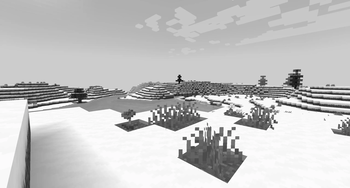
Shader showcase!
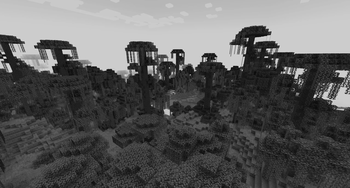
Shader showcase!
История
Версии проекта
Опубликованные версии и оригинальные файлы Modrinth.
v1.0.0-legacyПоследняяRelease
21.06.2025 · 1 435 загрузки
Optifine1.7.21.7.31.7.41.7.51.7.61.7.71.7.81.7.9
Ported Gray & Black Shader for Minecraft 1.7.2 – 1.16.5 (Legacy OpenGL support).
Known issue: underwater fog is not visible on some versions due to old shader limitations.
Everything else works correctly — terrain, lighting, night/day cycles and entity rendering.
v1.0.0Release
30.05.2025 · 4 317 загрузки
IrisOptifine1.171.17.11.181.18.11.18.21.191.19.11.19.2
Shader release!
Листайте товары колесом или стрелками