

See who you're chatting with!
Product
About

This clientside mod adds player heads next to chat messages, as seen on the screenshot above.
It makes telling various people in chat apart a bit easier, and it looks hella nice.
Based on a request from Hugman on the Fabric Discord.
Cloth Config (and Mod Menu for Fabric) is needed to access the settings, but the mod works without it, using the default settings.
Note: The default settings might not work on some servers. In this case try using the "Heuristic only" sender detection mode. Note that this might put wrong chat heads on some messages.
Note: Incompatible with newer versions of OptiFine (~1.20.1), use Sodium and co instead.
Preview
Product images
Environment
Requirements & compatibility
Compatibility & requirements
FabricForgeNeoforge1.16 – 1.18.21.19.1 – 1.21.1126.126.1.126.1.226.2
Local host
Required
Hosting on services
Unsupported
Terms
License
Terms for using, modifying and redistributing this product.
Mozilla Public License 2.0Modrinth
Release
Latest release
v1.2.5
22.07.2026 · Modrinth
1.2.5
- update Argentina Spanish (es_ar) translations, thanks to Texaliuz!
1.2.4
- [1.21.9+] slightly improve compatibility with Chat Patches
1.2.3
- [1.21.9+] make "Render Shadow" apply to "Before Name" rendering (allowing to turn off shadows, which will also move the heads down a pixel)
1.2.2
- port to 26.1
While 26.1 means massive changes for the entire modding community, this port ended up being relatively straightforward.
Thanks to shedaniel for pulling an...
Gallery
Project images
Screenshots and images from the original Modrinth page.

3Dness
Before Line

Before Name

Before Line, default (with offset)

Before Line, no offset
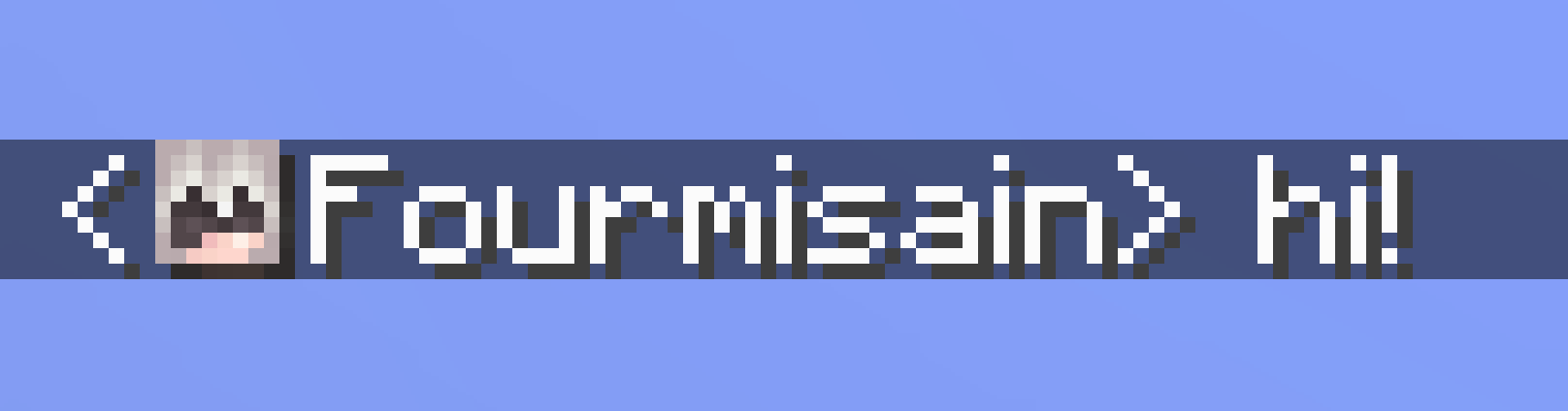
Shadow
History
Project versions
Published versions and original Modrinth files.
v1.2.5LatestRelease
22.07.2026 · 17 686 downloads
Fabric26.126.1.126.1.226.2
1.2.5
- update Argentina Spanish (es_ar) translations, thanks to Texaliuz!
1.2.4
- [1.21.9+] slightly improve compatibility with Chat Patches
1.2.3
- [1.21.9+] make "Render Shadow" apply to "Before Name" rendering (allowing to turn off shadows, which will also move the heads down a pixel)
1.2.2
- port to 26.1
While 26.1 means massive changes for the entire modding community, this port ended up being relatively straightforward.
Thanks to shedaniel for pulling an allnighter to get Architectury Loom (and Cloth Config) ready!
Also, as always, report any issues you find!
1.2.1
- [1.21.9+] implement "3Dness" for "Before Line" rendering
- [1.21.9+] fix "3D" heads being taller than intended
1.2.0
Welcome to the 3rd dimension!
- [1.21.9+] add "3Dness" config option, which can render the hat layer slightly bigger to make heads appear less flat
Example of "3Dness", or Fluffyness if you prefer:

1.1.8
- port to 1.21.11
note: "Before Line" rendering had to be rewritten, hopefully bug free
1.1.7
Quick followup fix for 1.1.6:
- chat heads always use the "white" style (fixes e.g. chat heads in leave messages rendering with a yellowish tint)
1.1.6
Another really small but important bug fix!
- fix an issue where translatable messages (e.g. join/whisper messages) could lose their style
1.1.5
- fix translations JSON (oops!)
1.1.4
- update Simplified Chinese (zh_cn), Traditional Chinese (zh_tw) and Japanese (ja_jp) translations, thanks to Internet Yamero!
1.1.3
- fix click position being wrongfully offset in "Before Name" rendering
1.1.2
Breaking News: Single Source Code Character causes Havoc!
This tiny release fixes an important bug where name aliases and display names weren't always considered for player detection.
Fixes e.g. nicknamed players on EssentialsX servers to not show a chat head despite a name alias being defined.
1.1.1
As expected, there were bugs!
Chat Heads should now deal with all forms of text styling including § formatting codes correctly again.
Keep the issue reports coming!
1.1.0
- add "Auto-detect Name Aliases" feature, which detects responses to
/realnamecommands on EssentialsX servers and automatically adds aliases for it (on by default) - [1.21.6+] fix "Missing Cloth Config" screen text being invisible
1.0.0
This is a large rewrite of the mod - it finally works how it always should have worked!
(And it took an insane amount of work to make it work, work.)
If you care for a bit of technical babbling with some info strewn inbetween, do read on!
The reason for this rework is that in 1.21.9 Mojang added 2 types of "object" text components:
Atlas sprites and player sprites, which allow putting any sprite or player head inside any text - chat, menus, signs, you name it!
Chat Heads now uses these player sprite text components.
On paper this should mean massively improved mod compatibility, since it's a vanilla feature.
In fact, it appears Chat Heads is finally fully compatible with Caxton!
The same may be true for Modern UI's text engine.
Servers will start making use of player sprites as well.
There was already ways to do "server-side chat heads" by using special fonts allowing to print 1 pixel at a time.
Now it's as easy as pie and due to that, Chat Heads will not add any heads itself, if it detects any in a received message.
(Whether this is sane behavior, time will tell)
Player sprites do however come with some limitations.
In Vanilla, they are always 8x8 pixels without any padding, which can look quite bad in chat.
To remedy this, Chat Heads adds 1 pixel of padding, making it consistent with regular characters. This only applies to chat, so it won't mess e.g. with signs.
They also suffer from transparency issues.
This only really affects you if you changed Minecraft's "Chat Text Opacity" setting.
What happens is that the hat layer of your skin blends together with the face, which can make the hat layer almost invisible.
(On that note, Chat Heads still supports the old "Before Line" render mode, which does have a transparency fix.)
Speaking of hat layers, Chat Heads now respects Minecraft's "Skin Customization" settings.
If you take your hat off, it won't show in chat either.
Finally, almost the entire player detection logic was rewritten.
It's hard to say if this really changes anything, but it's much more gooder code now.
While I did a ton of testing, due to the large scale of changes, issues are to be expected.
Please report any issue you find!
- Fourmisain
v1.2.5Release
22.07.2026 · 454 downloads
Neoforge26.126.1.126.1.226.2
1.2.5
- update Argentina Spanish (es_ar) translations, thanks to Texaliuz!
1.2.4
- [1.21.9+] slightly improve compatibility with Chat Patches
1.2.3
- [1.21.9+] make "Render Shadow" apply to "Before Name" rendering (allowing to turn off shadows, which will also move the heads down a pixel)
1.2.2
- port to 26.1
While 26.1 means massive changes for the entire modding community, this port ended up being relatively straightforward.
Thanks to shedaniel for pulling an allnighter to get Architectury Loom (and Cloth Config) ready!
Also, as always, report any issues you find!
1.2.1
- [1.21.9+] implement "3Dness" for "Before Line" rendering
- [1.21.9+] fix "3D" heads being taller than intended
1.2.0
Welcome to the 3rd dimension!
- [1.21.9+] add "3Dness" config option, which can render the hat layer slightly bigger to make heads appear less flat
Example of "3Dness", or Fluffyness if you prefer:
1.1.8
- port to 1.21.11
note: "Before Line" rendering had to be rewritten, hopefully bug free
1.1.7
Quick followup fix for 1.1.6:
- chat heads always use the "white" style (fixes e.g. chat heads in leave messages rendering with a yellowish tint)
1.1.6
Another really small but important bug fix!
- fix an issue where translatable messages (e.g. join/whisper messages) could lose their style
1.1.5
- fix translations JSON (oops!)
1.1.4
- update Simplified Chinese (zh_cn), Traditional Chinese (zh_tw) and Japanese (ja_jp) translations, thanks to Internet Yamero!
1.1.3
- fix click position being wrongfully offset in "Before Name" rendering
1.1.2
Breaking News: Single Source Code Character causes Havoc!
This tiny release fixes an important bug where name aliases and display names weren't always considered for player detection.
Fixes e.g. nicknamed players on EssentialsX servers to not show a chat head despite a name alias being defined.
1.1.1
As expected, there were bugs!
Chat Heads should now deal with all forms of text styling including § formatting codes correctly again.
Keep the issue reports coming!
1.1.0
- add "Auto-detect Name Aliases" feature, which detects responses to
/realnamecommands on EssentialsX servers and automatically adds aliases for it (on by default) - [1.21.6+] fix "Missing Cloth Config" screen text being invisible
1.0.0
This is a large rewrite of the mod - it finally works how it always should have worked!
(And it took an insane amount of work to make it work, work.)
If you care for a bit of technical babbling with some info strewn inbetween, do read on!
The reason for this rework is that in 1.21.9 Mojang added 2 types of "object" text components:
Atlas sprites and player sprites, which allow putting any sprite or player head inside any text - chat, menus, signs, you name it!
Chat Heads now uses these player sprite text components.
On paper this should mean massively improved mod compatibility, since it's a vanilla feature.
In fact, it appears Chat Heads is finally fully compatible with Caxton!
The same may be true for Modern UI's text engine.
Servers will start making use of player sprites as well.
There was already ways to do "server-side chat heads" by using special fonts allowing to print 1 pixel at a time.
Now it's as easy as pie and due to that, Chat Heads will not add any heads itself, if it detects any in a received message.
(Whether this is sane behavior, time will tell)
Player sprites do however come with some limitations.
In Vanilla, they are always 8x8 pixels without any padding, which can look quite bad in chat.
To remedy this, Chat Heads adds 1 pixel of padding, making it consistent with regular characters. This only applies to chat, so it won't mess e.g. with signs.
They also suffer from transparency issues.
This only really affects you if you changed Minecraft's "Chat Text Opacity" setting.
What happens is that the hat layer of your skin blends together with the face, which can make the hat layer almost invisible.
(On that note, Chat Heads still supports the old "Before Line" render mode, which does have a transparency fix.)
Speaking of hat layers, Chat Heads now respects Minecraft's "Skin Customization" settings.
If you take your hat off, it won't show in chat either.
Finally, almost the entire player detection logic was rewritten.
It's hard to say if this really changes anything, but it's much more gooder code now.
While I did a ton of testing, due to the large scale of changes, issues are to be expected.
Please report any issue you find!
- Fourmisain
v1.2.5Release
22.07.2026 · 10 840 downloads
Fabric1.21.11
1.2.5
- update Argentina Spanish (es_ar) translations, thanks to Texaliuz!
1.2.4
- [1.21.9+] slightly improve compatibility with Chat Patches
1.2.3
- [1.21.9+] make "Render Shadow" apply to "Before Name" rendering (allowing to turn off shadows, which will also move the heads down a pixel)
1.2.2
- port to 26.1
While 26.1 means massive changes for the entire modding community, this port ended up being relatively straightforward.
Thanks to shedaniel for pulling an allnighter to get Architectury Loom (and Cloth Config) ready!
Also, as always, report any issues you find!
1.2.1
- [1.21.9+] implement "3Dness" for "Before Line" rendering
- [1.21.9+] fix "3D" heads being taller than intended
1.2.0
Welcome to the 3rd dimension!
- [1.21.9+] add "3Dness" config option, which can render the hat layer slightly bigger to make heads appear less flat
Example of "3Dness", or Fluffyness if you prefer:
1.1.8
- port to 1.21.11
note: "Before Line" rendering had to be rewritten, hopefully bug free
1.1.7
Quick followup fix for 1.1.6:
- chat heads always use the "white" style (fixes e.g. chat heads in leave messages rendering with a yellowish tint)
1.1.6
Another really small but important bug fix!
- fix an issue where translatable messages (e.g. join/whisper messages) could lose their style
1.1.5
- fix translations JSON (oops!)
1.1.4
- update Simplified Chinese (zh_cn), Traditional Chinese (zh_tw) and Japanese (ja_jp) translations, thanks to Internet Yamero!
1.1.3
- fix click position being wrongfully offset in "Before Name" rendering
1.1.2
Breaking News: Single Source Code Character causes Havoc!
This tiny release fixes an important bug where name aliases and display names weren't always considered for player detection.
Fixes e.g. nicknamed players on EssentialsX servers to not show a chat head despite a name alias being defined.
1.1.1
As expected, there were bugs!
Chat Heads should now deal with all forms of text styling including § formatting codes correctly again.
Keep the issue reports coming!
1.1.0
- add "Auto-detect Name Aliases" feature, which detects responses to
/realnamecommands on EssentialsX servers and automatically adds aliases for it (on by default) - [1.21.6+] fix "Missing Cloth Config" screen text being invisible
1.0.0
This is a large rewrite of the mod - it finally works how it always should have worked!
(And it took an insane amount of work to make it work, work.)
If you care for a bit of technical babbling with some info strewn inbetween, do read on!
The reason for this rework is that in 1.21.9 Mojang added 2 types of "object" text components:
Atlas sprites and player sprites, which allow putting any sprite or player head inside any text - chat, menus, signs, you name it!
Chat Heads now uses these player sprite text components.
On paper this should mean massively improved mod compatibility, since it's a vanilla feature.
In fact, it appears Chat Heads is finally fully compatible with Caxton!
The same may be true for Modern UI's text engine.
Servers will start making use of player sprites as well.
There was already ways to do "server-side chat heads" by using special fonts allowing to print 1 pixel at a time.
Now it's as easy as pie and due to that, Chat Heads will not add any heads itself, if it detects any in a received message.
(Whether this is sane behavior, time will tell)
Player sprites do however come with some limitations.
In Vanilla, they are always 8x8 pixels without any padding, which can look quite bad in chat.
To remedy this, Chat Heads adds 1 pixel of padding, making it consistent with regular characters. This only applies to chat, so it won't mess e.g. with signs.
They also suffer from transparency issues.
This only really affects you if you changed Minecraft's "Chat Text Opacity" setting.
What happens is that the hat layer of your skin blends together with the face, which can make the hat layer almost invisible.
(On that note, Chat Heads still supports the old "Before Line" render mode, which does have a transparency fix.)
Speaking of hat layers, Chat Heads now respects Minecraft's "Skin Customization" settings.
If you take your hat off, it won't show in chat either.
Finally, almost the entire player detection logic was rewritten.
It's hard to say if this really changes anything, but it's much more gooder code now.
While I did a ton of testing, due to the large scale of changes, issues are to be expected.
Please report any issue you find!
- Fourmisain
v1.2.5Release
22.07.2026 · 173 downloads
Neoforge1.21.11
1.2.5
- update Argentina Spanish (es_ar) translations, thanks to Texaliuz!
1.2.4
- [1.21.9+] slightly improve compatibility with Chat Patches
1.2.3
- [1.21.9+] make "Render Shadow" apply to "Before Name" rendering (allowing to turn off shadows, which will also move the heads down a pixel)
1.2.2
- port to 26.1
While 26.1 means massive changes for the entire modding community, this port ended up being relatively straightforward.
Thanks to shedaniel for pulling an allnighter to get Architectury Loom (and Cloth Config) ready!
Also, as always, report any issues you find!
1.2.1
- [1.21.9+] implement "3Dness" for "Before Line" rendering
- [1.21.9+] fix "3D" heads being taller than intended
1.2.0
Welcome to the 3rd dimension!
- [1.21.9+] add "3Dness" config option, which can render the hat layer slightly bigger to make heads appear less flat
Example of "3Dness", or Fluffyness if you prefer:
1.1.8
- port to 1.21.11
note: "Before Line" rendering had to be rewritten, hopefully bug free
1.1.7
Quick followup fix for 1.1.6:
- chat heads always use the "white" style (fixes e.g. chat heads in leave messages rendering with a yellowish tint)
1.1.6
Another really small but important bug fix!
- fix an issue where translatable messages (e.g. join/whisper messages) could lose their style
1.1.5
- fix translations JSON (oops!)
1.1.4
- update Simplified Chinese (zh_cn), Traditional Chinese (zh_tw) and Japanese (ja_jp) translations, thanks to Internet Yamero!
1.1.3
- fix click position being wrongfully offset in "Before Name" rendering
1.1.2
Breaking News: Single Source Code Character causes Havoc!
This tiny release fixes an important bug where name aliases and display names weren't always considered for player detection.
Fixes e.g. nicknamed players on EssentialsX servers to not show a chat head despite a name alias being defined.
1.1.1
As expected, there were bugs!
Chat Heads should now deal with all forms of text styling including § formatting codes correctly again.
Keep the issue reports coming!
1.1.0
- add "Auto-detect Name Aliases" feature, which detects responses to
/realnamecommands on EssentialsX servers and automatically adds aliases for it (on by default) - [1.21.6+] fix "Missing Cloth Config" screen text being invisible
1.0.0
This is a large rewrite of the mod - it finally works how it always should have worked!
(And it took an insane amount of work to make it work, work.)
If you care for a bit of technical babbling with some info strewn inbetween, do read on!
The reason for this rework is that in 1.21.9 Mojang added 2 types of "object" text components:
Atlas sprites and player sprites, which allow putting any sprite or player head inside any text - chat, menus, signs, you name it!
Chat Heads now uses these player sprite text components.
On paper this should mean massively improved mod compatibility, since it's a vanilla feature.
In fact, it appears Chat Heads is finally fully compatible with Caxton!
The same may be true for Modern UI's text engine.
Servers will start making use of player sprites as well.
There was already ways to do "server-side chat heads" by using special fonts allowing to print 1 pixel at a time.
Now it's as easy as pie and due to that, Chat Heads will not add any heads itself, if it detects any in a received message.
(Whether this is sane behavior, time will tell)
Player sprites do however come with some limitations.
In Vanilla, they are always 8x8 pixels without any padding, which can look quite bad in chat.
To remedy this, Chat Heads adds 1 pixel of padding, making it consistent with regular characters. This only applies to chat, so it won't mess e.g. with signs.
They also suffer from transparency issues.
This only really affects you if you changed Minecraft's "Chat Text Opacity" setting.
What happens is that the hat layer of your skin blends together with the face, which can make the hat layer almost invisible.
(On that note, Chat Heads still supports the old "Before Line" render mode, which does have a transparency fix.)
Speaking of hat layers, Chat Heads now respects Minecraft's "Skin Customization" settings.
If you take your hat off, it won't show in chat either.
Finally, almost the entire player detection logic was rewritten.
It's hard to say if this really changes anything, but it's much more gooder code now.
While I did a ton of testing, due to the large scale of changes, issues are to be expected.
Please report any issue you find!
- Fourmisain
v1.2.5Release
22.07.2026 · 606 downloads
Fabric1.21.91.21.10
1.2.5
- update Argentina Spanish (es_ar) translations, thanks to Texaliuz!
1.2.4
- [1.21.9+] slightly improve compatibility with Chat Patches
1.2.3
- [1.21.9+] make "Render Shadow" apply to "Before Name" rendering (allowing to turn off shadows, which will also move the heads down a pixel)
1.2.2
- port to 26.1
While 26.1 means massive changes for the entire modding community, this port ended up being relatively straightforward.
Thanks to shedaniel for pulling an allnighter to get Architectury Loom (and Cloth Config) ready!
Also, as always, report any issues you find!
1.2.2 (for 1.21.9/10)
- [1.21.9/10] fix "Before Line" not rendering at all (I accidentally the whole code!)
1.2.1
- [1.21.9+] implement "3Dness" for "Before Line" rendering
- [1.21.9+] fix "3D" heads being taller than intended
1.2.0
Welcome to the 3rd dimension!
- [1.21.9+] add "3Dness" config option, which can render the hat layer slightly bigger to make heads appear less flat
Example of "3Dness", or Fluffyness if you prefer:
1.1.8
- port to 1.21.11
note: "Before Line" rendering had to be rewritten, hopefully bug free
1.1.7
Quick followup fix for 1.1.6:
- chat heads always use the "white" style (fixes e.g. chat heads in leave messages rendering with a yellowish tint)
1.1.6
Another really small but important bug fix!
- fix an issue where translatable messages (e.g. join/whisper messages) could lose their style
1.1.5
- fix translations JSON (oops!)
1.1.4
- update Simplified Chinese (zh_cn), Traditional Chinese (zh_tw) and Japanese (ja_jp) translations, thanks to Internet Yamero!
1.1.3
- fix click position being wrongfully offset in "Before Name" rendering
1.1.2
Breaking News: Single Source Code Character causes Havoc!
This tiny release fixes an important bug where name aliases and display names weren't always considered for player detection.
Fixes e.g. nicknamed players on EssentialsX servers to not show a chat head despite a name alias being defined.
1.1.1
As expected, there were bugs!
Chat Heads should now deal with all forms of text styling including § formatting codes correctly again.
Keep the issue reports coming!
1.1.0
- add "Auto-detect Name Aliases" feature, which detects responses to
/realnamecommands on EssentialsX servers and automatically adds aliases for it (on by default) - [1.21.6+] fix "Missing Cloth Config" screen text being invisible
1.0.0
This is a large rewrite of the mod - it finally works how it always should have worked!
(And it took an insane amount of work to make it work, work.)
If you care for a bit of technical babbling with some info strewn inbetween, do read on!
The reason for this rework is that in 1.21.9 Mojang added 2 types of "object" text components:
Atlas sprites and player sprites, which allow putting any sprite or player head inside any text - chat, menus, signs, you name it!
Chat Heads now uses these player sprite text components.
On paper this should mean massively improved mod compatibility, since it's a vanilla feature.
In fact, it appears Chat Heads is finally fully compatible with Caxton!
The same may be true for Modern UI's text engine.
Servers will start making use of player sprites as well.
There was already ways to do "server-side chat heads" by using special fonts allowing to print 1 pixel at a time.
Now it's as easy as pie and due to that, Chat Heads will not add any heads itself, if it detects any in a received message.
(Whether this is sane behavior, time will tell)
Player sprites do however come with some limitations.
In Vanilla, they are always 8x8 pixels without any padding, which can look quite bad in chat.
To remedy this, Chat Heads adds 1 pixel of padding, making it consistent with regular characters. This only applies to chat, so it won't mess e.g. with signs.
They also suffer from transparency issues.
This only really affects you if you changed Minecraft's "Chat Text Opacity" setting.
What happens is that the hat layer of your skin blends together with the face, which can make the hat layer almost invisible.
(On that note, Chat Heads still supports the old "Before Line" render mode, which does have a transparency fix.)
Speaking of hat layers, Chat Heads now respects Minecraft's "Skin Customization" settings.
If you take your hat off, it won't show in chat either.
Finally, almost the entire player detection logic was rewritten.
It's hard to say if this really changes anything, but it's much more gooder code now.
While I did a ton of testing, due to the large scale of changes, issues are to be expected.
Please report any issue you find!
- Fourmisain
v1.2.5Release
22.07.2026 · 32 downloads
Neoforge1.21.91.21.10
1.2.5
- update Argentina Spanish (es_ar) translations, thanks to Texaliuz!
1.2.4
- [1.21.9+] slightly improve compatibility with Chat Patches
1.2.3
- [1.21.9+] make "Render Shadow" apply to "Before Name" rendering (allowing to turn off shadows, which will also move the heads down a pixel)
1.2.2
- port to 26.1
While 26.1 means massive changes for the entire modding community, this port ended up being relatively straightforward.
Thanks to shedaniel for pulling an allnighter to get Architectury Loom (and Cloth Config) ready!
Also, as always, report any issues you find!
1.2.2 (for 1.21.9/10)
- [1.21.9/10] fix "Before Line" not rendering at all (I accidentally the whole code!)
1.2.1
- [1.21.9+] implement "3Dness" for "Before Line" rendering
- [1.21.9+] fix "3D" heads being taller than intended
1.2.0
Welcome to the 3rd dimension!
- [1.21.9+] add "3Dness" config option, which can render the hat layer slightly bigger to make heads appear less flat
Example of "3Dness", or Fluffyness if you prefer:
1.1.8
- port to 1.21.11
note: "Before Line" rendering had to be rewritten, hopefully bug free
1.1.7
Quick followup fix for 1.1.6:
- chat heads always use the "white" style (fixes e.g. chat heads in leave messages rendering with a yellowish tint)
1.1.6
Another really small but important bug fix!
- fix an issue where translatable messages (e.g. join/whisper messages) could lose their style
1.1.5
- fix translations JSON (oops!)
1.1.4
- update Simplified Chinese (zh_cn), Traditional Chinese (zh_tw) and Japanese (ja_jp) translations, thanks to Internet Yamero!
1.1.3
- fix click position being wrongfully offset in "Before Name" rendering
1.1.2
Breaking News: Single Source Code Character causes Havoc!
This tiny release fixes an important bug where name aliases and display names weren't always considered for player detection.
Fixes e.g. nicknamed players on EssentialsX servers to not show a chat head despite a name alias being defined.
1.1.1
As expected, there were bugs!
Chat Heads should now deal with all forms of text styling including § formatting codes correctly again.
Keep the issue reports coming!
1.1.0
- add "Auto-detect Name Aliases" feature, which detects responses to
/realnamecommands on EssentialsX servers and automatically adds aliases for it (on by default) - [1.21.6+] fix "Missing Cloth Config" screen text being invisible
1.0.0
This is a large rewrite of the mod - it finally works how it always should have worked!
(And it took an insane amount of work to make it work, work.)
If you care for a bit of technical babbling with some info strewn inbetween, do read on!
The reason for this rework is that in 1.21.9 Mojang added 2 types of "object" text components:
Atlas sprites and player sprites, which allow putting any sprite or player head inside any text - chat, menus, signs, you name it!
Chat Heads now uses these player sprite text components.
On paper this should mean massively improved mod compatibility, since it's a vanilla feature.
In fact, it appears Chat Heads is finally fully compatible with Caxton!
The same may be true for Modern UI's text engine.
Servers will start making use of player sprites as well.
There was already ways to do "server-side chat heads" by using special fonts allowing to print 1 pixel at a time.
Now it's as easy as pie and due to that, Chat Heads will not add any heads itself, if it detects any in a received message.
(Whether this is sane behavior, time will tell)
Player sprites do however come with some limitations.
In Vanilla, they are always 8x8 pixels without any padding, which can look quite bad in chat.
To remedy this, Chat Heads adds 1 pixel of padding, making it consistent with regular characters. This only applies to chat, so it won't mess e.g. with signs.
They also suffer from transparency issues.
This only really affects you if you changed Minecraft's "Chat Text Opacity" setting.
What happens is that the hat layer of your skin blends together with the face, which can make the hat layer almost invisible.
(On that note, Chat Heads still supports the old "Before Line" render mode, which does have a transparency fix.)
Speaking of hat layers, Chat Heads now respects Minecraft's "Skin Customization" settings.
If you take your hat off, it won't show in chat either.
Finally, almost the entire player detection logic was rewritten.
It's hard to say if this really changes anything, but it's much more gooder code now.
While I did a ton of testing, due to the large scale of changes, issues are to be expected.
Please report any issue you find!
- Fourmisain
v0.15.3Release
22.07.2026 · 689 downloads
Fabric1.21.61.21.71.21.8
0.15.3
- update Argentina Spanish (es_ar) translations, thanks to Texaliuz!
0.15.2
- [1.19.2 - 1.21.6] fix automatic "Before Line" fallback for Caxton and ModernUI not working anymore (regression of 0.14.0)
0.15.1
- [1.21.5-] fix click positions yet again
0.15.0
- backport "3Dness": a config option, which can render the hat layer slightly bigger to make heads appear less flat
Example of "3Dness", or Fluffyness if you prefer:
0.14.2
- fix translations JSON (oops!)
0.14.1
- update Simplified Chinese (zh_cn), Traditional Chinese (zh_tw) and Japanese (ja_jp) translations, thanks to Internet Yamero!
0.14.0
- add "Auto-detect Name Aliases" feature, which detects responses to
/realnamecommands on EssentialsX servers and automatically adds aliases for it (on by default) - [1.21.6+] fix "Missing Cloth Config" screen text being invisible
0.13.22
- respect "Player Customization" - If you take your hat off, it won't show in chat either
0.13.21
- add option to render shadow below chat heads (on by default)
- render upside down players upside down
v0.15.3Release
22.07.2026 · 34 downloads
Neoforge1.21.61.21.71.21.8
0.15.3
- update Argentina Spanish (es_ar) translations, thanks to Texaliuz!
0.15.2
- [1.19.2 - 1.21.6] fix automatic "Before Line" fallback for Caxton and ModernUI not working anymore (regression of 0.14.0)
0.15.1
- [1.21.5-] fix click positions yet again
0.15.0
- backport "3Dness": a config option, which can render the hat layer slightly bigger to make heads appear less flat
Example of "3Dness", or Fluffyness if you prefer:
0.14.2
- fix translations JSON (oops!)
0.14.1
- update Simplified Chinese (zh_cn), Traditional Chinese (zh_tw) and Japanese (ja_jp) translations, thanks to Internet Yamero!
0.14.0
- add "Auto-detect Name Aliases" feature, which detects responses to
/realnamecommands on EssentialsX servers and automatically adds aliases for it (on by default) - [1.21.6+] fix "Missing Cloth Config" screen text being invisible
0.13.22
- respect "Player Customization" - If you take your hat off, it won't show in chat either
0.13.21
- add option to render shadow below chat heads (on by default)
- render upside down players upside down
v0.15.3Release
22.07.2026 · 145 downloads
Fabric1.21.5
0.15.3
- update Argentina Spanish (es_ar) translations, thanks to Texaliuz!
0.15.2
- [1.19.2 - 1.21.6] fix automatic "Before Line" fallback for Caxton and ModernUI not working anymore (regression of 0.14.0)
0.15.1
- [1.21.5-] fix click positions yet again
0.15.0
- backport "3Dness": a config option, which can render the hat layer slightly bigger to make heads appear less flat
Example of "3Dness", or Fluffyness if you prefer:
0.14.2
- fix translations JSON (oops!)
0.14.1
- update Simplified Chinese (zh_cn), Traditional Chinese (zh_tw) and Japanese (ja_jp) translations, thanks to Internet Yamero!
0.14.0
- add "Auto-detect Name Aliases" feature, which detects responses to
/realnamecommands on EssentialsX servers and automatically adds aliases for it (on by default) - [1.21.6+] fix "Missing Cloth Config" screen text being invisible
0.13.22
- respect "Player Customization" - If you take your hat off, it won't show in chat either
0.13.21
- add option to render shadow below chat heads (on by default)
- render upside down players upside down
v0.15.3Release
22.07.2026 · 6 downloads
Neoforge1.21.5
0.15.3
- update Argentina Spanish (es_ar) translations, thanks to Texaliuz!
0.15.2
- [1.19.2 - 1.21.6] fix automatic "Before Line" fallback for Caxton and ModernUI not working anymore (regression of 0.14.0)
0.15.1
- [1.21.5-] fix click positions yet again
0.15.0
- backport "3Dness": a config option, which can render the hat layer slightly bigger to make heads appear less flat
Example of "3Dness", or Fluffyness if you prefer:
0.14.2
- fix translations JSON (oops!)
0.14.1
- update Simplified Chinese (zh_cn), Traditional Chinese (zh_tw) and Japanese (ja_jp) translations, thanks to Internet Yamero!
0.14.0
- add "Auto-detect Name Aliases" feature, which detects responses to
/realnamecommands on EssentialsX servers and automatically adds aliases for it (on by default) - [1.21.6+] fix "Missing Cloth Config" screen text being invisible
0.13.22
- respect "Player Customization" - If you take your hat off, it won't show in chat either
0.13.21
- add option to render shadow below chat heads (on by default)
- render upside down players upside down
v0.15.3Release
22.07.2026 · 680 downloads
Fabric1.21.4
0.15.3
- update Argentina Spanish (es_ar) translations, thanks to Texaliuz!
0.15.2
- [1.19.2 - 1.21.6] fix automatic "Before Line" fallback for Caxton and ModernUI not working anymore (regression of 0.14.0)
0.15.1
- [1.21.5-] fix click positions yet again
0.15.0
- backport "3Dness": a config option, which can render the hat layer slightly bigger to make heads appear less flat
Example of "3Dness", or Fluffyness if you prefer:
0.14.2
- fix translations JSON (oops!)
0.14.1
- update Simplified Chinese (zh_cn), Traditional Chinese (zh_tw) and Japanese (ja_jp) translations, thanks to Internet Yamero!
0.14.0
- add "Auto-detect Name Aliases" feature, which detects responses to
/realnamecommands on EssentialsX servers and automatically adds aliases for it (on by default) - [1.21.6+] fix "Missing Cloth Config" screen text being invisible
0.13.22
- respect "Player Customization" - If you take your hat off, it won't show in chat either
0.13.21
- add option to render shadow below chat heads (on by default)
- render upside down players upside down
v0.15.3Release
22.07.2026 · 40 downloads
Neoforge1.21.4
0.15.3
- update Argentina Spanish (es_ar) translations, thanks to Texaliuz!
0.15.2
- [1.19.2 - 1.21.6] fix automatic "Before Line" fallback for Caxton and ModernUI not working anymore (regression of 0.14.0)
0.15.1
- [1.21.5-] fix click positions yet again
0.15.0
- backport "3Dness": a config option, which can render the hat layer slightly bigger to make heads appear less flat
Example of "3Dness", or Fluffyness if you prefer:
0.14.2
- fix translations JSON (oops!)
0.14.1
- update Simplified Chinese (zh_cn), Traditional Chinese (zh_tw) and Japanese (ja_jp) translations, thanks to Internet Yamero!
0.14.0
- add "Auto-detect Name Aliases" feature, which detects responses to
/realnamecommands on EssentialsX servers and automatically adds aliases for it (on by default) - [1.21.6+] fix "Missing Cloth Config" screen text being invisible
0.13.22
- respect "Player Customization" - If you take your hat off, it won't show in chat either
0.13.21
- add option to render shadow below chat heads (on by default)
- render upside down players upside down
v0.15.3Release
22.07.2026 · 20 downloads
Forge1.21.4
0.15.3
- update Argentina Spanish (es_ar) translations, thanks to Texaliuz!
0.15.2
- [1.19.2 - 1.21.6] fix automatic "Before Line" fallback for Caxton and ModernUI not working anymore (regression of 0.14.0)
0.15.1
- [1.21.5-] fix click positions yet again
0.15.0
- backport "3Dness": a config option, which can render the hat layer slightly bigger to make heads appear less flat
Example of "3Dness", or Fluffyness if you prefer:
0.14.2
- fix translations JSON (oops!)
0.14.1
- update Simplified Chinese (zh_cn), Traditional Chinese (zh_tw) and Japanese (ja_jp) translations, thanks to Internet Yamero!
0.14.0
- add "Auto-detect Name Aliases" feature, which detects responses to
/realnamecommands on EssentialsX servers and automatically adds aliases for it (on by default) - [1.21.6+] fix "Missing Cloth Config" screen text being invisible
0.13.22
- respect "Player Customization" - If you take your hat off, it won't show in chat either
0.13.21
- add option to render shadow below chat heads (on by default)
- render upside down players upside down
v0.15.3Release
22.07.2026 · 47 downloads
Fabric1.21.21.21.3
0.15.3
- update Argentina Spanish (es_ar) translations, thanks to Texaliuz!
0.15.2
- [1.19.2 - 1.21.6] fix automatic "Before Line" fallback for Caxton and ModernUI not working anymore (regression of 0.14.0)
0.15.1
- [1.21.5-] fix click positions yet again
0.15.0
- backport "3Dness": a config option, which can render the hat layer slightly bigger to make heads appear less flat
Example of "3Dness", or Fluffyness if you prefer:
0.14.2
- fix translations JSON (oops!)
0.14.1
- update Simplified Chinese (zh_cn), Traditional Chinese (zh_tw) and Japanese (ja_jp) translations, thanks to Internet Yamero!
0.14.0
- add "Auto-detect Name Aliases" feature, which detects responses to
/realnamecommands on EssentialsX servers and automatically adds aliases for it (on by default) - [1.21.6+] fix "Missing Cloth Config" screen text being invisible
0.13.22
- respect "Player Customization" - If you take your hat off, it won't show in chat either
0.13.21
- add option to render shadow below chat heads (on by default)
- render upside down players upside down
v0.15.3Release
22.07.2026 · 6 downloads
Neoforge1.21.21.21.3
0.15.3
- update Argentina Spanish (es_ar) translations, thanks to Texaliuz!
0.15.2
- [1.19.2 - 1.21.6] fix automatic "Before Line" fallback for Caxton and ModernUI not working anymore (regression of 0.14.0)
0.15.1
- [1.21.5-] fix click positions yet again
0.15.0
- backport "3Dness": a config option, which can render the hat layer slightly bigger to make heads appear less flat
Example of "3Dness", or Fluffyness if you prefer:
0.14.2
- fix translations JSON (oops!)
0.14.1
- update Simplified Chinese (zh_cn), Traditional Chinese (zh_tw) and Japanese (ja_jp) translations, thanks to Internet Yamero!
0.14.0
- add "Auto-detect Name Aliases" feature, which detects responses to
/realnamecommands on EssentialsX servers and automatically adds aliases for it (on by default) - [1.21.6+] fix "Missing Cloth Config" screen text being invisible
0.13.22
- respect "Player Customization" - If you take your hat off, it won't show in chat either
0.13.21
- add option to render shadow below chat heads (on by default)
- render upside down players upside down
v0.15.3Release
22.07.2026 · 5 downloads
Forge1.21.3
0.15.3
- update Argentina Spanish (es_ar) translations, thanks to Texaliuz!
0.15.2
- [1.19.2 - 1.21.6] fix automatic "Before Line" fallback for Caxton and ModernUI not working anymore (regression of 0.14.0)
0.15.1
- [1.21.5-] fix click positions yet again
0.15.0
- backport "3Dness": a config option, which can render the hat layer slightly bigger to make heads appear less flat
Example of "3Dness", or Fluffyness if you prefer:
0.14.2
- fix translations JSON (oops!)
0.14.1
- update Simplified Chinese (zh_cn), Traditional Chinese (zh_tw) and Japanese (ja_jp) translations, thanks to Internet Yamero!
0.14.0
- add "Auto-detect Name Aliases" feature, which detects responses to
/realnamecommands on EssentialsX servers and automatically adds aliases for it (on by default) - [1.21.6+] fix "Missing Cloth Config" screen text being invisible
0.13.22
- respect "Player Customization" - If you take your hat off, it won't show in chat either
0.13.21
- add option to render shadow below chat heads (on by default)
- render upside down players upside down
v0.15.3Release
22.07.2026 · 2 580 downloads
Fabric1.211.21.1
0.15.3
- update Argentina Spanish (es_ar) translations, thanks to Texaliuz!
0.15.2
- [1.19.2 - 1.21.6] fix automatic "Before Line" fallback for Caxton and ModernUI not working anymore (regression of 0.14.0)
0.15.1
- [1.21.5-] fix click positions yet again
0.15.0
- backport "3Dness": a config option, which can render the hat layer slightly bigger to make heads appear less flat
Example of "3Dness", or Fluffyness if you prefer:
0.14.2
- fix translations JSON (oops!)
0.14.1
- update Simplified Chinese (zh_cn), Traditional Chinese (zh_tw) and Japanese (ja_jp) translations, thanks to Internet Yamero!
0.14.0
- add "Auto-detect Name Aliases" feature, which detects responses to
/realnamecommands on EssentialsX servers and automatically adds aliases for it (on by default) - [1.21.6+] fix "Missing Cloth Config" screen text being invisible
0.13.22
- respect "Player Customization" - If you take your hat off, it won't show in chat either
0.13.21
- add option to render shadow below chat heads (on by default)
- render upside down players upside down
v0.15.3Release
22.07.2026 · 4 493 downloads
Neoforge1.211.21.1
0.15.3
- update Argentina Spanish (es_ar) translations, thanks to Texaliuz!
0.15.2
- [1.19.2 - 1.21.6] fix automatic "Before Line" fallback for Caxton and ModernUI not working anymore (regression of 0.14.0)
0.15.1
- [1.21.5-] fix click positions yet again
0.15.0
- backport "3Dness": a config option, which can render the hat layer slightly bigger to make heads appear less flat
Example of "3Dness", or Fluffyness if you prefer:
0.14.2
- fix translations JSON (oops!)
0.14.1
- update Simplified Chinese (zh_cn), Traditional Chinese (zh_tw) and Japanese (ja_jp) translations, thanks to Internet Yamero!
0.14.0
- add "Auto-detect Name Aliases" feature, which detects responses to
/realnamecommands on EssentialsX servers and automatically adds aliases for it (on by default) - [1.21.6+] fix "Missing Cloth Config" screen text being invisible
0.13.22
- respect "Player Customization" - If you take your hat off, it won't show in chat either
0.13.21
- add option to render shadow below chat heads (on by default)
- render upside down players upside down
v0.15.3Release
22.07.2026 · 145 downloads
Forge1.211.21.1
0.15.3
- update Argentina Spanish (es_ar) translations, thanks to Texaliuz!
0.15.2
- [1.19.2 - 1.21.6] fix automatic "Before Line" fallback for Caxton and ModernUI not working anymore (regression of 0.14.0)
0.15.1
- [1.21.5-] fix click positions yet again
0.15.0
- backport "3Dness": a config option, which can render the hat layer slightly bigger to make heads appear less flat
Example of "3Dness", or Fluffyness if you prefer:
0.14.2
- fix translations JSON (oops!)
0.14.1
- update Simplified Chinese (zh_cn), Traditional Chinese (zh_tw) and Japanese (ja_jp) translations, thanks to Internet Yamero!
0.14.0
- add "Auto-detect Name Aliases" feature, which detects responses to
/realnamecommands on EssentialsX servers and automatically adds aliases for it (on by default) - [1.21.6+] fix "Missing Cloth Config" screen text being invisible
0.13.22
- respect "Player Customization" - If you take your hat off, it won't show in chat either
0.13.21
- add option to render shadow below chat heads (on by default)
- render upside down players upside down
v0.15.3Release
22.07.2026 · 32 downloads
Fabric1.20.51.20.6
0.15.3
- update Argentina Spanish (es_ar) translations, thanks to Texaliuz!
0.15.2
- [1.19.2 - 1.21.6] fix automatic "Before Line" fallback for Caxton and ModernUI not working anymore (regression of 0.14.0)
0.15.1
- [1.21.5-] fix click positions yet again
0.15.0
- backport "3Dness": a config option, which can render the hat layer slightly bigger to make heads appear less flat
Example of "3Dness", or Fluffyness if you prefer:
0.14.2
- fix translations JSON (oops!)
0.14.1
- update Simplified Chinese (zh_cn), Traditional Chinese (zh_tw) and Japanese (ja_jp) translations, thanks to Internet Yamero!
0.14.0
- add "Auto-detect Name Aliases" feature, which detects responses to
/realnamecommands on EssentialsX servers and automatically adds aliases for it (on by default) - [1.21.6+] fix "Missing Cloth Config" screen text being invisible
0.13.22
- respect "Player Customization" - If you take your hat off, it won't show in chat either
0.13.21
- add option to render shadow below chat heads (on by default)
- render upside down players upside down
v0.15.3Release
22.07.2026 · 3 downloads
Neoforge1.20.51.20.6
0.15.3
- update Argentina Spanish (es_ar) translations, thanks to Texaliuz!
0.15.2
- [1.19.2 - 1.21.6] fix automatic "Before Line" fallback for Caxton and ModernUI not working anymore (regression of 0.14.0)
0.15.1
- [1.21.5-] fix click positions yet again
0.15.0
- backport "3Dness": a config option, which can render the hat layer slightly bigger to make heads appear less flat
Example of "3Dness", or Fluffyness if you prefer:
0.14.2
- fix translations JSON (oops!)
0.14.1
- update Simplified Chinese (zh_cn), Traditional Chinese (zh_tw) and Japanese (ja_jp) translations, thanks to Internet Yamero!
0.14.0
- add "Auto-detect Name Aliases" feature, which detects responses to
/realnamecommands on EssentialsX servers and automatically adds aliases for it (on by default) - [1.21.6+] fix "Missing Cloth Config" screen text being invisible
0.13.22
- respect "Player Customization" - If you take your hat off, it won't show in chat either
0.13.21
- add option to render shadow below chat heads (on by default)
- render upside down players upside down
v0.15.3Release
22.07.2026 · 3 downloads
Forge1.20.6
0.15.3
- update Argentina Spanish (es_ar) translations, thanks to Texaliuz!
0.15.2
- [1.19.2 - 1.21.6] fix automatic "Before Line" fallback for Caxton and ModernUI not working anymore (regression of 0.14.0)
0.15.1
- [1.21.5-] fix click positions yet again
0.15.0
- backport "3Dness": a config option, which can render the hat layer slightly bigger to make heads appear less flat
Example of "3Dness", or Fluffyness if you prefer:
0.14.2
- fix translations JSON (oops!)
0.14.1
- update Simplified Chinese (zh_cn), Traditional Chinese (zh_tw) and Japanese (ja_jp) translations, thanks to Internet Yamero!
0.14.0
- add "Auto-detect Name Aliases" feature, which detects responses to
/realnamecommands on EssentialsX servers and automatically adds aliases for it (on by default) - [1.21.6+] fix "Missing Cloth Config" screen text being invisible
0.13.22
- respect "Player Customization" - If you take your hat off, it won't show in chat either
0.13.21
- add option to render shadow below chat heads (on by default)
- render upside down players upside down
v0.15.3Release
22.07.2026 · 108 downloads
Fabric1.20.31.20.4
0.15.3
- update Argentina Spanish (es_ar) translations, thanks to Texaliuz!
0.15.2
- [1.19.2 - 1.21.6] fix automatic "Before Line" fallback for Caxton and ModernUI not working anymore (regression of 0.14.0)
0.15.1
- [1.21.5-] fix click positions yet again
0.15.0
- backport "3Dness": a config option, which can render the hat layer slightly bigger to make heads appear less flat
Example of "3Dness", or Fluffyness if you prefer:
0.14.2
- fix translations JSON (oops!)
0.14.1
- update Simplified Chinese (zh_cn), Traditional Chinese (zh_tw) and Japanese (ja_jp) translations, thanks to Internet Yamero!
0.14.0
- add "Auto-detect Name Aliases" feature, which detects responses to
/realnamecommands on EssentialsX servers and automatically adds aliases for it (on by default) - [1.21.6+] fix "Missing Cloth Config" screen text being invisible
0.13.22
- respect "Player Customization" - If you take your hat off, it won't show in chat either
0.13.21
- add option to render shadow below chat heads (on by default)
- render upside down players upside down
v0.15.3Release
22.07.2026 · 3 downloads
Neoforge1.20.31.20.4
0.15.3
- update Argentina Spanish (es_ar) translations, thanks to Texaliuz!
0.15.2
- [1.19.2 - 1.21.6] fix automatic "Before Line" fallback for Caxton and ModernUI not working anymore (regression of 0.14.0)
0.15.1
- [1.21.5-] fix click positions yet again
0.15.0
- backport "3Dness": a config option, which can render the hat layer slightly bigger to make heads appear less flat
Example of "3Dness", or Fluffyness if you prefer:
0.14.2
- fix translations JSON (oops!)
0.14.1
- update Simplified Chinese (zh_cn), Traditional Chinese (zh_tw) and Japanese (ja_jp) translations, thanks to Internet Yamero!
0.14.0
- add "Auto-detect Name Aliases" feature, which detects responses to
/realnamecommands on EssentialsX servers and automatically adds aliases for it (on by default) - [1.21.6+] fix "Missing Cloth Config" screen text being invisible
0.13.22
- respect "Player Customization" - If you take your hat off, it won't show in chat either
0.13.21
- add option to render shadow below chat heads (on by default)
- render upside down players upside down
v0.15.3Release
22.07.2026 · 14 downloads
Forge1.20.31.20.4
0.15.3
- update Argentina Spanish (es_ar) translations, thanks to Texaliuz!
0.15.2
- [1.19.2 - 1.21.6] fix automatic "Before Line" fallback for Caxton and ModernUI not working anymore (regression of 0.14.0)
0.15.1
- [1.21.5-] fix click positions yet again
0.15.0
- backport "3Dness": a config option, which can render the hat layer slightly bigger to make heads appear less flat
Example of "3Dness", or Fluffyness if you prefer:
0.14.2
- fix translations JSON (oops!)
0.14.1
- update Simplified Chinese (zh_cn), Traditional Chinese (zh_tw) and Japanese (ja_jp) translations, thanks to Internet Yamero!
0.14.0
- add "Auto-detect Name Aliases" feature, which detects responses to
/realnamecommands on EssentialsX servers and automatically adds aliases for it (on by default) - [1.21.6+] fix "Missing Cloth Config" screen text being invisible
0.13.22
- respect "Player Customization" - If you take your hat off, it won't show in chat either
0.13.21
- add option to render shadow below chat heads (on by default)
- render upside down players upside down
v0.15.3Release
22.07.2026 · 29 downloads
Fabric1.20.2
0.15.3
- update Argentina Spanish (es_ar) translations, thanks to Texaliuz!
0.15.2
- [1.19.2 - 1.21.6] fix automatic "Before Line" fallback for Caxton and ModernUI not working anymore (regression of 0.14.0)
0.15.1
- [1.21.5-] fix click positions yet again
0.15.0
- backport "3Dness": a config option, which can render the hat layer slightly bigger to make heads appear less flat
Example of "3Dness", or Fluffyness if you prefer:
0.14.2
- fix translations JSON (oops!)
0.14.1
- update Simplified Chinese (zh_cn), Traditional Chinese (zh_tw) and Japanese (ja_jp) translations, thanks to Internet Yamero!
0.14.0
- add "Auto-detect Name Aliases" feature, which detects responses to
/realnamecommands on EssentialsX servers and automatically adds aliases for it (on by default) - [1.21.6+] fix "Missing Cloth Config" screen text being invisible
0.13.22
- respect "Player Customization" - If you take your hat off, it won't show in chat either
0.13.21
- add option to render shadow below chat heads (on by default)
- render upside down players upside down
v0.15.3Release
22.07.2026 · 2 downloads
Neoforge1.20.2
0.15.3
- update Argentina Spanish (es_ar) translations, thanks to Texaliuz!
0.15.2
- [1.19.2 - 1.21.6] fix automatic "Before Line" fallback for Caxton and ModernUI not working anymore (regression of 0.14.0)
0.15.1
- [1.21.5-] fix click positions yet again
0.15.0
- backport "3Dness": a config option, which can render the hat layer slightly bigger to make heads appear less flat
Example of "3Dness", or Fluffyness if you prefer:
0.14.2
- fix translations JSON (oops!)
0.14.1
- update Simplified Chinese (zh_cn), Traditional Chinese (zh_tw) and Japanese (ja_jp) translations, thanks to Internet Yamero!
0.14.0
- add "Auto-detect Name Aliases" feature, which detects responses to
/realnamecommands on EssentialsX servers and automatically adds aliases for it (on by default) - [1.21.6+] fix "Missing Cloth Config" screen text being invisible
0.13.22
- respect "Player Customization" - If you take your hat off, it won't show in chat either
0.13.21
- add option to render shadow below chat heads (on by default)
- render upside down players upside down
v0.15.3Release
22.07.2026 · 4 downloads
Forge1.20.2
0.15.3
- update Argentina Spanish (es_ar) translations, thanks to Texaliuz!
0.15.2
- [1.19.2 - 1.21.6] fix automatic "Before Line" fallback for Caxton and ModernUI not working anymore (regression of 0.14.0)
0.15.1
- [1.21.5-] fix click positions yet again
0.15.0
- backport "3Dness": a config option, which can render the hat layer slightly bigger to make heads appear less flat
Example of "3Dness", or Fluffyness if you prefer:
0.14.2
- fix translations JSON (oops!)
0.14.1
- update Simplified Chinese (zh_cn), Traditional Chinese (zh_tw) and Japanese (ja_jp) translations, thanks to Internet Yamero!
0.14.0
- add "Auto-detect Name Aliases" feature, which detects responses to
/realnamecommands on EssentialsX servers and automatically adds aliases for it (on by default) - [1.21.6+] fix "Missing Cloth Config" screen text being invisible
0.13.22
- respect "Player Customization" - If you take your hat off, it won't show in chat either
0.13.21
- add option to render shadow below chat heads (on by default)
- render upside down players upside down
v0.15.3Release
22.07.2026 · 1 686 downloads
Fabric1.201.20.1
0.15.3
- update Argentina Spanish (es_ar) translations, thanks to Texaliuz!
0.15.2
- [1.19.2 - 1.21.6] fix automatic "Before Line" fallback for Caxton and ModernUI not working anymore (regression of 0.14.0)
0.15.1
- [1.21.5-] fix click positions yet again
0.15.0
- backport "3Dness": a config option, which can render the hat layer slightly bigger to make heads appear less flat
Example of "3Dness", or Fluffyness if you prefer:
0.14.2
- fix translations JSON (oops!)
0.14.1
- update Simplified Chinese (zh_cn), Traditional Chinese (zh_tw) and Japanese (ja_jp) translations, thanks to Internet Yamero!
0.14.0
- add "Auto-detect Name Aliases" feature, which detects responses to
/realnamecommands on EssentialsX servers and automatically adds aliases for it (on by default) - [1.21.6+] fix "Missing Cloth Config" screen text being invisible
0.13.22
- respect "Player Customization" - If you take your hat off, it won't show in chat either
0.13.21
- add option to render shadow below chat heads (on by default)
- render upside down players upside down
v0.15.3Release
22.07.2026 · 4 393 downloads
Forge1.201.20.1
0.15.3
- update Argentina Spanish (es_ar) translations, thanks to Texaliuz!
0.15.2
- [1.19.2 - 1.21.6] fix automatic "Before Line" fallback for Caxton and ModernUI not working anymore (regression of 0.14.0)
0.15.1
- [1.21.5-] fix click positions yet again
0.15.0
- backport "3Dness": a config option, which can render the hat layer slightly bigger to make heads appear less flat
Example of "3Dness", or Fluffyness if you prefer:
0.14.2
- fix translations JSON (oops!)
0.14.1
- update Simplified Chinese (zh_cn), Traditional Chinese (zh_tw) and Japanese (ja_jp) translations, thanks to Internet Yamero!
0.14.0
- add "Auto-detect Name Aliases" feature, which detects responses to
/realnamecommands on EssentialsX servers and automatically adds aliases for it (on by default) - [1.21.6+] fix "Missing Cloth Config" screen text being invisible
0.13.22
- respect "Player Customization" - If you take your hat off, it won't show in chat either
0.13.21
- add option to render shadow below chat heads (on by default)
- render upside down players upside down
v0.15.3Release
22.07.2026 · 29 downloads
Fabric1.19.31.19.4
0.15.3
- update Argentina Spanish (es_ar) translations, thanks to Texaliuz!
0.15.2
- [1.19.2 - 1.21.6] fix automatic "Before Line" fallback for Caxton and ModernUI not working anymore (regression of 0.14.0)
0.15.1
- [1.21.5-] fix click positions yet again
0.15.0
- backport "3Dness": a config option, which can render the hat layer slightly bigger to make heads appear less flat
Example of "3Dness", or Fluffyness if you prefer:
0.14.2
- fix translations JSON (oops!)
0.14.1
- update Simplified Chinese (zh_cn), Traditional Chinese (zh_tw) and Japanese (ja_jp) translations, thanks to Internet Yamero!
0.14.0
- add "Auto-detect Name Aliases" feature, which detects responses to
/realnamecommands on EssentialsX servers and automatically adds aliases for it (on by default) - [1.21.6+] fix "Missing Cloth Config" screen text being invisible
0.13.22
- respect "Player Customization" - If you take your hat off, it won't show in chat either
0.13.21
- add option to render shadow below chat heads (on by default)
- render upside down players upside down
v0.15.3Release
22.07.2026 · 10 downloads
Forge1.19.31.19.4
0.15.3
- update Argentina Spanish (es_ar) translations, thanks to Texaliuz!
0.15.2
- [1.19.2 - 1.21.6] fix automatic "Before Line" fallback for Caxton and ModernUI not working anymore (regression of 0.14.0)
0.15.1
- [1.21.5-] fix click positions yet again
0.15.0
- backport "3Dness": a config option, which can render the hat layer slightly bigger to make heads appear less flat
Example of "3Dness", or Fluffyness if you prefer:
0.14.2
- fix translations JSON (oops!)
0.14.1
- update Simplified Chinese (zh_cn), Traditional Chinese (zh_tw) and Japanese (ja_jp) translations, thanks to Internet Yamero!
0.14.0
- add "Auto-detect Name Aliases" feature, which detects responses to
/realnamecommands on EssentialsX servers and automatically adds aliases for it (on by default) - [1.21.6+] fix "Missing Cloth Config" screen text being invisible
0.13.22
- respect "Player Customization" - If you take your hat off, it won't show in chat either
0.13.21
- add option to render shadow below chat heads (on by default)
- render upside down players upside down
v0.15.3Release
22.07.2026 · 33 downloads
Fabric1.19.2
0.15.3
- update Argentina Spanish (es_ar) translations, thanks to Texaliuz!
0.15.2
- [1.19.2 - 1.21.6] fix automatic "Before Line" fallback for Caxton and ModernUI not working anymore (regression of 0.14.0)
0.15.1
- [1.21.5-] fix click positions yet again
0.15.0
- backport "3Dness": a config option, which can render the hat layer slightly bigger to make heads appear less flat
Example of "3Dness", or Fluffyness if you prefer:
0.14.2
- fix translations JSON (oops!)
0.14.1
- update Simplified Chinese (zh_cn), Traditional Chinese (zh_tw) and Japanese (ja_jp) translations, thanks to Internet Yamero!
0.14.0
- add "Auto-detect Name Aliases" feature, which detects responses to
/realnamecommands on EssentialsX servers and automatically adds aliases for it (on by default) - [1.21.6+] fix "Missing Cloth Config" screen text being invisible
0.13.22
- respect "Player Customization" - If you take your hat off, it won't show in chat either
0.13.21
- add option to render shadow below chat heads (on by default)
- render upside down players upside down
v0.15.3Release
22.07.2026 · 112 downloads
Forge1.19.2
0.15.3
- update Argentina Spanish (es_ar) translations, thanks to Texaliuz!
0.15.2
- [1.19.2 - 1.21.6] fix automatic "Before Line" fallback for Caxton and ModernUI not working anymore (regression of 0.14.0)
0.15.1
- [1.21.5-] fix click positions yet again
0.15.0
- backport "3Dness": a config option, which can render the hat layer slightly bigger to make heads appear less flat
Example of "3Dness", or Fluffyness if you prefer:
0.14.2
- fix translations JSON (oops!)
0.14.1
- update Simplified Chinese (zh_cn), Traditional Chinese (zh_tw) and Japanese (ja_jp) translations, thanks to Internet Yamero!
0.14.0
- add "Auto-detect Name Aliases" feature, which detects responses to
/realnamecommands on EssentialsX servers and automatically adds aliases for it (on by default) - [1.21.6+] fix "Missing Cloth Config" screen text being invisible
0.13.22
- respect "Player Customization" - If you take your hat off, it won't show in chat either
0.13.21
- add option to render shadow below chat heads (on by default)
- render upside down players upside down
v0.15.2Release
13.06.2026 · 17 646 downloads
Fabric1.21.61.21.71.21.8
0.15.2
- [1.19.2 - 1.21.6] fix automatic "Before Line" fallback for Caxton and ModernUI not working anymore (regression of 0.14.0)
0.15.1
- [1.21.5-] fix click positions yet again
0.15.0
- backport "3Dness": a config option, which can render the hat layer slightly bigger to make heads appear less flat
Example of "3Dness", or Fluffyness if you prefer:
0.14.2
- fix translations JSON (oops!)
0.14.1
- update Simplified Chinese (zh_cn), Traditional Chinese (zh_tw) and Japanese (ja_jp) translations, thanks to Internet Yamero!
0.14.0
- add "Auto-detect Name Aliases" feature, which detects responses to
/realnamecommands on EssentialsX servers and automatically adds aliases for it (on by default) - [1.21.6+] fix "Missing Cloth Config" screen text being invisible
0.13.22
- respect "Player Customization" - If you take your hat off, it won't show in chat either
0.13.21
- add option to render shadow below chat heads (on by default)
- render upside down players upside down
v0.15.2Release
13.06.2026 · 879 downloads
Neoforge1.21.61.21.71.21.8
0.15.2
- [1.19.2 - 1.21.6] fix automatic "Before Line" fallback for Caxton and ModernUI not working anymore (regression of 0.14.0)
0.15.1
- [1.21.5-] fix click positions yet again
0.15.0
- backport "3Dness": a config option, which can render the hat layer slightly bigger to make heads appear less flat
Example of "3Dness", or Fluffyness if you prefer:
0.14.2
- fix translations JSON (oops!)
0.14.1
- update Simplified Chinese (zh_cn), Traditional Chinese (zh_tw) and Japanese (ja_jp) translations, thanks to Internet Yamero!
0.14.0
- add "Auto-detect Name Aliases" feature, which detects responses to
/realnamecommands on EssentialsX servers and automatically adds aliases for it (on by default) - [1.21.6+] fix "Missing Cloth Config" screen text being invisible
0.13.22
- respect "Player Customization" - If you take your hat off, it won't show in chat either
0.13.21
- add option to render shadow below chat heads (on by default)
- render upside down players upside down
v0.15.2Release
13.06.2026 · 4 444 downloads
Fabric1.21.5
0.15.2
- [1.19.2 - 1.21.6] fix automatic "Before Line" fallback for Caxton and ModernUI not working anymore (regression of 0.14.0)
0.15.1
- [1.21.5-] fix click positions yet again
0.15.0
- backport "3Dness": a config option, which can render the hat layer slightly bigger to make heads appear less flat
Example of "3Dness", or Fluffyness if you prefer:
0.14.2
- fix translations JSON (oops!)
0.14.1
- update Simplified Chinese (zh_cn), Traditional Chinese (zh_tw) and Japanese (ja_jp) translations, thanks to Internet Yamero!
0.14.0
- add "Auto-detect Name Aliases" feature, which detects responses to
/realnamecommands on EssentialsX servers and automatically adds aliases for it (on by default) - [1.21.6+] fix "Missing Cloth Config" screen text being invisible
0.13.22
- respect "Player Customization" - If you take your hat off, it won't show in chat either
0.13.21
- add option to render shadow below chat heads (on by default)
- render upside down players upside down
v0.15.2Release
13.06.2026 · 177 downloads
Neoforge1.21.5
0.15.2
- [1.19.2 - 1.21.6] fix automatic "Before Line" fallback for Caxton and ModernUI not working anymore (regression of 0.14.0)
0.15.1
- [1.21.5-] fix click positions yet again
0.15.0
- backport "3Dness": a config option, which can render the hat layer slightly bigger to make heads appear less flat
Example of "3Dness", or Fluffyness if you prefer:
0.14.2
- fix translations JSON (oops!)
0.14.1
- update Simplified Chinese (zh_cn), Traditional Chinese (zh_tw) and Japanese (ja_jp) translations, thanks to Internet Yamero!
0.14.0
- add "Auto-detect Name Aliases" feature, which detects responses to
/realnamecommands on EssentialsX servers and automatically adds aliases for it (on by default) - [1.21.6+] fix "Missing Cloth Config" screen text being invisible
0.13.22
- respect "Player Customization" - If you take your hat off, it won't show in chat either
0.13.21
- add option to render shadow below chat heads (on by default)
- render upside down players upside down
v0.15.2Release
13.06.2026 · 16 927 downloads
Fabric1.21.4
0.15.2
- [1.19.2 - 1.21.6] fix automatic "Before Line" fallback for Caxton and ModernUI not working anymore (regression of 0.14.0)
0.15.1
- [1.21.5-] fix click positions yet again
0.15.0
- backport "3Dness": a config option, which can render the hat layer slightly bigger to make heads appear less flat
Example of "3Dness", or Fluffyness if you prefer:
0.14.2
- fix translations JSON (oops!)
0.14.1
- update Simplified Chinese (zh_cn), Traditional Chinese (zh_tw) and Japanese (ja_jp) translations, thanks to Internet Yamero!
0.14.0
- add "Auto-detect Name Aliases" feature, which detects responses to
/realnamecommands on EssentialsX servers and automatically adds aliases for it (on by default) - [1.21.6+] fix "Missing Cloth Config" screen text being invisible
0.13.22
- respect "Player Customization" - If you take your hat off, it won't show in chat either
0.13.21
- add option to render shadow below chat heads (on by default)
- render upside down players upside down
v0.15.2Release
13.06.2026 · 891 downloads
Neoforge1.21.4
0.15.2
- [1.19.2 - 1.21.6] fix automatic "Before Line" fallback for Caxton and ModernUI not working anymore (regression of 0.14.0)
0.15.1
- [1.21.5-] fix click positions yet again
0.15.0
- backport "3Dness": a config option, which can render the hat layer slightly bigger to make heads appear less flat
Example of "3Dness", or Fluffyness if you prefer:
0.14.2
- fix translations JSON (oops!)
0.14.1
- update Simplified Chinese (zh_cn), Traditional Chinese (zh_tw) and Japanese (ja_jp) translations, thanks to Internet Yamero!
0.14.0
- add "Auto-detect Name Aliases" feature, which detects responses to
/realnamecommands on EssentialsX servers and automatically adds aliases for it (on by default) - [1.21.6+] fix "Missing Cloth Config" screen text being invisible
0.13.22
- respect "Player Customization" - If you take your hat off, it won't show in chat either
0.13.21
- add option to render shadow below chat heads (on by default)
- render upside down players upside down
v0.15.2Release
13.06.2026 · 573 downloads
Forge1.21.4
0.15.2
- [1.19.2 - 1.21.6] fix automatic "Before Line" fallback for Caxton and ModernUI not working anymore (regression of 0.14.0)
0.15.1
- [1.21.5-] fix click positions yet again
0.15.0
- backport "3Dness": a config option, which can render the hat layer slightly bigger to make heads appear less flat
Example of "3Dness", or Fluffyness if you prefer:
0.14.2
- fix translations JSON (oops!)
0.14.1
- update Simplified Chinese (zh_cn), Traditional Chinese (zh_tw) and Japanese (ja_jp) translations, thanks to Internet Yamero!
0.14.0
- add "Auto-detect Name Aliases" feature, which detects responses to
/realnamecommands on EssentialsX servers and automatically adds aliases for it (on by default) - [1.21.6+] fix "Missing Cloth Config" screen text being invisible
0.13.22
- respect "Player Customization" - If you take your hat off, it won't show in chat either
0.13.21
- add option to render shadow below chat heads (on by default)
- render upside down players upside down
v0.15.2Release
13.06.2026 · 1 356 downloads
Fabric1.21.21.21.3
0.15.2
- [1.19.2 - 1.21.6] fix automatic "Before Line" fallback for Caxton and ModernUI not working anymore (regression of 0.14.0)
0.15.1
- [1.21.5-] fix click positions yet again
0.15.0
- backport "3Dness": a config option, which can render the hat layer slightly bigger to make heads appear less flat
Example of "3Dness", or Fluffyness if you prefer:
0.14.2
- fix translations JSON (oops!)
0.14.1
- update Simplified Chinese (zh_cn), Traditional Chinese (zh_tw) and Japanese (ja_jp) translations, thanks to Internet Yamero!
0.14.0
- add "Auto-detect Name Aliases" feature, which detects responses to
/realnamecommands on EssentialsX servers and automatically adds aliases for it (on by default) - [1.21.6+] fix "Missing Cloth Config" screen text being invisible
0.13.22
- respect "Player Customization" - If you take your hat off, it won't show in chat either
0.13.21
- add option to render shadow below chat heads (on by default)
- render upside down players upside down
v0.15.2Release
13.06.2026 · 141 downloads
Neoforge1.21.21.21.3
0.15.2
- [1.19.2 - 1.21.6] fix automatic "Before Line" fallback for Caxton and ModernUI not working anymore (regression of 0.14.0)
0.15.1
- [1.21.5-] fix click positions yet again
0.15.0
- backport "3Dness": a config option, which can render the hat layer slightly bigger to make heads appear less flat
Example of "3Dness", or Fluffyness if you prefer:
0.14.2
- fix translations JSON (oops!)
0.14.1
- update Simplified Chinese (zh_cn), Traditional Chinese (zh_tw) and Japanese (ja_jp) translations, thanks to Internet Yamero!
0.14.0
- add "Auto-detect Name Aliases" feature, which detects responses to
/realnamecommands on EssentialsX servers and automatically adds aliases for it (on by default) - [1.21.6+] fix "Missing Cloth Config" screen text being invisible
0.13.22
- respect "Player Customization" - If you take your hat off, it won't show in chat either
0.13.21
- add option to render shadow below chat heads (on by default)
- render upside down players upside down
v0.15.2Release
13.06.2026 · 70 downloads
Forge1.21.3
0.15.2
- [1.19.2 - 1.21.6] fix automatic "Before Line" fallback for Caxton and ModernUI not working anymore (regression of 0.14.0)
0.15.1
- [1.21.5-] fix click positions yet again
0.15.0
- backport "3Dness": a config option, which can render the hat layer slightly bigger to make heads appear less flat
Example of "3Dness", or Fluffyness if you prefer:
0.14.2
- fix translations JSON (oops!)
0.14.1
- update Simplified Chinese (zh_cn), Traditional Chinese (zh_tw) and Japanese (ja_jp) translations, thanks to Internet Yamero!
0.14.0
- add "Auto-detect Name Aliases" feature, which detects responses to
/realnamecommands on EssentialsX servers and automatically adds aliases for it (on by default) - [1.21.6+] fix "Missing Cloth Config" screen text being invisible
0.13.22
- respect "Player Customization" - If you take your hat off, it won't show in chat either
0.13.21
- add option to render shadow below chat heads (on by default)
- render upside down players upside down
v0.15.2Release
13.06.2026 · 90 697 downloads
Fabric1.211.21.1
0.15.2
- [1.19.2 - 1.21.6] fix automatic "Before Line" fallback for Caxton and ModernUI not working anymore (regression of 0.14.0)
0.15.1
- [1.21.5-] fix click positions yet again
0.15.0
- backport "3Dness": a config option, which can render the hat layer slightly bigger to make heads appear less flat
Example of "3Dness", or Fluffyness if you prefer:
0.14.2
- fix translations JSON (oops!)
0.14.1
- update Simplified Chinese (zh_cn), Traditional Chinese (zh_tw) and Japanese (ja_jp) translations, thanks to Internet Yamero!
0.14.0
- add "Auto-detect Name Aliases" feature, which detects responses to
/realnamecommands on EssentialsX servers and automatically adds aliases for it (on by default) - [1.21.6+] fix "Missing Cloth Config" screen text being invisible
0.13.22
- respect "Player Customization" - If you take your hat off, it won't show in chat either
0.13.21
- add option to render shadow below chat heads (on by default)
- render upside down players upside down
v0.15.2Release
13.06.2026 · 275 932 downloads
Neoforge1.211.21.1
0.15.2
- [1.19.2 - 1.21.6] fix automatic "Before Line" fallback for Caxton and ModernUI not working anymore (regression of 0.14.0)
0.15.1
- [1.21.5-] fix click positions yet again
0.15.0
- backport "3Dness": a config option, which can render the hat layer slightly bigger to make heads appear less flat
Example of "3Dness", or Fluffyness if you prefer:
0.14.2
- fix translations JSON (oops!)
0.14.1
- update Simplified Chinese (zh_cn), Traditional Chinese (zh_tw) and Japanese (ja_jp) translations, thanks to Internet Yamero!
0.14.0
- add "Auto-detect Name Aliases" feature, which detects responses to
/realnamecommands on EssentialsX servers and automatically adds aliases for it (on by default) - [1.21.6+] fix "Missing Cloth Config" screen text being invisible
0.13.22
- respect "Player Customization" - If you take your hat off, it won't show in chat either
0.13.21
- add option to render shadow below chat heads (on by default)
- render upside down players upside down
v0.15.2Release
13.06.2026 · 3 481 downloads
Forge1.211.21.1
0.15.2
- [1.19.2 - 1.21.6] fix automatic "Before Line" fallback for Caxton and ModernUI not working anymore (regression of 0.14.0)
0.15.1
- [1.21.5-] fix click positions yet again
0.15.0
- backport "3Dness": a config option, which can render the hat layer slightly bigger to make heads appear less flat
Example of "3Dness", or Fluffyness if you prefer:
0.14.2
- fix translations JSON (oops!)
0.14.1
- update Simplified Chinese (zh_cn), Traditional Chinese (zh_tw) and Japanese (ja_jp) translations, thanks to Internet Yamero!
0.14.0
- add "Auto-detect Name Aliases" feature, which detects responses to
/realnamecommands on EssentialsX servers and automatically adds aliases for it (on by default) - [1.21.6+] fix "Missing Cloth Config" screen text being invisible
0.13.22
- respect "Player Customization" - If you take your hat off, it won't show in chat either
0.13.21
- add option to render shadow below chat heads (on by default)
- render upside down players upside down
v0.15.2Release
13.06.2026 · 842 downloads
Fabric1.20.51.20.6
0.15.2
- [1.19.2 - 1.21.6] fix automatic "Before Line" fallback for Caxton and ModernUI not working anymore (regression of 0.14.0)
0.15.1
- [1.21.5-] fix click positions yet again
0.15.0
- backport "3Dness": a config option, which can render the hat layer slightly bigger to make heads appear less flat
Example of "3Dness", or Fluffyness if you prefer:
0.14.2
- fix translations JSON (oops!)
0.14.1
- update Simplified Chinese (zh_cn), Traditional Chinese (zh_tw) and Japanese (ja_jp) translations, thanks to Internet Yamero!
0.14.0
- add "Auto-detect Name Aliases" feature, which detects responses to
/realnamecommands on EssentialsX servers and automatically adds aliases for it (on by default) - [1.21.6+] fix "Missing Cloth Config" screen text being invisible
0.13.22
- respect "Player Customization" - If you take your hat off, it won't show in chat either
0.13.21
- add option to render shadow below chat heads (on by default)
- render upside down players upside down
v0.15.2Release
13.06.2026 · 84 downloads
Neoforge1.20.51.20.6
0.15.2
- [1.19.2 - 1.21.6] fix automatic "Before Line" fallback for Caxton and ModernUI not working anymore (regression of 0.14.0)
0.15.1
- [1.21.5-] fix click positions yet again
0.15.0
- backport "3Dness": a config option, which can render the hat layer slightly bigger to make heads appear less flat
Example of "3Dness", or Fluffyness if you prefer:
0.14.2
- fix translations JSON (oops!)
0.14.1
- update Simplified Chinese (zh_cn), Traditional Chinese (zh_tw) and Japanese (ja_jp) translations, thanks to Internet Yamero!
0.14.0
- add "Auto-detect Name Aliases" feature, which detects responses to
/realnamecommands on EssentialsX servers and automatically adds aliases for it (on by default) - [1.21.6+] fix "Missing Cloth Config" screen text being invisible
0.13.22
- respect "Player Customization" - If you take your hat off, it won't show in chat either
0.13.21
- add option to render shadow below chat heads (on by default)
- render upside down players upside down
v0.15.2Release
13.06.2026 · 160 downloads
Forge1.20.6
0.15.2
- [1.19.2 - 1.21.6] fix automatic "Before Line" fallback for Caxton and ModernUI not working anymore (regression of 0.14.0)
0.15.1
- [1.21.5-] fix click positions yet again
0.15.0
- backport "3Dness": a config option, which can render the hat layer slightly bigger to make heads appear less flat
Example of "3Dness", or Fluffyness if you prefer:
0.14.2
- fix translations JSON (oops!)
0.14.1
- update Simplified Chinese (zh_cn), Traditional Chinese (zh_tw) and Japanese (ja_jp) translations, thanks to Internet Yamero!
0.14.0
- add "Auto-detect Name Aliases" feature, which detects responses to
/realnamecommands on EssentialsX servers and automatically adds aliases for it (on by default) - [1.21.6+] fix "Missing Cloth Config" screen text being invisible
0.13.22
- respect "Player Customization" - If you take your hat off, it won't show in chat either
0.13.21
- add option to render shadow below chat heads (on by default)
- render upside down players upside down
v0.15.2Release
13.06.2026 · 5 489 downloads
Fabric1.20.31.20.4
0.15.2
- [1.19.2 - 1.21.6] fix automatic "Before Line" fallback for Caxton and ModernUI not working anymore (regression of 0.14.0)
0.15.1
- [1.21.5-] fix click positions yet again
0.15.0
- backport "3Dness": a config option, which can render the hat layer slightly bigger to make heads appear less flat
Example of "3Dness", or Fluffyness if you prefer:
0.14.2
- fix translations JSON (oops!)
0.14.1
- update Simplified Chinese (zh_cn), Traditional Chinese (zh_tw) and Japanese (ja_jp) translations, thanks to Internet Yamero!
0.14.0
- add "Auto-detect Name Aliases" feature, which detects responses to
/realnamecommands on EssentialsX servers and automatically adds aliases for it (on by default) - [1.21.6+] fix "Missing Cloth Config" screen text being invisible
0.13.22
- respect "Player Customization" - If you take your hat off, it won't show in chat either
0.13.21
- add option to render shadow below chat heads (on by default)
- render upside down players upside down
v0.15.2Release
13.06.2026 · 122 downloads
Neoforge1.20.31.20.4
0.15.2
- [1.19.2 - 1.21.6] fix automatic "Before Line" fallback for Caxton and ModernUI not working anymore (regression of 0.14.0)
0.15.1
- [1.21.5-] fix click positions yet again
0.15.0
- backport "3Dness": a config option, which can render the hat layer slightly bigger to make heads appear less flat
Example of "3Dness", or Fluffyness if you prefer:
0.14.2
- fix translations JSON (oops!)
0.14.1
- update Simplified Chinese (zh_cn), Traditional Chinese (zh_tw) and Japanese (ja_jp) translations, thanks to Internet Yamero!
0.14.0
- add "Auto-detect Name Aliases" feature, which detects responses to
/realnamecommands on EssentialsX servers and automatically adds aliases for it (on by default) - [1.21.6+] fix "Missing Cloth Config" screen text being invisible
0.13.22
- respect "Player Customization" - If you take your hat off, it won't show in chat either
0.13.21
- add option to render shadow below chat heads (on by default)
- render upside down players upside down
v0.15.2Release
13.06.2026 · 454 downloads
Forge1.20.31.20.4
0.15.2
- [1.19.2 - 1.21.6] fix automatic "Before Line" fallback for Caxton and ModernUI not working anymore (regression of 0.14.0)
0.15.1
- [1.21.5-] fix click positions yet again
0.15.0
- backport "3Dness": a config option, which can render the hat layer slightly bigger to make heads appear less flat
Example of "3Dness", or Fluffyness if you prefer:
0.14.2
- fix translations JSON (oops!)
0.14.1
- update Simplified Chinese (zh_cn), Traditional Chinese (zh_tw) and Japanese (ja_jp) translations, thanks to Internet Yamero!
0.14.0
- add "Auto-detect Name Aliases" feature, which detects responses to
/realnamecommands on EssentialsX servers and automatically adds aliases for it (on by default) - [1.21.6+] fix "Missing Cloth Config" screen text being invisible
0.13.22
- respect "Player Customization" - If you take your hat off, it won't show in chat either
0.13.21
- add option to render shadow below chat heads (on by default)
- render upside down players upside down
v0.15.2Release
13.06.2026 · 613 downloads
Fabric1.20.2
0.15.2
- [1.19.2 - 1.21.6] fix automatic "Before Line" fallback for Caxton and ModernUI not working anymore (regression of 0.14.0)
0.15.1
- [1.21.5-] fix click positions yet again
0.15.0
- backport "3Dness": a config option, which can render the hat layer slightly bigger to make heads appear less flat
Example of "3Dness", or Fluffyness if you prefer:
0.14.2
- fix translations JSON (oops!)
0.14.1
- update Simplified Chinese (zh_cn), Traditional Chinese (zh_tw) and Japanese (ja_jp) translations, thanks to Internet Yamero!
0.14.0
- add "Auto-detect Name Aliases" feature, which detects responses to
/realnamecommands on EssentialsX servers and automatically adds aliases for it (on by default) - [1.21.6+] fix "Missing Cloth Config" screen text being invisible
0.13.22
- respect "Player Customization" - If you take your hat off, it won't show in chat either
0.13.21
- add option to render shadow below chat heads (on by default)
- render upside down players upside down
v0.15.2Release
13.06.2026 · 32 downloads
Neoforge1.20.2
0.15.2
- [1.19.2 - 1.21.6] fix automatic "Before Line" fallback for Caxton and ModernUI not working anymore (regression of 0.14.0)
0.15.1
- [1.21.5-] fix click positions yet again
0.15.0
- backport "3Dness": a config option, which can render the hat layer slightly bigger to make heads appear less flat
Example of "3Dness", or Fluffyness if you prefer:
0.14.2
- fix translations JSON (oops!)
0.14.1
- update Simplified Chinese (zh_cn), Traditional Chinese (zh_tw) and Japanese (ja_jp) translations, thanks to Internet Yamero!
0.14.0
- add "Auto-detect Name Aliases" feature, which detects responses to
/realnamecommands on EssentialsX servers and automatically adds aliases for it (on by default) - [1.21.6+] fix "Missing Cloth Config" screen text being invisible
0.13.22
- respect "Player Customization" - If you take your hat off, it won't show in chat either
0.13.21
- add option to render shadow below chat heads (on by default)
- render upside down players upside down
v0.15.2Release
13.06.2026 · 137 downloads
Forge1.20.2
0.15.2
- [1.19.2 - 1.21.6] fix automatic "Before Line" fallback for Caxton and ModernUI not working anymore (regression of 0.14.0)
0.15.1
- [1.21.5-] fix click positions yet again
0.15.0
- backport "3Dness": a config option, which can render the hat layer slightly bigger to make heads appear less flat
Example of "3Dness", or Fluffyness if you prefer:
0.14.2
- fix translations JSON (oops!)
0.14.1
- update Simplified Chinese (zh_cn), Traditional Chinese (zh_tw) and Japanese (ja_jp) translations, thanks to Internet Yamero!
0.14.0
- add "Auto-detect Name Aliases" feature, which detects responses to
/realnamecommands on EssentialsX servers and automatically adds aliases for it (on by default) - [1.21.6+] fix "Missing Cloth Config" screen text being invisible
0.13.22
- respect "Player Customization" - If you take your hat off, it won't show in chat either
0.13.21
- add option to render shadow below chat heads (on by default)
- render upside down players upside down
v0.15.2Release
13.06.2026 · 119 139 downloads
Fabric1.201.20.1
0.15.2
- [1.19.2 - 1.21.6] fix automatic "Before Line" fallback for Caxton and ModernUI not working anymore (regression of 0.14.0)
0.15.1
- [1.21.5-] fix click positions yet again
0.15.0
- backport "3Dness": a config option, which can render the hat layer slightly bigger to make heads appear less flat
Example of "3Dness", or Fluffyness if you prefer:
0.14.2
- fix translations JSON (oops!)
0.14.1
- update Simplified Chinese (zh_cn), Traditional Chinese (zh_tw) and Japanese (ja_jp) translations, thanks to Internet Yamero!
0.14.0
- add "Auto-detect Name Aliases" feature, which detects responses to
/realnamecommands on EssentialsX servers and automatically adds aliases for it (on by default) - [1.21.6+] fix "Missing Cloth Config" screen text being invisible
0.13.22
- respect "Player Customization" - If you take your hat off, it won't show in chat either
0.13.21
- add option to render shadow below chat heads (on by default)
- render upside down players upside down
v0.15.2Release
13.06.2026 · 425 943 downloads
Forge1.201.20.1
0.15.2
- [1.19.2 - 1.21.6] fix automatic "Before Line" fallback for Caxton and ModernUI not working anymore (regression of 0.14.0)
0.15.1
- [1.21.5-] fix click positions yet again
0.15.0
- backport "3Dness": a config option, which can render the hat layer slightly bigger to make heads appear less flat
Example of "3Dness", or Fluffyness if you prefer:
0.14.2
- fix translations JSON (oops!)
0.14.1
- update Simplified Chinese (zh_cn), Traditional Chinese (zh_tw) and Japanese (ja_jp) translations, thanks to Internet Yamero!
0.14.0
- add "Auto-detect Name Aliases" feature, which detects responses to
/realnamecommands on EssentialsX servers and automatically adds aliases for it (on by default) - [1.21.6+] fix "Missing Cloth Config" screen text being invisible
0.13.22
- respect "Player Customization" - If you take your hat off, it won't show in chat either
0.13.21
- add option to render shadow below chat heads (on by default)
- render upside down players upside down
v0.15.2Release
13.06.2026 · 831 downloads
Fabric1.19.31.19.4
0.15.2
- [1.19.2 - 1.21.6] fix automatic "Before Line" fallback for Caxton and ModernUI not working anymore (regression of 0.14.0)
0.15.1
- [1.21.5-] fix click positions yet again
0.15.0
- backport "3Dness": a config option, which can render the hat layer slightly bigger to make heads appear less flat
Example of "3Dness", or Fluffyness if you prefer:
0.14.2
- fix translations JSON (oops!)
0.14.1
- update Simplified Chinese (zh_cn), Traditional Chinese (zh_tw) and Japanese (ja_jp) translations, thanks to Internet Yamero!
0.14.0
- add "Auto-detect Name Aliases" feature, which detects responses to
/realnamecommands on EssentialsX servers and automatically adds aliases for it (on by default) - [1.21.6+] fix "Missing Cloth Config" screen text being invisible
0.13.22
- respect "Player Customization" - If you take your hat off, it won't show in chat either
0.13.21
- add option to render shadow below chat heads (on by default)
- render upside down players upside down
v0.15.2Release
13.06.2026 · 319 downloads
Forge1.19.31.19.4
0.15.2
- [1.19.2 - 1.21.6] fix automatic "Before Line" fallback for Caxton and ModernUI not working anymore (regression of 0.14.0)
0.15.1
- [1.21.5-] fix click positions yet again
0.15.0
- backport "3Dness": a config option, which can render the hat layer slightly bigger to make heads appear less flat
Example of "3Dness", or Fluffyness if you prefer:
0.14.2
- fix translations JSON (oops!)
0.14.1
- update Simplified Chinese (zh_cn), Traditional Chinese (zh_tw) and Japanese (ja_jp) translations, thanks to Internet Yamero!
0.14.0
- add "Auto-detect Name Aliases" feature, which detects responses to
/realnamecommands on EssentialsX servers and automatically adds aliases for it (on by default) - [1.21.6+] fix "Missing Cloth Config" screen text being invisible
0.13.22
- respect "Player Customization" - If you take your hat off, it won't show in chat either
0.13.21
- add option to render shadow below chat heads (on by default)
- render upside down players upside down
v0.15.2Release
13.06.2026 · 1 173 downloads
Fabric1.19.2
0.15.2
- [1.19.2 - 1.21.6] fix automatic "Before Line" fallback for Caxton and ModernUI not working anymore (regression of 0.14.0)
0.15.1
- [1.21.5-] fix click positions yet again
0.15.0
- backport "3Dness": a config option, which can render the hat layer slightly bigger to make heads appear less flat
Example of "3Dness", or Fluffyness if you prefer:
0.14.2
- fix translations JSON (oops!)
0.14.1
- update Simplified Chinese (zh_cn), Traditional Chinese (zh_tw) and Japanese (ja_jp) translations, thanks to Internet Yamero!
0.14.0
- add "Auto-detect Name Aliases" feature, which detects responses to
/realnamecommands on EssentialsX servers and automatically adds aliases for it (on by default) - [1.21.6+] fix "Missing Cloth Config" screen text being invisible
0.13.22
- respect "Player Customization" - If you take your hat off, it won't show in chat either
0.13.21
- add option to render shadow below chat heads (on by default)
- render upside down players upside down
v0.15.2Release
13.06.2026 · 3 429 downloads
Forge1.19.2
0.15.2
- [1.19.2 - 1.21.6] fix automatic "Before Line" fallback for Caxton and ModernUI not working anymore (regression of 0.14.0)
0.15.1
- [1.21.5-] fix click positions yet again
0.15.0
- backport "3Dness": a config option, which can render the hat layer slightly bigger to make heads appear less flat
Example of "3Dness", or Fluffyness if you prefer:
0.14.2
- fix translations JSON (oops!)
0.14.1
- update Simplified Chinese (zh_cn), Traditional Chinese (zh_tw) and Japanese (ja_jp) translations, thanks to Internet Yamero!
0.14.0
- add "Auto-detect Name Aliases" feature, which detects responses to
/realnamecommands on EssentialsX servers and automatically adds aliases for it (on by default) - [1.21.6+] fix "Missing Cloth Config" screen text being invisible
0.13.22
- respect "Player Customization" - If you take your hat off, it won't show in chat either
0.13.21
- add option to render shadow below chat heads (on by default)
- render upside down players upside down
v1.2.4Release
31.05.2026 · 504 463 downloads
Fabric26.126.1.126.1.226.2
1.2.4
- [1.21.9+] slightly improve compatibility with Chat Patches
1.2.3
- [1.21.9+] make "Render Shadow" apply to "Before Name" rendering (allowing to turn off shadows, which will also move the heads down a pixel)
1.2.2
- port to 26.1
While 26.1 means massive changes for the entire modding community, this port ended up being relatively straightforward.
Thanks to shedaniel for pulling an allnighter to get Architectury Loom (and Cloth Config) ready!
Also, as always, report any issues you find!
1.2.1
- [1.21.9+] implement "3Dness" for "Before Line" rendering
- [1.21.9+] fix "3D" heads being taller than intended
1.2.0
Welcome to the 3rd dimension!
- [1.21.9+] add "3Dness" config option, which can render the hat layer slightly bigger to make heads appear less flat
Example of "3Dness", or Fluffyness if you prefer:
1.1.8
- port to 1.21.11
note: "Before Line" rendering had to be rewritten, hopefully bug free
1.1.7
Quick followup fix for 1.1.6:
- chat heads always use the "white" style (fixes e.g. chat heads in leave messages rendering with a yellowish tint)
1.1.6
Another really small but important bug fix!
- fix an issue where translatable messages (e.g. join/whisper messages) could lose their style
1.1.5
- fix translations JSON (oops!)
1.1.4
- update Simplified Chinese (zh_cn), Traditional Chinese (zh_tw) and Japanese (ja_jp) translations, thanks to Internet Yamero!
1.1.3
- fix click position being wrongfully offset in "Before Name" rendering
1.1.2
Breaking News: Single Source Code Character causes Havoc!
This tiny release fixes an important bug where name aliases and display names weren't always considered for player detection.
Fixes e.g. nicknamed players on EssentialsX servers to not show a chat head despite a name alias being defined.
1.1.1
As expected, there were bugs!
Chat Heads should now deal with all forms of text styling including § formatting codes correctly again.
Keep the issue reports coming!
1.1.0
- add "Auto-detect Name Aliases" feature, which detects responses to
/realnamecommands on EssentialsX servers and automatically adds aliases for it (on by default) - [1.21.6+] fix "Missing Cloth Config" screen text being invisible
1.0.0
This is a large rewrite of the mod - it finally works how it always should have worked!
(And it took an insane amount of work to make it work, work.)
If you care for a bit of technical babbling with some info strewn inbetween, do read on!
The reason for this rework is that in 1.21.9 Mojang added 2 types of "object" text components:
Atlas sprites and player sprites, which allow putting any sprite or player head inside any text - chat, menus, signs, you name it!
Chat Heads now uses these player sprite text components.
On paper this should mean massively improved mod compatibility, since it's a vanilla feature.
In fact, it appears Chat Heads is finally fully compatible with Caxton!
The same may be true for Modern UI's text engine.
Servers will start making use of player sprites as well.
There was already ways to do "server-side chat heads" by using special fonts allowing to print 1 pixel at a time.
Now it's as easy as pie and due to that, Chat Heads will not add any heads itself, if it detects any in a received message.
(Whether this is sane behavior, time will tell)
Player sprites do however come with some limitations.
In Vanilla, they are always 8x8 pixels without any padding, which can look quite bad in chat.
To remedy this, Chat Heads adds 1 pixel of padding, making it consistent with regular characters. This only applies to chat, so it won't mess e.g. with signs.
They also suffer from transparency issues.
This only really affects you if you changed Minecraft's "Chat Text Opacity" setting.
What happens is that the hat layer of your skin blends together with the face, which can make the hat layer almost invisible.
(On that note, Chat Heads still supports the old "Before Line" render mode, which does have a transparency fix.)
Speaking of hat layers, Chat Heads now respects Minecraft's "Skin Customization" settings.
If you take your hat off, it won't show in chat either.
Finally, almost the entire player detection logic was rewritten.
It's hard to say if this really changes anything, but it's much more gooder code now.
While I did a ton of testing, due to the large scale of changes, issues are to be expected.
Please report any issue you find!
- Fourmisain
v1.2.4Release
31.05.2026 · 9 349 downloads
Neoforge26.126.1.126.1.226.2
1.2.4
- [1.21.9+] slightly improve compatibility with Chat Patches
1.2.3
- [1.21.9+] make "Render Shadow" apply to "Before Name" rendering (allowing to turn off shadows, which will also move the heads down a pixel)
1.2.2
- port to 26.1
While 26.1 means massive changes for the entire modding community, this port ended up being relatively straightforward.
Thanks to shedaniel for pulling an allnighter to get Architectury Loom (and Cloth Config) ready!
Also, as always, report any issues you find!
1.2.1
- [1.21.9+] implement "3Dness" for "Before Line" rendering
- [1.21.9+] fix "3D" heads being taller than intended
1.2.0
Welcome to the 3rd dimension!
- [1.21.9+] add "3Dness" config option, which can render the hat layer slightly bigger to make heads appear less flat
Example of "3Dness", or Fluffyness if you prefer:
1.1.8
- port to 1.21.11
note: "Before Line" rendering had to be rewritten, hopefully bug free
1.1.7
Quick followup fix for 1.1.6:
- chat heads always use the "white" style (fixes e.g. chat heads in leave messages rendering with a yellowish tint)
1.1.6
Another really small but important bug fix!
- fix an issue where translatable messages (e.g. join/whisper messages) could lose their style
1.1.5
- fix translations JSON (oops!)
1.1.4
- update Simplified Chinese (zh_cn), Traditional Chinese (zh_tw) and Japanese (ja_jp) translations, thanks to Internet Yamero!
1.1.3
- fix click position being wrongfully offset in "Before Name" rendering
1.1.2
Breaking News: Single Source Code Character causes Havoc!
This tiny release fixes an important bug where name aliases and display names weren't always considered for player detection.
Fixes e.g. nicknamed players on EssentialsX servers to not show a chat head despite a name alias being defined.
1.1.1
As expected, there were bugs!
Chat Heads should now deal with all forms of text styling including § formatting codes correctly again.
Keep the issue reports coming!
1.1.0
- add "Auto-detect Name Aliases" feature, which detects responses to
/realnamecommands on EssentialsX servers and automatically adds aliases for it (on by default) - [1.21.6+] fix "Missing Cloth Config" screen text being invisible
1.0.0
This is a large rewrite of the mod - it finally works how it always should have worked!
(And it took an insane amount of work to make it work, work.)
If you care for a bit of technical babbling with some info strewn inbetween, do read on!
The reason for this rework is that in 1.21.9 Mojang added 2 types of "object" text components:
Atlas sprites and player sprites, which allow putting any sprite or player head inside any text - chat, menus, signs, you name it!
Chat Heads now uses these player sprite text components.
On paper this should mean massively improved mod compatibility, since it's a vanilla feature.
In fact, it appears Chat Heads is finally fully compatible with Caxton!
The same may be true for Modern UI's text engine.
Servers will start making use of player sprites as well.
There was already ways to do "server-side chat heads" by using special fonts allowing to print 1 pixel at a time.
Now it's as easy as pie and due to that, Chat Heads will not add any heads itself, if it detects any in a received message.
(Whether this is sane behavior, time will tell)
Player sprites do however come with some limitations.
In Vanilla, they are always 8x8 pixels without any padding, which can look quite bad in chat.
To remedy this, Chat Heads adds 1 pixel of padding, making it consistent with regular characters. This only applies to chat, so it won't mess e.g. with signs.
They also suffer from transparency issues.
This only really affects you if you changed Minecraft's "Chat Text Opacity" setting.
What happens is that the hat layer of your skin blends together with the face, which can make the hat layer almost invisible.
(On that note, Chat Heads still supports the old "Before Line" render mode, which does have a transparency fix.)
Speaking of hat layers, Chat Heads now respects Minecraft's "Skin Customization" settings.
If you take your hat off, it won't show in chat either.
Finally, almost the entire player detection logic was rewritten.
It's hard to say if this really changes anything, but it's much more gooder code now.
While I did a ton of testing, due to the large scale of changes, issues are to be expected.
Please report any issue you find!
- Fourmisain
v1.2.4Release
31.05.2026 · 372 934 downloads
Fabric1.21.11
1.2.4
- [1.21.9+] slightly improve compatibility with Chat Patches
1.2.3
- [1.21.9+] make "Render Shadow" apply to "Before Name" rendering (allowing to turn off shadows, which will also move the heads down a pixel)
1.2.2
- port to 26.1
While 26.1 means massive changes for the entire modding community, this port ended up being relatively straightforward.
Thanks to shedaniel for pulling an allnighter to get Architectury Loom (and Cloth Config) ready!
Also, as always, report any issues you find!
1.2.1
- [1.21.9+] implement "3Dness" for "Before Line" rendering
- [1.21.9+] fix "3D" heads being taller than intended
1.2.0
Welcome to the 3rd dimension!
- [1.21.9+] add "3Dness" config option, which can render the hat layer slightly bigger to make heads appear less flat
Example of "3Dness", or Fluffyness if you prefer:
1.1.8
- port to 1.21.11
note: "Before Line" rendering had to be rewritten, hopefully bug free
1.1.7
Quick followup fix for 1.1.6:
- chat heads always use the "white" style (fixes e.g. chat heads in leave messages rendering with a yellowish tint)
1.1.6
Another really small but important bug fix!
- fix an issue where translatable messages (e.g. join/whisper messages) could lose their style
1.1.5
- fix translations JSON (oops!)
1.1.4
- update Simplified Chinese (zh_cn), Traditional Chinese (zh_tw) and Japanese (ja_jp) translations, thanks to Internet Yamero!
1.1.3
- fix click position being wrongfully offset in "Before Name" rendering
1.1.2
Breaking News: Single Source Code Character causes Havoc!
This tiny release fixes an important bug where name aliases and display names weren't always considered for player detection.
Fixes e.g. nicknamed players on EssentialsX servers to not show a chat head despite a name alias being defined.
1.1.1
As expected, there were bugs!
Chat Heads should now deal with all forms of text styling including § formatting codes correctly again.
Keep the issue reports coming!
1.1.0
- add "Auto-detect Name Aliases" feature, which detects responses to
/realnamecommands on EssentialsX servers and automatically adds aliases for it (on by default) - [1.21.6+] fix "Missing Cloth Config" screen text being invisible
1.0.0
This is a large rewrite of the mod - it finally works how it always should have worked!
(And it took an insane amount of work to make it work, work.)
If you care for a bit of technical babbling with some info strewn inbetween, do read on!
The reason for this rework is that in 1.21.9 Mojang added 2 types of "object" text components:
Atlas sprites and player sprites, which allow putting any sprite or player head inside any text - chat, menus, signs, you name it!
Chat Heads now uses these player sprite text components.
On paper this should mean massively improved mod compatibility, since it's a vanilla feature.
In fact, it appears Chat Heads is finally fully compatible with Caxton!
The same may be true for Modern UI's text engine.
Servers will start making use of player sprites as well.
There was already ways to do "server-side chat heads" by using special fonts allowing to print 1 pixel at a time.
Now it's as easy as pie and due to that, Chat Heads will not add any heads itself, if it detects any in a received message.
(Whether this is sane behavior, time will tell)
Player sprites do however come with some limitations.
In Vanilla, they are always 8x8 pixels without any padding, which can look quite bad in chat.
To remedy this, Chat Heads adds 1 pixel of padding, making it consistent with regular characters. This only applies to chat, so it won't mess e.g. with signs.
They also suffer from transparency issues.
This only really affects you if you changed Minecraft's "Chat Text Opacity" setting.
What happens is that the hat layer of your skin blends together with the face, which can make the hat layer almost invisible.
(On that note, Chat Heads still supports the old "Before Line" render mode, which does have a transparency fix.)
Speaking of hat layers, Chat Heads now respects Minecraft's "Skin Customization" settings.
If you take your hat off, it won't show in chat either.
Finally, almost the entire player detection logic was rewritten.
It's hard to say if this really changes anything, but it's much more gooder code now.
While I did a ton of testing, due to the large scale of changes, issues are to be expected.
Please report any issue you find!
- Fourmisain
v1.2.4Release
31.05.2026 · 5 676 downloads
Neoforge1.21.11
1.2.4
- [1.21.9+] slightly improve compatibility with Chat Patches
1.2.3
- [1.21.9+] make "Render Shadow" apply to "Before Name" rendering (allowing to turn off shadows, which will also move the heads down a pixel)
1.2.2
- port to 26.1
While 26.1 means massive changes for the entire modding community, this port ended up being relatively straightforward.
Thanks to shedaniel for pulling an allnighter to get Architectury Loom (and Cloth Config) ready!
Also, as always, report any issues you find!
1.2.1
- [1.21.9+] implement "3Dness" for "Before Line" rendering
- [1.21.9+] fix "3D" heads being taller than intended
1.2.0
Welcome to the 3rd dimension!
- [1.21.9+] add "3Dness" config option, which can render the hat layer slightly bigger to make heads appear less flat
Example of "3Dness", or Fluffyness if you prefer:
1.1.8
- port to 1.21.11
note: "Before Line" rendering had to be rewritten, hopefully bug free
1.1.7
Quick followup fix for 1.1.6:
- chat heads always use the "white" style (fixes e.g. chat heads in leave messages rendering with a yellowish tint)
1.1.6
Another really small but important bug fix!
- fix an issue where translatable messages (e.g. join/whisper messages) could lose their style
1.1.5
- fix translations JSON (oops!)
1.1.4
- update Simplified Chinese (zh_cn), Traditional Chinese (zh_tw) and Japanese (ja_jp) translations, thanks to Internet Yamero!
1.1.3
- fix click position being wrongfully offset in "Before Name" rendering
1.1.2
Breaking News: Single Source Code Character causes Havoc!
This tiny release fixes an important bug where name aliases and display names weren't always considered for player detection.
Fixes e.g. nicknamed players on EssentialsX servers to not show a chat head despite a name alias being defined.
1.1.1
As expected, there were bugs!
Chat Heads should now deal with all forms of text styling including § formatting codes correctly again.
Keep the issue reports coming!
1.1.0
- add "Auto-detect Name Aliases" feature, which detects responses to
/realnamecommands on EssentialsX servers and automatically adds aliases for it (on by default) - [1.21.6+] fix "Missing Cloth Config" screen text being invisible
1.0.0
This is a large rewrite of the mod - it finally works how it always should have worked!
(And it took an insane amount of work to make it work, work.)
If you care for a bit of technical babbling with some info strewn inbetween, do read on!
The reason for this rework is that in 1.21.9 Mojang added 2 types of "object" text components:
Atlas sprites and player sprites, which allow putting any sprite or player head inside any text - chat, menus, signs, you name it!
Chat Heads now uses these player sprite text components.
On paper this should mean massively improved mod compatibility, since it's a vanilla feature.
In fact, it appears Chat Heads is finally fully compatible with Caxton!
The same may be true for Modern UI's text engine.
Servers will start making use of player sprites as well.
There was already ways to do "server-side chat heads" by using special fonts allowing to print 1 pixel at a time.
Now it's as easy as pie and due to that, Chat Heads will not add any heads itself, if it detects any in a received message.
(Whether this is sane behavior, time will tell)
Player sprites do however come with some limitations.
In Vanilla, they are always 8x8 pixels without any padding, which can look quite bad in chat.
To remedy this, Chat Heads adds 1 pixel of padding, making it consistent with regular characters. This only applies to chat, so it won't mess e.g. with signs.
They also suffer from transparency issues.
This only really affects you if you changed Minecraft's "Chat Text Opacity" setting.
What happens is that the hat layer of your skin blends together with the face, which can make the hat layer almost invisible.
(On that note, Chat Heads still supports the old "Before Line" render mode, which does have a transparency fix.)
Speaking of hat layers, Chat Heads now respects Minecraft's "Skin Customization" settings.
If you take your hat off, it won't show in chat either.
Finally, almost the entire player detection logic was rewritten.
It's hard to say if this really changes anything, but it's much more gooder code now.
While I did a ton of testing, due to the large scale of changes, issues are to be expected.
Please report any issue you find!
- Fourmisain
v1.2.4Release
31.05.2026 · 29 194 downloads
Fabric1.21.91.21.10
1.2.4
- [1.21.9+] slightly improve compatibility with Chat Patches
1.2.3
- [1.21.9+] make "Render Shadow" apply to "Before Name" rendering (allowing to turn off shadows, which will also move the heads down a pixel)
1.2.2
- port to 26.1
While 26.1 means massive changes for the entire modding community, this port ended up being relatively straightforward.
Thanks to shedaniel for pulling an allnighter to get Architectury Loom (and Cloth Config) ready!
Also, as always, report any issues you find!
1.2.2 (for 1.21.9/10)
- [1.21.9/10] fix "Before Line" not rendering at all (I accidentally the whole code!)
1.2.1
- [1.21.9+] implement "3Dness" for "Before Line" rendering
- [1.21.9+] fix "3D" heads being taller than intended
1.2.0
Welcome to the 3rd dimension!
- [1.21.9+] add "3Dness" config option, which can render the hat layer slightly bigger to make heads appear less flat
Example of "3Dness", or Fluffyness if you prefer:
1.1.8
- port to 1.21.11
note: "Before Line" rendering had to be rewritten, hopefully bug free
1.1.7
Quick followup fix for 1.1.6:
- chat heads always use the "white" style (fixes e.g. chat heads in leave messages rendering with a yellowish tint)
1.1.6
Another really small but important bug fix!
- fix an issue where translatable messages (e.g. join/whisper messages) could lose their style
1.1.5
- fix translations JSON (oops!)
1.1.4
- update Simplified Chinese (zh_cn), Traditional Chinese (zh_tw) and Japanese (ja_jp) translations, thanks to Internet Yamero!
1.1.3
- fix click position being wrongfully offset in "Before Name" rendering
1.1.2
Breaking News: Single Source Code Character causes Havoc!
This tiny release fixes an important bug where name aliases and display names weren't always considered for player detection.
Fixes e.g. nicknamed players on EssentialsX servers to not show a chat head despite a name alias being defined.
1.1.1
As expected, there were bugs!
Chat Heads should now deal with all forms of text styling including § formatting codes correctly again.
Keep the issue reports coming!
1.1.0
- add "Auto-detect Name Aliases" feature, which detects responses to
/realnamecommands on EssentialsX servers and automatically adds aliases for it (on by default) - [1.21.6+] fix "Missing Cloth Config" screen text being invisible
1.0.0
This is a large rewrite of the mod - it finally works how it always should have worked!
(And it took an insane amount of work to make it work, work.)
If you care for a bit of technical babbling with some info strewn inbetween, do read on!
The reason for this rework is that in 1.21.9 Mojang added 2 types of "object" text components:
Atlas sprites and player sprites, which allow putting any sprite or player head inside any text - chat, menus, signs, you name it!
Chat Heads now uses these player sprite text components.
On paper this should mean massively improved mod compatibility, since it's a vanilla feature.
In fact, it appears Chat Heads is finally fully compatible with Caxton!
The same may be true for Modern UI's text engine.
Servers will start making use of player sprites as well.
There was already ways to do "server-side chat heads" by using special fonts allowing to print 1 pixel at a time.
Now it's as easy as pie and due to that, Chat Heads will not add any heads itself, if it detects any in a received message.
(Whether this is sane behavior, time will tell)
Player sprites do however come with some limitations.
In Vanilla, they are always 8x8 pixels without any padding, which can look quite bad in chat.
To remedy this, Chat Heads adds 1 pixel of padding, making it consistent with regular characters. This only applies to chat, so it won't mess e.g. with signs.
They also suffer from transparency issues.
This only really affects you if you changed Minecraft's "Chat Text Opacity" setting.
What happens is that the hat layer of your skin blends together with the face, which can make the hat layer almost invisible.
(On that note, Chat Heads still supports the old "Before Line" render mode, which does have a transparency fix.)
Speaking of hat layers, Chat Heads now respects Minecraft's "Skin Customization" settings.
If you take your hat off, it won't show in chat either.
Finally, almost the entire player detection logic was rewritten.
It's hard to say if this really changes anything, but it's much more gooder code now.
While I did a ton of testing, due to the large scale of changes, issues are to be expected.
Please report any issue you find!
- Fourmisain
v1.2.4Release
31.05.2026 · 705 downloads
Neoforge1.21.91.21.10
1.2.4
- [1.21.9+] slightly improve compatibility with Chat Patches
1.2.3
- [1.21.9+] make "Render Shadow" apply to "Before Name" rendering (allowing to turn off shadows, which will also move the heads down a pixel)
1.2.2
- port to 26.1
While 26.1 means massive changes for the entire modding community, this port ended up being relatively straightforward.
Thanks to shedaniel for pulling an allnighter to get Architectury Loom (and Cloth Config) ready!
Also, as always, report any issues you find!
1.2.2 (for 1.21.9/10)
- [1.21.9/10] fix "Before Line" not rendering at all (I accidentally the whole code!)
1.2.1
- [1.21.9+] implement "3Dness" for "Before Line" rendering
- [1.21.9+] fix "3D" heads being taller than intended
1.2.0
Welcome to the 3rd dimension!
- [1.21.9+] add "3Dness" config option, which can render the hat layer slightly bigger to make heads appear less flat
Example of "3Dness", or Fluffyness if you prefer:
1.1.8
- port to 1.21.11
note: "Before Line" rendering had to be rewritten, hopefully bug free
1.1.7
Quick followup fix for 1.1.6:
- chat heads always use the "white" style (fixes e.g. chat heads in leave messages rendering with a yellowish tint)
1.1.6
Another really small but important bug fix!
- fix an issue where translatable messages (e.g. join/whisper messages) could lose their style
1.1.5
- fix translations JSON (oops!)
1.1.4
- update Simplified Chinese (zh_cn), Traditional Chinese (zh_tw) and Japanese (ja_jp) translations, thanks to Internet Yamero!
1.1.3
- fix click position being wrongfully offset in "Before Name" rendering
1.1.2
Breaking News: Single Source Code Character causes Havoc!
This tiny release fixes an important bug where name aliases and display names weren't always considered for player detection.
Fixes e.g. nicknamed players on EssentialsX servers to not show a chat head despite a name alias being defined.
1.1.1
As expected, there were bugs!
Chat Heads should now deal with all forms of text styling including § formatting codes correctly again.
Keep the issue reports coming!
1.1.0
- add "Auto-detect Name Aliases" feature, which detects responses to
/realnamecommands on EssentialsX servers and automatically adds aliases for it (on by default) - [1.21.6+] fix "Missing Cloth Config" screen text being invisible
1.0.0
This is a large rewrite of the mod - it finally works how it always should have worked!
(And it took an insane amount of work to make it work, work.)
If you care for a bit of technical babbling with some info strewn inbetween, do read on!
The reason for this rework is that in 1.21.9 Mojang added 2 types of "object" text components:
Atlas sprites and player sprites, which allow putting any sprite or player head inside any text - chat, menus, signs, you name it!
Chat Heads now uses these player sprite text components.
On paper this should mean massively improved mod compatibility, since it's a vanilla feature.
In fact, it appears Chat Heads is finally fully compatible with Caxton!
The same may be true for Modern UI's text engine.
Servers will start making use of player sprites as well.
There was already ways to do "server-side chat heads" by using special fonts allowing to print 1 pixel at a time.
Now it's as easy as pie and due to that, Chat Heads will not add any heads itself, if it detects any in a received message.
(Whether this is sane behavior, time will tell)
Player sprites do however come with some limitations.
In Vanilla, they are always 8x8 pixels without any padding, which can look quite bad in chat.
To remedy this, Chat Heads adds 1 pixel of padding, making it consistent with regular characters. This only applies to chat, so it won't mess e.g. with signs.
They also suffer from transparency issues.
This only really affects you if you changed Minecraft's "Chat Text Opacity" setting.
What happens is that the hat layer of your skin blends together with the face, which can make the hat layer almost invisible.
(On that note, Chat Heads still supports the old "Before Line" render mode, which does have a transparency fix.)
Speaking of hat layers, Chat Heads now respects Minecraft's "Skin Customization" settings.
If you take your hat off, it won't show in chat either.
Finally, almost the entire player detection logic was rewritten.
It's hard to say if this really changes anything, but it's much more gooder code now.
While I did a ton of testing, due to the large scale of changes, issues are to be expected.
Please report any issue you find!
- Fourmisain
v1.2.3Release
27.05.2026 · 5 873 downloads
Fabric26.126.1.126.1.2
1.2.3
- [1.21.9+] make "Render Shadow" apply to "Before Name" rendering (allowing to turn off shadows, which will also move the heads down a pixel)
1.2.2
- port to 26.1
While 26.1 means massive changes for the entire modding community, this port ended up being relatively straightforward.
Thanks to shedaniel for pulling an allnighter to get Architectury Loom (and Cloth Config) ready!
Also, as always, report any issues you find!
1.2.1
- [1.21.9+] implement "3Dness" for "Before Line" rendering
- [1.21.9+] fix "3D" heads being taller than intended
1.2.0
Welcome to the 3rd dimension!
- [1.21.9+] add "3Dness" config option, which can render the hat layer slightly bigger to make heads appear less flat
Example of "3Dness", or Fluffyness if you prefer:
1.1.8
- port to 1.21.11
note: "Before Line" rendering had to be rewritten, hopefully bug free
1.1.7
Quick followup fix for 1.1.6:
- chat heads always use the "white" style (fixes e.g. chat heads in leave messages rendering with a yellowish tint)
1.1.6
Another really small but important bug fix!
- fix an issue where translatable messages (e.g. join/whisper messages) could lose their style
1.1.5
- fix translations JSON (oops!)
1.1.4
- update Simplified Chinese (zh_cn), Traditional Chinese (zh_tw) and Japanese (ja_jp) translations, thanks to Internet Yamero!
1.1.3
- fix click position being wrongfully offset in "Before Name" rendering
1.1.2
Breaking News: Single Source Code Character causes Havoc!
This tiny release fixes an important bug where name aliases and display names weren't always considered for player detection.
Fixes e.g. nicknamed players on EssentialsX servers to not show a chat head despite a name alias being defined.
1.1.1
As expected, there were bugs!
Chat Heads should now deal with all forms of text styling including § formatting codes correctly again.
Keep the issue reports coming!
1.1.0
- add "Auto-detect Name Aliases" feature, which detects responses to
/realnamecommands on EssentialsX servers and automatically adds aliases for it (on by default) - [1.21.6+] fix "Missing Cloth Config" screen text being invisible
1.0.0
This is a large rewrite of the mod - it finally works how it always should have worked!
(And it took an insane amount of work to make it work, work.)
If you care for a bit of technical babbling with some info strewn inbetween, do read on!
The reason for this rework is that in 1.21.9 Mojang added 2 types of "object" text components:
Atlas sprites and player sprites, which allow putting any sprite or player head inside any text - chat, menus, signs, you name it!
Chat Heads now uses these player sprite text components.
On paper this should mean massively improved mod compatibility, since it's a vanilla feature.
In fact, it appears Chat Heads is finally fully compatible with Caxton!
The same may be true for Modern UI's text engine.
Servers will start making use of player sprites as well.
There was already ways to do "server-side chat heads" by using special fonts allowing to print 1 pixel at a time.
Now it's as easy as pie and due to that, Chat Heads will not add any heads itself, if it detects any in a received message.
(Whether this is sane behavior, time will tell)
Player sprites do however come with some limitations.
In Vanilla, they are always 8x8 pixels without any padding, which can look quite bad in chat.
To remedy this, Chat Heads adds 1 pixel of padding, making it consistent with regular characters. This only applies to chat, so it won't mess e.g. with signs.
They also suffer from transparency issues.
This only really affects you if you changed Minecraft's "Chat Text Opacity" setting.
What happens is that the hat layer of your skin blends together with the face, which can make the hat layer almost invisible.
(On that note, Chat Heads still supports the old "Before Line" render mode, which does have a transparency fix.)
Speaking of hat layers, Chat Heads now respects Minecraft's "Skin Customization" settings.
If you take your hat off, it won't show in chat either.
Finally, almost the entire player detection logic was rewritten.
It's hard to say if this really changes anything, but it's much more gooder code now.
While I did a ton of testing, due to the large scale of changes, issues are to be expected.
Please report any issue you find!
- Fourmisain
v1.2.3Release
27.05.2026 · 73 downloads
Neoforge26.126.1.126.1.2
1.2.3
- [1.21.9+] make "Render Shadow" apply to "Before Name" rendering (allowing to turn off shadows, which will also move the heads down a pixel)
1.2.2
- port to 26.1
While 26.1 means massive changes for the entire modding community, this port ended up being relatively straightforward.
Thanks to shedaniel for pulling an allnighter to get Architectury Loom (and Cloth Config) ready!
Also, as always, report any issues you find!
1.2.1
- [1.21.9+] implement "3Dness" for "Before Line" rendering
- [1.21.9+] fix "3D" heads being taller than intended
1.2.0
Welcome to the 3rd dimension!
- [1.21.9+] add "3Dness" config option, which can render the hat layer slightly bigger to make heads appear less flat
Example of "3Dness", or Fluffyness if you prefer:
1.1.8
- port to 1.21.11
note: "Before Line" rendering had to be rewritten, hopefully bug free
1.1.7
Quick followup fix for 1.1.6:
- chat heads always use the "white" style (fixes e.g. chat heads in leave messages rendering with a yellowish tint)
1.1.6
Another really small but important bug fix!
- fix an issue where translatable messages (e.g. join/whisper messages) could lose their style
1.1.5
- fix translations JSON (oops!)
1.1.4
- update Simplified Chinese (zh_cn), Traditional Chinese (zh_tw) and Japanese (ja_jp) translations, thanks to Internet Yamero!
1.1.3
- fix click position being wrongfully offset in "Before Name" rendering
1.1.2
Breaking News: Single Source Code Character causes Havoc!
This tiny release fixes an important bug where name aliases and display names weren't always considered for player detection.
Fixes e.g. nicknamed players on EssentialsX servers to not show a chat head despite a name alias being defined.
1.1.1
As expected, there were bugs!
Chat Heads should now deal with all forms of text styling including § formatting codes correctly again.
Keep the issue reports coming!
1.1.0
- add "Auto-detect Name Aliases" feature, which detects responses to
/realnamecommands on EssentialsX servers and automatically adds aliases for it (on by default) - [1.21.6+] fix "Missing Cloth Config" screen text being invisible
1.0.0
This is a large rewrite of the mod - it finally works how it always should have worked!
(And it took an insane amount of work to make it work, work.)
If you care for a bit of technical babbling with some info strewn inbetween, do read on!
The reason for this rework is that in 1.21.9 Mojang added 2 types of "object" text components:
Atlas sprites and player sprites, which allow putting any sprite or player head inside any text - chat, menus, signs, you name it!
Chat Heads now uses these player sprite text components.
On paper this should mean massively improved mod compatibility, since it's a vanilla feature.
In fact, it appears Chat Heads is finally fully compatible with Caxton!
The same may be true for Modern UI's text engine.
Servers will start making use of player sprites as well.
There was already ways to do "server-side chat heads" by using special fonts allowing to print 1 pixel at a time.
Now it's as easy as pie and due to that, Chat Heads will not add any heads itself, if it detects any in a received message.
(Whether this is sane behavior, time will tell)
Player sprites do however come with some limitations.
In Vanilla, they are always 8x8 pixels without any padding, which can look quite bad in chat.
To remedy this, Chat Heads adds 1 pixel of padding, making it consistent with regular characters. This only applies to chat, so it won't mess e.g. with signs.
They also suffer from transparency issues.
This only really affects you if you changed Minecraft's "Chat Text Opacity" setting.
What happens is that the hat layer of your skin blends together with the face, which can make the hat layer almost invisible.
(On that note, Chat Heads still supports the old "Before Line" render mode, which does have a transparency fix.)
Speaking of hat layers, Chat Heads now respects Minecraft's "Skin Customization" settings.
If you take your hat off, it won't show in chat either.
Finally, almost the entire player detection logic was rewritten.
It's hard to say if this really changes anything, but it's much more gooder code now.
While I did a ton of testing, due to the large scale of changes, issues are to be expected.
Please report any issue you find!
- Fourmisain
v1.2.3Release
27.05.2026 · 77 939 downloads
Fabric1.21.11
1.2.3
- [1.21.9+] make "Render Shadow" apply to "Before Name" rendering (allowing to turn off shadows, which will also move the heads down a pixel)
1.2.2
- port to 26.1
While 26.1 means massive changes for the entire modding community, this port ended up being relatively straightforward.
Thanks to shedaniel for pulling an allnighter to get Architectury Loom (and Cloth Config) ready!
Also, as always, report any issues you find!
1.2.1
- [1.21.9+] implement "3Dness" for "Before Line" rendering
- [1.21.9+] fix "3D" heads being taller than intended
1.2.0
Welcome to the 3rd dimension!
- [1.21.9+] add "3Dness" config option, which can render the hat layer slightly bigger to make heads appear less flat
Example of "3Dness", or Fluffyness if you prefer:
1.1.8
- port to 1.21.11
note: "Before Line" rendering had to be rewritten, hopefully bug free
1.1.7
Quick followup fix for 1.1.6:
- chat heads always use the "white" style (fixes e.g. chat heads in leave messages rendering with a yellowish tint)
1.1.6
Another really small but important bug fix!
- fix an issue where translatable messages (e.g. join/whisper messages) could lose their style
1.1.5
- fix translations JSON (oops!)
1.1.4
- update Simplified Chinese (zh_cn), Traditional Chinese (zh_tw) and Japanese (ja_jp) translations, thanks to Internet Yamero!
1.1.3
- fix click position being wrongfully offset in "Before Name" rendering
1.1.2
Breaking News: Single Source Code Character causes Havoc!
This tiny release fixes an important bug where name aliases and display names weren't always considered for player detection.
Fixes e.g. nicknamed players on EssentialsX servers to not show a chat head despite a name alias being defined.
1.1.1
As expected, there were bugs!
Chat Heads should now deal with all forms of text styling including § formatting codes correctly again.
Keep the issue reports coming!
1.1.0
- add "Auto-detect Name Aliases" feature, which detects responses to
/realnamecommands on EssentialsX servers and automatically adds aliases for it (on by default) - [1.21.6+] fix "Missing Cloth Config" screen text being invisible
1.0.0
This is a large rewrite of the mod - it finally works how it always should have worked!
(And it took an insane amount of work to make it work, work.)
If you care for a bit of technical babbling with some info strewn inbetween, do read on!
The reason for this rework is that in 1.21.9 Mojang added 2 types of "object" text components:
Atlas sprites and player sprites, which allow putting any sprite or player head inside any text - chat, menus, signs, you name it!
Chat Heads now uses these player sprite text components.
On paper this should mean massively improved mod compatibility, since it's a vanilla feature.
In fact, it appears Chat Heads is finally fully compatible with Caxton!
The same may be true for Modern UI's text engine.
Servers will start making use of player sprites as well.
There was already ways to do "server-side chat heads" by using special fonts allowing to print 1 pixel at a time.
Now it's as easy as pie and due to that, Chat Heads will not add any heads itself, if it detects any in a received message.
(Whether this is sane behavior, time will tell)
Player sprites do however come with some limitations.
In Vanilla, they are always 8x8 pixels without any padding, which can look quite bad in chat.
To remedy this, Chat Heads adds 1 pixel of padding, making it consistent with regular characters. This only applies to chat, so it won't mess e.g. with signs.
They also suffer from transparency issues.
This only really affects you if you changed Minecraft's "Chat Text Opacity" setting.
What happens is that the hat layer of your skin blends together with the face, which can make the hat layer almost invisible.
(On that note, Chat Heads still supports the old "Before Line" render mode, which does have a transparency fix.)
Speaking of hat layers, Chat Heads now respects Minecraft's "Skin Customization" settings.
If you take your hat off, it won't show in chat either.
Finally, almost the entire player detection logic was rewritten.
It's hard to say if this really changes anything, but it's much more gooder code now.
While I did a ton of testing, due to the large scale of changes, issues are to be expected.
Please report any issue you find!
- Fourmisain
v1.2.3Release
27.05.2026 · 459 downloads
Neoforge1.21.11
1.2.3
- [1.21.9+] make "Render Shadow" apply to "Before Name" rendering (allowing to turn off shadows, which will also move the heads down a pixel)
1.2.2
- port to 26.1
While 26.1 means massive changes for the entire modding community, this port ended up being relatively straightforward.
Thanks to shedaniel for pulling an allnighter to get Architectury Loom (and Cloth Config) ready!
Also, as always, report any issues you find!
1.2.1
- [1.21.9+] implement "3Dness" for "Before Line" rendering
- [1.21.9+] fix "3D" heads being taller than intended
1.2.0
Welcome to the 3rd dimension!
- [1.21.9+] add "3Dness" config option, which can render the hat layer slightly bigger to make heads appear less flat
Example of "3Dness", or Fluffyness if you prefer:
1.1.8
- port to 1.21.11
note: "Before Line" rendering had to be rewritten, hopefully bug free
1.1.7
Quick followup fix for 1.1.6:
- chat heads always use the "white" style (fixes e.g. chat heads in leave messages rendering with a yellowish tint)
1.1.6
Another really small but important bug fix!
- fix an issue where translatable messages (e.g. join/whisper messages) could lose their style
1.1.5
- fix translations JSON (oops!)
1.1.4
- update Simplified Chinese (zh_cn), Traditional Chinese (zh_tw) and Japanese (ja_jp) translations, thanks to Internet Yamero!
1.1.3
- fix click position being wrongfully offset in "Before Name" rendering
1.1.2
Breaking News: Single Source Code Character causes Havoc!
This tiny release fixes an important bug where name aliases and display names weren't always considered for player detection.
Fixes e.g. nicknamed players on EssentialsX servers to not show a chat head despite a name alias being defined.
1.1.1
As expected, there were bugs!
Chat Heads should now deal with all forms of text styling including § formatting codes correctly again.
Keep the issue reports coming!
1.1.0
- add "Auto-detect Name Aliases" feature, which detects responses to
/realnamecommands on EssentialsX servers and automatically adds aliases for it (on by default) - [1.21.6+] fix "Missing Cloth Config" screen text being invisible
1.0.0
This is a large rewrite of the mod - it finally works how it always should have worked!
(And it took an insane amount of work to make it work, work.)
If you care for a bit of technical babbling with some info strewn inbetween, do read on!
The reason for this rework is that in 1.21.9 Mojang added 2 types of "object" text components:
Atlas sprites and player sprites, which allow putting any sprite or player head inside any text - chat, menus, signs, you name it!
Chat Heads now uses these player sprite text components.
On paper this should mean massively improved mod compatibility, since it's a vanilla feature.
In fact, it appears Chat Heads is finally fully compatible with Caxton!
The same may be true for Modern UI's text engine.
Servers will start making use of player sprites as well.
There was already ways to do "server-side chat heads" by using special fonts allowing to print 1 pixel at a time.
Now it's as easy as pie and due to that, Chat Heads will not add any heads itself, if it detects any in a received message.
(Whether this is sane behavior, time will tell)
Player sprites do however come with some limitations.
In Vanilla, they are always 8x8 pixels without any padding, which can look quite bad in chat.
To remedy this, Chat Heads adds 1 pixel of padding, making it consistent with regular characters. This only applies to chat, so it won't mess e.g. with signs.
They also suffer from transparency issues.
This only really affects you if you changed Minecraft's "Chat Text Opacity" setting.
What happens is that the hat layer of your skin blends together with the face, which can make the hat layer almost invisible.
(On that note, Chat Heads still supports the old "Before Line" render mode, which does have a transparency fix.)
Speaking of hat layers, Chat Heads now respects Minecraft's "Skin Customization" settings.
If you take your hat off, it won't show in chat either.
Finally, almost the entire player detection logic was rewritten.
It's hard to say if this really changes anything, but it's much more gooder code now.
While I did a ton of testing, due to the large scale of changes, issues are to be expected.
Please report any issue you find!
- Fourmisain
v1.2.3Release
27.05.2026 · 3 771 downloads
Fabric1.21.91.21.10
1.2.3
- [1.21.9+] make "Render Shadow" apply to "Before Name" rendering (allowing to turn off shadows, which will also move the heads down a pixel)
1.2.2
- port to 26.1
While 26.1 means massive changes for the entire modding community, this port ended up being relatively straightforward.
Thanks to shedaniel for pulling an allnighter to get Architectury Loom (and Cloth Config) ready!
Also, as always, report any issues you find!
1.2.2 (for 1.21.9/10)
- [1.21.9/10] fix "Before Line" not rendering at all (I accidentally the whole code!)
1.2.1
- [1.21.9+] implement "3Dness" for "Before Line" rendering
- [1.21.9+] fix "3D" heads being taller than intended
1.2.0
Welcome to the 3rd dimension!
- [1.21.9+] add "3Dness" config option, which can render the hat layer slightly bigger to make heads appear less flat
Example of "3Dness", or Fluffyness if you prefer:
1.1.8
- port to 1.21.11
note: "Before Line" rendering had to be rewritten, hopefully bug free
1.1.7
Quick followup fix for 1.1.6:
- chat heads always use the "white" style (fixes e.g. chat heads in leave messages rendering with a yellowish tint)
1.1.6
Another really small but important bug fix!
- fix an issue where translatable messages (e.g. join/whisper messages) could lose their style
1.1.5
- fix translations JSON (oops!)
1.1.4
- update Simplified Chinese (zh_cn), Traditional Chinese (zh_tw) and Japanese (ja_jp) translations, thanks to Internet Yamero!
1.1.3
- fix click position being wrongfully offset in "Before Name" rendering
1.1.2
Breaking News: Single Source Code Character causes Havoc!
This tiny release fixes an important bug where name aliases and display names weren't always considered for player detection.
Fixes e.g. nicknamed players on EssentialsX servers to not show a chat head despite a name alias being defined.
1.1.1
As expected, there were bugs!
Chat Heads should now deal with all forms of text styling including § formatting codes correctly again.
Keep the issue reports coming!
1.1.0
- add "Auto-detect Name Aliases" feature, which detects responses to
/realnamecommands on EssentialsX servers and automatically adds aliases for it (on by default) - [1.21.6+] fix "Missing Cloth Config" screen text being invisible
1.0.0
This is a large rewrite of the mod - it finally works how it always should have worked!
(And it took an insane amount of work to make it work, work.)
If you care for a bit of technical babbling with some info strewn inbetween, do read on!
The reason for this rework is that in 1.21.9 Mojang added 2 types of "object" text components:
Atlas sprites and player sprites, which allow putting any sprite or player head inside any text - chat, menus, signs, you name it!
Chat Heads now uses these player sprite text components.
On paper this should mean massively improved mod compatibility, since it's a vanilla feature.
In fact, it appears Chat Heads is finally fully compatible with Caxton!
The same may be true for Modern UI's text engine.
Servers will start making use of player sprites as well.
There was already ways to do "server-side chat heads" by using special fonts allowing to print 1 pixel at a time.
Now it's as easy as pie and due to that, Chat Heads will not add any heads itself, if it detects any in a received message.
(Whether this is sane behavior, time will tell)
Player sprites do however come with some limitations.
In Vanilla, they are always 8x8 pixels without any padding, which can look quite bad in chat.
To remedy this, Chat Heads adds 1 pixel of padding, making it consistent with regular characters. This only applies to chat, so it won't mess e.g. with signs.
They also suffer from transparency issues.
This only really affects you if you changed Minecraft's "Chat Text Opacity" setting.
What happens is that the hat layer of your skin blends together with the face, which can make the hat layer almost invisible.
(On that note, Chat Heads still supports the old "Before Line" render mode, which does have a transparency fix.)
Speaking of hat layers, Chat Heads now respects Minecraft's "Skin Customization" settings.
If you take your hat off, it won't show in chat either.
Finally, almost the entire player detection logic was rewritten.
It's hard to say if this really changes anything, but it's much more gooder code now.
While I did a ton of testing, due to the large scale of changes, issues are to be expected.
Please report any issue you find!
- Fourmisain
v1.2.3Release
27.05.2026 · 89 downloads
Neoforge1.21.91.21.10
1.2.3
- [1.21.9+] make "Render Shadow" apply to "Before Name" rendering (allowing to turn off shadows, which will also move the heads down a pixel)
1.2.2
- port to 26.1
While 26.1 means massive changes for the entire modding community, this port ended up being relatively straightforward.
Thanks to shedaniel for pulling an allnighter to get Architectury Loom (and Cloth Config) ready!
Also, as always, report any issues you find!
1.2.2 (for 1.21.9/10)
- [1.21.9/10] fix "Before Line" not rendering at all (I accidentally the whole code!)
1.2.1
- [1.21.9+] implement "3Dness" for "Before Line" rendering
- [1.21.9+] fix "3D" heads being taller than intended
1.2.0
Welcome to the 3rd dimension!
- [1.21.9+] add "3Dness" config option, which can render the hat layer slightly bigger to make heads appear less flat
Example of "3Dness", or Fluffyness if you prefer:
1.1.8
- port to 1.21.11
note: "Before Line" rendering had to be rewritten, hopefully bug free
1.1.7
Quick followup fix for 1.1.6:
- chat heads always use the "white" style (fixes e.g. chat heads in leave messages rendering with a yellowish tint)
1.1.6
Another really small but important bug fix!
- fix an issue where translatable messages (e.g. join/whisper messages) could lose their style
1.1.5
- fix translations JSON (oops!)
1.1.4
- update Simplified Chinese (zh_cn), Traditional Chinese (zh_tw) and Japanese (ja_jp) translations, thanks to Internet Yamero!
1.1.3
- fix click position being wrongfully offset in "Before Name" rendering
1.1.2
Breaking News: Single Source Code Character causes Havoc!
This tiny release fixes an important bug where name aliases and display names weren't always considered for player detection.
Fixes e.g. nicknamed players on EssentialsX servers to not show a chat head despite a name alias being defined.
1.1.1
As expected, there were bugs!
Chat Heads should now deal with all forms of text styling including § formatting codes correctly again.
Keep the issue reports coming!
1.1.0
- add "Auto-detect Name Aliases" feature, which detects responses to
/realnamecommands on EssentialsX servers and automatically adds aliases for it (on by default) - [1.21.6+] fix "Missing Cloth Config" screen text being invisible
1.0.0
This is a large rewrite of the mod - it finally works how it always should have worked!
(And it took an insane amount of work to make it work, work.)
If you care for a bit of technical babbling with some info strewn inbetween, do read on!
The reason for this rework is that in 1.21.9 Mojang added 2 types of "object" text components:
Atlas sprites and player sprites, which allow putting any sprite or player head inside any text - chat, menus, signs, you name it!
Chat Heads now uses these player sprite text components.
On paper this should mean massively improved mod compatibility, since it's a vanilla feature.
In fact, it appears Chat Heads is finally fully compatible with Caxton!
The same may be true for Modern UI's text engine.
Servers will start making use of player sprites as well.
There was already ways to do "server-side chat heads" by using special fonts allowing to print 1 pixel at a time.
Now it's as easy as pie and due to that, Chat Heads will not add any heads itself, if it detects any in a received message.
(Whether this is sane behavior, time will tell)
Player sprites do however come with some limitations.
In Vanilla, they are always 8x8 pixels without any padding, which can look quite bad in chat.
To remedy this, Chat Heads adds 1 pixel of padding, making it consistent with regular characters. This only applies to chat, so it won't mess e.g. with signs.
They also suffer from transparency issues.
This only really affects you if you changed Minecraft's "Chat Text Opacity" setting.
What happens is that the hat layer of your skin blends together with the face, which can make the hat layer almost invisible.
(On that note, Chat Heads still supports the old "Before Line" render mode, which does have a transparency fix.)
Speaking of hat layers, Chat Heads now respects Minecraft's "Skin Customization" settings.
If you take your hat off, it won't show in chat either.
Finally, almost the entire player detection logic was rewritten.
It's hard to say if this really changes anything, but it's much more gooder code now.
While I did a ton of testing, due to the large scale of changes, issues are to be expected.
Please report any issue you find!
- Fourmisain
v0.15.1Release
04.04.2026 · 12 024 downloads
Fabric1.21.5
0.15.1
- [1.21.5-] fix click positions yet again
0.15.0
- backport "3Dness": a config option, which can render the hat layer slightly bigger to make heads appear less flat
Example of "3Dness", or Fluffyness if you prefer:
0.14.2
- fix translations JSON (oops!)
0.14.1
- update Simplified Chinese (zh_cn), Traditional Chinese (zh_tw) and Japanese (ja_jp) translations, thanks to Internet Yamero!
0.14.0
- add "Auto-detect Name Aliases" feature, which detects responses to
/realnamecommands on EssentialsX servers and automatically adds aliases for it (on by default) - [1.21.6+] fix "Missing Cloth Config" screen text being invisible
0.13.22
- respect "Player Customization" - If you take your hat off, it won't show in chat either
0.13.21
- add option to render shadow below chat heads (on by default)
- render upside down players upside down
v0.15.1Release
04.04.2026 · 4 011 downloads
Neoforge1.21.5
0.15.1
- [1.21.5-] fix click positions yet again
0.15.0
- backport "3Dness": a config option, which can render the hat layer slightly bigger to make heads appear less flat
Example of "3Dness", or Fluffyness if you prefer:
0.14.2
- fix translations JSON (oops!)
0.14.1
- update Simplified Chinese (zh_cn), Traditional Chinese (zh_tw) and Japanese (ja_jp) translations, thanks to Internet Yamero!
0.14.0
- add "Auto-detect Name Aliases" feature, which detects responses to
/realnamecommands on EssentialsX servers and automatically adds aliases for it (on by default) - [1.21.6+] fix "Missing Cloth Config" screen text being invisible
0.13.22
- respect "Player Customization" - If you take your hat off, it won't show in chat either
0.13.21
- add option to render shadow below chat heads (on by default)
- render upside down players upside down
v0.15.1Release
04.04.2026 · 37 121 downloads
Fabric1.21.4
0.15.1
- [1.21.5-] fix click positions yet again
0.15.0
- backport "3Dness": a config option, which can render the hat layer slightly bigger to make heads appear less flat
Example of "3Dness", or Fluffyness if you prefer:
0.14.2
- fix translations JSON (oops!)
0.14.1
- update Simplified Chinese (zh_cn), Traditional Chinese (zh_tw) and Japanese (ja_jp) translations, thanks to Internet Yamero!
0.14.0
- add "Auto-detect Name Aliases" feature, which detects responses to
/realnamecommands on EssentialsX servers and automatically adds aliases for it (on by default) - [1.21.6+] fix "Missing Cloth Config" screen text being invisible
0.13.22
- respect "Player Customization" - If you take your hat off, it won't show in chat either
0.13.21
- add option to render shadow below chat heads (on by default)
- render upside down players upside down
v0.15.1Release
04.04.2026 · 1 155 downloads
Neoforge1.21.4
0.15.1
- [1.21.5-] fix click positions yet again
0.15.0
- backport "3Dness": a config option, which can render the hat layer slightly bigger to make heads appear less flat
Example of "3Dness", or Fluffyness if you prefer:
0.14.2
- fix translations JSON (oops!)
0.14.1
- update Simplified Chinese (zh_cn), Traditional Chinese (zh_tw) and Japanese (ja_jp) translations, thanks to Internet Yamero!
0.14.0
- add "Auto-detect Name Aliases" feature, which detects responses to
/realnamecommands on EssentialsX servers and automatically adds aliases for it (on by default) - [1.21.6+] fix "Missing Cloth Config" screen text being invisible
0.13.22
- respect "Player Customization" - If you take your hat off, it won't show in chat either
0.13.21
- add option to render shadow below chat heads (on by default)
- render upside down players upside down
v0.15.1Release
04.04.2026 · 1 000 downloads
Forge1.21.4
0.15.1
- [1.21.5-] fix click positions yet again
0.15.0
- backport "3Dness": a config option, which can render the hat layer slightly bigger to make heads appear less flat
Example of "3Dness", or Fluffyness if you prefer:
0.14.2
- fix translations JSON (oops!)
0.14.1
- update Simplified Chinese (zh_cn), Traditional Chinese (zh_tw) and Japanese (ja_jp) translations, thanks to Internet Yamero!
0.14.0
- add "Auto-detect Name Aliases" feature, which detects responses to
/realnamecommands on EssentialsX servers and automatically adds aliases for it (on by default) - [1.21.6+] fix "Missing Cloth Config" screen text being invisible
0.13.22
- respect "Player Customization" - If you take your hat off, it won't show in chat either
0.13.21
- add option to render shadow below chat heads (on by default)
- render upside down players upside down
v0.15.1Release
04.04.2026 · 2 471 downloads
Fabric1.21.21.21.3
0.15.1
- [1.21.5-] fix click positions yet again
0.15.0
- backport "3Dness": a config option, which can render the hat layer slightly bigger to make heads appear less flat
Example of "3Dness", or Fluffyness if you prefer:
0.14.2
- fix translations JSON (oops!)
0.14.1
- update Simplified Chinese (zh_cn), Traditional Chinese (zh_tw) and Japanese (ja_jp) translations, thanks to Internet Yamero!
0.14.0
- add "Auto-detect Name Aliases" feature, which detects responses to
/realnamecommands on EssentialsX servers and automatically adds aliases for it (on by default) - [1.21.6+] fix "Missing Cloth Config" screen text being invisible
0.13.22
- respect "Player Customization" - If you take your hat off, it won't show in chat either
0.13.21
- add option to render shadow below chat heads (on by default)
- render upside down players upside down
v0.15.1Release
04.04.2026 · 199 downloads
Neoforge1.21.21.21.3
0.15.1
- [1.21.5-] fix click positions yet again
0.15.0
- backport "3Dness": a config option, which can render the hat layer slightly bigger to make heads appear less flat
Example of "3Dness", or Fluffyness if you prefer:
0.14.2
- fix translations JSON (oops!)
0.14.1
- update Simplified Chinese (zh_cn), Traditional Chinese (zh_tw) and Japanese (ja_jp) translations, thanks to Internet Yamero!
0.14.0
- add "Auto-detect Name Aliases" feature, which detects responses to
/realnamecommands on EssentialsX servers and automatically adds aliases for it (on by default) - [1.21.6+] fix "Missing Cloth Config" screen text being invisible
0.13.22
- respect "Player Customization" - If you take your hat off, it won't show in chat either
0.13.21
- add option to render shadow below chat heads (on by default)
- render upside down players upside down
v0.15.1Release
04.04.2026 · 119 downloads
Forge1.21.3
0.15.1
- [1.21.5-] fix click positions yet again
0.15.0
- backport "3Dness": a config option, which can render the hat layer slightly bigger to make heads appear less flat
Example of "3Dness", or Fluffyness if you prefer:
0.14.2
- fix translations JSON (oops!)
0.14.1
- update Simplified Chinese (zh_cn), Traditional Chinese (zh_tw) and Japanese (ja_jp) translations, thanks to Internet Yamero!
0.14.0
- add "Auto-detect Name Aliases" feature, which detects responses to
/realnamecommands on EssentialsX servers and automatically adds aliases for it (on by default) - [1.21.6+] fix "Missing Cloth Config" screen text being invisible
0.13.22
- respect "Player Customization" - If you take your hat off, it won't show in chat either
0.13.21
- add option to render shadow below chat heads (on by default)
- render upside down players upside down
v0.15.1Release
04.04.2026 · 176 514 downloads
Fabric1.211.21.1
0.15.1
- [1.21.5-] fix click positions yet again
0.15.0
- backport "3Dness": a config option, which can render the hat layer slightly bigger to make heads appear less flat
Example of "3Dness", or Fluffyness if you prefer:
0.14.2
- fix translations JSON (oops!)
0.14.1
- update Simplified Chinese (zh_cn), Traditional Chinese (zh_tw) and Japanese (ja_jp) translations, thanks to Internet Yamero!
0.14.0
- add "Auto-detect Name Aliases" feature, which detects responses to
/realnamecommands on EssentialsX servers and automatically adds aliases for it (on by default) - [1.21.6+] fix "Missing Cloth Config" screen text being invisible
0.13.22
- respect "Player Customization" - If you take your hat off, it won't show in chat either
0.13.21
- add option to render shadow below chat heads (on by default)
- render upside down players upside down
v0.15.1Release
04.04.2026 · 621 470 downloads
Neoforge1.211.21.1
0.15.1
- [1.21.5-] fix click positions yet again
0.15.0
- backport "3Dness": a config option, which can render the hat layer slightly bigger to make heads appear less flat
Example of "3Dness", or Fluffyness if you prefer:
0.14.2
- fix translations JSON (oops!)
0.14.1
- update Simplified Chinese (zh_cn), Traditional Chinese (zh_tw) and Japanese (ja_jp) translations, thanks to Internet Yamero!
0.14.0
- add "Auto-detect Name Aliases" feature, which detects responses to
/realnamecommands on EssentialsX servers and automatically adds aliases for it (on by default) - [1.21.6+] fix "Missing Cloth Config" screen text being invisible
0.13.22
- respect "Player Customization" - If you take your hat off, it won't show in chat either
0.13.21
- add option to render shadow below chat heads (on by default)
- render upside down players upside down
v0.15.1Release
04.04.2026 · 5 092 downloads
Forge1.211.21.1
0.15.1
- [1.21.5-] fix click positions yet again
0.15.0
- backport "3Dness": a config option, which can render the hat layer slightly bigger to make heads appear less flat
Example of "3Dness", or Fluffyness if you prefer:
0.14.2
- fix translations JSON (oops!)
0.14.1
- update Simplified Chinese (zh_cn), Traditional Chinese (zh_tw) and Japanese (ja_jp) translations, thanks to Internet Yamero!
0.14.0
- add "Auto-detect Name Aliases" feature, which detects responses to
/realnamecommands on EssentialsX servers and automatically adds aliases for it (on by default) - [1.21.6+] fix "Missing Cloth Config" screen text being invisible
0.13.22
- respect "Player Customization" - If you take your hat off, it won't show in chat either
0.13.21
- add option to render shadow below chat heads (on by default)
- render upside down players upside down
v0.15.1Release
04.04.2026 · 1 618 downloads
Fabric1.20.51.20.6
0.15.1
- [1.21.5-] fix click positions yet again
0.15.0
- backport "3Dness": a config option, which can render the hat layer slightly bigger to make heads appear less flat
Example of "3Dness", or Fluffyness if you prefer:
0.14.2
- fix translations JSON (oops!)
0.14.1
- update Simplified Chinese (zh_cn), Traditional Chinese (zh_tw) and Japanese (ja_jp) translations, thanks to Internet Yamero!
0.14.0
- add "Auto-detect Name Aliases" feature, which detects responses to
/realnamecommands on EssentialsX servers and automatically adds aliases for it (on by default) - [1.21.6+] fix "Missing Cloth Config" screen text being invisible
0.13.22
- respect "Player Customization" - If you take your hat off, it won't show in chat either
0.13.21
- add option to render shadow below chat heads (on by default)
- render upside down players upside down
v0.15.1Release
04.04.2026 · 131 downloads
Neoforge1.20.51.20.6
0.15.1
- [1.21.5-] fix click positions yet again
0.15.0
- backport "3Dness": a config option, which can render the hat layer slightly bigger to make heads appear less flat
Example of "3Dness", or Fluffyness if you prefer:
0.14.2
- fix translations JSON (oops!)
0.14.1
- update Simplified Chinese (zh_cn), Traditional Chinese (zh_tw) and Japanese (ja_jp) translations, thanks to Internet Yamero!
0.14.0
- add "Auto-detect Name Aliases" feature, which detects responses to
/realnamecommands on EssentialsX servers and automatically adds aliases for it (on by default) - [1.21.6+] fix "Missing Cloth Config" screen text being invisible
0.13.22
- respect "Player Customization" - If you take your hat off, it won't show in chat either
0.13.21
- add option to render shadow below chat heads (on by default)
- render upside down players upside down
v0.15.1Release
04.04.2026 · 233 downloads
Forge1.20.6
0.15.1
- [1.21.5-] fix click positions yet again
0.15.0
- backport "3Dness": a config option, which can render the hat layer slightly bigger to make heads appear less flat
Example of "3Dness", or Fluffyness if you prefer:
0.14.2
- fix translations JSON (oops!)
0.14.1
- update Simplified Chinese (zh_cn), Traditional Chinese (zh_tw) and Japanese (ja_jp) translations, thanks to Internet Yamero!
0.14.0
- add "Auto-detect Name Aliases" feature, which detects responses to
/realnamecommands on EssentialsX servers and automatically adds aliases for it (on by default) - [1.21.6+] fix "Missing Cloth Config" screen text being invisible
0.13.22
- respect "Player Customization" - If you take your hat off, it won't show in chat either
0.13.21
- add option to render shadow below chat heads (on by default)
- render upside down players upside down
v0.15.1Release
04.04.2026 · 6 712 downloads
Fabric1.20.31.20.4
0.15.1
- [1.21.5-] fix click positions yet again
0.15.0
- backport "3Dness": a config option, which can render the hat layer slightly bigger to make heads appear less flat
Example of "3Dness", or Fluffyness if you prefer:
0.14.2
- fix translations JSON (oops!)
0.14.1
- update Simplified Chinese (zh_cn), Traditional Chinese (zh_tw) and Japanese (ja_jp) translations, thanks to Internet Yamero!
0.14.0
- add "Auto-detect Name Aliases" feature, which detects responses to
/realnamecommands on EssentialsX servers and automatically adds aliases for it (on by default) - [1.21.6+] fix "Missing Cloth Config" screen text being invisible
0.13.22
- respect "Player Customization" - If you take your hat off, it won't show in chat either
0.13.21
- add option to render shadow below chat heads (on by default)
- render upside down players upside down
v0.15.1Release
04.04.2026 · 245 downloads
Neoforge1.20.31.20.4
0.15.1
- [1.21.5-] fix click positions yet again
0.15.0
- backport "3Dness": a config option, which can render the hat layer slightly bigger to make heads appear less flat
Example of "3Dness", or Fluffyness if you prefer:
0.14.2
- fix translations JSON (oops!)
0.14.1
- update Simplified Chinese (zh_cn), Traditional Chinese (zh_tw) and Japanese (ja_jp) translations, thanks to Internet Yamero!
0.14.0
- add "Auto-detect Name Aliases" feature, which detects responses to
/realnamecommands on EssentialsX servers and automatically adds aliases for it (on by default) - [1.21.6+] fix "Missing Cloth Config" screen text being invisible
0.13.22
- respect "Player Customization" - If you take your hat off, it won't show in chat either
0.13.21
- add option to render shadow below chat heads (on by default)
- render upside down players upside down
v0.15.1Release
04.04.2026 · 431 downloads
Forge1.20.31.20.4
0.15.1
- [1.21.5-] fix click positions yet again
0.15.0
- backport "3Dness": a config option, which can render the hat layer slightly bigger to make heads appear less flat
Example of "3Dness", or Fluffyness if you prefer:
0.14.2
- fix translations JSON (oops!)
0.14.1
- update Simplified Chinese (zh_cn), Traditional Chinese (zh_tw) and Japanese (ja_jp) translations, thanks to Internet Yamero!
0.14.0
- add "Auto-detect Name Aliases" feature, which detects responses to
/realnamecommands on EssentialsX servers and automatically adds aliases for it (on by default) - [1.21.6+] fix "Missing Cloth Config" screen text being invisible
0.13.22
- respect "Player Customization" - If you take your hat off, it won't show in chat either
0.13.21
- add option to render shadow below chat heads (on by default)
- render upside down players upside down
v0.15.1Release
04.04.2026 · 1 107 downloads
Fabric1.20.2
0.15.1
- [1.21.5-] fix click positions yet again
0.15.0
- backport "3Dness": a config option, which can render the hat layer slightly bigger to make heads appear less flat
Example of "3Dness", or Fluffyness if you prefer:
0.14.2
- fix translations JSON (oops!)
0.14.1
- update Simplified Chinese (zh_cn), Traditional Chinese (zh_tw) and Japanese (ja_jp) translations, thanks to Internet Yamero!
0.14.0
- add "Auto-detect Name Aliases" feature, which detects responses to
/realnamecommands on EssentialsX servers and automatically adds aliases for it (on by default) - [1.21.6+] fix "Missing Cloth Config" screen text being invisible
0.13.22
- respect "Player Customization" - If you take your hat off, it won't show in chat either
0.13.21
- add option to render shadow below chat heads (on by default)
- render upside down players upside down
v0.15.1Release
04.04.2026 · 46 downloads
Neoforge1.20.2
0.15.1
- [1.21.5-] fix click positions yet again
0.15.0
- backport "3Dness": a config option, which can render the hat layer slightly bigger to make heads appear less flat
Example of "3Dness", or Fluffyness if you prefer:
0.14.2
- fix translations JSON (oops!)
0.14.1
- update Simplified Chinese (zh_cn), Traditional Chinese (zh_tw) and Japanese (ja_jp) translations, thanks to Internet Yamero!
0.14.0
- add "Auto-detect Name Aliases" feature, which detects responses to
/realnamecommands on EssentialsX servers and automatically adds aliases for it (on by default) - [1.21.6+] fix "Missing Cloth Config" screen text being invisible
0.13.22
- respect "Player Customization" - If you take your hat off, it won't show in chat either
0.13.21
- add option to render shadow below chat heads (on by default)
- render upside down players upside down
v0.15.1Release
04.04.2026 · 201 downloads
Forge1.20.2
0.15.1
- [1.21.5-] fix click positions yet again
0.15.0
- backport "3Dness": a config option, which can render the hat layer slightly bigger to make heads appear less flat
Example of "3Dness", or Fluffyness if you prefer:
0.14.2
- fix translations JSON (oops!)
0.14.1
- update Simplified Chinese (zh_cn), Traditional Chinese (zh_tw) and Japanese (ja_jp) translations, thanks to Internet Yamero!
0.14.0
- add "Auto-detect Name Aliases" feature, which detects responses to
/realnamecommands on EssentialsX servers and automatically adds aliases for it (on by default) - [1.21.6+] fix "Missing Cloth Config" screen text being invisible
0.13.22
- respect "Player Customization" - If you take your hat off, it won't show in chat either
0.13.21
- add option to render shadow below chat heads (on by default)
- render upside down players upside down
v0.15.1Release
04.04.2026 · 460 654 downloads
Fabric1.201.20.1
0.15.1
- [1.21.5-] fix click positions yet again
0.15.0
- backport "3Dness": a config option, which can render the hat layer slightly bigger to make heads appear less flat
Example of "3Dness", or Fluffyness if you prefer:
0.14.2
- fix translations JSON (oops!)
0.14.1
- update Simplified Chinese (zh_cn), Traditional Chinese (zh_tw) and Japanese (ja_jp) translations, thanks to Internet Yamero!
0.14.0
- add "Auto-detect Name Aliases" feature, which detects responses to
/realnamecommands on EssentialsX servers and automatically adds aliases for it (on by default) - [1.21.6+] fix "Missing Cloth Config" screen text being invisible
0.13.22
- respect "Player Customization" - If you take your hat off, it won't show in chat either
0.13.21
- add option to render shadow below chat heads (on by default)
- render upside down players upside down
v0.15.1Release
04.04.2026 · 789 955 downloads
Forge1.201.20.1
0.15.1
- [1.21.5-] fix click positions yet again
0.15.0
- backport "3Dness": a config option, which can render the hat layer slightly bigger to make heads appear less flat
Example of "3Dness", or Fluffyness if you prefer:
0.14.2
- fix translations JSON (oops!)
0.14.1
- update Simplified Chinese (zh_cn), Traditional Chinese (zh_tw) and Japanese (ja_jp) translations, thanks to Internet Yamero!
0.14.0
- add "Auto-detect Name Aliases" feature, which detects responses to
/realnamecommands on EssentialsX servers and automatically adds aliases for it (on by default) - [1.21.6+] fix "Missing Cloth Config" screen text being invisible
0.13.22
- respect "Player Customization" - If you take your hat off, it won't show in chat either
0.13.21
- add option to render shadow below chat heads (on by default)
- render upside down players upside down
v0.15.1Release
04.04.2026 · 1 333 downloads
Fabric1.19.31.19.4
0.15.1
- [1.21.5-] fix click positions yet again
0.15.0
- backport "3Dness": a config option, which can render the hat layer slightly bigger to make heads appear less flat
Example of "3Dness", or Fluffyness if you prefer:
0.14.2
- fix translations JSON (oops!)
0.14.1
- update Simplified Chinese (zh_cn), Traditional Chinese (zh_tw) and Japanese (ja_jp) translations, thanks to Internet Yamero!
0.14.0
- add "Auto-detect Name Aliases" feature, which detects responses to
/realnamecommands on EssentialsX servers and automatically adds aliases for it (on by default) - [1.21.6+] fix "Missing Cloth Config" screen text being invisible
0.13.22
- respect "Player Customization" - If you take your hat off, it won't show in chat either
0.13.21
- add option to render shadow below chat heads (on by default)
- render upside down players upside down
v0.15.1Release
04.04.2026 · 473 downloads
Forge1.19.31.19.4
0.15.1
- [1.21.5-] fix click positions yet again
0.15.0
- backport "3Dness": a config option, which can render the hat layer slightly bigger to make heads appear less flat
Example of "3Dness", or Fluffyness if you prefer:
0.14.2
- fix translations JSON (oops!)
0.14.1
- update Simplified Chinese (zh_cn), Traditional Chinese (zh_tw) and Japanese (ja_jp) translations, thanks to Internet Yamero!
0.14.0
- add "Auto-detect Name Aliases" feature, which detects responses to
/realnamecommands on EssentialsX servers and automatically adds aliases for it (on by default) - [1.21.6+] fix "Missing Cloth Config" screen text being invisible
0.13.22
- respect "Player Customization" - If you take your hat off, it won't show in chat either
0.13.21
- add option to render shadow below chat heads (on by default)
- render upside down players upside down
v0.15.1Release
04.04.2026 · 1 927 downloads
Fabric1.19.2
0.15.1
- [1.21.5-] fix click positions yet again
0.15.0
- backport "3Dness": a config option, which can render the hat layer slightly bigger to make heads appear less flat
Example of "3Dness", or Fluffyness if you prefer:
0.14.2
- fix translations JSON (oops!)
0.14.1
- update Simplified Chinese (zh_cn), Traditional Chinese (zh_tw) and Japanese (ja_jp) translations, thanks to Internet Yamero!
0.14.0
- add "Auto-detect Name Aliases" feature, which detects responses to
/realnamecommands on EssentialsX servers and automatically adds aliases for it (on by default) - [1.21.6+] fix "Missing Cloth Config" screen text being invisible
0.13.22
- respect "Player Customization" - If you take your hat off, it won't show in chat either
0.13.21
- add option to render shadow below chat heads (on by default)
- render upside down players upside down
v0.15.1Release
04.04.2026 · 13 189 downloads
Forge1.19.2
0.15.1
- [1.21.5-] fix click positions yet again
0.15.0
- backport "3Dness": a config option, which can render the hat layer slightly bigger to make heads appear less flat
Example of "3Dness", or Fluffyness if you prefer:
0.14.2
- fix translations JSON (oops!)
0.14.1
- update Simplified Chinese (zh_cn), Traditional Chinese (zh_tw) and Japanese (ja_jp) translations, thanks to Internet Yamero!
0.14.0
- add "Auto-detect Name Aliases" feature, which detects responses to
/realnamecommands on EssentialsX servers and automatically adds aliases for it (on by default) - [1.21.6+] fix "Missing Cloth Config" screen text being invisible
0.13.22
- respect "Player Customization" - If you take your hat off, it won't show in chat either
0.13.21
- add option to render shadow below chat heads (on by default)
- render upside down players upside down
v1.2.2Release
26.03.2026 · 694 957 downloads
Fabric26.126.1.126.1.2
1.2.2
- port to 26.1
While 26.1 means massive changes for the entire modding community, this port ended up being relatively straightforward.
Thanks to shedaniel for pulling an allnighter to get Architectury Loom (and Cloth Config) ready!
Also, as always, report any issues you find!
1.2.1
- [1.21.9+] implement "3Dness" for "Before Line" rendering
- [1.21.9+] fix "3D" heads being taller than intended
1.2.0
Welcome to the 3rd dimension!
- [1.21.9+] add "3Dness" config option, which can render the hat layer slightly bigger to make heads appear less flat
Example of "3Dness", or Fluffyness if you prefer:
1.1.8
- port to 1.21.11
note: "Before Line" rendering had to be rewritten, hopefully bug free
1.1.7
Quick followup fix for 1.1.6:
- chat heads always use the "white" style (fixes e.g. chat heads in leave messages rendering with a yellowish tint)
1.1.6
Another really small but important bug fix!
- fix an issue where translatable messages (e.g. join/whisper messages) could lose their style
1.1.5
- fix translations JSON (oops!)
1.1.4
- update Simplified Chinese (zh_cn), Traditional Chinese (zh_tw) and Japanese (ja_jp) translations, thanks to Internet Yamero!
1.1.3
- fix click position being wrongfully offset in "Before Name" rendering
1.1.2
Breaking News: Single Source Code Character causes Havoc!
This tiny release fixes an important bug where name aliases and display names weren't always considered for player detection.
Fixes e.g. nicknamed players on EssentialsX servers to not show a chat head despite a name alias being defined.
1.1.1
As expected, there were bugs!
Chat Heads should now deal with all forms of text styling including § formatting codes correctly again.
Keep the issue reports coming!
1.1.0
- add "Auto-detect Name Aliases" feature, which detects responses to
/realnamecommands on EssentialsX servers and automatically adds aliases for it (on by default) - [1.21.6+] fix "Missing Cloth Config" screen text being invisible
1.0.0
This is a large rewrite of the mod - it finally works how it always should have worked!
(And it took an insane amount of work to make it work, work.)
If you care for a bit of technical babbling with some info strewn inbetween, do read on!
The reason for this rework is that in 1.21.9 Mojang added 2 types of "object" text components:
Atlas sprites and player sprites, which allow putting any sprite or player head inside any text - chat, menus, signs, you name it!
Chat Heads now uses these player sprite text components.
On paper this should mean massively improved mod compatibility, since it's a vanilla feature.
In fact, it appears Chat Heads is finally fully compatible with Caxton!
The same may be true for Modern UI's text engine.
Servers will start making use of player sprites as well.
There was already ways to do "server-side chat heads" by using special fonts allowing to print 1 pixel at a time.
Now it's as easy as pie and due to that, Chat Heads will not add any heads itself, if it detects any in a received message.
(Whether this is sane behavior, time will tell)
Player sprites do however come with some limitations.
In Vanilla, they are always 8x8 pixels without any padding, which can look quite bad in chat.
To remedy this, Chat Heads adds 1 pixel of padding, making it consistent with regular characters. This only applies to chat, so it won't mess e.g. with signs.
They also suffer from transparency issues.
This only really affects you if you changed Minecraft's "Chat Text Opacity" setting.
What happens is that the hat layer of your skin blends together with the face, which can make the hat layer almost invisible.
(On that note, Chat Heads still supports the old "Before Line" render mode, which does have a transparency fix.)
Speaking of hat layers, Chat Heads now respects Minecraft's "Skin Customization" settings.
If you take your hat off, it won't show in chat either.
Finally, almost the entire player detection logic was rewritten.
It's hard to say if this really changes anything, but it's much more gooder code now.
While I did a ton of testing, due to the large scale of changes, issues are to be expected.
Please report any issue you find!
- Fourmisain
v1.2.2Release
26.03.2026 · 14 429 downloads
Neoforge26.126.1.126.1.2
1.2.2
- port to 26.1
While 26.1 means massive changes for the entire modding community, this port ended up being relatively straightforward.
Thanks to shedaniel for pulling an allnighter to get Architectury Loom (and Cloth Config) ready!
Also, as always, report any issues you find!
1.2.1
- [1.21.9+] implement "3Dness" for "Before Line" rendering
- [1.21.9+] fix "3D" heads being taller than intended
1.2.0
Welcome to the 3rd dimension!
- [1.21.9+] add "3Dness" config option, which can render the hat layer slightly bigger to make heads appear less flat
Example of "3Dness", or Fluffyness if you prefer:
1.1.8
- port to 1.21.11
note: "Before Line" rendering had to be rewritten, hopefully bug free
1.1.7
Quick followup fix for 1.1.6:
- chat heads always use the "white" style (fixes e.g. chat heads in leave messages rendering with a yellowish tint)
1.1.6
Another really small but important bug fix!
- fix an issue where translatable messages (e.g. join/whisper messages) could lose their style
1.1.5
- fix translations JSON (oops!)
1.1.4
- update Simplified Chinese (zh_cn), Traditional Chinese (zh_tw) and Japanese (ja_jp) translations, thanks to Internet Yamero!
1.1.3
- fix click position being wrongfully offset in "Before Name" rendering
1.1.2
Breaking News: Single Source Code Character causes Havoc!
This tiny release fixes an important bug where name aliases and display names weren't always considered for player detection.
Fixes e.g. nicknamed players on EssentialsX servers to not show a chat head despite a name alias being defined.
1.1.1
As expected, there were bugs!
Chat Heads should now deal with all forms of text styling including § formatting codes correctly again.
Keep the issue reports coming!
1.1.0
- add "Auto-detect Name Aliases" feature, which detects responses to
/realnamecommands on EssentialsX servers and automatically adds aliases for it (on by default) - [1.21.6+] fix "Missing Cloth Config" screen text being invisible
1.0.0
This is a large rewrite of the mod - it finally works how it always should have worked!
(And it took an insane amount of work to make it work, work.)
If you care for a bit of technical babbling with some info strewn inbetween, do read on!
The reason for this rework is that in 1.21.9 Mojang added 2 types of "object" text components:
Atlas sprites and player sprites, which allow putting any sprite or player head inside any text - chat, menus, signs, you name it!
Chat Heads now uses these player sprite text components.
On paper this should mean massively improved mod compatibility, since it's a vanilla feature.
In fact, it appears Chat Heads is finally fully compatible with Caxton!
The same may be true for Modern UI's text engine.
Servers will start making use of player sprites as well.
There was already ways to do "server-side chat heads" by using special fonts allowing to print 1 pixel at a time.
Now it's as easy as pie and due to that, Chat Heads will not add any heads itself, if it detects any in a received message.
(Whether this is sane behavior, time will tell)
Player sprites do however come with some limitations.
In Vanilla, they are always 8x8 pixels without any padding, which can look quite bad in chat.
To remedy this, Chat Heads adds 1 pixel of padding, making it consistent with regular characters. This only applies to chat, so it won't mess e.g. with signs.
They also suffer from transparency issues.
This only really affects you if you changed Minecraft's "Chat Text Opacity" setting.
What happens is that the hat layer of your skin blends together with the face, which can make the hat layer almost invisible.
(On that note, Chat Heads still supports the old "Before Line" render mode, which does have a transparency fix.)
Speaking of hat layers, Chat Heads now respects Minecraft's "Skin Customization" settings.
If you take your hat off, it won't show in chat either.
Finally, almost the entire player detection logic was rewritten.
It's hard to say if this really changes anything, but it's much more gooder code now.
While I did a ton of testing, due to the large scale of changes, issues are to be expected.
Please report any issue you find!
- Fourmisain
v1.2.2Release
14.02.2026 · 129 719 downloads
Fabric1.21.91.21.10
1.2.2
- [1.21.9/10] fix "Before Line" not rendering at all (I accidentally the whole code!)
1.2.1
- [1.21.9+] implement "3Dness" for "Before Line" rendering
- [1.21.9+] fix "3D" heads being taller than intended
1.2.0
Welcome to the 3rd dimension!
- [1.21.9+] add "3Dness" config option, which can render the hat layer slightly bigger to make heads appear less flat
Example of "3Dness", or Fluffyness if you prefer:
1.1.8
- port to 1.21.11
note: "Before Line" rendering had to be rewritten, hopefully bug free
1.1.7
Quick followup fix for 1.1.6:
- chat heads always use the "white" style (fixes e.g. chat heads in leave messages rendering with a yellowish tint)
1.1.6
Another really small but important bug fix!
- fix an issue where translatable messages (e.g. join/whisper messages) could lose their style
1.1.5
- fix translations JSON (oops!)
1.1.4
- update Simplified Chinese (zh_cn), Traditional Chinese (zh_tw) and Japanese (ja_jp) translations, thanks to Internet Yamero!
1.1.3
- fix click position being wrongfully offset in "Before Name" rendering
1.1.2
Breaking News: Single Source Code Character causes Havoc!
This tiny release fixes an important bug where name aliases and display names weren't always considered for player detection.
Fixes e.g. nicknamed players on EssentialsX servers to not show a chat head despite a name alias being defined.
1.1.1
As expected, there were bugs!
Chat Heads should now deal with all forms of text styling including § formatting codes correctly again.
Keep the issue reports coming!
1.1.0
- add "Auto-detect Name Aliases" feature, which detects responses to
/realnamecommands on EssentialsX servers and automatically adds aliases for it (on by default) - [1.21.6+] fix "Missing Cloth Config" screen text being invisible
1.0.0
This is a large rewrite of the mod - it finally works how it always should have worked!
(And it took an insane amount of work to make it work, work.)
If you care for a bit of technical babbling with some info strewn inbetween, do read on!
The reason for this rework is that in 1.21.9 Mojang added 2 types of "object" text components:
Atlas sprites and player sprites, which allow putting any sprite or player head inside any text - chat, menus, signs, you name it!
Chat Heads now uses these player sprite text components.
On paper this should mean massively improved mod compatibility, since it's a vanilla feature.
In fact, it appears Chat Heads is finally fully compatible with Caxton!
The same may be true for Modern UI's text engine.
Servers will start making use of player sprites as well.
There was already ways to do "server-side chat heads" by using special fonts allowing to print 1 pixel at a time.
Now it's as easy as pie and due to that, Chat Heads will not add any heads itself, if it detects any in a received message.
(Whether this is sane behavior, time will tell)
Player sprites do however come with some limitations.
In Vanilla, they are always 8x8 pixels without any padding, which can look quite bad in chat.
To remedy this, Chat Heads adds 1 pixel of padding, making it consistent with regular characters. This only applies to chat, so it won't mess e.g. with signs.
They also suffer from transparency issues.
This only really affects you if you changed Minecraft's "Chat Text Opacity" setting.
What happens is that the hat layer of your skin blends together with the face, which can make the hat layer almost invisible.
(On that note, Chat Heads still supports the old "Before Line" render mode, which does have a transparency fix.)
Speaking of hat layers, Chat Heads now respects Minecraft's "Skin Customization" settings.
If you take your hat off, it won't show in chat either.
Finally, almost the entire player detection logic was rewritten.
It's hard to say if this really changes anything, but it's much more gooder code now.
While I did a ton of testing, due to the large scale of changes, issues are to be expected.
Please report any issue you find!
- Fourmisain
v1.2.2Release
14.02.2026 · 2 032 downloads
Neoforge1.21.91.21.10
1.2.2
- [1.21.9/10] fix "Before Line" not rendering at all (I accidentally the whole code!)
1.2.1
- [1.21.9+] implement "3Dness" for "Before Line" rendering
- [1.21.9+] fix "3D" heads being taller than intended
1.2.0
Welcome to the 3rd dimension!
- [1.21.9+] add "3Dness" config option, which can render the hat layer slightly bigger to make heads appear less flat
Example of "3Dness", or Fluffyness if you prefer:
1.1.8
- port to 1.21.11
note: "Before Line" rendering had to be rewritten, hopefully bug free
1.1.7
Quick followup fix for 1.1.6:
- chat heads always use the "white" style (fixes e.g. chat heads in leave messages rendering with a yellowish tint)
1.1.6
Another really small but important bug fix!
- fix an issue where translatable messages (e.g. join/whisper messages) could lose their style
1.1.5
- fix translations JSON (oops!)
1.1.4
- update Simplified Chinese (zh_cn), Traditional Chinese (zh_tw) and Japanese (ja_jp) translations, thanks to Internet Yamero!
1.1.3
- fix click position being wrongfully offset in "Before Name" rendering
1.1.2
Breaking News: Single Source Code Character causes Havoc!
This tiny release fixes an important bug where name aliases and display names weren't always considered for player detection.
Fixes e.g. nicknamed players on EssentialsX servers to not show a chat head despite a name alias being defined.
1.1.1
As expected, there were bugs!
Chat Heads should now deal with all forms of text styling including § formatting codes correctly again.
Keep the issue reports coming!
1.1.0
- add "Auto-detect Name Aliases" feature, which detects responses to
/realnamecommands on EssentialsX servers and automatically adds aliases for it (on by default) - [1.21.6+] fix "Missing Cloth Config" screen text being invisible
1.0.0
This is a large rewrite of the mod - it finally works how it always should have worked!
(And it took an insane amount of work to make it work, work.)
If you care for a bit of technical babbling with some info strewn inbetween, do read on!
The reason for this rework is that in 1.21.9 Mojang added 2 types of "object" text components:
Atlas sprites and player sprites, which allow putting any sprite or player head inside any text - chat, menus, signs, you name it!
Chat Heads now uses these player sprite text components.
On paper this should mean massively improved mod compatibility, since it's a vanilla feature.
In fact, it appears Chat Heads is finally fully compatible with Caxton!
The same may be true for Modern UI's text engine.
Servers will start making use of player sprites as well.
There was already ways to do "server-side chat heads" by using special fonts allowing to print 1 pixel at a time.
Now it's as easy as pie and due to that, Chat Heads will not add any heads itself, if it detects any in a received message.
(Whether this is sane behavior, time will tell)
Player sprites do however come with some limitations.
In Vanilla, they are always 8x8 pixels without any padding, which can look quite bad in chat.
To remedy this, Chat Heads adds 1 pixel of padding, making it consistent with regular characters. This only applies to chat, so it won't mess e.g. with signs.
They also suffer from transparency issues.
This only really affects you if you changed Minecraft's "Chat Text Opacity" setting.
What happens is that the hat layer of your skin blends together with the face, which can make the hat layer almost invisible.
(On that note, Chat Heads still supports the old "Before Line" render mode, which does have a transparency fix.)
Speaking of hat layers, Chat Heads now respects Minecraft's "Skin Customization" settings.
If you take your hat off, it won't show in chat either.
Finally, almost the entire player detection logic was rewritten.
It's hard to say if this really changes anything, but it's much more gooder code now.
While I did a ton of testing, due to the large scale of changes, issues are to be expected.
Please report any issue you find!
- Fourmisain
v0.15.0Release
07.02.2026 · 99 105 downloads
Fabric1.21.61.21.71.21.8
0.15.0
- backport "3Dness": a config option, which can render the hat layer slightly bigger to make heads appear less flat
Example of "3Dness", or Fluffyness if you prefer:
0.14.2
- fix translations JSON (oops!)
0.14.1
- update Simplified Chinese (zh_cn), Traditional Chinese (zh_tw) and Japanese (ja_jp) translations, thanks to Internet Yamero!
0.14.0
- add "Auto-detect Name Aliases" feature, which detects responses to
/realnamecommands on EssentialsX servers and automatically adds aliases for it (on by default) - [1.21.6+] fix "Missing Cloth Config" screen text being invisible
0.13.22
- respect "Player Customization" - If you take your hat off, it won't show in chat either
0.13.21
- add option to render shadow below chat heads (on by default)
- render upside down players upside down
v0.15.0Release
07.02.2026 · 3 569 downloads
Neoforge1.21.61.21.71.21.8
0.15.0
- backport "3Dness": a config option, which can render the hat layer slightly bigger to make heads appear less flat
Example of "3Dness", or Fluffyness if you prefer:
0.14.2
- fix translations JSON (oops!)
0.14.1
- update Simplified Chinese (zh_cn), Traditional Chinese (zh_tw) and Japanese (ja_jp) translations, thanks to Internet Yamero!
0.14.0
- add "Auto-detect Name Aliases" feature, which detects responses to
/realnamecommands on EssentialsX servers and automatically adds aliases for it (on by default) - [1.21.6+] fix "Missing Cloth Config" screen text being invisible
0.13.22
- respect "Player Customization" - If you take your hat off, it won't show in chat either
0.13.21
- add option to render shadow below chat heads (on by default)
- render upside down players upside down
v0.15.0Release
07.02.2026 · 13 393 downloads
Fabric1.21.5
0.15.0
- backport "3Dness": a config option, which can render the hat layer slightly bigger to make heads appear less flat
Example of "3Dness", or Fluffyness if you prefer:
0.14.2
- fix translations JSON (oops!)
0.14.1
- update Simplified Chinese (zh_cn), Traditional Chinese (zh_tw) and Japanese (ja_jp) translations, thanks to Internet Yamero!
0.14.0
- add "Auto-detect Name Aliases" feature, which detects responses to
/realnamecommands on EssentialsX servers and automatically adds aliases for it (on by default) - [1.21.6+] fix "Missing Cloth Config" screen text being invisible
0.13.22
- respect "Player Customization" - If you take your hat off, it won't show in chat either
0.13.21
- add option to render shadow below chat heads (on by default)
- render upside down players upside down
v0.15.0Release
07.02.2026 · 1 578 downloads
Neoforge1.21.5
0.15.0
- backport "3Dness": a config option, which can render the hat layer slightly bigger to make heads appear less flat
Example of "3Dness", or Fluffyness if you prefer:
0.14.2
- fix translations JSON (oops!)
0.14.1
- update Simplified Chinese (zh_cn), Traditional Chinese (zh_tw) and Japanese (ja_jp) translations, thanks to Internet Yamero!
0.14.0
- add "Auto-detect Name Aliases" feature, which detects responses to
/realnamecommands on EssentialsX servers and automatically adds aliases for it (on by default) - [1.21.6+] fix "Missing Cloth Config" screen text being invisible
0.13.22
- respect "Player Customization" - If you take your hat off, it won't show in chat either
0.13.21
- add option to render shadow below chat heads (on by default)
- render upside down players upside down
v0.15.0Release
07.02.2026 · 41 040 downloads
Fabric1.21.4
0.15.0
- backport "3Dness": a config option, which can render the hat layer slightly bigger to make heads appear less flat
Example of "3Dness", or Fluffyness if you prefer:
0.14.2
- fix translations JSON (oops!)
0.14.1
- update Simplified Chinese (zh_cn), Traditional Chinese (zh_tw) and Japanese (ja_jp) translations, thanks to Internet Yamero!
0.14.0
- add "Auto-detect Name Aliases" feature, which detects responses to
/realnamecommands on EssentialsX servers and automatically adds aliases for it (on by default) - [1.21.6+] fix "Missing Cloth Config" screen text being invisible
0.13.22
- respect "Player Customization" - If you take your hat off, it won't show in chat either
0.13.21
- add option to render shadow below chat heads (on by default)
- render upside down players upside down
v0.15.0Release
07.02.2026 · 11 965 downloads
Neoforge1.21.4
0.15.0
- backport "3Dness": a config option, which can render the hat layer slightly bigger to make heads appear less flat
Example of "3Dness", or Fluffyness if you prefer:
0.14.2
- fix translations JSON (oops!)
0.14.1
- update Simplified Chinese (zh_cn), Traditional Chinese (zh_tw) and Japanese (ja_jp) translations, thanks to Internet Yamero!
0.14.0
- add "Auto-detect Name Aliases" feature, which detects responses to
/realnamecommands on EssentialsX servers and automatically adds aliases for it (on by default) - [1.21.6+] fix "Missing Cloth Config" screen text being invisible
0.13.22
- respect "Player Customization" - If you take your hat off, it won't show in chat either
0.13.21
- add option to render shadow below chat heads (on by default)
- render upside down players upside down
v0.15.0Release
07.02.2026 · 977 downloads
Forge1.21.4
0.15.0
- backport "3Dness": a config option, which can render the hat layer slightly bigger to make heads appear less flat
Example of "3Dness", or Fluffyness if you prefer:
0.14.2
- fix translations JSON (oops!)
0.14.1
- update Simplified Chinese (zh_cn), Traditional Chinese (zh_tw) and Japanese (ja_jp) translations, thanks to Internet Yamero!
0.14.0
- add "Auto-detect Name Aliases" feature, which detects responses to
/realnamecommands on EssentialsX servers and automatically adds aliases for it (on by default) - [1.21.6+] fix "Missing Cloth Config" screen text being invisible
0.13.22
- respect "Player Customization" - If you take your hat off, it won't show in chat either
0.13.21
- add option to render shadow below chat heads (on by default)
- render upside down players upside down
v0.15.0Release
07.02.2026 · 2 649 downloads
Fabric1.21.21.21.3
0.15.0
- backport "3Dness": a config option, which can render the hat layer slightly bigger to make heads appear less flat
Example of "3Dness", or Fluffyness if you prefer:
0.14.2
- fix translations JSON (oops!)
0.14.1
- update Simplified Chinese (zh_cn), Traditional Chinese (zh_tw) and Japanese (ja_jp) translations, thanks to Internet Yamero!
0.14.0
- add "Auto-detect Name Aliases" feature, which detects responses to
/realnamecommands on EssentialsX servers and automatically adds aliases for it (on by default) - [1.21.6+] fix "Missing Cloth Config" screen text being invisible
0.13.22
- respect "Player Customization" - If you take your hat off, it won't show in chat either
0.13.21
- add option to render shadow below chat heads (on by default)
- render upside down players upside down
v0.15.0Release
07.02.2026 · 180 downloads
Neoforge1.21.21.21.3
0.15.0
- backport "3Dness": a config option, which can render the hat layer slightly bigger to make heads appear less flat
Example of "3Dness", or Fluffyness if you prefer:
0.14.2
- fix translations JSON (oops!)
0.14.1
- update Simplified Chinese (zh_cn), Traditional Chinese (zh_tw) and Japanese (ja_jp) translations, thanks to Internet Yamero!
0.14.0
- add "Auto-detect Name Aliases" feature, which detects responses to
/realnamecommands on EssentialsX servers and automatically adds aliases for it (on by default) - [1.21.6+] fix "Missing Cloth Config" screen text being invisible
0.13.22
- respect "Player Customization" - If you take your hat off, it won't show in chat either
0.13.21
- add option to render shadow below chat heads (on by default)
- render upside down players upside down
v0.15.0Release
07.02.2026 · 195 downloads
Forge1.21.3
0.15.0
- backport "3Dness": a config option, which can render the hat layer slightly bigger to make heads appear less flat
Example of "3Dness", or Fluffyness if you prefer:
0.14.2
- fix translations JSON (oops!)
0.14.1
- update Simplified Chinese (zh_cn), Traditional Chinese (zh_tw) and Japanese (ja_jp) translations, thanks to Internet Yamero!
0.14.0
- add "Auto-detect Name Aliases" feature, which detects responses to
/realnamecommands on EssentialsX servers and automatically adds aliases for it (on by default) - [1.21.6+] fix "Missing Cloth Config" screen text being invisible
0.13.22
- respect "Player Customization" - If you take your hat off, it won't show in chat either
0.13.21
- add option to render shadow below chat heads (on by default)
- render upside down players upside down
v0.15.0Release
07.02.2026 · 174 009 downloads
Fabric1.211.21.1
0.15.0
- backport "3Dness": a config option, which can render the hat layer slightly bigger to make heads appear less flat
Example of "3Dness", or Fluffyness if you prefer:
0.14.2
- fix translations JSON (oops!)
0.14.1
- update Simplified Chinese (zh_cn), Traditional Chinese (zh_tw) and Japanese (ja_jp) translations, thanks to Internet Yamero!
0.14.0
- add "Auto-detect Name Aliases" feature, which detects responses to
/realnamecommands on EssentialsX servers and automatically adds aliases for it (on by default) - [1.21.6+] fix "Missing Cloth Config" screen text being invisible
0.13.22
- respect "Player Customization" - If you take your hat off, it won't show in chat either
0.13.21
- add option to render shadow below chat heads (on by default)
- render upside down players upside down
v0.15.0Release
07.02.2026 · 121 068 downloads
Neoforge1.211.21.1
0.15.0
- backport "3Dness": a config option, which can render the hat layer slightly bigger to make heads appear less flat
Example of "3Dness", or Fluffyness if you prefer:
0.14.2
- fix translations JSON (oops!)
0.14.1
- update Simplified Chinese (zh_cn), Traditional Chinese (zh_tw) and Japanese (ja_jp) translations, thanks to Internet Yamero!
0.14.0
- add "Auto-detect Name Aliases" feature, which detects responses to
/realnamecommands on EssentialsX servers and automatically adds aliases for it (on by default) - [1.21.6+] fix "Missing Cloth Config" screen text being invisible
0.13.22
- respect "Player Customization" - If you take your hat off, it won't show in chat either
0.13.21
- add option to render shadow below chat heads (on by default)
- render upside down players upside down
v0.15.0Release
07.02.2026 · 3 901 downloads
Forge1.211.21.1
0.15.0
- backport "3Dness": a config option, which can render the hat layer slightly bigger to make heads appear less flat
Example of "3Dness", or Fluffyness if you prefer:
0.14.2
- fix translations JSON (oops!)
0.14.1
- update Simplified Chinese (zh_cn), Traditional Chinese (zh_tw) and Japanese (ja_jp) translations, thanks to Internet Yamero!
0.14.0
- add "Auto-detect Name Aliases" feature, which detects responses to
/realnamecommands on EssentialsX servers and automatically adds aliases for it (on by default) - [1.21.6+] fix "Missing Cloth Config" screen text being invisible
0.13.22
- respect "Player Customization" - If you take your hat off, it won't show in chat either
0.13.21
- add option to render shadow below chat heads (on by default)
- render upside down players upside down
v0.15.0Release
07.02.2026 · 1 479 downloads
Fabric1.20.51.20.6
0.15.0
- backport "3Dness": a config option, which can render the hat layer slightly bigger to make heads appear less flat
Example of "3Dness", or Fluffyness if you prefer:
0.14.2
- fix translations JSON (oops!)
0.14.1
- update Simplified Chinese (zh_cn), Traditional Chinese (zh_tw) and Japanese (ja_jp) translations, thanks to Internet Yamero!
0.14.0
- add "Auto-detect Name Aliases" feature, which detects responses to
/realnamecommands on EssentialsX servers and automatically adds aliases for it (on by default) - [1.21.6+] fix "Missing Cloth Config" screen text being invisible
0.13.22
- respect "Player Customization" - If you take your hat off, it won't show in chat either
0.13.21
- add option to render shadow below chat heads (on by default)
- render upside down players upside down
v0.15.0Release
07.02.2026 · 111 downloads
Neoforge1.20.51.20.6
0.15.0
- backport "3Dness": a config option, which can render the hat layer slightly bigger to make heads appear less flat
Example of "3Dness", or Fluffyness if you prefer:
0.14.2
- fix translations JSON (oops!)
0.14.1
- update Simplified Chinese (zh_cn), Traditional Chinese (zh_tw) and Japanese (ja_jp) translations, thanks to Internet Yamero!
0.14.0
- add "Auto-detect Name Aliases" feature, which detects responses to
/realnamecommands on EssentialsX servers and automatically adds aliases for it (on by default) - [1.21.6+] fix "Missing Cloth Config" screen text being invisible
0.13.22
- respect "Player Customization" - If you take your hat off, it won't show in chat either
0.13.21
- add option to render shadow below chat heads (on by default)
- render upside down players upside down
v0.15.0Release
07.02.2026 · 258 downloads
Forge1.20.6
0.15.0
- backport "3Dness": a config option, which can render the hat layer slightly bigger to make heads appear less flat
Example of "3Dness", or Fluffyness if you prefer:
0.14.2
- fix translations JSON (oops!)
0.14.1
- update Simplified Chinese (zh_cn), Traditional Chinese (zh_tw) and Japanese (ja_jp) translations, thanks to Internet Yamero!
0.14.0
- add "Auto-detect Name Aliases" feature, which detects responses to
/realnamecommands on EssentialsX servers and automatically adds aliases for it (on by default) - [1.21.6+] fix "Missing Cloth Config" screen text being invisible
0.13.22
- respect "Player Customization" - If you take your hat off, it won't show in chat either
0.13.21
- add option to render shadow below chat heads (on by default)
- render upside down players upside down
v0.15.0Release
07.02.2026 · 10 292 downloads
Fabric1.20.31.20.4
0.15.0
- backport "3Dness": a config option, which can render the hat layer slightly bigger to make heads appear less flat
Example of "3Dness", or Fluffyness if you prefer:
0.14.2
- fix translations JSON (oops!)
0.14.1
- update Simplified Chinese (zh_cn), Traditional Chinese (zh_tw) and Japanese (ja_jp) translations, thanks to Internet Yamero!
0.14.0
- add "Auto-detect Name Aliases" feature, which detects responses to
/realnamecommands on EssentialsX servers and automatically adds aliases for it (on by default) - [1.21.6+] fix "Missing Cloth Config" screen text being invisible
0.13.22
- respect "Player Customization" - If you take your hat off, it won't show in chat either
0.13.21
- add option to render shadow below chat heads (on by default)
- render upside down players upside down
v0.15.0Release
07.02.2026 · 257 downloads
Neoforge1.20.31.20.4
0.15.0
- backport "3Dness": a config option, which can render the hat layer slightly bigger to make heads appear less flat
Example of "3Dness", or Fluffyness if you prefer:
0.14.2
- fix translations JSON (oops!)
0.14.1
- update Simplified Chinese (zh_cn), Traditional Chinese (zh_tw) and Japanese (ja_jp) translations, thanks to Internet Yamero!
0.14.0
- add "Auto-detect Name Aliases" feature, which detects responses to
/realnamecommands on EssentialsX servers and automatically adds aliases for it (on by default) - [1.21.6+] fix "Missing Cloth Config" screen text being invisible
0.13.22
- respect "Player Customization" - If you take your hat off, it won't show in chat either
0.13.21
- add option to render shadow below chat heads (on by default)
- render upside down players upside down
v0.15.0Release
07.02.2026 · 463 downloads
Forge1.20.31.20.4
0.15.0
- backport "3Dness": a config option, which can render the hat layer slightly bigger to make heads appear less flat
Example of "3Dness", or Fluffyness if you prefer:
0.14.2
- fix translations JSON (oops!)
0.14.1
- update Simplified Chinese (zh_cn), Traditional Chinese (zh_tw) and Japanese (ja_jp) translations, thanks to Internet Yamero!
0.14.0
- add "Auto-detect Name Aliases" feature, which detects responses to
/realnamecommands on EssentialsX servers and automatically adds aliases for it (on by default) - [1.21.6+] fix "Missing Cloth Config" screen text being invisible
0.13.22
- respect "Player Customization" - If you take your hat off, it won't show in chat either
0.13.21
- add option to render shadow below chat heads (on by default)
- render upside down players upside down
v0.15.0Release
07.02.2026 · 953 downloads
Fabric1.20.2
0.15.0
- backport "3Dness": a config option, which can render the hat layer slightly bigger to make heads appear less flat
Example of "3Dness", or Fluffyness if you prefer:
0.14.2
- fix translations JSON (oops!)
0.14.1
- update Simplified Chinese (zh_cn), Traditional Chinese (zh_tw) and Japanese (ja_jp) translations, thanks to Internet Yamero!
0.14.0
- add "Auto-detect Name Aliases" feature, which detects responses to
/realnamecommands on EssentialsX servers and automatically adds aliases for it (on by default) - [1.21.6+] fix "Missing Cloth Config" screen text being invisible
0.13.22
- respect "Player Customization" - If you take your hat off, it won't show in chat either
0.13.21
- add option to render shadow below chat heads (on by default)
- render upside down players upside down
v0.15.0Release
07.02.2026 · 45 downloads
Neoforge1.20.2
0.15.0
- backport "3Dness": a config option, which can render the hat layer slightly bigger to make heads appear less flat
Example of "3Dness", or Fluffyness if you prefer:
0.14.2
- fix translations JSON (oops!)
0.14.1
- update Simplified Chinese (zh_cn), Traditional Chinese (zh_tw) and Japanese (ja_jp) translations, thanks to Internet Yamero!
0.14.0
- add "Auto-detect Name Aliases" feature, which detects responses to
/realnamecommands on EssentialsX servers and automatically adds aliases for it (on by default) - [1.21.6+] fix "Missing Cloth Config" screen text being invisible
0.13.22
- respect "Player Customization" - If you take your hat off, it won't show in chat either
0.13.21
- add option to render shadow below chat heads (on by default)
- render upside down players upside down
v0.15.0Release
07.02.2026 · 178 downloads
Forge1.20.2
0.15.0
- backport "3Dness": a config option, which can render the hat layer slightly bigger to make heads appear less flat
Example of "3Dness", or Fluffyness if you prefer:
0.14.2
- fix translations JSON (oops!)
0.14.1
- update Simplified Chinese (zh_cn), Traditional Chinese (zh_tw) and Japanese (ja_jp) translations, thanks to Internet Yamero!
0.14.0
- add "Auto-detect Name Aliases" feature, which detects responses to
/realnamecommands on EssentialsX servers and automatically adds aliases for it (on by default) - [1.21.6+] fix "Missing Cloth Config" screen text being invisible
0.13.22
- respect "Player Customization" - If you take your hat off, it won't show in chat either
0.13.21
- add option to render shadow below chat heads (on by default)
- render upside down players upside down
v0.15.0Release
07.02.2026 · 379 175 downloads
Fabric1.201.20.1
0.15.0
- backport "3Dness": a config option, which can render the hat layer slightly bigger to make heads appear less flat
Example of "3Dness", or Fluffyness if you prefer:
0.14.2
- fix translations JSON (oops!)
0.14.1
- update Simplified Chinese (zh_cn), Traditional Chinese (zh_tw) and Japanese (ja_jp) translations, thanks to Internet Yamero!
0.14.0
- add "Auto-detect Name Aliases" feature, which detects responses to
/realnamecommands on EssentialsX servers and automatically adds aliases for it (on by default) - [1.21.6+] fix "Missing Cloth Config" screen text being invisible
0.13.22
- respect "Player Customization" - If you take your hat off, it won't show in chat either
0.13.21
- add option to render shadow below chat heads (on by default)
- render upside down players upside down
v0.15.0Release
07.02.2026 · 523 192 downloads
Forge1.201.20.1
0.15.0
- backport "3Dness": a config option, which can render the hat layer slightly bigger to make heads appear less flat
Example of "3Dness", or Fluffyness if you prefer:
0.14.2
- fix translations JSON (oops!)
0.14.1
- update Simplified Chinese (zh_cn), Traditional Chinese (zh_tw) and Japanese (ja_jp) translations, thanks to Internet Yamero!
0.14.0
- add "Auto-detect Name Aliases" feature, which detects responses to
/realnamecommands on EssentialsX servers and automatically adds aliases for it (on by default) - [1.21.6+] fix "Missing Cloth Config" screen text being invisible
0.13.22
- respect "Player Customization" - If you take your hat off, it won't show in chat either
0.13.21
- add option to render shadow below chat heads (on by default)
- render upside down players upside down
v0.15.0Release
07.02.2026 · 1 375 downloads
Fabric1.19.31.19.4
0.15.0
- backport "3Dness": a config option, which can render the hat layer slightly bigger to make heads appear less flat
Example of "3Dness", or Fluffyness if you prefer:
0.14.2
- fix translations JSON (oops!)
0.14.1
- update Simplified Chinese (zh_cn), Traditional Chinese (zh_tw) and Japanese (ja_jp) translations, thanks to Internet Yamero!
0.14.0
- add "Auto-detect Name Aliases" feature, which detects responses to
/realnamecommands on EssentialsX servers and automatically adds aliases for it (on by default) - [1.21.6+] fix "Missing Cloth Config" screen text being invisible
0.13.22
- respect "Player Customization" - If you take your hat off, it won't show in chat either
0.13.21
- add option to render shadow below chat heads (on by default)
- render upside down players upside down
v0.15.0Release
07.02.2026 · 425 downloads
Forge1.19.31.19.4
0.15.0
- backport "3Dness": a config option, which can render the hat layer slightly bigger to make heads appear less flat
Example of "3Dness", or Fluffyness if you prefer:
0.14.2
- fix translations JSON (oops!)
0.14.1
- update Simplified Chinese (zh_cn), Traditional Chinese (zh_tw) and Japanese (ja_jp) translations, thanks to Internet Yamero!
0.14.0
- add "Auto-detect Name Aliases" feature, which detects responses to
/realnamecommands on EssentialsX servers and automatically adds aliases for it (on by default) - [1.21.6+] fix "Missing Cloth Config" screen text being invisible
0.13.22
- respect "Player Customization" - If you take your hat off, it won't show in chat either
0.13.21
- add option to render shadow below chat heads (on by default)
- render upside down players upside down
v0.15.0Release
07.02.2026 · 1 820 downloads
Fabric1.19.2
0.15.0
- backport "3Dness": a config option, which can render the hat layer slightly bigger to make heads appear less flat
Example of "3Dness", or Fluffyness if you prefer:
0.14.2
- fix translations JSON (oops!)
0.14.1
- update Simplified Chinese (zh_cn), Traditional Chinese (zh_tw) and Japanese (ja_jp) translations, thanks to Internet Yamero!
0.14.0
- add "Auto-detect Name Aliases" feature, which detects responses to
/realnamecommands on EssentialsX servers and automatically adds aliases for it (on by default) - [1.21.6+] fix "Missing Cloth Config" screen text being invisible
0.13.22
- respect "Player Customization" - If you take your hat off, it won't show in chat either
0.13.21
- add option to render shadow below chat heads (on by default)
- render upside down players upside down
v0.15.0Release
07.02.2026 · 9 803 downloads
Forge1.19.2
0.15.0
- backport "3Dness": a config option, which can render the hat layer slightly bigger to make heads appear less flat
Example of "3Dness", or Fluffyness if you prefer:
0.14.2
- fix translations JSON (oops!)
0.14.1
- update Simplified Chinese (zh_cn), Traditional Chinese (zh_tw) and Japanese (ja_jp) translations, thanks to Internet Yamero!
0.14.0
- add "Auto-detect Name Aliases" feature, which detects responses to
/realnamecommands on EssentialsX servers and automatically adds aliases for it (on by default) - [1.21.6+] fix "Missing Cloth Config" screen text being invisible
0.13.22
- respect "Player Customization" - If you take your hat off, it won't show in chat either
0.13.21
- add option to render shadow below chat heads (on by default)
- render upside down players upside down
v1.2.1Release
06.02.2026 · 1 186 856 downloads
Fabric1.21.11
1.2.1
- [1.21.9+] implement "3Dness" for "Before Line" rendering
- [1.21.9+] fix "3D" heads being taller than intended
1.2.0
Welcome to the 3rd dimension!
- [1.21.9+] add "3Dness" config option, which can render the hat layer slightly bigger to make heads appear less flat
Example of "3Dness", or Fluffyness if you prefer:
1.1.8
- port to 1.21.11
note: "Before Line" rendering had to be rewritten, hopefully bug free
1.1.7
Quick followup fix for 1.1.6:
- chat heads always use the "white" style (fixes e.g. chat heads in leave messages rendering with a yellowish tint)
1.1.6
Another really small but important bug fix!
- fix an issue where translatable messages (e.g. join/whisper messages) could lose their style
1.1.5
- fix translations JSON (oops!)
1.1.4
- update Simplified Chinese (zh_cn), Traditional Chinese (zh_tw) and Japanese (ja_jp) translations, thanks to Internet Yamero!
1.1.3
- fix click position being wrongfully offset in "Before Name" rendering
1.1.2
Breaking News: Single Source Code Character causes Havoc!
This tiny release fixes an important bug where name aliases and display names weren't always considered for player detection.
Fixes e.g. nicknamed players on EssentialsX servers to not show a chat head despite a name alias being defined.
1.1.1
As expected, there were bugs!
Chat Heads should now deal with all forms of text styling including § formatting codes correctly again.
Keep the issue reports coming!
1.1.0
- add "Auto-detect Name Aliases" feature, which detects responses to
/realnamecommands on EssentialsX servers and automatically adds aliases for it (on by default) - [1.21.6+] fix "Missing Cloth Config" screen text being invisible
1.0.0
This is a large rewrite of the mod - it finally works how it always should have worked!
(And it took an insane amount of work to make it work, work.)
If you care for a bit of technical babbling with some info strewn inbetween, do read on!
The reason for this rework is that in 1.21.9 Mojang added 2 types of "object" text components:
Atlas sprites and player sprites, which allow putting any sprite or player head inside any text - chat, menus, signs, you name it!
Chat Heads now uses these player sprite text components.
On paper this should mean massively improved mod compatibility, since it's a vanilla feature.
In fact, it appears Chat Heads is finally fully compatible with Caxton!
The same may be true for Modern UI's text engine.
Servers will start making use of player sprites as well.
There was already ways to do "server-side chat heads" by using special fonts allowing to print 1 pixel at a time.
Now it's as easy as pie and due to that, Chat Heads will not add any heads itself, if it detects any in a received message.
(Whether this is sane behavior, time will tell)
Player sprites do however come with some limitations.
In Vanilla, they are always 8x8 pixels without any padding, which can look quite bad in chat.
To remedy this, Chat Heads adds 1 pixel of padding, making it consistent with regular characters. This only applies to chat, so it won't mess e.g. with signs.
They also suffer from transparency issues.
This only really affects you if you changed Minecraft's "Chat Text Opacity" setting.
What happens is that the hat layer of your skin blends together with the face, which can make the hat layer almost invisible.
(On that note, Chat Heads still supports the old "Before Line" render mode, which does have a transparency fix.)
Speaking of hat layers, Chat Heads now respects Minecraft's "Skin Customization" settings.
If you take your hat off, it won't show in chat either.
Finally, almost the entire player detection logic was rewritten.
It's hard to say if this really changes anything, but it's much more gooder code now.
While I did a ton of testing, due to the large scale of changes, issues are to be expected.
Please report any issue you find!
- Fourmisain
v1.2.1Release
06.02.2026 · 14 295 downloads
Neoforge1.21.11
1.2.1
- [1.21.9+] implement "3Dness" for "Before Line" rendering
- [1.21.9+] fix "3D" heads being taller than intended
1.2.0
Welcome to the 3rd dimension!
- [1.21.9+] add "3Dness" config option, which can render the hat layer slightly bigger to make heads appear less flat
Example of "3Dness", or Fluffyness if you prefer:
1.1.8
- port to 1.21.11
note: "Before Line" rendering had to be rewritten, hopefully bug free
1.1.7
Quick followup fix for 1.1.6:
- chat heads always use the "white" style (fixes e.g. chat heads in leave messages rendering with a yellowish tint)
1.1.6
Another really small but important bug fix!
- fix an issue where translatable messages (e.g. join/whisper messages) could lose their style
1.1.5
- fix translations JSON (oops!)
1.1.4
- update Simplified Chinese (zh_cn), Traditional Chinese (zh_tw) and Japanese (ja_jp) translations, thanks to Internet Yamero!
1.1.3
- fix click position being wrongfully offset in "Before Name" rendering
1.1.2
Breaking News: Single Source Code Character causes Havoc!
This tiny release fixes an important bug where name aliases and display names weren't always considered for player detection.
Fixes e.g. nicknamed players on EssentialsX servers to not show a chat head despite a name alias being defined.
1.1.1
As expected, there were bugs!
Chat Heads should now deal with all forms of text styling including § formatting codes correctly again.
Keep the issue reports coming!
1.1.0
- add "Auto-detect Name Aliases" feature, which detects responses to
/realnamecommands on EssentialsX servers and automatically adds aliases for it (on by default) - [1.21.6+] fix "Missing Cloth Config" screen text being invisible
1.0.0
This is a large rewrite of the mod - it finally works how it always should have worked!
(And it took an insane amount of work to make it work, work.)
If you care for a bit of technical babbling with some info strewn inbetween, do read on!
The reason for this rework is that in 1.21.9 Mojang added 2 types of "object" text components:
Atlas sprites and player sprites, which allow putting any sprite or player head inside any text - chat, menus, signs, you name it!
Chat Heads now uses these player sprite text components.
On paper this should mean massively improved mod compatibility, since it's a vanilla feature.
In fact, it appears Chat Heads is finally fully compatible with Caxton!
The same may be true for Modern UI's text engine.
Servers will start making use of player sprites as well.
There was already ways to do "server-side chat heads" by using special fonts allowing to print 1 pixel at a time.
Now it's as easy as pie and due to that, Chat Heads will not add any heads itself, if it detects any in a received message.
(Whether this is sane behavior, time will tell)
Player sprites do however come with some limitations.
In Vanilla, they are always 8x8 pixels without any padding, which can look quite bad in chat.
To remedy this, Chat Heads adds 1 pixel of padding, making it consistent with regular characters. This only applies to chat, so it won't mess e.g. with signs.
They also suffer from transparency issues.
This only really affects you if you changed Minecraft's "Chat Text Opacity" setting.
What happens is that the hat layer of your skin blends together with the face, which can make the hat layer almost invisible.
(On that note, Chat Heads still supports the old "Before Line" render mode, which does have a transparency fix.)
Speaking of hat layers, Chat Heads now respects Minecraft's "Skin Customization" settings.
If you take your hat off, it won't show in chat either.
Finally, almost the entire player detection logic was rewritten.
It's hard to say if this really changes anything, but it's much more gooder code now.
While I did a ton of testing, due to the large scale of changes, issues are to be expected.
Please report any issue you find!
- Fourmisain
v1.2.1Release
06.02.2026 · 23 325 downloads
Fabric1.21.91.21.10
1.2.1
- [1.21.9+] implement "3Dness" for "Before Line" rendering
- [1.21.9+] fix "3D" heads being taller than intended
1.2.0
Welcome to the 3rd dimension!
- [1.21.9+] add "3Dness" config option, which can render the hat layer slightly bigger to make heads appear less flat
Example of "3Dness", or Fluffyness if you prefer:
1.1.8
- port to 1.21.11
note: "Before Line" rendering had to be rewritten, hopefully bug free
1.1.7
Quick followup fix for 1.1.6:
- chat heads always use the "white" style (fixes e.g. chat heads in leave messages rendering with a yellowish tint)
1.1.6
Another really small but important bug fix!
- fix an issue where translatable messages (e.g. join/whisper messages) could lose their style
1.1.5
- fix translations JSON (oops!)
1.1.4
- update Simplified Chinese (zh_cn), Traditional Chinese (zh_tw) and Japanese (ja_jp) translations, thanks to Internet Yamero!
1.1.3
- fix click position being wrongfully offset in "Before Name" rendering
1.1.2
Breaking News: Single Source Code Character causes Havoc!
This tiny release fixes an important bug where name aliases and display names weren't always considered for player detection.
Fixes e.g. nicknamed players on EssentialsX servers to not show a chat head despite a name alias being defined.
1.1.1
As expected, there were bugs!
Chat Heads should now deal with all forms of text styling including § formatting codes correctly again.
Keep the issue reports coming!
1.1.0
- add "Auto-detect Name Aliases" feature, which detects responses to
/realnamecommands on EssentialsX servers and automatically adds aliases for it (on by default) - [1.21.6+] fix "Missing Cloth Config" screen text being invisible
1.0.0
This is a large rewrite of the mod - it finally works how it always should have worked!
(And it took an insane amount of work to make it work, work.)
If you care for a bit of technical babbling with some info strewn inbetween, do read on!
The reason for this rework is that in 1.21.9 Mojang added 2 types of "object" text components:
Atlas sprites and player sprites, which allow putting any sprite or player head inside any text - chat, menus, signs, you name it!
Chat Heads now uses these player sprite text components.
On paper this should mean massively improved mod compatibility, since it's a vanilla feature.
In fact, it appears Chat Heads is finally fully compatible with Caxton!
The same may be true for Modern UI's text engine.
Servers will start making use of player sprites as well.
There was already ways to do "server-side chat heads" by using special fonts allowing to print 1 pixel at a time.
Now it's as easy as pie and due to that, Chat Heads will not add any heads itself, if it detects any in a received message.
(Whether this is sane behavior, time will tell)
Player sprites do however come with some limitations.
In Vanilla, they are always 8x8 pixels without any padding, which can look quite bad in chat.
To remedy this, Chat Heads adds 1 pixel of padding, making it consistent with regular characters. This only applies to chat, so it won't mess e.g. with signs.
They also suffer from transparency issues.
This only really affects you if you changed Minecraft's "Chat Text Opacity" setting.
What happens is that the hat layer of your skin blends together with the face, which can make the hat layer almost invisible.
(On that note, Chat Heads still supports the old "Before Line" render mode, which does have a transparency fix.)
Speaking of hat layers, Chat Heads now respects Minecraft's "Skin Customization" settings.
If you take your hat off, it won't show in chat either.
Finally, almost the entire player detection logic was rewritten.
It's hard to say if this really changes anything, but it's much more gooder code now.
While I did a ton of testing, due to the large scale of changes, issues are to be expected.
Please report any issue you find!
- Fourmisain
v1.2.1Release
06.02.2026 · 343 downloads
Neoforge1.21.91.21.10
1.2.1
- [1.21.9+] implement "3Dness" for "Before Line" rendering
- [1.21.9+] fix "3D" heads being taller than intended
1.2.0
Welcome to the 3rd dimension!
- [1.21.9+] add "3Dness" config option, which can render the hat layer slightly bigger to make heads appear less flat
Example of "3Dness", or Fluffyness if you prefer:
1.1.8
- port to 1.21.11
note: "Before Line" rendering had to be rewritten, hopefully bug free
1.1.7
Quick followup fix for 1.1.6:
- chat heads always use the "white" style (fixes e.g. chat heads in leave messages rendering with a yellowish tint)
1.1.6
Another really small but important bug fix!
- fix an issue where translatable messages (e.g. join/whisper messages) could lose their style
1.1.5
- fix translations JSON (oops!)
1.1.4
- update Simplified Chinese (zh_cn), Traditional Chinese (zh_tw) and Japanese (ja_jp) translations, thanks to Internet Yamero!
1.1.3
- fix click position being wrongfully offset in "Before Name" rendering
1.1.2
Breaking News: Single Source Code Character causes Havoc!
This tiny release fixes an important bug where name aliases and display names weren't always considered for player detection.
Fixes e.g. nicknamed players on EssentialsX servers to not show a chat head despite a name alias being defined.
1.1.1
As expected, there were bugs!
Chat Heads should now deal with all forms of text styling including § formatting codes correctly again.
Keep the issue reports coming!
1.1.0
- add "Auto-detect Name Aliases" feature, which detects responses to
/realnamecommands on EssentialsX servers and automatically adds aliases for it (on by default) - [1.21.6+] fix "Missing Cloth Config" screen text being invisible
1.0.0
This is a large rewrite of the mod - it finally works how it always should have worked!
(And it took an insane amount of work to make it work, work.)
If you care for a bit of technical babbling with some info strewn inbetween, do read on!
The reason for this rework is that in 1.21.9 Mojang added 2 types of "object" text components:
Atlas sprites and player sprites, which allow putting any sprite or player head inside any text - chat, menus, signs, you name it!
Chat Heads now uses these player sprite text components.
On paper this should mean massively improved mod compatibility, since it's a vanilla feature.
In fact, it appears Chat Heads is finally fully compatible with Caxton!
The same may be true for Modern UI's text engine.
Servers will start making use of player sprites as well.
There was already ways to do "server-side chat heads" by using special fonts allowing to print 1 pixel at a time.
Now it's as easy as pie and due to that, Chat Heads will not add any heads itself, if it detects any in a received message.
(Whether this is sane behavior, time will tell)
Player sprites do however come with some limitations.
In Vanilla, they are always 8x8 pixels without any padding, which can look quite bad in chat.
To remedy this, Chat Heads adds 1 pixel of padding, making it consistent with regular characters. This only applies to chat, so it won't mess e.g. with signs.
They also suffer from transparency issues.
This only really affects you if you changed Minecraft's "Chat Text Opacity" setting.
What happens is that the hat layer of your skin blends together with the face, which can make the hat layer almost invisible.
(On that note, Chat Heads still supports the old "Before Line" render mode, which does have a transparency fix.)
Speaking of hat layers, Chat Heads now respects Minecraft's "Skin Customization" settings.
If you take your hat off, it won't show in chat either.
Finally, almost the entire player detection logic was rewritten.
It's hard to say if this really changes anything, but it's much more gooder code now.
While I did a ton of testing, due to the large scale of changes, issues are to be expected.
Please report any issue you find!
- Fourmisain
v1.2.0Release
13.01.2026 · 329 970 downloads
Fabric1.21.11
1.2.0
Welcome to the 3rd dimension!
- [1.21.9+] add "3Dness" config option, which can render the hat layer slightly bigger to make heads appear less flat
Example of "3Dness", or Fluffyness if you prefer:
1.1.8
- port to 1.21.11
note: "Before Line" rendering had to be rewritten, hopefully bug free
1.1.7
Quick followup fix for 1.1.6:
- chat heads always use the "white" style (fixes e.g. chat heads in leave messages rendering with a yellowish tint)
1.1.6
Another really small but important bug fix!
- fix an issue where translatable messages (e.g. join/whisper messages) could lose their style
1.1.5
- fix translations JSON (oops!)
1.1.4
- update Simplified Chinese (zh_cn), Traditional Chinese (zh_tw) and Japanese (ja_jp) translations, thanks to Internet Yamero!
1.1.3
- fix click position being wrongfully offset in "Before Name" rendering
1.1.2
Breaking News: Single Source Code Character causes Havoc!
This tiny release fixes an important bug where name aliases and display names weren't always considered for player detection.
Fixes e.g. nicknamed players on EssentialsX servers to not show a chat head despite a name alias being defined.
1.1.1
As expected, there were bugs!
Chat Heads should now deal with all forms of text styling including § formatting codes correctly again.
Keep the issue reports coming!
1.1.0
- add "Auto-detect Name Aliases" feature, which detects responses to
/realnamecommands on EssentialsX servers and automatically adds aliases for it (on by default) - [1.21.6+] fix "Missing Cloth Config" screen text being invisible
1.0.0
This is a large rewrite of the mod - it finally works how it always should have worked!
(And it took an insane amount of work to make it work, work.)
If you care for a bit of technical babbling with some info strewn inbetween, do read on!
The reason for this rework is that in 1.21.9 Mojang added 2 types of "object" text components:
Atlas sprites and player sprites, which allow putting any sprite or player head inside any text - chat, menus, signs, you name it!
Chat Heads now uses these player sprite text components.
On paper this should mean massively improved mod compatibility, since it's a vanilla feature.
In fact, it appears Chat Heads is finally fully compatible with Caxton!
The same may be true for Modern UI's text engine.
Servers will start making use of player sprites as well.
There was already ways to do "server-side chat heads" by using special fonts allowing to print 1 pixel at a time.
Now it's as easy as pie and due to that, Chat Heads will not add any heads itself, if it detects any in a received message.
(Whether this is sane behavior, time will tell)
Player sprites do however come with some limitations.
In Vanilla, they are always 8x8 pixels without any padding, which can look quite bad in chat.
To remedy this, Chat Heads adds 1 pixel of padding, making it consistent with regular characters. This only applies to chat, so it won't mess e.g. with signs.
They also suffer from transparency issues.
This only really affects you if you changed Minecraft's "Chat Text Opacity" setting.
What happens is that the hat layer of your skin blends together with the face, which can make the hat layer almost invisible.
(On that note, Chat Heads still supports the old "Before Line" render mode, which does have a transparency fix.)
Speaking of hat layers, Chat Heads now respects Minecraft's "Skin Customization" settings.
If you take your hat off, it won't show in chat either.
Finally, almost the entire player detection logic was rewritten.
It's hard to say if this really changes anything, but it's much more gooder code now.
While I did a ton of testing, due to the large scale of changes, issues are to be expected.
Please report any issue you find!
- Fourmisain
v1.2.0Release
13.01.2026 · 10 767 downloads
Neoforge1.21.11
1.2.0
Welcome to the 3rd dimension!
- [1.21.9+] add "3Dness" config option, which can render the hat layer slightly bigger to make heads appear less flat
Example of "3Dness", or Fluffyness if you prefer:
1.1.8
- port to 1.21.11
note: "Before Line" rendering had to be rewritten, hopefully bug free
1.1.7
Quick followup fix for 1.1.6:
- chat heads always use the "white" style (fixes e.g. chat heads in leave messages rendering with a yellowish tint)
1.1.6
Another really small but important bug fix!
- fix an issue where translatable messages (e.g. join/whisper messages) could lose their style
1.1.5
- fix translations JSON (oops!)
1.1.4
- update Simplified Chinese (zh_cn), Traditional Chinese (zh_tw) and Japanese (ja_jp) translations, thanks to Internet Yamero!
1.1.3
- fix click position being wrongfully offset in "Before Name" rendering
1.1.2
Breaking News: Single Source Code Character causes Havoc!
This tiny release fixes an important bug where name aliases and display names weren't always considered for player detection.
Fixes e.g. nicknamed players on EssentialsX servers to not show a chat head despite a name alias being defined.
1.1.1
As expected, there were bugs!
Chat Heads should now deal with all forms of text styling including § formatting codes correctly again.
Keep the issue reports coming!
1.1.0
- add "Auto-detect Name Aliases" feature, which detects responses to
/realnamecommands on EssentialsX servers and automatically adds aliases for it (on by default) - [1.21.6+] fix "Missing Cloth Config" screen text being invisible
1.0.0
This is a large rewrite of the mod - it finally works how it always should have worked!
(And it took an insane amount of work to make it work, work.)
If you care for a bit of technical babbling with some info strewn inbetween, do read on!
The reason for this rework is that in 1.21.9 Mojang added 2 types of "object" text components:
Atlas sprites and player sprites, which allow putting any sprite or player head inside any text - chat, menus, signs, you name it!
Chat Heads now uses these player sprite text components.
On paper this should mean massively improved mod compatibility, since it's a vanilla feature.
In fact, it appears Chat Heads is finally fully compatible with Caxton!
The same may be true for Modern UI's text engine.
Servers will start making use of player sprites as well.
There was already ways to do "server-side chat heads" by using special fonts allowing to print 1 pixel at a time.
Now it's as easy as pie and due to that, Chat Heads will not add any heads itself, if it detects any in a received message.
(Whether this is sane behavior, time will tell)
Player sprites do however come with some limitations.
In Vanilla, they are always 8x8 pixels without any padding, which can look quite bad in chat.
To remedy this, Chat Heads adds 1 pixel of padding, making it consistent with regular characters. This only applies to chat, so it won't mess e.g. with signs.
They also suffer from transparency issues.
This only really affects you if you changed Minecraft's "Chat Text Opacity" setting.
What happens is that the hat layer of your skin blends together with the face, which can make the hat layer almost invisible.
(On that note, Chat Heads still supports the old "Before Line" render mode, which does have a transparency fix.)
Speaking of hat layers, Chat Heads now respects Minecraft's "Skin Customization" settings.
If you take your hat off, it won't show in chat either.
Finally, almost the entire player detection logic was rewritten.
It's hard to say if this really changes anything, but it's much more gooder code now.
While I did a ton of testing, due to the large scale of changes, issues are to be expected.
Please report any issue you find!
- Fourmisain
v1.2.0Release
13.01.2026 · 60 624 downloads
Fabric1.21.91.21.10
1.2.0
Welcome to the 3rd dimension!
- [1.21.9+] add "3Dness" config option, which can render the hat layer slightly bigger to make heads appear less flat
Example of "3Dness", or Fluffyness if you prefer:
1.1.8
- port to 1.21.11
note: "Before Line" rendering had to be rewritten, hopefully bug free
1.1.7
Quick followup fix for 1.1.6:
- chat heads always use the "white" style (fixes e.g. chat heads in leave messages rendering with a yellowish tint)
1.1.6
Another really small but important bug fix!
- fix an issue where translatable messages (e.g. join/whisper messages) could lose their style
1.1.5
- fix translations JSON (oops!)
1.1.4
- update Simplified Chinese (zh_cn), Traditional Chinese (zh_tw) and Japanese (ja_jp) translations, thanks to Internet Yamero!
1.1.3
- fix click position being wrongfully offset in "Before Name" rendering
1.1.2
Breaking News: Single Source Code Character causes Havoc!
This tiny release fixes an important bug where name aliases and display names weren't always considered for player detection.
Fixes e.g. nicknamed players on EssentialsX servers to not show a chat head despite a name alias being defined.
1.1.1
As expected, there were bugs!
Chat Heads should now deal with all forms of text styling including § formatting codes correctly again.
Keep the issue reports coming!
1.1.0
- add "Auto-detect Name Aliases" feature, which detects responses to
/realnamecommands on EssentialsX servers and automatically adds aliases for it (on by default) - [1.21.6+] fix "Missing Cloth Config" screen text being invisible
1.0.0
This is a large rewrite of the mod - it finally works how it always should have worked!
(And it took an insane amount of work to make it work, work.)
If you care for a bit of technical babbling with some info strewn inbetween, do read on!
The reason for this rework is that in 1.21.9 Mojang added 2 types of "object" text components:
Atlas sprites and player sprites, which allow putting any sprite or player head inside any text - chat, menus, signs, you name it!
Chat Heads now uses these player sprite text components.
On paper this should mean massively improved mod compatibility, since it's a vanilla feature.
In fact, it appears Chat Heads is finally fully compatible with Caxton!
The same may be true for Modern UI's text engine.
Servers will start making use of player sprites as well.
There was already ways to do "server-side chat heads" by using special fonts allowing to print 1 pixel at a time.
Now it's as easy as pie and due to that, Chat Heads will not add any heads itself, if it detects any in a received message.
(Whether this is sane behavior, time will tell)
Player sprites do however come with some limitations.
In Vanilla, they are always 8x8 pixels without any padding, which can look quite bad in chat.
To remedy this, Chat Heads adds 1 pixel of padding, making it consistent with regular characters. This only applies to chat, so it won't mess e.g. with signs.
They also suffer from transparency issues.
This only really affects you if you changed Minecraft's "Chat Text Opacity" setting.
What happens is that the hat layer of your skin blends together with the face, which can make the hat layer almost invisible.
(On that note, Chat Heads still supports the old "Before Line" render mode, which does have a transparency fix.)
Speaking of hat layers, Chat Heads now respects Minecraft's "Skin Customization" settings.
If you take your hat off, it won't show in chat either.
Finally, almost the entire player detection logic was rewritten.
It's hard to say if this really changes anything, but it's much more gooder code now.
While I did a ton of testing, due to the large scale of changes, issues are to be expected.
Please report any issue you find!
- Fourmisain
v1.2.0Release
13.01.2026 · 808 downloads
Neoforge1.21.91.21.10
1.2.0
Welcome to the 3rd dimension!
- [1.21.9+] add "3Dness" config option, which can render the hat layer slightly bigger to make heads appear less flat
Example of "3Dness", or Fluffyness if you prefer:
1.1.8
- port to 1.21.11
note: "Before Line" rendering had to be rewritten, hopefully bug free
1.1.7
Quick followup fix for 1.1.6:
- chat heads always use the "white" style (fixes e.g. chat heads in leave messages rendering with a yellowish tint)
1.1.6
Another really small but important bug fix!
- fix an issue where translatable messages (e.g. join/whisper messages) could lose their style
1.1.5
- fix translations JSON (oops!)
1.1.4
- update Simplified Chinese (zh_cn), Traditional Chinese (zh_tw) and Japanese (ja_jp) translations, thanks to Internet Yamero!
1.1.3
- fix click position being wrongfully offset in "Before Name" rendering
1.1.2
Breaking News: Single Source Code Character causes Havoc!
This tiny release fixes an important bug where name aliases and display names weren't always considered for player detection.
Fixes e.g. nicknamed players on EssentialsX servers to not show a chat head despite a name alias being defined.
1.1.1
As expected, there were bugs!
Chat Heads should now deal with all forms of text styling including § formatting codes correctly again.
Keep the issue reports coming!
1.1.0
- add "Auto-detect Name Aliases" feature, which detects responses to
/realnamecommands on EssentialsX servers and automatically adds aliases for it (on by default) - [1.21.6+] fix "Missing Cloth Config" screen text being invisible
1.0.0
This is a large rewrite of the mod - it finally works how it always should have worked!
(And it took an insane amount of work to make it work, work.)
If you care for a bit of technical babbling with some info strewn inbetween, do read on!
The reason for this rework is that in 1.21.9 Mojang added 2 types of "object" text components:
Atlas sprites and player sprites, which allow putting any sprite or player head inside any text - chat, menus, signs, you name it!
Chat Heads now uses these player sprite text components.
On paper this should mean massively improved mod compatibility, since it's a vanilla feature.
In fact, it appears Chat Heads is finally fully compatible with Caxton!
The same may be true for Modern UI's text engine.
Servers will start making use of player sprites as well.
There was already ways to do "server-side chat heads" by using special fonts allowing to print 1 pixel at a time.
Now it's as easy as pie and due to that, Chat Heads will not add any heads itself, if it detects any in a received message.
(Whether this is sane behavior, time will tell)
Player sprites do however come with some limitations.
In Vanilla, they are always 8x8 pixels without any padding, which can look quite bad in chat.
To remedy this, Chat Heads adds 1 pixel of padding, making it consistent with regular characters. This only applies to chat, so it won't mess e.g. with signs.
They also suffer from transparency issues.
This only really affects you if you changed Minecraft's "Chat Text Opacity" setting.
What happens is that the hat layer of your skin blends together with the face, which can make the hat layer almost invisible.
(On that note, Chat Heads still supports the old "Before Line" render mode, which does have a transparency fix.)
Speaking of hat layers, Chat Heads now respects Minecraft's "Skin Customization" settings.
If you take your hat off, it won't show in chat either.
Finally, almost the entire player detection logic was rewritten.
It's hard to say if this really changes anything, but it's much more gooder code now.
While I did a ton of testing, due to the large scale of changes, issues are to be expected.
Please report any issue you find!
- Fourmisain
v1.1.8Release
12.12.2025 · 510 071 downloads
Fabric1.21.11
1.1.8
- port to 1.21.11
note: "Before Line" rendering had to be rewritten, hopefully bug free
1.1.7
Quick followup fix for 1.1.6:
- chat heads always use the "white" style (fixes e.g. chat heads in leave messages rendering with a yellowish tint)
1.1.6
Another really small but important bug fix!
- fix an issue where translatable messages (e.g. join/whisper messages) could lose their style
1.1.5
- fix translations JSON (oops!)
1.1.4
- update Simplified Chinese (zh_cn), Traditional Chinese (zh_tw) and Japanese (ja_jp) translations, thanks to Internet Yamero!
1.1.3
- fix click position being wrongfully offset in "Before Name" rendering
1.1.2
Breaking News: Single Source Code Character causes Havoc!
This tiny release fixes an important bug where name aliases and display names weren't always considered for player detection.
Fixes e.g. nicknamed players on EssentialsX servers to not show a chat head despite a name alias being defined.
1.1.1
As expected, there were bugs!
Chat Heads should now deal with all forms of text styling including § formatting codes correctly again.
Keep the issue reports coming!
1.1.0
- add "Auto-detect Name Aliases" feature, which detects responses to
/realnamecommands on EssentialsX servers and automatically adds aliases for it (on by default) - [1.21.6+] fix "Missing Cloth Config" screen text being invisible
1.0.0
This is a large rewrite of the mod - it finally works how it always should have worked!
(And it took an insane amount of work to make it work, work.)
If you care for a bit of technical babbling with some info strewn inbetween, do read on!
The reason for this rework is that in 1.21.9 Mojang added 2 types of "object" text components:
Atlas sprites and player sprites, which allow putting any sprite or player head inside any text - chat, menus, signs, you name it!
Chat Heads now uses these player sprite text components.
On paper this should mean massively improved mod compatibility, since it's a vanilla feature.
In fact, it appears Chat Heads is finally fully compatible with Caxton!
The same may be true for Modern UI's text engine.
Servers will start making use of player sprites as well.
There was already ways to do "server-side chat heads" by using special fonts allowing to print 1 pixel at a time.
Now it's as easy as pie and due to that, Chat Heads will not add any heads itself, if it detects any in a received message.
(Whether this is sane behavior, time will tell)
Player sprites do however come with some limitations.
In Vanilla, they are always 8x8 pixels without any padding, which can look quite bad in chat.
To remedy this, Chat Heads adds 1 pixel of padding, making it consistent with regular characters. This only applies to chat, so it won't mess e.g. with signs.
They also suffer from transparency issues.
This only really affects you if you changed Minecraft's "Chat Text Opacity" setting.
What happens is that the hat layer of your skin blends together with the face, which can make the hat layer almost invisible.
(On that note, Chat Heads still supports the old "Before Line" render mode, which does have a transparency fix.)
Speaking of hat layers, Chat Heads now respects Minecraft's "Skin Customization" settings.
If you take your hat off, it won't show in chat either.
Finally, almost the entire player detection logic was rewritten.
It's hard to say if this really changes anything, but it's much more gooder code now.
While I did a ton of testing, due to the large scale of changes, issues are to be expected.
Please report any issue you find!
- Fourmisain
v1.1.8Release
12.12.2025 · 5 184 downloads
Neoforge1.21.11
1.1.8
- port to 1.21.11
note: "Before Line" rendering had to be rewritten, hopefully bug free
1.1.7
Quick followup fix for 1.1.6:
- chat heads always use the "white" style (fixes e.g. chat heads in leave messages rendering with a yellowish tint)
1.1.6
Another really small but important bug fix!
- fix an issue where translatable messages (e.g. join/whisper messages) could lose their style
1.1.5
- fix translations JSON (oops!)
1.1.4
- update Simplified Chinese (zh_cn), Traditional Chinese (zh_tw) and Japanese (ja_jp) translations, thanks to Internet Yamero!
1.1.3
- fix click position being wrongfully offset in "Before Name" rendering
1.1.2
Breaking News: Single Source Code Character causes Havoc!
This tiny release fixes an important bug where name aliases and display names weren't always considered for player detection.
Fixes e.g. nicknamed players on EssentialsX servers to not show a chat head despite a name alias being defined.
1.1.1
As expected, there were bugs!
Chat Heads should now deal with all forms of text styling including § formatting codes correctly again.
Keep the issue reports coming!
1.1.0
- add "Auto-detect Name Aliases" feature, which detects responses to
/realnamecommands on EssentialsX servers and automatically adds aliases for it (on by default) - [1.21.6+] fix "Missing Cloth Config" screen text being invisible
1.0.0
This is a large rewrite of the mod - it finally works how it always should have worked!
(And it took an insane amount of work to make it work, work.)
If you care for a bit of technical babbling with some info strewn inbetween, do read on!
The reason for this rework is that in 1.21.9 Mojang added 2 types of "object" text components:
Atlas sprites and player sprites, which allow putting any sprite or player head inside any text - chat, menus, signs, you name it!
Chat Heads now uses these player sprite text components.
On paper this should mean massively improved mod compatibility, since it's a vanilla feature.
In fact, it appears Chat Heads is finally fully compatible with Caxton!
The same may be true for Modern UI's text engine.
Servers will start making use of player sprites as well.
There was already ways to do "server-side chat heads" by using special fonts allowing to print 1 pixel at a time.
Now it's as easy as pie and due to that, Chat Heads will not add any heads itself, if it detects any in a received message.
(Whether this is sane behavior, time will tell)
Player sprites do however come with some limitations.
In Vanilla, they are always 8x8 pixels without any padding, which can look quite bad in chat.
To remedy this, Chat Heads adds 1 pixel of padding, making it consistent with regular characters. This only applies to chat, so it won't mess e.g. with signs.
They also suffer from transparency issues.
This only really affects you if you changed Minecraft's "Chat Text Opacity" setting.
What happens is that the hat layer of your skin blends together with the face, which can make the hat layer almost invisible.
(On that note, Chat Heads still supports the old "Before Line" render mode, which does have a transparency fix.)
Speaking of hat layers, Chat Heads now respects Minecraft's "Skin Customization" settings.
If you take your hat off, it won't show in chat either.
Finally, almost the entire player detection logic was rewritten.
It's hard to say if this really changes anything, but it's much more gooder code now.
While I did a ton of testing, due to the large scale of changes, issues are to be expected.
Please report any issue you find!
- Fourmisain
v1.1.7Release
24.11.2025 · 353 849 downloads
Fabric1.21.91.21.101.21.11
1.1.7
Quick followup fix for 1.1.6:
- chat heads always use the "white" style (fixes e.g. chat heads in leave messages rendering with a yellowish tint)
1.1.6
Another really small but important bug fix!
- fix an issue where translatable messages (e.g. join/whisper messages) could lose their style
1.1.5
- fix translations JSON (oops!)
1.1.4
- update Simplified Chinese (zh_cn), Traditional Chinese (zh_tw) and Japanese (ja_jp) translations, thanks to Internet Yamero!
1.1.3
- fix click position being wrongfully offset in "Before Name" rendering
1.1.2
Breaking News: Single Source Code Character causes Havoc!
This tiny release fixes an important bug where name aliases and display names weren't always considered for player detection.
Fixes e.g. nicknamed players on EssentialsX servers to not show a chat head despite a name alias being defined.
1.1.1
As expected, there were bugs!
Chat Heads should now deal with all forms of text styling including § formatting codes correctly again.
Keep the issue reports coming!
1.1.0
- add "Auto-detect Name Aliases" feature, which detects responses to
/realnamecommands on EssentialsX servers and automatically adds aliases for it (on by default) - [1.21.6+] fix "Missing Cloth Config" screen text being invisible
1.0.0
This is a large rewrite of the mod - it finally works how it always should have worked!
(And it took an insane amount of work to make it work, work.)
If you care for a bit of technical babbling with some info strewn inbetween, do read on!
The reason for this rework is that in 1.21.9 Mojang added 2 types of "object" text components:
Atlas sprites and player sprites, which allow putting any sprite or player head inside any text - chat, menus, signs, you name it!
Chat Heads now uses these player sprite text components.
On paper this should mean massively improved mod compatibility, since it's a vanilla feature.
In fact, it appears Chat Heads is finally fully compatible with Caxton!
The same may be true for Modern UI's text engine.
Servers will start making use of player sprites as well.
There was already ways to do "server-side chat heads" by using special fonts allowing to print 1 pixel at a time.
Now it's as easy as pie and due to that, Chat Heads will not add any heads itself, if it detects any in a received message.
(Whether this is sane behavior, time will tell)
Player sprites do however come with some limitations.
In Vanilla, they are always 8x8 pixels without any padding, which can look quite bad in chat.
To remedy this, Chat Heads adds 1 pixel of padding, making it consistent with regular characters. This only applies to chat, so it won't mess e.g. with signs.
They also suffer from transparency issues.
This only really affects you if you changed Minecraft's "Chat Text Opacity" setting.
What happens is that the hat layer of your skin blends together with the face, which can make the hat layer almost invisible.
(On that note, Chat Heads still supports the old "Before Line" render mode, which does have a transparency fix.)
Speaking of hat layers, Chat Heads now respects Minecraft's "Skin Customization" settings.
If you take your hat off, it won't show in chat either.
Finally, almost the entire player detection logic was rewritten.
It's hard to say if this really changes anything, but it's much more gooder code now.
While I did a ton of testing, due to the large scale of changes, issues are to be expected.
Please report any issue you find!
- Fourmisain
v1.1.7Release
24.11.2025 · 4 761 downloads
Neoforge1.21.91.21.10
1.1.7
Quick followup fix for 1.1.6:
- chat heads always use the "white" style (fixes e.g. chat heads in leave messages rendering with a yellowish tint)
1.1.6
Another really small but important bug fix!
- fix an issue where translatable messages (e.g. join/whisper messages) could lose their style
1.1.5
- fix translations JSON (oops!)
1.1.4
- update Simplified Chinese (zh_cn), Traditional Chinese (zh_tw) and Japanese (ja_jp) translations, thanks to Internet Yamero!
1.1.3
- fix click position being wrongfully offset in "Before Name" rendering
1.1.2
Breaking News: Single Source Code Character causes Havoc!
This tiny release fixes an important bug where name aliases and display names weren't always considered for player detection.
Fixes e.g. nicknamed players on EssentialsX servers to not show a chat head despite a name alias being defined.
1.1.1
As expected, there were bugs!
Chat Heads should now deal with all forms of text styling including § formatting codes correctly again.
Keep the issue reports coming!
1.1.0
- add "Auto-detect Name Aliases" feature, which detects responses to
/realnamecommands on EssentialsX servers and automatically adds aliases for it (on by default) - [1.21.6+] fix "Missing Cloth Config" screen text being invisible
1.0.0
This is a large rewrite of the mod - it finally works how it always should have worked!
(And it took an insane amount of work to make it work, work.)
If you care for a bit of technical babbling with some info strewn inbetween, do read on!
The reason for this rework is that in 1.21.9 Mojang added 2 types of "object" text components:
Atlas sprites and player sprites, which allow putting any sprite or player head inside any text - chat, menus, signs, you name it!
Chat Heads now uses these player sprite text components.
On paper this should mean massively improved mod compatibility, since it's a vanilla feature.
In fact, it appears Chat Heads is finally fully compatible with Caxton!
The same may be true for Modern UI's text engine.
Servers will start making use of player sprites as well.
There was already ways to do "server-side chat heads" by using special fonts allowing to print 1 pixel at a time.
Now it's as easy as pie and due to that, Chat Heads will not add any heads itself, if it detects any in a received message.
(Whether this is sane behavior, time will tell)
Player sprites do however come with some limitations.
In Vanilla, they are always 8x8 pixels without any padding, which can look quite bad in chat.
To remedy this, Chat Heads adds 1 pixel of padding, making it consistent with regular characters. This only applies to chat, so it won't mess e.g. with signs.
They also suffer from transparency issues.
This only really affects you if you changed Minecraft's "Chat Text Opacity" setting.
What happens is that the hat layer of your skin blends together with the face, which can make the hat layer almost invisible.
(On that note, Chat Heads still supports the old "Before Line" render mode, which does have a transparency fix.)
Speaking of hat layers, Chat Heads now respects Minecraft's "Skin Customization" settings.
If you take your hat off, it won't show in chat either.
Finally, almost the entire player detection logic was rewritten.
It's hard to say if this really changes anything, but it's much more gooder code now.
While I did a ton of testing, due to the large scale of changes, issues are to be expected.
Please report any issue you find!
- Fourmisain
v1.1.6Release
20.11.2025 · 48 728 downloads
Fabric1.21.91.21.10
1.1.6
Another really small but important bug fix!
- fix an issue where translatable messages (e.g. join/whisper messages) could lose their style
1.1.5
- fix translations JSON (oops!)
1.1.4
- update Simplified Chinese (zh_cn), Traditional Chinese (zh_tw) and Japanese (ja_jp) translations, thanks to Internet Yamero!
1.1.3
- fix click position being wrongfully offset in "Before Name" rendering
1.1.2
Breaking News: Single Source Code Character causes Havoc!
This tiny release fixes an important bug where name aliases and display names weren't always considered for player detection.
Fixes e.g. nicknamed players on EssentialsX servers to not show a chat head despite a name alias being defined.
1.1.1
As expected, there were bugs!
Chat Heads should now deal with all forms of text styling including § formatting codes correctly again.
Keep the issue reports coming!
1.1.0
- add "Auto-detect Name Aliases" feature, which detects responses to
/realnamecommands on EssentialsX servers and automatically adds aliases for it (on by default) - [1.21.6+] fix "Missing Cloth Config" screen text being invisible
1.0.0
This is a large rewrite of the mod - it finally works how it always should have worked!
(And it took an insane amount of work to make it work, work.)
If you care for a bit of technical babbling with some info strewn inbetween, do read on!
The reason for this rework is that in 1.21.9 Mojang added 2 types of "object" text components:
Atlas sprites and player sprites, which allow putting any sprite or player head inside any text - chat, menus, signs, you name it!
Chat Heads now uses these player sprite text components.
On paper this should mean massively improved mod compatibility, since it's a vanilla feature.
In fact, it appears Chat Heads is finally fully compatible with Caxton!
The same may be true for Modern UI's text engine.
Servers will start making use of player sprites as well.
There was already ways to do "server-side chat heads" by using special fonts allowing to print 1 pixel at a time.
Now it's as easy as pie and due to that, Chat Heads will not add any heads itself, if it detects any in a received message.
(Whether this is sane behavior, time will tell)
Player sprites do however come with some limitations.
In Vanilla, they are always 8x8 pixels without any padding, which can look quite bad in chat.
To remedy this, Chat Heads adds 1 pixel of padding, making it consistent with regular characters. This only applies to chat, so it won't mess e.g. with signs.
They also suffer from transparency issues.
This only really affects you if you changed Minecraft's "Chat Text Opacity" setting.
What happens is that the hat layer of your skin blends together with the face, which can make the hat layer almost invisible.
(On that note, Chat Heads still supports the old "Before Line" render mode, which does have a transparency fix.)
Speaking of hat layers, Chat Heads now respects Minecraft's "Skin Customization" settings.
If you take your hat off, it won't show in chat either.
Finally, almost the entire player detection logic was rewritten.
It's hard to say if this really changes anything, but it's much more gooder code now.
While I did a ton of testing, due to the large scale of changes, issues are to be expected.
Please report any issue you find!
- Fourmisain
v1.1.6Release
20.11.2025 · 772 downloads
Neoforge1.21.91.21.10
1.1.6
Another really small but important bug fix!
- fix an issue where translatable messages (e.g. join/whisper messages) could lose their style
1.1.5
- fix translations JSON (oops!)
1.1.4
- update Simplified Chinese (zh_cn), Traditional Chinese (zh_tw) and Japanese (ja_jp) translations, thanks to Internet Yamero!
1.1.3
- fix click position being wrongfully offset in "Before Name" rendering
1.1.2
Breaking News: Single Source Code Character causes Havoc!
This tiny release fixes an important bug where name aliases and display names weren't always considered for player detection.
Fixes e.g. nicknamed players on EssentialsX servers to not show a chat head despite a name alias being defined.
1.1.1
As expected, there were bugs!
Chat Heads should now deal with all forms of text styling including § formatting codes correctly again.
Keep the issue reports coming!
1.1.0
- add "Auto-detect Name Aliases" feature, which detects responses to
/realnamecommands on EssentialsX servers and automatically adds aliases for it (on by default) - [1.21.6+] fix "Missing Cloth Config" screen text being invisible
1.0.0
This is a large rewrite of the mod - it finally works how it always should have worked!
(And it took an insane amount of work to make it work, work.)
If you care for a bit of technical babbling with some info strewn inbetween, do read on!
The reason for this rework is that in 1.21.9 Mojang added 2 types of "object" text components:
Atlas sprites and player sprites, which allow putting any sprite or player head inside any text - chat, menus, signs, you name it!
Chat Heads now uses these player sprite text components.
On paper this should mean massively improved mod compatibility, since it's a vanilla feature.
In fact, it appears Chat Heads is finally fully compatible with Caxton!
The same may be true for Modern UI's text engine.
Servers will start making use of player sprites as well.
There was already ways to do "server-side chat heads" by using special fonts allowing to print 1 pixel at a time.
Now it's as easy as pie and due to that, Chat Heads will not add any heads itself, if it detects any in a received message.
(Whether this is sane behavior, time will tell)
Player sprites do however come with some limitations.
In Vanilla, they are always 8x8 pixels without any padding, which can look quite bad in chat.
To remedy this, Chat Heads adds 1 pixel of padding, making it consistent with regular characters. This only applies to chat, so it won't mess e.g. with signs.
They also suffer from transparency issues.
This only really affects you if you changed Minecraft's "Chat Text Opacity" setting.
What happens is that the hat layer of your skin blends together with the face, which can make the hat layer almost invisible.
(On that note, Chat Heads still supports the old "Before Line" render mode, which does have a transparency fix.)
Speaking of hat layers, Chat Heads now respects Minecraft's "Skin Customization" settings.
If you take your hat off, it won't show in chat either.
Finally, almost the entire player detection logic was rewritten.
It's hard to say if this really changes anything, but it's much more gooder code now.
While I did a ton of testing, due to the large scale of changes, issues are to be expected.
Please report any issue you find!
- Fourmisain
v1.1.5Release
11.11.2025 · 73 982 downloads
Fabric1.21.91.21.10
1.1.5
- fix translations JSON (oops!)
1.1.4
- update Simplified Chinese (zh_cn), Traditional Chinese (zh_tw) and Japanese (ja_jp) translations, thanks to Internet Yamero!
1.1.3
- fix click position being wrongfully offset in "Before Name" rendering
1.1.2
Breaking News: Single Source Code Character causes Havoc!
This tiny release fixes an important bug where name aliases and display names weren't always considered for player detection.
Fixes e.g. nicknamed players on EssentialsX servers to not show a chat head despite a name alias being defined.
1.1.1
As expected, there were bugs!
Chat Heads should now deal with all forms of text styling including § formatting codes correctly again.
Keep the issue reports coming!
1.1.0
- add "Auto-detect Name Aliases" feature, which detects responses to
/realnamecommands on EssentialsX servers and automatically adds aliases for it (on by default) - [1.21.6+] fix "Missing Cloth Config" screen text being invisible
1.0.0
This is a large rewrite of the mod - it finally works how it always should have worked!
(And it took an insane amount of work to make it work, work.)
If you care for a bit of technical babbling with some info strewn inbetween, do read on!
The reason for this rework is that in 1.21.9 Mojang added 2 types of "object" text components:
Atlas sprites and player sprites, which allow putting any sprite or player head inside any text - chat, menus, signs, you name it!
Chat Heads now uses these player sprite text components.
On paper this should mean massively improved mod compatibility, since it's a vanilla feature.
In fact, it appears Chat Heads is finally fully compatible with Caxton!
The same may be true for Modern UI's text engine.
Servers will start making use of player sprites as well.
There was already ways to do "server-side chat heads" by using special fonts allowing to print 1 pixel at a time.
Now it's as easy as pie and due to that, Chat Heads will not add any heads itself, if it detects any in a received message.
(Whether this is sane behavior, time will tell)
Player sprites do however come with some limitations.
In Vanilla, they are always 8x8 pixels without any padding, which can look quite bad in chat.
To remedy this, Chat Heads adds 1 pixel of padding, making it consistent with regular characters. This only applies to chat, so it won't mess e.g. with signs.
They also suffer from transparency issues.
This only really affects you if you changed Minecraft's "Chat Text Opacity" setting.
What happens is that the hat layer of your skin blends together with the face, which can make the hat layer almost invisible.
(On that note, Chat Heads still supports the old "Before Line" render mode, which does have a transparency fix.)
Speaking of hat layers, Chat Heads now respects Minecraft's "Skin Customization" settings.
If you take your hat off, it won't show in chat either.
Finally, almost the entire player detection logic was rewritten.
It's hard to say if this really changes anything, but it's much more gooder code now.
While I did a ton of testing, due to the large scale of changes, issues are to be expected.
Please report any issue you find!
- Fourmisain
v1.1.5Release
11.11.2025 · 1 142 downloads
Neoforge1.21.91.21.10
1.1.5
- fix translations JSON (oops!)
1.1.4
- update Simplified Chinese (zh_cn), Traditional Chinese (zh_tw) and Japanese (ja_jp) translations, thanks to Internet Yamero!
1.1.3
- fix click position being wrongfully offset in "Before Name" rendering
1.1.2
Breaking News: Single Source Code Character causes Havoc!
This tiny release fixes an important bug where name aliases and display names weren't always considered for player detection.
Fixes e.g. nicknamed players on EssentialsX servers to not show a chat head despite a name alias being defined.
1.1.1
As expected, there were bugs!
Chat Heads should now deal with all forms of text styling including § formatting codes correctly again.
Keep the issue reports coming!
1.1.0
- add "Auto-detect Name Aliases" feature, which detects responses to
/realnamecommands on EssentialsX servers and automatically adds aliases for it (on by default) - [1.21.6+] fix "Missing Cloth Config" screen text being invisible
1.0.0
This is a large rewrite of the mod - it finally works how it always should have worked!
(And it took an insane amount of work to make it work, work.)
If you care for a bit of technical babbling with some info strewn inbetween, do read on!
The reason for this rework is that in 1.21.9 Mojang added 2 types of "object" text components:
Atlas sprites and player sprites, which allow putting any sprite or player head inside any text - chat, menus, signs, you name it!
Chat Heads now uses these player sprite text components.
On paper this should mean massively improved mod compatibility, since it's a vanilla feature.
In fact, it appears Chat Heads is finally fully compatible with Caxton!
The same may be true for Modern UI's text engine.
Servers will start making use of player sprites as well.
There was already ways to do "server-side chat heads" by using special fonts allowing to print 1 pixel at a time.
Now it's as easy as pie and due to that, Chat Heads will not add any heads itself, if it detects any in a received message.
(Whether this is sane behavior, time will tell)
Player sprites do however come with some limitations.
In Vanilla, they are always 8x8 pixels without any padding, which can look quite bad in chat.
To remedy this, Chat Heads adds 1 pixel of padding, making it consistent with regular characters. This only applies to chat, so it won't mess e.g. with signs.
They also suffer from transparency issues.
This only really affects you if you changed Minecraft's "Chat Text Opacity" setting.
What happens is that the hat layer of your skin blends together with the face, which can make the hat layer almost invisible.
(On that note, Chat Heads still supports the old "Before Line" render mode, which does have a transparency fix.)
Speaking of hat layers, Chat Heads now respects Minecraft's "Skin Customization" settings.
If you take your hat off, it won't show in chat either.
Finally, almost the entire player detection logic was rewritten.
It's hard to say if this really changes anything, but it's much more gooder code now.
While I did a ton of testing, due to the large scale of changes, issues are to be expected.
Please report any issue you find!
- Fourmisain
v0.14.2Release
11.11.2025 · 174 868 downloads
Fabric1.21.61.21.71.21.8
1.14.2
- fix translations JSON (oops!)
0.14.1
- update Simplified Chinese (zh_cn), Traditional Chinese (zh_tw) and Japanese (ja_jp) translations, thanks to Internet Yamero!
0.14.0
- add "Auto-detect Name Aliases" feature, which detects responses to
/realnamecommands on EssentialsX servers and automatically adds aliases for it (on by default) - [1.21.6+] fix "Missing Cloth Config" screen text being invisible
0.13.22
- respect "Player Customization" - If you take your hat off, it won't show in chat either
0.13.21
- add option to render shadow below chat heads (on by default)
- render upside down players upside down
v0.14.2Release
11.11.2025 · 2 821 downloads
Neoforge1.21.61.21.71.21.8
1.14.2
- fix translations JSON (oops!)
0.14.1
- update Simplified Chinese (zh_cn), Traditional Chinese (zh_tw) and Japanese (ja_jp) translations, thanks to Internet Yamero!
0.14.0
- add "Auto-detect Name Aliases" feature, which detects responses to
/realnamecommands on EssentialsX servers and automatically adds aliases for it (on by default) - [1.21.6+] fix "Missing Cloth Config" screen text being invisible
0.13.22
- respect "Player Customization" - If you take your hat off, it won't show in chat either
0.13.21
- add option to render shadow below chat heads (on by default)
- render upside down players upside down
v0.14.2Release
11.11.2025 · 41 151 downloads
Fabric1.21.5
1.14.2
- fix translations JSON (oops!)
0.14.1
- update Simplified Chinese (zh_cn), Traditional Chinese (zh_tw) and Japanese (ja_jp) translations, thanks to Internet Yamero!
0.14.0
- add "Auto-detect Name Aliases" feature, which detects responses to
/realnamecommands on EssentialsX servers and automatically adds aliases for it (on by default) - [1.21.6+] fix "Missing Cloth Config" screen text being invisible
0.13.22
- respect "Player Customization" - If you take your hat off, it won't show in chat either
0.13.21
- add option to render shadow below chat heads (on by default)
- render upside down players upside down
v0.14.2Release
11.11.2025 · 8 532 downloads
Neoforge1.21.5
1.14.2
- fix translations JSON (oops!)
0.14.1
- update Simplified Chinese (zh_cn), Traditional Chinese (zh_tw) and Japanese (ja_jp) translations, thanks to Internet Yamero!
0.14.0
- add "Auto-detect Name Aliases" feature, which detects responses to
/realnamecommands on EssentialsX servers and automatically adds aliases for it (on by default) - [1.21.6+] fix "Missing Cloth Config" screen text being invisible
0.13.22
- respect "Player Customization" - If you take your hat off, it won't show in chat either
0.13.21
- add option to render shadow below chat heads (on by default)
- render upside down players upside down
v0.14.2Release
11.11.2025 · 103 749 downloads
Fabric1.21.4
1.14.2
- fix translations JSON (oops!)
0.14.1
- update Simplified Chinese (zh_cn), Traditional Chinese (zh_tw) and Japanese (ja_jp) translations, thanks to Internet Yamero!
0.14.0
- add "Auto-detect Name Aliases" feature, which detects responses to
/realnamecommands on EssentialsX servers and automatically adds aliases for it (on by default) - [1.21.6+] fix "Missing Cloth Config" screen text being invisible
0.13.22
- respect "Player Customization" - If you take your hat off, it won't show in chat either
0.13.21
- add option to render shadow below chat heads (on by default)
- render upside down players upside down
v0.14.2Release
11.11.2025 · 2 044 downloads
Neoforge1.21.4
1.14.2
- fix translations JSON (oops!)
0.14.1
- update Simplified Chinese (zh_cn), Traditional Chinese (zh_tw) and Japanese (ja_jp) translations, thanks to Internet Yamero!
0.14.0
- add "Auto-detect Name Aliases" feature, which detects responses to
/realnamecommands on EssentialsX servers and automatically adds aliases for it (on by default) - [1.21.6+] fix "Missing Cloth Config" screen text being invisible
0.13.22
- respect "Player Customization" - If you take your hat off, it won't show in chat either
0.13.21
- add option to render shadow below chat heads (on by default)
- render upside down players upside down
v0.14.2Release
11.11.2025 · 1 934 downloads
Forge1.21.4
1.14.2
- fix translations JSON (oops!)
0.14.1
- update Simplified Chinese (zh_cn), Traditional Chinese (zh_tw) and Japanese (ja_jp) translations, thanks to Internet Yamero!
0.14.0
- add "Auto-detect Name Aliases" feature, which detects responses to
/realnamecommands on EssentialsX servers and automatically adds aliases for it (on by default) - [1.21.6+] fix "Missing Cloth Config" screen text being invisible
0.13.22
- respect "Player Customization" - If you take your hat off, it won't show in chat either
0.13.21
- add option to render shadow below chat heads (on by default)
- render upside down players upside down
v0.14.2Release
11.11.2025 · 5 836 downloads
Fabric1.21.21.21.3
1.14.2
- fix translations JSON (oops!)
0.14.1
- update Simplified Chinese (zh_cn), Traditional Chinese (zh_tw) and Japanese (ja_jp) translations, thanks to Internet Yamero!
0.14.0
- add "Auto-detect Name Aliases" feature, which detects responses to
/realnamecommands on EssentialsX servers and automatically adds aliases for it (on by default) - [1.21.6+] fix "Missing Cloth Config" screen text being invisible
0.13.22
- respect "Player Customization" - If you take your hat off, it won't show in chat either
0.13.21
- add option to render shadow below chat heads (on by default)
- render upside down players upside down
v0.14.2Release
11.11.2025 · 258 downloads
Neoforge1.21.21.21.3
1.14.2
- fix translations JSON (oops!)
0.14.1
- update Simplified Chinese (zh_cn), Traditional Chinese (zh_tw) and Japanese (ja_jp) translations, thanks to Internet Yamero!
0.14.0
- add "Auto-detect Name Aliases" feature, which detects responses to
/realnamecommands on EssentialsX servers and automatically adds aliases for it (on by default) - [1.21.6+] fix "Missing Cloth Config" screen text being invisible
0.13.22
- respect "Player Customization" - If you take your hat off, it won't show in chat either
0.13.21
- add option to render shadow below chat heads (on by default)
- render upside down players upside down
v0.14.2Release
11.11.2025 · 287 downloads
Forge1.21.3
1.14.2
- fix translations JSON (oops!)
0.14.1
- update Simplified Chinese (zh_cn), Traditional Chinese (zh_tw) and Japanese (ja_jp) translations, thanks to Internet Yamero!
0.14.0
- add "Auto-detect Name Aliases" feature, which detects responses to
/realnamecommands on EssentialsX servers and automatically adds aliases for it (on by default) - [1.21.6+] fix "Missing Cloth Config" screen text being invisible
0.13.22
- respect "Player Customization" - If you take your hat off, it won't show in chat either
0.13.21
- add option to render shadow below chat heads (on by default)
- render upside down players upside down
v0.14.2Release
11.11.2025 · 860 221 downloads
Fabric1.211.21.1
1.14.2
- fix translations JSON (oops!)
0.14.1
- update Simplified Chinese (zh_cn), Traditional Chinese (zh_tw) and Japanese (ja_jp) translations, thanks to Internet Yamero!
0.14.0
- add "Auto-detect Name Aliases" feature, which detects responses to
/realnamecommands on EssentialsX servers and automatically adds aliases for it (on by default) - [1.21.6+] fix "Missing Cloth Config" screen text being invisible
0.13.22
- respect "Player Customization" - If you take your hat off, it won't show in chat either
0.13.21
- add option to render shadow below chat heads (on by default)
- render upside down players upside down
v0.14.2Release
11.11.2025 · 238 085 downloads
Neoforge1.211.21.1
1.14.2
- fix translations JSON (oops!)
0.14.1
- update Simplified Chinese (zh_cn), Traditional Chinese (zh_tw) and Japanese (ja_jp) translations, thanks to Internet Yamero!
0.14.0
- add "Auto-detect Name Aliases" feature, which detects responses to
/realnamecommands on EssentialsX servers and automatically adds aliases for it (on by default) - [1.21.6+] fix "Missing Cloth Config" screen text being invisible
0.13.22
- respect "Player Customization" - If you take your hat off, it won't show in chat either
0.13.21
- add option to render shadow below chat heads (on by default)
- render upside down players upside down
v0.14.2Release
11.11.2025 · 7 378 downloads
Forge1.211.21.1
1.14.2
- fix translations JSON (oops!)
0.14.1
- update Simplified Chinese (zh_cn), Traditional Chinese (zh_tw) and Japanese (ja_jp) translations, thanks to Internet Yamero!
0.14.0
- add "Auto-detect Name Aliases" feature, which detects responses to
/realnamecommands on EssentialsX servers and automatically adds aliases for it (on by default) - [1.21.6+] fix "Missing Cloth Config" screen text being invisible
0.13.22
- respect "Player Customization" - If you take your hat off, it won't show in chat either
0.13.21
- add option to render shadow below chat heads (on by default)
- render upside down players upside down
v0.14.2Release
11.11.2025 · 3 076 downloads
Fabric1.20.51.20.6
1.14.2
- fix translations JSON (oops!)
0.14.1
- update Simplified Chinese (zh_cn), Traditional Chinese (zh_tw) and Japanese (ja_jp) translations, thanks to Internet Yamero!
0.14.0
- add "Auto-detect Name Aliases" feature, which detects responses to
/realnamecommands on EssentialsX servers and automatically adds aliases for it (on by default) - [1.21.6+] fix "Missing Cloth Config" screen text being invisible
0.13.22
- respect "Player Customization" - If you take your hat off, it won't show in chat either
0.13.21
- add option to render shadow below chat heads (on by default)
- render upside down players upside down
v0.14.2Release
11.11.2025 · 161 downloads
Neoforge1.20.51.20.6
1.14.2
- fix translations JSON (oops!)
0.14.1
- update Simplified Chinese (zh_cn), Traditional Chinese (zh_tw) and Japanese (ja_jp) translations, thanks to Internet Yamero!
0.14.0
- add "Auto-detect Name Aliases" feature, which detects responses to
/realnamecommands on EssentialsX servers and automatically adds aliases for it (on by default) - [1.21.6+] fix "Missing Cloth Config" screen text being invisible
0.13.22
- respect "Player Customization" - If you take your hat off, it won't show in chat either
0.13.21
- add option to render shadow below chat heads (on by default)
- render upside down players upside down
v0.14.2Release
11.11.2025 · 452 downloads
Forge1.20.6
1.14.2
- fix translations JSON (oops!)
0.14.1
- update Simplified Chinese (zh_cn), Traditional Chinese (zh_tw) and Japanese (ja_jp) translations, thanks to Internet Yamero!
0.14.0
- add "Auto-detect Name Aliases" feature, which detects responses to
/realnamecommands on EssentialsX servers and automatically adds aliases for it (on by default) - [1.21.6+] fix "Missing Cloth Config" screen text being invisible
0.13.22
- respect "Player Customization" - If you take your hat off, it won't show in chat either
0.13.21
- add option to render shadow below chat heads (on by default)
- render upside down players upside down
v0.14.2Release
11.11.2025 · 12 474 downloads
Fabric1.20.31.20.4
1.14.2
- fix translations JSON (oops!)
0.14.1
- update Simplified Chinese (zh_cn), Traditional Chinese (zh_tw) and Japanese (ja_jp) translations, thanks to Internet Yamero!
0.14.0
- add "Auto-detect Name Aliases" feature, which detects responses to
/realnamecommands on EssentialsX servers and automatically adds aliases for it (on by default) - [1.21.6+] fix "Missing Cloth Config" screen text being invisible
0.13.22
- respect "Player Customization" - If you take your hat off, it won't show in chat either
0.13.21
- add option to render shadow below chat heads (on by default)
- render upside down players upside down
v0.14.2Release
11.11.2025 · 364 downloads
Neoforge1.20.31.20.4
1.14.2
- fix translations JSON (oops!)
0.14.1
- update Simplified Chinese (zh_cn), Traditional Chinese (zh_tw) and Japanese (ja_jp) translations, thanks to Internet Yamero!
0.14.0
- add "Auto-detect Name Aliases" feature, which detects responses to
/realnamecommands on EssentialsX servers and automatically adds aliases for it (on by default) - [1.21.6+] fix "Missing Cloth Config" screen text being invisible
0.13.22
- respect "Player Customization" - If you take your hat off, it won't show in chat either
0.13.21
- add option to render shadow below chat heads (on by default)
- render upside down players upside down
v0.14.2Release
11.11.2025 · 787 downloads
Forge1.20.31.20.4
1.14.2
- fix translations JSON (oops!)
0.14.1
- update Simplified Chinese (zh_cn), Traditional Chinese (zh_tw) and Japanese (ja_jp) translations, thanks to Internet Yamero!
0.14.0
- add "Auto-detect Name Aliases" feature, which detects responses to
/realnamecommands on EssentialsX servers and automatically adds aliases for it (on by default) - [1.21.6+] fix "Missing Cloth Config" screen text being invisible
0.13.22
- respect "Player Customization" - If you take your hat off, it won't show in chat either
0.13.21
- add option to render shadow below chat heads (on by default)
- render upside down players upside down
v0.14.2Release
11.11.2025 · 1 785 downloads
Fabric1.20.2
1.14.2
- fix translations JSON (oops!)
0.14.1
- update Simplified Chinese (zh_cn), Traditional Chinese (zh_tw) and Japanese (ja_jp) translations, thanks to Internet Yamero!
0.14.0
- add "Auto-detect Name Aliases" feature, which detects responses to
/realnamecommands on EssentialsX servers and automatically adds aliases for it (on by default) - [1.21.6+] fix "Missing Cloth Config" screen text being invisible
0.13.22
- respect "Player Customization" - If you take your hat off, it won't show in chat either
0.13.21
- add option to render shadow below chat heads (on by default)
- render upside down players upside down
v0.14.2Release
11.11.2025 · 64 downloads
Neoforge1.20.2
1.14.2
- fix translations JSON (oops!)
0.14.1
- update Simplified Chinese (zh_cn), Traditional Chinese (zh_tw) and Japanese (ja_jp) translations, thanks to Internet Yamero!
0.14.0
- add "Auto-detect Name Aliases" feature, which detects responses to
/realnamecommands on EssentialsX servers and automatically adds aliases for it (on by default) - [1.21.6+] fix "Missing Cloth Config" screen text being invisible
0.13.22
- respect "Player Customization" - If you take your hat off, it won't show in chat either
0.13.21
- add option to render shadow below chat heads (on by default)
- render upside down players upside down
v0.14.2Release
11.11.2025 · 394 downloads
Forge1.20.2
1.14.2
- fix translations JSON (oops!)
0.14.1
- update Simplified Chinese (zh_cn), Traditional Chinese (zh_tw) and Japanese (ja_jp) translations, thanks to Internet Yamero!
0.14.0
- add "Auto-detect Name Aliases" feature, which detects responses to
/realnamecommands on EssentialsX servers and automatically adds aliases for it (on by default) - [1.21.6+] fix "Missing Cloth Config" screen text being invisible
0.13.22
- respect "Player Customization" - If you take your hat off, it won't show in chat either
0.13.21
- add option to render shadow below chat heads (on by default)
- render upside down players upside down
v0.14.2Release
11.11.2025 · 845 690 downloads
Fabric1.201.20.1
1.14.2
- fix translations JSON (oops!)
0.14.1
- update Simplified Chinese (zh_cn), Traditional Chinese (zh_tw) and Japanese (ja_jp) translations, thanks to Internet Yamero!
0.14.0
- add "Auto-detect Name Aliases" feature, which detects responses to
/realnamecommands on EssentialsX servers and automatically adds aliases for it (on by default) - [1.21.6+] fix "Missing Cloth Config" screen text being invisible
0.13.22
- respect "Player Customization" - If you take your hat off, it won't show in chat either
0.13.21
- add option to render shadow below chat heads (on by default)
- render upside down players upside down
v0.14.2Release
11.11.2025 · 3 376 067 downloads
Forge1.201.20.1
1.14.2
- fix translations JSON (oops!)
0.14.1
- update Simplified Chinese (zh_cn), Traditional Chinese (zh_tw) and Japanese (ja_jp) translations, thanks to Internet Yamero!
0.14.0
- add "Auto-detect Name Aliases" feature, which detects responses to
/realnamecommands on EssentialsX servers and automatically adds aliases for it (on by default) - [1.21.6+] fix "Missing Cloth Config" screen text being invisible
0.13.22
- respect "Player Customization" - If you take your hat off, it won't show in chat either
0.13.21
- add option to render shadow below chat heads (on by default)
- render upside down players upside down
v0.14.2Release
11.11.2025 · 2 546 downloads
Fabric1.19.31.19.4
1.14.2
- fix translations JSON (oops!)
0.14.1
- update Simplified Chinese (zh_cn), Traditional Chinese (zh_tw) and Japanese (ja_jp) translations, thanks to Internet Yamero!
0.14.0
- add "Auto-detect Name Aliases" feature, which detects responses to
/realnamecommands on EssentialsX servers and automatically adds aliases for it (on by default) - [1.21.6+] fix "Missing Cloth Config" screen text being invisible
0.13.22
- respect "Player Customization" - If you take your hat off, it won't show in chat either
0.13.21
- add option to render shadow below chat heads (on by default)
- render upside down players upside down
v0.14.2Release
11.11.2025 · 746 downloads
Forge1.19.31.19.4
1.14.2
- fix translations JSON (oops!)
0.14.1
- update Simplified Chinese (zh_cn), Traditional Chinese (zh_tw) and Japanese (ja_jp) translations, thanks to Internet Yamero!
0.14.0
- add "Auto-detect Name Aliases" feature, which detects responses to
/realnamecommands on EssentialsX servers and automatically adds aliases for it (on by default) - [1.21.6+] fix "Missing Cloth Config" screen text being invisible
0.13.22
- respect "Player Customization" - If you take your hat off, it won't show in chat either
0.13.21
- add option to render shadow below chat heads (on by default)
- render upside down players upside down
v0.14.2Release
11.11.2025 · 3 599 downloads
Fabric1.19.2
1.14.2
- fix translations JSON (oops!)
0.14.1
- update Simplified Chinese (zh_cn), Traditional Chinese (zh_tw) and Japanese (ja_jp) translations, thanks to Internet Yamero!
0.14.0
- add "Auto-detect Name Aliases" feature, which detects responses to
/realnamecommands on EssentialsX servers and automatically adds aliases for it (on by default) - [1.21.6+] fix "Missing Cloth Config" screen text being invisible
0.13.22
- respect "Player Customization" - If you take your hat off, it won't show in chat either
0.13.21
- add option to render shadow below chat heads (on by default)
- render upside down players upside down
v0.14.2Release
11.11.2025 · 15 534 downloads
Forge1.19.2
1.14.2
- fix translations JSON (oops!)
0.14.1
- update Simplified Chinese (zh_cn), Traditional Chinese (zh_tw) and Japanese (ja_jp) translations, thanks to Internet Yamero!
0.14.0
- add "Auto-detect Name Aliases" feature, which detects responses to
/realnamecommands on EssentialsX servers and automatically adds aliases for it (on by default) - [1.21.6+] fix "Missing Cloth Config" screen text being invisible
0.13.22
- respect "Player Customization" - If you take your hat off, it won't show in chat either
0.13.21
- add option to render shadow below chat heads (on by default)
- render upside down players upside down
v1.1.4Release
11.11.2025 · 2 828 downloads
Fabric1.21.91.21.10
1.1.4
- update Simplified Chinese (zh_cn), Traditional Chinese (zh_tw) and Japanese (ja_jp) translations, thanks to Internet Yamero!
1.1.3
- fix click position being wrongfully offset in "Before Name" rendering
1.1.2
Breaking News: Single Source Code Character causes Havoc!
This tiny release fixes an important bug where name aliases and display names weren't always considered for player detection.
Fixes e.g. nicknamed players on EssentialsX servers to not show a chat head despite a name alias being defined.
1.1.1
As expected, there were bugs!
Chat Heads should now deal with all forms of text styling including § formatting codes correctly again.
Keep the issue reports coming!
1.1.0
- add "Auto-detect Name Aliases" feature, which detects responses to
/realnamecommands on EssentialsX servers and automatically adds aliases for it (on by default) - [1.21.6+] fix "Missing Cloth Config" screen text being invisible
1.0.0
This is a large rewrite of the mod - it finally works how it always should have worked!
(And it took an insane amount of work to make it work, work.)
If you care for a bit of technical babbling with some info strewn inbetween, do read on!
The reason for this rework is that in 1.21.9 Mojang added 2 types of "object" text components:
Atlas sprites and player sprites, which allow putting any sprite or player head inside any text - chat, menus, signs, you name it!
Chat Heads now uses these player sprite text components.
On paper this should mean massively improved mod compatibility, since it's a vanilla feature.
In fact, it appears Chat Heads is finally fully compatible with Caxton!
The same may be true for Modern UI's text engine.
Servers will start making use of player sprites as well.
There was already ways to do "server-side chat heads" by using special fonts allowing to print 1 pixel at a time.
Now it's as easy as pie and due to that, Chat Heads will not add any heads itself, if it detects any in a received message.
(Whether this is sane behavior, time will tell)
Player sprites do however come with some limitations.
In Vanilla, they are always 8x8 pixels without any padding, which can look quite bad in chat.
To remedy this, Chat Heads adds 1 pixel of padding, making it consistent with regular characters. This only applies to chat, so it won't mess e.g. with signs.
They also suffer from transparency issues.
This only really affects you if you changed Minecraft's "Chat Text Opacity" setting.
What happens is that the hat layer of your skin blends together with the face, which can make the hat layer almost invisible.
(On that note, Chat Heads still supports the old "Before Line" render mode, which does have a transparency fix.)
Speaking of hat layers, Chat Heads now respects Minecraft's "Skin Customization" settings.
If you take your hat off, it won't show in chat either.
Finally, almost the entire player detection logic was rewritten.
It's hard to say if this really changes anything, but it's much more gooder code now.
While I did a ton of testing, due to the large scale of changes, issues are to be expected.
Please report any issue you find!
- Fourmisain
v1.1.4Release
11.11.2025 · 50 downloads
Neoforge1.21.91.21.10
1.1.4
- update Simplified Chinese (zh_cn), Traditional Chinese (zh_tw) and Japanese (ja_jp) translations, thanks to Internet Yamero!
1.1.3
- fix click position being wrongfully offset in "Before Name" rendering
1.1.2
Breaking News: Single Source Code Character causes Havoc!
This tiny release fixes an important bug where name aliases and display names weren't always considered for player detection.
Fixes e.g. nicknamed players on EssentialsX servers to not show a chat head despite a name alias being defined.
1.1.1
As expected, there were bugs!
Chat Heads should now deal with all forms of text styling including § formatting codes correctly again.
Keep the issue reports coming!
1.1.0
- add "Auto-detect Name Aliases" feature, which detects responses to
/realnamecommands on EssentialsX servers and automatically adds aliases for it (on by default) - [1.21.6+] fix "Missing Cloth Config" screen text being invisible
1.0.0
This is a large rewrite of the mod - it finally works how it always should have worked!
(And it took an insane amount of work to make it work, work.)
If you care for a bit of technical babbling with some info strewn inbetween, do read on!
The reason for this rework is that in 1.21.9 Mojang added 2 types of "object" text components:
Atlas sprites and player sprites, which allow putting any sprite or player head inside any text - chat, menus, signs, you name it!
Chat Heads now uses these player sprite text components.
On paper this should mean massively improved mod compatibility, since it's a vanilla feature.
In fact, it appears Chat Heads is finally fully compatible with Caxton!
The same may be true for Modern UI's text engine.
Servers will start making use of player sprites as well.
There was already ways to do "server-side chat heads" by using special fonts allowing to print 1 pixel at a time.
Now it's as easy as pie and due to that, Chat Heads will not add any heads itself, if it detects any in a received message.
(Whether this is sane behavior, time will tell)
Player sprites do however come with some limitations.
In Vanilla, they are always 8x8 pixels without any padding, which can look quite bad in chat.
To remedy this, Chat Heads adds 1 pixel of padding, making it consistent with regular characters. This only applies to chat, so it won't mess e.g. with signs.
They also suffer from transparency issues.
This only really affects you if you changed Minecraft's "Chat Text Opacity" setting.
What happens is that the hat layer of your skin blends together with the face, which can make the hat layer almost invisible.
(On that note, Chat Heads still supports the old "Before Line" render mode, which does have a transparency fix.)
Speaking of hat layers, Chat Heads now respects Minecraft's "Skin Customization" settings.
If you take your hat off, it won't show in chat either.
Finally, almost the entire player detection logic was rewritten.
It's hard to say if this really changes anything, but it's much more gooder code now.
While I did a ton of testing, due to the large scale of changes, issues are to be expected.
Please report any issue you find!
- Fourmisain
v0.14.1Release
11.11.2025 · 1 141 downloads
Fabric1.21.61.21.71.21.8
0.14.1
- update Simplified Chinese (zh_cn), Traditional Chinese (zh_tw) and Japanese (ja_jp) translations, thanks to Internet Yamero!
0.14.0
- add "Auto-detect Name Aliases" feature, which detects responses to
/realnamecommands on EssentialsX servers and automatically adds aliases for it (on by default) - [1.21.6+] fix "Missing Cloth Config" screen text being invisible
0.13.22
- respect "Player Customization" - If you take your hat off, it won't show in chat either
0.13.21
- add option to render shadow below chat heads (on by default)
- render upside down players upside down
v0.14.1Release
11.11.2025 · 46 downloads
Neoforge1.21.61.21.71.21.8
0.14.1
- update Simplified Chinese (zh_cn), Traditional Chinese (zh_tw) and Japanese (ja_jp) translations, thanks to Internet Yamero!
0.14.0
- add "Auto-detect Name Aliases" feature, which detects responses to
/realnamecommands on EssentialsX servers and automatically adds aliases for it (on by default) - [1.21.6+] fix "Missing Cloth Config" screen text being invisible
0.13.22
- respect "Player Customization" - If you take your hat off, it won't show in chat either
0.13.21
- add option to render shadow below chat heads (on by default)
- render upside down players upside down
v0.14.1Release
11.11.2025 · 238 downloads
Fabric1.21.5
0.14.1
- update Simplified Chinese (zh_cn), Traditional Chinese (zh_tw) and Japanese (ja_jp) translations, thanks to Internet Yamero!
0.14.0
- add "Auto-detect Name Aliases" feature, which detects responses to
/realnamecommands on EssentialsX servers and automatically adds aliases for it (on by default) - [1.21.6+] fix "Missing Cloth Config" screen text being invisible
0.13.22
- respect "Player Customization" - If you take your hat off, it won't show in chat either
0.13.21
- add option to render shadow below chat heads (on by default)
- render upside down players upside down
v0.14.1Release
11.11.2025 · 15 downloads
Neoforge1.21.5
0.14.1
- update Simplified Chinese (zh_cn), Traditional Chinese (zh_tw) and Japanese (ja_jp) translations, thanks to Internet Yamero!
0.14.0
- add "Auto-detect Name Aliases" feature, which detects responses to
/realnamecommands on EssentialsX servers and automatically adds aliases for it (on by default) - [1.21.6+] fix "Missing Cloth Config" screen text being invisible
0.13.22
- respect "Player Customization" - If you take your hat off, it won't show in chat either
0.13.21
- add option to render shadow below chat heads (on by default)
- render upside down players upside down
v0.14.1Release
11.11.2025 · 466 downloads
Fabric1.21.4
0.14.1
- update Simplified Chinese (zh_cn), Traditional Chinese (zh_tw) and Japanese (ja_jp) translations, thanks to Internet Yamero!
0.14.0
- add "Auto-detect Name Aliases" feature, which detects responses to
/realnamecommands on EssentialsX servers and automatically adds aliases for it (on by default) - [1.21.6+] fix "Missing Cloth Config" screen text being invisible
0.13.22
- respect "Player Customization" - If you take your hat off, it won't show in chat either
0.13.21
- add option to render shadow below chat heads (on by default)
- render upside down players upside down
v0.14.1Release
11.11.2025 · 20 downloads
Neoforge1.21.4
0.14.1
- update Simplified Chinese (zh_cn), Traditional Chinese (zh_tw) and Japanese (ja_jp) translations, thanks to Internet Yamero!
0.14.0
- add "Auto-detect Name Aliases" feature, which detects responses to
/realnamecommands on EssentialsX servers and automatically adds aliases for it (on by default) - [1.21.6+] fix "Missing Cloth Config" screen text being invisible
0.13.22
- respect "Player Customization" - If you take your hat off, it won't show in chat either
0.13.21
- add option to render shadow below chat heads (on by default)
- render upside down players upside down
v0.14.1Release
11.11.2025 · 37 downloads
Forge1.21.4
0.14.1
- update Simplified Chinese (zh_cn), Traditional Chinese (zh_tw) and Japanese (ja_jp) translations, thanks to Internet Yamero!
0.14.0
- add "Auto-detect Name Aliases" feature, which detects responses to
/realnamecommands on EssentialsX servers and automatically adds aliases for it (on by default) - [1.21.6+] fix "Missing Cloth Config" screen text being invisible
0.13.22
- respect "Player Customization" - If you take your hat off, it won't show in chat either
0.13.21
- add option to render shadow below chat heads (on by default)
- render upside down players upside down
v0.14.1Release
11.11.2025 · 44 downloads
Fabric1.21.21.21.3
0.14.1
- update Simplified Chinese (zh_cn), Traditional Chinese (zh_tw) and Japanese (ja_jp) translations, thanks to Internet Yamero!
0.14.0
- add "Auto-detect Name Aliases" feature, which detects responses to
/realnamecommands on EssentialsX servers and automatically adds aliases for it (on by default) - [1.21.6+] fix "Missing Cloth Config" screen text being invisible
0.13.22
- respect "Player Customization" - If you take your hat off, it won't show in chat either
0.13.21
- add option to render shadow below chat heads (on by default)
- render upside down players upside down
v0.14.1Release
11.11.2025 · 18 downloads
Neoforge1.21.21.21.3
0.14.1
- update Simplified Chinese (zh_cn), Traditional Chinese (zh_tw) and Japanese (ja_jp) translations, thanks to Internet Yamero!
0.14.0
- add "Auto-detect Name Aliases" feature, which detects responses to
/realnamecommands on EssentialsX servers and automatically adds aliases for it (on by default) - [1.21.6+] fix "Missing Cloth Config" screen text being invisible
0.13.22
- respect "Player Customization" - If you take your hat off, it won't show in chat either
0.13.21
- add option to render shadow below chat heads (on by default)
- render upside down players upside down
v0.14.1Release
11.11.2025 · 15 downloads
Forge1.21.3
0.14.1
- update Simplified Chinese (zh_cn), Traditional Chinese (zh_tw) and Japanese (ja_jp) translations, thanks to Internet Yamero!
0.14.0
- add "Auto-detect Name Aliases" feature, which detects responses to
/realnamecommands on EssentialsX servers and automatically adds aliases for it (on by default) - [1.21.6+] fix "Missing Cloth Config" screen text being invisible
0.13.22
- respect "Player Customization" - If you take your hat off, it won't show in chat either
0.13.21
- add option to render shadow below chat heads (on by default)
- render upside down players upside down
v0.14.1Release
11.11.2025 · 576 downloads
Fabric1.211.21.1
0.14.1
- update Simplified Chinese (zh_cn), Traditional Chinese (zh_tw) and Japanese (ja_jp) translations, thanks to Internet Yamero!
0.14.0
- add "Auto-detect Name Aliases" feature, which detects responses to
/realnamecommands on EssentialsX servers and automatically adds aliases for it (on by default) - [1.21.6+] fix "Missing Cloth Config" screen text being invisible
0.13.22
- respect "Player Customization" - If you take your hat off, it won't show in chat either
0.13.21
- add option to render shadow below chat heads (on by default)
- render upside down players upside down
v0.14.1Release
11.11.2025 · 286 downloads
Neoforge1.211.21.1
0.14.1
- update Simplified Chinese (zh_cn), Traditional Chinese (zh_tw) and Japanese (ja_jp) translations, thanks to Internet Yamero!
0.14.0
- add "Auto-detect Name Aliases" feature, which detects responses to
/realnamecommands on EssentialsX servers and automatically adds aliases for it (on by default) - [1.21.6+] fix "Missing Cloth Config" screen text being invisible
0.13.22
- respect "Player Customization" - If you take your hat off, it won't show in chat either
0.13.21
- add option to render shadow below chat heads (on by default)
- render upside down players upside down
v0.14.1Release
11.11.2025 · 30 downloads
Forge1.211.21.1
0.14.1
- update Simplified Chinese (zh_cn), Traditional Chinese (zh_tw) and Japanese (ja_jp) translations, thanks to Internet Yamero!
0.14.0
- add "Auto-detect Name Aliases" feature, which detects responses to
/realnamecommands on EssentialsX servers and automatically adds aliases for it (on by default) - [1.21.6+] fix "Missing Cloth Config" screen text being invisible
0.13.22
- respect "Player Customization" - If you take your hat off, it won't show in chat either
0.13.21
- add option to render shadow below chat heads (on by default)
- render upside down players upside down
v0.14.1Release
11.11.2025 · 25 downloads
Fabric1.20.51.20.6
0.14.1
- update Simplified Chinese (zh_cn), Traditional Chinese (zh_tw) and Japanese (ja_jp) translations, thanks to Internet Yamero!
0.14.0
- add "Auto-detect Name Aliases" feature, which detects responses to
/realnamecommands on EssentialsX servers and automatically adds aliases for it (on by default) - [1.21.6+] fix "Missing Cloth Config" screen text being invisible
0.13.22
- respect "Player Customization" - If you take your hat off, it won't show in chat either
0.13.21
- add option to render shadow below chat heads (on by default)
- render upside down players upside down
v0.14.1Release
11.11.2025 · 14 downloads
Neoforge1.20.51.20.6
0.14.1
- update Simplified Chinese (zh_cn), Traditional Chinese (zh_tw) and Japanese (ja_jp) translations, thanks to Internet Yamero!
0.14.0
- add "Auto-detect Name Aliases" feature, which detects responses to
/realnamecommands on EssentialsX servers and automatically adds aliases for it (on by default) - [1.21.6+] fix "Missing Cloth Config" screen text being invisible
0.13.22
- respect "Player Customization" - If you take your hat off, it won't show in chat either
0.13.21
- add option to render shadow below chat heads (on by default)
- render upside down players upside down
v0.14.1Release
11.11.2025 · 16 downloads
Forge1.20.6
0.14.1
- update Simplified Chinese (zh_cn), Traditional Chinese (zh_tw) and Japanese (ja_jp) translations, thanks to Internet Yamero!
0.14.0
- add "Auto-detect Name Aliases" feature, which detects responses to
/realnamecommands on EssentialsX servers and automatically adds aliases for it (on by default) - [1.21.6+] fix "Missing Cloth Config" screen text being invisible
0.13.22
- respect "Player Customization" - If you take your hat off, it won't show in chat either
0.13.21
- add option to render shadow below chat heads (on by default)
- render upside down players upside down
v0.14.1Release
11.11.2025 · 50 downloads
Fabric1.20.31.20.4
0.14.1
- update Simplified Chinese (zh_cn), Traditional Chinese (zh_tw) and Japanese (ja_jp) translations, thanks to Internet Yamero!
0.14.0
- add "Auto-detect Name Aliases" feature, which detects responses to
/realnamecommands on EssentialsX servers and automatically adds aliases for it (on by default) - [1.21.6+] fix "Missing Cloth Config" screen text being invisible
0.13.22
- respect "Player Customization" - If you take your hat off, it won't show in chat either
0.13.21
- add option to render shadow below chat heads (on by default)
- render upside down players upside down
v0.14.1Release
11.11.2025 · 14 downloads
Neoforge1.20.31.20.4
0.14.1
- update Simplified Chinese (zh_cn), Traditional Chinese (zh_tw) and Japanese (ja_jp) translations, thanks to Internet Yamero!
0.14.0
- add "Auto-detect Name Aliases" feature, which detects responses to
/realnamecommands on EssentialsX servers and automatically adds aliases for it (on by default) - [1.21.6+] fix "Missing Cloth Config" screen text being invisible
0.13.22
- respect "Player Customization" - If you take your hat off, it won't show in chat either
0.13.21
- add option to render shadow below chat heads (on by default)
- render upside down players upside down
v0.14.1Release
11.11.2025 · 13 downloads
Forge1.20.31.20.4
0.14.1
- update Simplified Chinese (zh_cn), Traditional Chinese (zh_tw) and Japanese (ja_jp) translations, thanks to Internet Yamero!
0.14.0
- add "Auto-detect Name Aliases" feature, which detects responses to
/realnamecommands on EssentialsX servers and automatically adds aliases for it (on by default) - [1.21.6+] fix "Missing Cloth Config" screen text being invisible
0.13.22
- respect "Player Customization" - If you take your hat off, it won't show in chat either
0.13.21
- add option to render shadow below chat heads (on by default)
- render upside down players upside down
v0.14.1Release
11.11.2025 · 31 downloads
Fabric1.20.2
0.14.1
- update Simplified Chinese (zh_cn), Traditional Chinese (zh_tw) and Japanese (ja_jp) translations, thanks to Internet Yamero!
0.14.0
- add "Auto-detect Name Aliases" feature, which detects responses to
/realnamecommands on EssentialsX servers and automatically adds aliases for it (on by default) - [1.21.6+] fix "Missing Cloth Config" screen text being invisible
0.13.22
- respect "Player Customization" - If you take your hat off, it won't show in chat either
0.13.21
- add option to render shadow below chat heads (on by default)
- render upside down players upside down
v0.14.1Release
11.11.2025 · 16 downloads
Neoforge1.20.2
0.14.1
- update Simplified Chinese (zh_cn), Traditional Chinese (zh_tw) and Japanese (ja_jp) translations, thanks to Internet Yamero!
0.14.0
- add "Auto-detect Name Aliases" feature, which detects responses to
/realnamecommands on EssentialsX servers and automatically adds aliases for it (on by default) - [1.21.6+] fix "Missing Cloth Config" screen text being invisible
0.13.22
- respect "Player Customization" - If you take your hat off, it won't show in chat either
0.13.21
- add option to render shadow below chat heads (on by default)
- render upside down players upside down
v0.14.1Release
11.11.2025 · 14 downloads
Forge1.20.2
0.14.1
- update Simplified Chinese (zh_cn), Traditional Chinese (zh_tw) and Japanese (ja_jp) translations, thanks to Internet Yamero!
0.14.0
- add "Auto-detect Name Aliases" feature, which detects responses to
/realnamecommands on EssentialsX servers and automatically adds aliases for it (on by default) - [1.21.6+] fix "Missing Cloth Config" screen text being invisible
0.13.22
- respect "Player Customization" - If you take your hat off, it won't show in chat either
0.13.21
- add option to render shadow below chat heads (on by default)
- render upside down players upside down
v0.14.1Release
11.11.2025 · 1 424 downloads
Fabric1.201.20.1
0.14.1
- update Simplified Chinese (zh_cn), Traditional Chinese (zh_tw) and Japanese (ja_jp) translations, thanks to Internet Yamero!
0.14.0
- add "Auto-detect Name Aliases" feature, which detects responses to
/realnamecommands on EssentialsX servers and automatically adds aliases for it (on by default) - [1.21.6+] fix "Missing Cloth Config" screen text being invisible
0.13.22
- respect "Player Customization" - If you take your hat off, it won't show in chat either
0.13.21
- add option to render shadow below chat heads (on by default)
- render upside down players upside down
v0.14.1Release
11.11.2025 · 542 downloads
Forge1.201.20.1
0.14.1
- update Simplified Chinese (zh_cn), Traditional Chinese (zh_tw) and Japanese (ja_jp) translations, thanks to Internet Yamero!
0.14.0
- add "Auto-detect Name Aliases" feature, which detects responses to
/realnamecommands on EssentialsX servers and automatically adds aliases for it (on by default) - [1.21.6+] fix "Missing Cloth Config" screen text being invisible
0.13.22
- respect "Player Customization" - If you take your hat off, it won't show in chat either
0.13.21
- add option to render shadow below chat heads (on by default)
- render upside down players upside down
v0.14.1Release
11.11.2025 · 34 downloads
Fabric1.19.31.19.4
0.14.1
- update Simplified Chinese (zh_cn), Traditional Chinese (zh_tw) and Japanese (ja_jp) translations, thanks to Internet Yamero!
0.14.0
- add "Auto-detect Name Aliases" feature, which detects responses to
/realnamecommands on EssentialsX servers and automatically adds aliases for it (on by default) - [1.21.6+] fix "Missing Cloth Config" screen text being invisible
0.13.22
- respect "Player Customization" - If you take your hat off, it won't show in chat either
0.13.21
- add option to render shadow below chat heads (on by default)
- render upside down players upside down
v0.14.1Release
11.11.2025 · 20 downloads
Forge1.19.31.19.4
0.14.1
- update Simplified Chinese (zh_cn), Traditional Chinese (zh_tw) and Japanese (ja_jp) translations, thanks to Internet Yamero!
0.14.0
- add "Auto-detect Name Aliases" feature, which detects responses to
/realnamecommands on EssentialsX servers and automatically adds aliases for it (on by default) - [1.21.6+] fix "Missing Cloth Config" screen text being invisible
0.13.22
- respect "Player Customization" - If you take your hat off, it won't show in chat either
0.13.21
- add option to render shadow below chat heads (on by default)
- render upside down players upside down
v0.14.1Release
11.11.2025 · 25 downloads
Fabric1.19.2
0.14.1
- update Simplified Chinese (zh_cn), Traditional Chinese (zh_tw) and Japanese (ja_jp) translations, thanks to Internet Yamero!
0.14.0
- add "Auto-detect Name Aliases" feature, which detects responses to
/realnamecommands on EssentialsX servers and automatically adds aliases for it (on by default) - [1.21.6+] fix "Missing Cloth Config" screen text being invisible
0.13.22
- respect "Player Customization" - If you take your hat off, it won't show in chat either
0.13.21
- add option to render shadow below chat heads (on by default)
- render upside down players upside down
v0.14.1Release
11.11.2025 · 50 downloads
Forge1.19.2
0.14.1
- update Simplified Chinese (zh_cn), Traditional Chinese (zh_tw) and Japanese (ja_jp) translations, thanks to Internet Yamero!
0.14.0
- add "Auto-detect Name Aliases" feature, which detects responses to
/realnamecommands on EssentialsX servers and automatically adds aliases for it (on by default) - [1.21.6+] fix "Missing Cloth Config" screen text being invisible
0.13.22
- respect "Player Customization" - If you take your hat off, it won't show in chat either
0.13.21
- add option to render shadow below chat heads (on by default)
- render upside down players upside down
v1.1.3Release
06.11.2025 · 70 012 downloads
Fabric1.21.91.21.10
1.1.3
- fix click position being wrongfully offset in "Before Name" rendering
1.1.2
Breaking News: Single Source Code Character causes Havoc!
This tiny release fixes an important bug where name aliases and display names weren't always considered for player detection.
Fixes e.g. nicknamed players on EssentialsX servers to not show a chat head despite a name alias being defined.
1.1.1
As expected, there were bugs!
Chat Heads should now deal with all forms of text styling including § formatting codes correctly again.
Keep the issue reports coming!
1.1.0
- add "Auto-detect Name Aliases" feature, which detects responses to
/realnamecommands on EssentialsX servers and automatically adds aliases for it (on by default) - [1.21.6+] fix "Missing Cloth Config" screen text being invisible
1.0.0
This is a large rewrite of the mod - it finally works how it always should have worked!
(And it took an insane amount of work to make it work, work.)
If you care for a bit of technical babbling with some info strewn inbetween, do read on!
The reason for this rework is that in 1.21.9 Mojang added 2 types of "object" text components:
Atlas sprites and player sprites, which allow putting any sprite or player head inside any text - chat, menus, signs, you name it!
Chat Heads now uses these player sprite text components.
On paper this should mean massively improved mod compatibility, since it's a vanilla feature.
In fact, it appears Chat Heads is finally fully compatible with Caxton!
The same may be true for Modern UI's text engine.
Servers will start making use of player sprites as well.
There was already ways to do "server-side chat heads" by using special fonts allowing to print 1 pixel at a time.
Now it's as easy as pie and due to that, Chat Heads will not add any heads itself, if it detects any in a received message.
(Whether this is sane behavior, time will tell)
Player sprites do however come with some limitations.
In Vanilla, they are always 8x8 pixels without any padding, which can look quite bad in chat.
To remedy this, Chat Heads adds 1 pixel of padding, making it consistent with regular characters. This only applies to chat, so it won't mess e.g. with signs.
They also suffer from transparency issues.
This only really affects you if you changed Minecraft's "Chat Text Opacity" setting.
What happens is that the hat layer of your skin blends together with the face, which can make the hat layer almost invisible.
(On that note, Chat Heads still supports the old "Before Line" render mode, which does have a transparency fix.)
Speaking of hat layers, Chat Heads now respects Minecraft's "Skin Customization" settings.
If you take your hat off, it won't show in chat either.
Finally, almost the entire player detection logic was rewritten.
It's hard to say if this really changes anything, but it's much more gooder code now.
While I did a ton of testing, due to the large scale of changes, issues are to be expected.
Please report any issue you find!
- Fourmisain
v1.1.3Release
06.11.2025 · 732 downloads
Neoforge1.21.91.21.10
1.1.3
- fix click position being wrongfully offset in "Before Name" rendering
1.1.2
Breaking News: Single Source Code Character causes Havoc!
This tiny release fixes an important bug where name aliases and display names weren't always considered for player detection.
Fixes e.g. nicknamed players on EssentialsX servers to not show a chat head despite a name alias being defined.
1.1.1
As expected, there were bugs!
Chat Heads should now deal with all forms of text styling including § formatting codes correctly again.
Keep the issue reports coming!
1.1.0
- add "Auto-detect Name Aliases" feature, which detects responses to
/realnamecommands on EssentialsX servers and automatically adds aliases for it (on by default) - [1.21.6+] fix "Missing Cloth Config" screen text being invisible
1.0.0
This is a large rewrite of the mod - it finally works how it always should have worked!
(And it took an insane amount of work to make it work, work.)
If you care for a bit of technical babbling with some info strewn inbetween, do read on!
The reason for this rework is that in 1.21.9 Mojang added 2 types of "object" text components:
Atlas sprites and player sprites, which allow putting any sprite or player head inside any text - chat, menus, signs, you name it!
Chat Heads now uses these player sprite text components.
On paper this should mean massively improved mod compatibility, since it's a vanilla feature.
In fact, it appears Chat Heads is finally fully compatible with Caxton!
The same may be true for Modern UI's text engine.
Servers will start making use of player sprites as well.
There was already ways to do "server-side chat heads" by using special fonts allowing to print 1 pixel at a time.
Now it's as easy as pie and due to that, Chat Heads will not add any heads itself, if it detects any in a received message.
(Whether this is sane behavior, time will tell)
Player sprites do however come with some limitations.
In Vanilla, they are always 8x8 pixels without any padding, which can look quite bad in chat.
To remedy this, Chat Heads adds 1 pixel of padding, making it consistent with regular characters. This only applies to chat, so it won't mess e.g. with signs.
They also suffer from transparency issues.
This only really affects you if you changed Minecraft's "Chat Text Opacity" setting.
What happens is that the hat layer of your skin blends together with the face, which can make the hat layer almost invisible.
(On that note, Chat Heads still supports the old "Before Line" render mode, which does have a transparency fix.)
Speaking of hat layers, Chat Heads now respects Minecraft's "Skin Customization" settings.
If you take your hat off, it won't show in chat either.
Finally, almost the entire player detection logic was rewritten.
It's hard to say if this really changes anything, but it's much more gooder code now.
While I did a ton of testing, due to the large scale of changes, issues are to be expected.
Please report any issue you find!
- Fourmisain
v1.1.2Release
19.10.2025 · 245 238 downloads
Fabric1.21.91.21.10
1.1.2
Breaking News: Single Source Code Character causes Havoc!
This tiny release fixes an important bug where name aliases and display names weren't always considered for player detection.
Fixes e.g. nicknamed players on EssentialsX servers to not show a chat head despite a name alias being defined.
1.1.1
As expected, there were bugs!
Chat Heads should now deal with all forms of text styling including § formatting codes correctly again.
Keep the issue reports coming!
1.1.0
- add "Auto-detect Name Aliases" feature, which detects responses to
/realnamecommands on EssentialsX servers and automatically adds aliases for it (on by default) - [1.21.6+] fix "Missing Cloth Config" screen text being invisible
1.0.0
This is a large rewrite of the mod - it finally works how it always should have worked!
(And it took an insane amount of work to make it work, work.)
If you care for a bit of technical babbling with some info strewn inbetween, do read on!
The reason for this rework is that in 1.21.9 Mojang added 2 types of "object" text components:
Atlas sprites and player sprites, which allow putting any sprite or player head inside any text - chat, menus, signs, you name it!
Chat Heads now uses these player sprite text components.
On paper this should mean massively improved mod compatibility, since it's a vanilla feature.
In fact, it appears Chat Heads is finally fully compatible with Caxton!
The same may be true for Modern UI's text engine.
Servers will start making use of player sprites as well.
There was already ways to do "server-side chat heads" by using special fonts allowing to print 1 pixel at a time.
Now it's as easy as pie and due to that, Chat Heads will not add any heads itself, if it detects any in a received message.
(Whether this is sane behavior, time will tell)
Player sprites do however come with some limitations.
In Vanilla, they are always 8x8 pixels without any padding, which can look quite bad in chat.
To remedy this, Chat Heads adds 1 pixel of padding, making it consistent with regular characters. This only applies to chat, so it won't mess e.g. with signs.
They also suffer from transparency issues.
This only really affects you if you changed Minecraft's "Chat Text Opacity" setting.
What happens is that the hat layer of your skin blends together with the face, which can make the hat layer almost invisible.
(On that note, Chat Heads still supports the old "Before Line" render mode, which does have a transparency fix.)
Speaking of hat layers, Chat Heads now respects Minecraft's "Skin Customization" settings.
If you take your hat off, it won't show in chat either.
Finally, almost the entire player detection logic was rewritten.
It's hard to say if this really changes anything, but it's much more gooder code now.
While I did a ton of testing, due to the large scale of changes, issues are to be expected.
Please report any issue you find!
- Fourmisain
v1.1.2Release
19.10.2025 · 2 636 downloads
Neoforge1.21.91.21.10
1.1.2
Breaking News: Single Source Code Character causes Havoc!
This tiny release fixes an important bug where name aliases and display names weren't always considered for player detection.
Fixes e.g. nicknamed players on EssentialsX servers to not show a chat head despite a name alias being defined.
1.1.1
As expected, there were bugs!
Chat Heads should now deal with all forms of text styling including § formatting codes correctly again.
Keep the issue reports coming!
1.1.0
- add "Auto-detect Name Aliases" feature, which detects responses to
/realnamecommands on EssentialsX servers and automatically adds aliases for it (on by default) - [1.21.6+] fix "Missing Cloth Config" screen text being invisible
1.0.0
This is a large rewrite of the mod - it finally works how it always should have worked!
(And it took an insane amount of work to make it work, work.)
If you care for a bit of technical babbling with some info strewn inbetween, do read on!
The reason for this rework is that in 1.21.9 Mojang added 2 types of "object" text components:
Atlas sprites and player sprites, which allow putting any sprite or player head inside any text - chat, menus, signs, you name it!
Chat Heads now uses these player sprite text components.
On paper this should mean massively improved mod compatibility, since it's a vanilla feature.
In fact, it appears Chat Heads is finally fully compatible with Caxton!
The same may be true for Modern UI's text engine.
Servers will start making use of player sprites as well.
There was already ways to do "server-side chat heads" by using special fonts allowing to print 1 pixel at a time.
Now it's as easy as pie and due to that, Chat Heads will not add any heads itself, if it detects any in a received message.
(Whether this is sane behavior, time will tell)
Player sprites do however come with some limitations.
In Vanilla, they are always 8x8 pixels without any padding, which can look quite bad in chat.
To remedy this, Chat Heads adds 1 pixel of padding, making it consistent with regular characters. This only applies to chat, so it won't mess e.g. with signs.
They also suffer from transparency issues.
This only really affects you if you changed Minecraft's "Chat Text Opacity" setting.
What happens is that the hat layer of your skin blends together with the face, which can make the hat layer almost invisible.
(On that note, Chat Heads still supports the old "Before Line" render mode, which does have a transparency fix.)
Speaking of hat layers, Chat Heads now respects Minecraft's "Skin Customization" settings.
If you take your hat off, it won't show in chat either.
Finally, almost the entire player detection logic was rewritten.
It's hard to say if this really changes anything, but it's much more gooder code now.
While I did a ton of testing, due to the large scale of changes, issues are to be expected.
Please report any issue you find!
- Fourmisain
v1.1.1Release
06.10.2025 · 113 182 downloads
Fabric1.21.91.21.10
1.1.1
As expected, there were bugs!
Chat Heads should now deal with all forms of text styling including § formatting codes correctly again.
Keep the issue reports coming!
1.1.0
- add "Auto-detect Name Aliases" feature, which detects responses to
/realnamecommands on EssentialsX servers and automatically adds aliases for it (on by default) - [1.21.6+] fix "Missing Cloth Config" screen text being invisible
1.0.0
This is a large rewrite of the mod - it finally works how it always should have worked!
(And it took an insane amount of work to make it work, work.)
If you care for a bit of technical babbling with some info strewn inbetween, do read on!
The reason for this rework is that in 1.21.9 Mojang added 2 types of "object" text components:
Atlas sprites and player sprites, which allow putting any sprite or player head inside any text - chat, menus, signs, you name it!
Chat Heads now uses these player sprite text components.
On paper this should mean massively improved mod compatibility, since it's a vanilla feature.
In fact, it appears Chat Heads is finally fully compatible with Caxton!
The same may be true for Modern UI's text engine.
Servers will start making use of player sprites as well.
There was already ways to do "server-side chat heads" by using special fonts allowing to print 1 pixel at a time.
Now it's as easy as pie and due to that, Chat Heads will not add any heads itself, if it detects any in a received message.
(Whether this is sane behavior, time will tell)
Player sprites do however come with some limitations.
In Vanilla, they are always 8x8 pixels without any padding, which can look quite bad in chat.
To remedy this, Chat Heads adds 1 pixel of padding, making it consistent with regular characters. This only applies to chat, so it won't mess e.g. with signs.
They also suffer from transparency issues.
This only really affects you if you changed Minecraft's "Chat Text Opacity" setting.
What happens is that the hat layer of your skin blends together with the face, which can make the hat layer almost invisible.
(On that note, Chat Heads still supports the old "Before Line" render mode, which does have a transparency fix.)
Speaking of hat layers, Chat Heads now respects Minecraft's "Skin Customization" settings.
If you take your hat off, it won't show in chat either.
Finally, almost the entire player detection logic was rewritten.
It's hard to say if this really changes anything, but it's much more gooder code now.
While I did a ton of testing, due to the large scale of changes, issues are to be expected.
Please report any issue you find!
- Fourmisain
v1.1.1Release
06.10.2025 · 2 694 downloads
Neoforge1.21.91.21.10
1.1.1
As expected, there were bugs!
Chat Heads should now deal with all forms of text styling including § formatting codes correctly again.
Keep the issue reports coming!
1.1.0
- add "Auto-detect Name Aliases" feature, which detects responses to
/realnamecommands on EssentialsX servers and automatically adds aliases for it (on by default) - [1.21.6+] fix "Missing Cloth Config" screen text being invisible
1.0.0
This is a large rewrite of the mod - it finally works how it always should have worked!
(And it took an insane amount of work to make it work, work.)
If you care for a bit of technical babbling with some info strewn inbetween, do read on!
The reason for this rework is that in 1.21.9 Mojang added 2 types of "object" text components:
Atlas sprites and player sprites, which allow putting any sprite or player head inside any text - chat, menus, signs, you name it!
Chat Heads now uses these player sprite text components.
On paper this should mean massively improved mod compatibility, since it's a vanilla feature.
In fact, it appears Chat Heads is finally fully compatible with Caxton!
The same may be true for Modern UI's text engine.
Servers will start making use of player sprites as well.
There was already ways to do "server-side chat heads" by using special fonts allowing to print 1 pixel at a time.
Now it's as easy as pie and due to that, Chat Heads will not add any heads itself, if it detects any in a received message.
(Whether this is sane behavior, time will tell)
Player sprites do however come with some limitations.
In Vanilla, they are always 8x8 pixels without any padding, which can look quite bad in chat.
To remedy this, Chat Heads adds 1 pixel of padding, making it consistent with regular characters. This only applies to chat, so it won't mess e.g. with signs.
They also suffer from transparency issues.
This only really affects you if you changed Minecraft's "Chat Text Opacity" setting.
What happens is that the hat layer of your skin blends together with the face, which can make the hat layer almost invisible.
(On that note, Chat Heads still supports the old "Before Line" render mode, which does have a transparency fix.)
Speaking of hat layers, Chat Heads now respects Minecraft's "Skin Customization" settings.
If you take your hat off, it won't show in chat either.
Finally, almost the entire player detection logic was rewritten.
It's hard to say if this really changes anything, but it's much more gooder code now.
While I did a ton of testing, due to the large scale of changes, issues are to be expected.
Please report any issue you find!
- Fourmisain
v1.1.0Release
02.10.2025 · 24 462 downloads
Fabric1.21.9
1.1.0
- add "Auto-detect Name Aliases" feature, which detects responses to
/realnamecommands on EssentialsX servers and automatically adds aliases for it (on by default) - [1.21.6+] fix "Missing Cloth Config" screen text being invisible
1.0.0
This is a large rewrite of the mod - it finally works how it always should have worked!
(And it took an insane amount of work to make it work, work.)
If you care for a bit of technical babbling with some info strewn inbetween, do read on!
The reason for this rework is that in 1.21.9 Mojang added 2 types of "object" text components:
Atlas sprites and player sprites, which allow putting any sprite or player head inside any text - chat, menus, signs, you name it!
Chat Heads now uses these player sprite text components.
On paper this should mean massively improved mod compatibility, since it's a vanilla feature.
In fact, it appears Chat Heads is finally fully compatible with Caxton!
The same may be true for Modern UI's text engine.
Servers will start making use of player sprites as well.
There was already ways to do "server-side chat heads" by using special fonts allowing to print 1 pixel at a time.
Now it's as easy as pie and due to that, Chat Heads will not add any heads itself, if it detects any in a received message.
(Whether this is sane behavior, time will tell)
Player sprites do however come with some limitations.
In Vanilla, they are always 8x8 pixels without any padding, which can look quite bad in chat.
To remedy this, Chat Heads adds 1 pixel of padding, making it consistent with regular characters. This only applies to chat, so it won't mess e.g. with signs.
They also suffer from transparency issues.
This only really affects you if you changed Minecraft's "Chat Text Opacity" setting.
What happens is that the hat layer of your skin blends together with the face, which can make the hat layer almost invisible.
(On that note, Chat Heads still supports the old "Before Line" render mode, which does have a transparency fix.)
Speaking of hat layers, Chat Heads now respects Minecraft's "Skin Customization" settings.
If you take your hat off, it won't show in chat either.
Finally, almost the entire player detection logic was rewritten.
It's hard to say if this really changes anything, but it's much more gooder code now.
While I did a ton of testing, due to the large scale of changes, issues are to be expected.
Please report any issue you find!
- Fourmisain
v1.1.0Release
02.10.2025 · 516 downloads
Neoforge1.21.9
1.1.0
- add "Auto-detect Name Aliases" feature, which detects responses to
/realnamecommands on EssentialsX servers and automatically adds aliases for it (on by default) - [1.21.6+] fix "Missing Cloth Config" screen text being invisible
1.0.0
This is a large rewrite of the mod - it finally works how it always should have worked!
(And it took an insane amount of work to make it work, work.)
If you care for a bit of technical babbling with some info strewn inbetween, do read on!
The reason for this rework is that in 1.21.9 Mojang added 2 types of "object" text components:
Atlas sprites and player sprites, which allow putting any sprite or player head inside any text - chat, menus, signs, you name it!
Chat Heads now uses these player sprite text components.
On paper this should mean massively improved mod compatibility, since it's a vanilla feature.
In fact, it appears Chat Heads is finally fully compatible with Caxton!
The same may be true for Modern UI's text engine.
Servers will start making use of player sprites as well.
There was already ways to do "server-side chat heads" by using special fonts allowing to print 1 pixel at a time.
Now it's as easy as pie and due to that, Chat Heads will not add any heads itself, if it detects any in a received message.
(Whether this is sane behavior, time will tell)
Player sprites do however come with some limitations.
In Vanilla, they are always 8x8 pixels without any padding, which can look quite bad in chat.
To remedy this, Chat Heads adds 1 pixel of padding, making it consistent with regular characters. This only applies to chat, so it won't mess e.g. with signs.
They also suffer from transparency issues.
This only really affects you if you changed Minecraft's "Chat Text Opacity" setting.
What happens is that the hat layer of your skin blends together with the face, which can make the hat layer almost invisible.
(On that note, Chat Heads still supports the old "Before Line" render mode, which does have a transparency fix.)
Speaking of hat layers, Chat Heads now respects Minecraft's "Skin Customization" settings.
If you take your hat off, it won't show in chat either.
Finally, almost the entire player detection logic was rewritten.
It's hard to say if this really changes anything, but it's much more gooder code now.
While I did a ton of testing, due to the large scale of changes, issues are to be expected.
Please report any issue you find!
- Fourmisain
v0.14.0Release
02.10.2025 · 204 804 downloads
Fabric1.21.61.21.71.21.8
0.14.0
- add "Auto-detect Name Aliases" feature, which detects responses to
/realnamecommands on EssentialsX servers and automatically adds aliases for it (on by default) - [1.21.6+] fix "Missing Cloth Config" screen text being invisible
0.13.22
- respect "Player Customization" - If you take your hat off, it won't show in chat either
0.13.21
- add option to render shadow below chat heads (on by default)
- render upside down players upside down
v0.14.0Release
02.10.2025 · 2 406 downloads
Neoforge1.21.61.21.71.21.8
0.14.0
- add "Auto-detect Name Aliases" feature, which detects responses to
/realnamecommands on EssentialsX servers and automatically adds aliases for it (on by default) - [1.21.6+] fix "Missing Cloth Config" screen text being invisible
0.13.22
- respect "Player Customization" - If you take your hat off, it won't show in chat either
0.13.21
- add option to render shadow below chat heads (on by default)
- render upside down players upside down
v0.14.0Release
02.10.2025 · 29 832 downloads
Fabric1.21.5
0.14.0
- add "Auto-detect Name Aliases" feature, which detects responses to
/realnamecommands on EssentialsX servers and automatically adds aliases for it (on by default) - [1.21.6+] fix "Missing Cloth Config" screen text being invisible
0.13.22
- respect "Player Customization" - If you take your hat off, it won't show in chat either
0.13.21
- add option to render shadow below chat heads (on by default)
- render upside down players upside down
v0.14.0Release
02.10.2025 · 574 downloads
Neoforge1.21.5
0.14.0
- add "Auto-detect Name Aliases" feature, which detects responses to
/realnamecommands on EssentialsX servers and automatically adds aliases for it (on by default) - [1.21.6+] fix "Missing Cloth Config" screen text being invisible
0.13.22
- respect "Player Customization" - If you take your hat off, it won't show in chat either
0.13.21
- add option to render shadow below chat heads (on by default)
- render upside down players upside down
v0.14.0Release
02.10.2025 · 50 025 downloads
Fabric1.21.4
0.14.0
- add "Auto-detect Name Aliases" feature, which detects responses to
/realnamecommands on EssentialsX servers and automatically adds aliases for it (on by default) - [1.21.6+] fix "Missing Cloth Config" screen text being invisible
0.13.22
- respect "Player Customization" - If you take your hat off, it won't show in chat either
0.13.21
- add option to render shadow below chat heads (on by default)
- render upside down players upside down
v0.14.0Release
02.10.2025 · 961 downloads
Neoforge1.21.4
0.14.0
- add "Auto-detect Name Aliases" feature, which detects responses to
/realnamecommands on EssentialsX servers and automatically adds aliases for it (on by default) - [1.21.6+] fix "Missing Cloth Config" screen text being invisible
0.13.22
- respect "Player Customization" - If you take your hat off, it won't show in chat either
0.13.21
- add option to render shadow below chat heads (on by default)
- render upside down players upside down
v0.14.0Release
02.10.2025 · 1 028 downloads
Forge1.21.4
0.14.0
- add "Auto-detect Name Aliases" feature, which detects responses to
/realnamecommands on EssentialsX servers and automatically adds aliases for it (on by default) - [1.21.6+] fix "Missing Cloth Config" screen text being invisible
0.13.22
- respect "Player Customization" - If you take your hat off, it won't show in chat either
0.13.21
- add option to render shadow below chat heads (on by default)
- render upside down players upside down
v0.14.0Release
02.10.2025 · 2 326 downloads
Fabric1.21.21.21.3
0.14.0
- add "Auto-detect Name Aliases" feature, which detects responses to
/realnamecommands on EssentialsX servers and automatically adds aliases for it (on by default) - [1.21.6+] fix "Missing Cloth Config" screen text being invisible
0.13.22
- respect "Player Customization" - If you take your hat off, it won't show in chat either
0.13.21
- add option to render shadow below chat heads (on by default)
- render upside down players upside down
v0.14.0Release
02.10.2025 · 124 downloads
Neoforge1.21.21.21.3
0.14.0
- add "Auto-detect Name Aliases" feature, which detects responses to
/realnamecommands on EssentialsX servers and automatically adds aliases for it (on by default) - [1.21.6+] fix "Missing Cloth Config" screen text being invisible
0.13.22
- respect "Player Customization" - If you take your hat off, it won't show in chat either
0.13.21
- add option to render shadow below chat heads (on by default)
- render upside down players upside down
v0.14.0Release
02.10.2025 · 104 downloads
Forge1.21.3
0.14.0
- add "Auto-detect Name Aliases" feature, which detects responses to
/realnamecommands on EssentialsX servers and automatically adds aliases for it (on by default) - [1.21.6+] fix "Missing Cloth Config" screen text being invisible
0.13.22
- respect "Player Customization" - If you take your hat off, it won't show in chat either
0.13.21
- add option to render shadow below chat heads (on by default)
- render upside down players upside down
v0.14.0Release
02.10.2025 · 104 802 downloads
Fabric1.211.21.1
0.14.0
- add "Auto-detect Name Aliases" feature, which detects responses to
/realnamecommands on EssentialsX servers and automatically adds aliases for it (on by default) - [1.21.6+] fix "Missing Cloth Config" screen text being invisible
0.13.22
- respect "Player Customization" - If you take your hat off, it won't show in chat either
0.13.21
- add option to render shadow below chat heads (on by default)
- render upside down players upside down
v0.14.0Release
02.10.2025 · 79 128 downloads
Neoforge1.211.21.1
0.14.0
- add "Auto-detect Name Aliases" feature, which detects responses to
/realnamecommands on EssentialsX servers and automatically adds aliases for it (on by default) - [1.21.6+] fix "Missing Cloth Config" screen text being invisible
0.13.22
- respect "Player Customization" - If you take your hat off, it won't show in chat either
0.13.21
- add option to render shadow below chat heads (on by default)
- render upside down players upside down
v0.14.0Release
02.10.2025 · 2 839 downloads
Forge1.211.21.1
0.14.0
- add "Auto-detect Name Aliases" feature, which detects responses to
/realnamecommands on EssentialsX servers and automatically adds aliases for it (on by default) - [1.21.6+] fix "Missing Cloth Config" screen text being invisible
0.13.22
- respect "Player Customization" - If you take your hat off, it won't show in chat either
0.13.21
- add option to render shadow below chat heads (on by default)
- render upside down players upside down
v0.14.0Release
02.10.2025 · 1 228 downloads
Fabric1.20.51.20.6
0.14.0
- add "Auto-detect Name Aliases" feature, which detects responses to
/realnamecommands on EssentialsX servers and automatically adds aliases for it (on by default) - [1.21.6+] fix "Missing Cloth Config" screen text being invisible
0.13.22
- respect "Player Customization" - If you take your hat off, it won't show in chat either
0.13.21
- add option to render shadow below chat heads (on by default)
- render upside down players upside down
v0.14.0Release
02.10.2025 · 96 downloads
Neoforge1.20.51.20.6
0.14.0
- add "Auto-detect Name Aliases" feature, which detects responses to
/realnamecommands on EssentialsX servers and automatically adds aliases for it (on by default) - [1.21.6+] fix "Missing Cloth Config" screen text being invisible
0.13.22
- respect "Player Customization" - If you take your hat off, it won't show in chat either
0.13.21
- add option to render shadow below chat heads (on by default)
- render upside down players upside down
v0.14.0Release
02.10.2025 · 145 downloads
Forge1.20.6
0.14.0
- add "Auto-detect Name Aliases" feature, which detects responses to
/realnamecommands on EssentialsX servers and automatically adds aliases for it (on by default) - [1.21.6+] fix "Missing Cloth Config" screen text being invisible
0.13.22
- respect "Player Customization" - If you take your hat off, it won't show in chat either
0.13.21
- add option to render shadow below chat heads (on by default)
- render upside down players upside down
v0.14.0Release
02.10.2025 · 6 193 downloads
Fabric1.20.31.20.4
0.14.0
- add "Auto-detect Name Aliases" feature, which detects responses to
/realnamecommands on EssentialsX servers and automatically adds aliases for it (on by default) - [1.21.6+] fix "Missing Cloth Config" screen text being invisible
0.13.22
- respect "Player Customization" - If you take your hat off, it won't show in chat either
0.13.21
- add option to render shadow below chat heads (on by default)
- render upside down players upside down
v0.14.0Release
02.10.2025 · 127 downloads
Neoforge1.20.31.20.4
0.14.0
- add "Auto-detect Name Aliases" feature, which detects responses to
/realnamecommands on EssentialsX servers and automatically adds aliases for it (on by default) - [1.21.6+] fix "Missing Cloth Config" screen text being invisible
0.13.22
- respect "Player Customization" - If you take your hat off, it won't show in chat either
0.13.21
- add option to render shadow below chat heads (on by default)
- render upside down players upside down
v0.14.0Release
02.10.2025 · 311 downloads
Forge1.20.31.20.4
0.14.0
- add "Auto-detect Name Aliases" feature, which detects responses to
/realnamecommands on EssentialsX servers and automatically adds aliases for it (on by default) - [1.21.6+] fix "Missing Cloth Config" screen text being invisible
0.13.22
- respect "Player Customization" - If you take your hat off, it won't show in chat either
0.13.21
- add option to render shadow below chat heads (on by default)
- render upside down players upside down
v0.14.0Release
02.10.2025 · 766 downloads
Fabric1.20.2
0.14.0
- add "Auto-detect Name Aliases" feature, which detects responses to
/realnamecommands on EssentialsX servers and automatically adds aliases for it (on by default) - [1.21.6+] fix "Missing Cloth Config" screen text being invisible
0.13.22
- respect "Player Customization" - If you take your hat off, it won't show in chat either
0.13.21
- add option to render shadow below chat heads (on by default)
- render upside down players upside down
v0.14.0Release
02.10.2025 · 63 downloads
Neoforge1.20.2
0.14.0
- add "Auto-detect Name Aliases" feature, which detects responses to
/realnamecommands on EssentialsX servers and automatically adds aliases for it (on by default) - [1.21.6+] fix "Missing Cloth Config" screen text being invisible
0.13.22
- respect "Player Customization" - If you take your hat off, it won't show in chat either
0.13.21
- add option to render shadow below chat heads (on by default)
- render upside down players upside down
v0.14.0Release
02.10.2025 · 150 downloads
Forge1.20.2
0.14.0
- add "Auto-detect Name Aliases" feature, which detects responses to
/realnamecommands on EssentialsX servers and automatically adds aliases for it (on by default) - [1.21.6+] fix "Missing Cloth Config" screen text being invisible
0.13.22
- respect "Player Customization" - If you take your hat off, it won't show in chat either
0.13.21
- add option to render shadow below chat heads (on by default)
- render upside down players upside down
v0.14.0Release
02.10.2025 · 239 378 downloads
Fabric1.201.20.1
0.14.0
- add "Auto-detect Name Aliases" feature, which detects responses to
/realnamecommands on EssentialsX servers and automatically adds aliases for it (on by default) - [1.21.6+] fix "Missing Cloth Config" screen text being invisible
0.13.22
- respect "Player Customization" - If you take your hat off, it won't show in chat either
0.13.21
- add option to render shadow below chat heads (on by default)
- render upside down players upside down
v0.14.0Release
02.10.2025 · 418 744 downloads
Forge1.201.20.1
0.14.0
- add "Auto-detect Name Aliases" feature, which detects responses to
/realnamecommands on EssentialsX servers and automatically adds aliases for it (on by default) - [1.21.6+] fix "Missing Cloth Config" screen text being invisible
0.13.22
- respect "Player Customization" - If you take your hat off, it won't show in chat either
0.13.21
- add option to render shadow below chat heads (on by default)
- render upside down players upside down
v0.14.0Release
02.10.2025 · 1 046 downloads
Fabric1.19.31.19.4
0.14.0
- add "Auto-detect Name Aliases" feature, which detects responses to
/realnamecommands on EssentialsX servers and automatically adds aliases for it (on by default) - [1.21.6+] fix "Missing Cloth Config" screen text being invisible
0.13.22
- respect "Player Customization" - If you take your hat off, it won't show in chat either
0.13.21
- add option to render shadow below chat heads (on by default)
- render upside down players upside down
v0.14.0Release
02.10.2025 · 305 downloads
Forge1.19.31.19.4
0.14.0
- add "Auto-detect Name Aliases" feature, which detects responses to
/realnamecommands on EssentialsX servers and automatically adds aliases for it (on by default) - [1.21.6+] fix "Missing Cloth Config" screen text being invisible
0.13.22
- respect "Player Customization" - If you take your hat off, it won't show in chat either
0.13.21
- add option to render shadow below chat heads (on by default)
- render upside down players upside down
v0.14.0Release
02.10.2025 · 1 964 downloads
Fabric1.19.2
0.14.0
- add "Auto-detect Name Aliases" feature, which detects responses to
/realnamecommands on EssentialsX servers and automatically adds aliases for it (on by default) - [1.21.6+] fix "Missing Cloth Config" screen text being invisible
0.13.22
- respect "Player Customization" - If you take your hat off, it won't show in chat either
0.13.21
- add option to render shadow below chat heads (on by default)
- render upside down players upside down
v0.14.0Release
02.10.2025 · 4 675 downloads
Forge1.19.2
0.14.0
- add "Auto-detect Name Aliases" feature, which detects responses to
/realnamecommands on EssentialsX servers and automatically adds aliases for it (on by default) - [1.21.6+] fix "Missing Cloth Config" screen text being invisible
0.13.22
- respect "Player Customization" - If you take your hat off, it won't show in chat either
0.13.21
- add option to render shadow below chat heads (on by default)
- render upside down players upside down
v1.0.0Release
30.09.2025 · 482 downloads
Neoforge1.21.9
1.0.0
This is a large rewrite of the mod - it finally works how it always should have worked!
(And it took an insane amount of work to make it work, work.)
If you care for a bit of technical babbling with some info strewn inbetween, do read on!
The reason for this rework is that in 1.21.9 Mojang added 2 types of "object" text components:
Atlas sprites and player sprites, which allow putting any sprite or player head inside any text - chat, menus, signs, you name it!
Chat Heads now uses these player sprite text components.
On paper this should mean massively improved mod compatibility, since it's a vanilla feature.
In fact, it appears Chat Heads is finally fully compatible with Caxton!
The same may be true for Modern UI's text engine.
Servers will start making use of player sprites as well.
There was already ways to do "server-side chat heads" by using special fonts allowing to print 1 pixel at a time.
Now it's as easy as pie and due to that, Chat Heads will not add any heads itself, if it detects any in a received message.
(Whether this is sane behavior, time will tell)
Player sprites do however come with some limitations.
In Vanilla, they are always 8x8 pixels without any padding, which can look quite bad in chat.
To remedy this, Chat Heads adds 1 pixel of padding, making it consistent with regular characters. This only applies to chat, so it won't mess e.g. with signs.
They also suffer from transparency issues.
This only really affects you if you changed Minecraft's "Chat Text Opacity" setting.
What happens is that the hat layer of your skin blends together with the face, which can make the hat layer almost invisible.
(On that note, Chat Heads still supports the old "Before Line" render mode, which does have a transparency fix.)
Speaking of hat layers, Chat Heads now respects Minecraft's "Skin Customization" settings.
If you take your hat off, it won't show in chat either.
Finally, almost the entire player detection logic was rewritten.
It's hard to say if this really changes anything, but it's much more gooder code now.
While I did a ton of testing, due to the large scale of changes, issues are to be expected.
Please report any issue you find!
- Fourmisain
v1.0.0Release
30.09.2025 · 15 179 downloads
Fabric1.21.9
1.0.0
This is a large rewrite of the mod - it finally works how it always should have worked!
(And it took an insane amount of work to make it work, work.)
If you care for a bit of technical babbling with some info strewn inbetween, do read on!
The reason for this rework is that in 1.21.9 Mojang added 2 types of "object" text components:
Atlas sprites and player sprites, which allow putting any sprite or player head inside any text - chat, menus, signs, you name it!
Chat Heads now uses these player sprite text components.
On paper this should mean massively improved mod compatibility, since it's a vanilla feature.
In fact, it appears Chat Heads is finally fully compatible with Caxton!
The same may be true for Modern UI's text engine.
Servers will start making use of player sprites as well.
There was already ways to do "server-side chat heads" by using special fonts allowing to print 1 pixel at a time.
Now it's as easy as pie and due to that, Chat Heads will not add any heads itself, if it detects any in a received message.
(Whether this is sane behavior, time will tell)
Player sprites do however come with some limitations.
In Vanilla, they are always 8x8 pixels without any padding, which can look quite bad in chat.
To remedy this, Chat Heads adds 1 pixel of padding, making it consistent with regular characters. This only applies to chat, so it won't mess e.g. with signs.
They also suffer from transparency issues.
This only really affects you if you changed Minecraft's "Chat Text Opacity" setting.
What happens is that the hat layer of your skin blends together with the face, which can make the hat layer almost invisible.
(On that note, Chat Heads still supports the old "Before Line" render mode, which does have a transparency fix.)
Speaking of hat layers, Chat Heads now respects Minecraft's "Skin Customization" settings.
If you take your hat off, it won't show in chat either.
Finally, almost the entire player detection logic was rewritten.
It's hard to say if this really changes anything, but it's much more gooder code now.
While I did a ton of testing, due to the large scale of changes, issues are to be expected.
Please report any issue you find!
- Fourmisain
v0.13.22Release
29.09.2025 · 36 274 downloads
Fabric1.21.61.21.71.21.8
0.13.22
- respect "Player Customization" - If you take your hat off, it won't show in chat either
0.13.21
- add option to render shadow below chat heads (on by default)
- render upside down players upside down
v0.13.22Release
29.09.2025 · 502 downloads
Neoforge1.21.61.21.71.21.8
0.13.22
- respect "Player Customization" - If you take your hat off, it won't show in chat either
0.13.21
- add option to render shadow below chat heads (on by default)
- render upside down players upside down
v0.13.22Release
29.09.2025 · 3 394 downloads
Fabric1.21.5
0.13.22
- respect "Player Customization" - If you take your hat off, it won't show in chat either
0.13.21
- add option to render shadow below chat heads (on by default)
- render upside down players upside down
v0.13.22Release
29.09.2025 · 55 downloads
Neoforge1.21.5
0.13.22
- respect "Player Customization" - If you take your hat off, it won't show in chat either
0.13.21
- add option to render shadow below chat heads (on by default)
- render upside down players upside down
v0.13.22Release
29.09.2025 · 4 935 downloads
Fabric1.21.4
0.13.22
- respect "Player Customization" - If you take your hat off, it won't show in chat either
0.13.21
- add option to render shadow below chat heads (on by default)
- render upside down players upside down
v0.13.22Release
29.09.2025 · 131 downloads
Neoforge1.21.4
0.13.22
- respect "Player Customization" - If you take your hat off, it won't show in chat either
0.13.21
- add option to render shadow below chat heads (on by default)
- render upside down players upside down
v0.13.22Release
29.09.2025 · 121 downloads
Forge1.21.4
0.13.22
- respect "Player Customization" - If you take your hat off, it won't show in chat either
0.13.21
- add option to render shadow below chat heads (on by default)
- render upside down players upside down
v0.13.22Release
29.09.2025 · 202 downloads
Fabric1.21.21.21.3
0.13.22
- respect "Player Customization" - If you take your hat off, it won't show in chat either
0.13.21
- add option to render shadow below chat heads (on by default)
- render upside down players upside down
v0.13.22Release
29.09.2025 · 38 downloads
Neoforge1.21.21.21.3
0.13.22
- respect "Player Customization" - If you take your hat off, it won't show in chat either
0.13.21
- add option to render shadow below chat heads (on by default)
- render upside down players upside down
v0.13.22Release
29.09.2025 · 32 downloads
Forge1.21.3
0.13.22
- respect "Player Customization" - If you take your hat off, it won't show in chat either
0.13.21
- add option to render shadow below chat heads (on by default)
- render upside down players upside down
v0.13.22Release
29.09.2025 · 35 344 downloads
Fabric1.211.21.1
0.13.22
- respect "Player Customization" - If you take your hat off, it won't show in chat either
0.13.21
- add option to render shadow below chat heads (on by default)
- render upside down players upside down
v0.13.22Release
29.09.2025 · 4 565 downloads
Neoforge1.211.21.1
0.13.22
- respect "Player Customization" - If you take your hat off, it won't show in chat either
0.13.21
- add option to render shadow below chat heads (on by default)
- render upside down players upside down
v0.13.22Release
29.09.2025 · 242 downloads
Forge1.211.21.1
0.13.22
- respect "Player Customization" - If you take your hat off, it won't show in chat either
0.13.21
- add option to render shadow below chat heads (on by default)
- render upside down players upside down
v0.13.22Release
29.09.2025 · 122 downloads
Fabric1.20.51.20.6
0.13.22
- respect "Player Customization" - If you take your hat off, it won't show in chat either
0.13.21
- add option to render shadow below chat heads (on by default)
- render upside down players upside down
v0.13.22Release
29.09.2025 · 39 downloads
Neoforge1.20.51.20.6
0.13.22
- respect "Player Customization" - If you take your hat off, it won't show in chat either
0.13.21
- add option to render shadow below chat heads (on by default)
- render upside down players upside down
v0.13.22Release
29.09.2025 · 36 downloads
Forge1.20.6
0.13.22
- respect "Player Customization" - If you take your hat off, it won't show in chat either
0.13.21
- add option to render shadow below chat heads (on by default)
- render upside down players upside down
v0.13.22Release
29.09.2025 · 3 143 downloads
Fabric1.20.31.20.4
0.13.22
- respect "Player Customization" - If you take your hat off, it won't show in chat either
0.13.21
- add option to render shadow below chat heads (on by default)
- render upside down players upside down
v0.13.22Release
29.09.2025 · 34 downloads
Neoforge1.20.31.20.4
0.13.22
- respect "Player Customization" - If you take your hat off, it won't show in chat either
0.13.21
- add option to render shadow below chat heads (on by default)
- render upside down players upside down
v0.13.22Release
29.09.2025 · 51 downloads
Forge1.20.31.20.4
0.13.22
- respect "Player Customization" - If you take your hat off, it won't show in chat either
0.13.21
- add option to render shadow below chat heads (on by default)
- render upside down players upside down
v0.13.22Release
29.09.2025 · 99 downloads
Fabric1.20.2
0.13.22
- respect "Player Customization" - If you take your hat off, it won't show in chat either
0.13.21
- add option to render shadow below chat heads (on by default)
- render upside down players upside down
v0.13.22Release
29.09.2025 · 25 downloads
Neoforge1.20.2
0.13.22
- respect "Player Customization" - If you take your hat off, it won't show in chat either
0.13.21
- add option to render shadow below chat heads (on by default)
- render upside down players upside down
v0.13.22Release
29.09.2025 · 39 downloads
Forge1.20.2
0.13.22
- respect "Player Customization" - If you take your hat off, it won't show in chat either
0.13.21
- add option to render shadow below chat heads (on by default)
- render upside down players upside down
v0.13.22Release
29.09.2025 · 5 928 downloads
Fabric1.201.20.1
0.13.22
- respect "Player Customization" - If you take your hat off, it won't show in chat either
0.13.21
- add option to render shadow below chat heads (on by default)
- render upside down players upside down
v0.13.22Release
29.09.2025 · 36 751 downloads
Forge1.201.20.1
0.13.22
- respect "Player Customization" - If you take your hat off, it won't show in chat either
0.13.21
- add option to render shadow below chat heads (on by default)
- render upside down players upside down
v0.13.22Release
29.09.2025 · 116 downloads
Fabric1.19.31.19.4
0.13.22
- respect "Player Customization" - If you take your hat off, it won't show in chat either
0.13.21
- add option to render shadow below chat heads (on by default)
- render upside down players upside down
v0.13.22Release
29.09.2025 · 54 downloads
Forge1.19.31.19.4
0.13.22
- respect "Player Customization" - If you take your hat off, it won't show in chat either
0.13.21
- add option to render shadow below chat heads (on by default)
- render upside down players upside down
v0.13.22Release
29.09.2025 · 172 downloads
Fabric1.19.2
0.13.22
- respect "Player Customization" - If you take your hat off, it won't show in chat either
0.13.21
- add option to render shadow below chat heads (on by default)
- render upside down players upside down
v0.13.22Release
29.09.2025 · 435 downloads
Forge1.19.2
0.13.22
- respect "Player Customization" - If you take your hat off, it won't show in chat either
0.13.21
- add option to render shadow below chat heads (on by default)
- render upside down players upside down
v0.13.21Release
20.09.2025 · 61 239 downloads
Fabric1.21.61.21.71.21.8
- add option to render shadow below chat heads (on by default)
- render upside down players upside down
v0.13.21Release
20.09.2025 · 1 265 downloads
Neoforge1.21.61.21.71.21.8
- add option to render shadow below chat heads (on by default)
- render upside down players upside down
v0.13.21Release
20.09.2025 · 7 375 downloads
Fabric1.21.5
- add option to render shadow below chat heads (on by default)
- render upside down players upside down
v0.13.21Release
20.09.2025 · 134 downloads
Neoforge1.21.5
- add option to render shadow below chat heads (on by default)
- render upside down players upside down
v0.13.21Release
20.09.2025 · 14 365 downloads
Fabric1.21.4
- add option to render shadow below chat heads (on by default)
- render upside down players upside down
v0.13.21Release
20.09.2025 · 267 downloads
Neoforge1.21.4
- add option to render shadow below chat heads (on by default)
- render upside down players upside down
v0.13.21Release
20.09.2025 · 249 downloads
Forge1.21.4
- add option to render shadow below chat heads (on by default)
- render upside down players upside down
v0.13.21Release
20.09.2025 · 393 downloads
Fabric1.21.21.21.3
- add option to render shadow below chat heads (on by default)
- render upside down players upside down
v0.13.21Release
20.09.2025 · 52 downloads
Neoforge1.21.21.21.3
- add option to render shadow below chat heads (on by default)
- render upside down players upside down
v0.13.21Release
20.09.2025 · 44 downloads
Forge1.21.3
- add option to render shadow below chat heads (on by default)
- render upside down players upside down
v0.13.21Release
20.09.2025 · 21 015 downloads
Fabric1.211.21.1
- add option to render shadow below chat heads (on by default)
- render upside down players upside down
v0.13.21Release
20.09.2025 · 17 960 downloads
Neoforge1.211.21.1
- add option to render shadow below chat heads (on by default)
- render upside down players upside down
v0.13.21Release
20.09.2025 · 546 downloads
Forge1.211.21.1
- add option to render shadow below chat heads (on by default)
- render upside down players upside down
v0.13.21Release
20.09.2025 · 290 downloads
Fabric1.20.51.20.6
- add option to render shadow below chat heads (on by default)
- render upside down players upside down
v0.13.21Release
20.09.2025 · 37 downloads
Neoforge1.20.51.20.6
- add option to render shadow below chat heads (on by default)
- render upside down players upside down
v0.13.21Release
20.09.2025 · 71 downloads
Forge1.20.6
- add option to render shadow below chat heads (on by default)
- render upside down players upside down
v0.13.21Release
20.09.2025 · 958 downloads
Fabric1.20.31.20.4
- add option to render shadow below chat heads (on by default)
- render upside down players upside down
v0.13.21Release
20.09.2025 · 159 downloads
Neoforge1.20.31.20.4
- add option to render shadow below chat heads (on by default)
- render upside down players upside down
v0.13.21Release
20.09.2025 · 93 downloads
Forge1.20.31.20.4
- add option to render shadow below chat heads (on by default)
- render upside down players upside down
v0.13.21Release
20.09.2025 · 245 downloads
Fabric1.20.2
- add option to render shadow below chat heads (on by default)
- render upside down players upside down
v0.13.21Release
20.09.2025 · 26 downloads
Neoforge1.20.2
- add option to render shadow below chat heads (on by default)
- render upside down players upside down
v0.13.21Release
20.09.2025 · 67 downloads
Forge1.20.2
- add option to render shadow below chat heads (on by default)
- render upside down players upside down
v0.13.21Release
20.09.2025 · 203 949 downloads
Fabric1.201.20.1
- add option to render shadow below chat heads (on by default)
- render upside down players upside down
v0.13.21Release
20.09.2025 · 161 872 downloads
Forge1.201.20.1
- add option to render shadow below chat heads (on by default)
- render upside down players upside down
v0.13.21Release
20.09.2025 · 233 downloads
Fabric1.19.31.19.4
- add option to render shadow below chat heads (on by default)
- render upside down players upside down
v0.13.21Release
20.09.2025 · 81 downloads
Forge1.19.31.19.4
- add option to render shadow below chat heads (on by default)
- render upside down players upside down
v0.13.21Release
20.09.2025 · 748 downloads
Fabric1.19.2
- add option to render shadow below chat heads (on by default)
- render upside down players upside down
v0.13.21Release
20.09.2025 · 1 167 downloads
Forge1.19.2
- add option to render shadow below chat heads (on by default)
- render upside down players upside down
v0.13.20Release
05.08.2025 · 141 870 downloads
Fabric1.211.21.1
update Emojiful compatibility for 5.2.x
v0.13.20Release
05.08.2025 · 103 030 downloads
Neoforge1.211.21.1
update Emojiful compatibility for 5.2.x
v0.13.19Release
19.06.2025 · 696 732 downloads
Fabric1.21.61.21.71.21.8
- port to 1.21.6
- remove Emojiful compatibility for now (needs a rewrite once it is out)
- fix some chat positioning issues (text overflow, tag icons, click positions) in "before name" render mode
v0.13.19Release
19.06.2025 · 10 918 downloads
Neoforge1.21.61.21.71.21.8
- port to 1.21.6
- remove Emojiful compatibility for now (needs a rewrite once it is out)
- fix some chat positioning issues (text overflow, tag icons, click positions) in "before name" render mode
v0.13.18Release
08.05.2025 · 540 315 downloads
Fabric1.21.5
add Argentine Spanish (es_ar) translation, thanks to Texaliuz!
(Oops, this was supposed to go up with the last week's batch)
v0.13.18Release
08.05.2025 · 6 564 downloads
Neoforge1.21.5
add Argentine Spanish (es_ar) translation, thanks to Texaliuz!
(Oops, this was supposed to go up with the last week's batch)
v0.13.18Release
01.05.2025 · 268 167 downloads
Fabric1.21.4
add Argentine Spanish (es_ar) translation, thanks to Texaliuz!
v0.13.18Release
01.05.2025 · 10 707 downloads
Neoforge1.21.4
add Argentine Spanish (es_ar) translation, thanks to Texaliuz!
v0.13.18Release
01.05.2025 · 5 356 downloads
Forge1.21.4
add Argentine Spanish (es_ar) translation, thanks to Texaliuz!
v0.13.18Release
01.05.2025 · 13 007 downloads
Fabric1.21.21.21.3
add Argentine Spanish (es_ar) translation, thanks to Texaliuz!
v0.13.18Release
01.05.2025 · 466 downloads
Neoforge1.21.21.21.3
add Argentine Spanish (es_ar) translation, thanks to Texaliuz!
v0.13.18Release
01.05.2025 · 566 downloads
Forge1.21.3
add Argentine Spanish (es_ar) translation, thanks to Texaliuz!
v0.13.18Release
01.05.2025 · 643 800 downloads
Fabric1.211.21.1
add Argentine Spanish (es_ar) translation, thanks to Texaliuz!
v0.13.18Release
01.05.2025 · 309 924 downloads
Neoforge1.211.21.1
add Argentine Spanish (es_ar) translation, thanks to Texaliuz!
v0.13.18Release
01.05.2025 · 10 205 downloads
Forge1.211.21.1
add Argentine Spanish (es_ar) translation, thanks to Texaliuz!
v0.13.18Release
01.05.2025 · 7 397 downloads
Fabric1.20.51.20.6
add Argentine Spanish (es_ar) translation, thanks to Texaliuz!
v0.13.18Release
01.05.2025 · 274 downloads
Neoforge1.20.51.20.6
add Argentine Spanish (es_ar) translation, thanks to Texaliuz!
v0.13.18Release
01.05.2025 · 576 downloads
Forge1.20.6
add Argentine Spanish (es_ar) translation, thanks to Texaliuz!
v0.13.18Release
01.05.2025 · 33 472 downloads
Fabric1.20.31.20.4
add Argentine Spanish (es_ar) translation, thanks to Texaliuz!
v0.13.18Release
01.05.2025 · 583 downloads
Neoforge1.20.31.20.4
add Argentine Spanish (es_ar) translation, thanks to Texaliuz!
v0.13.18Release
01.05.2025 · 1 577 downloads
Forge1.20.31.20.4
add Argentine Spanish (es_ar) translation, thanks to Texaliuz!
v0.13.18Release
01.05.2025 · 3 562 downloads
Fabric1.20.2
add Argentine Spanish (es_ar) translation, thanks to Texaliuz!
v0.13.18Release
01.05.2025 · 96 downloads
Neoforge1.20.2
add Argentine Spanish (es_ar) translation, thanks to Texaliuz!
v0.13.18Release
01.05.2025 · 723 downloads
Forge1.20.2
add Argentine Spanish (es_ar) translation, thanks to Texaliuz!
v0.13.18Release
01.05.2025 · 1 677 463 downloads
Fabric1.201.20.1
add Argentine Spanish (es_ar) translation, thanks to Texaliuz!
v0.13.18Release
01.05.2025 · 3 245 873 downloads
Forge1.201.20.1
add Argentine Spanish (es_ar) translation, thanks to Texaliuz!
v0.13.18Release
01.05.2025 · 4 618 downloads
Fabric1.19.31.19.4
add Argentine Spanish (es_ar) translation, thanks to Texaliuz!
v0.13.18Release
01.05.2025 · 1 192 downloads
Forge1.19.31.19.4
add Argentine Spanish (es_ar) translation, thanks to Texaliuz!
v0.13.18Release
01.05.2025 · 8 923 downloads
Fabric1.19.2
add Argentine Spanish (es_ar) translation, thanks to Texaliuz!
v0.13.18Release
01.05.2025 · 298 812 downloads
Forge1.19.2
add Argentine Spanish (es_ar) translation, thanks to Texaliuz!
v0.13.17Release
15.04.2025 · 2 253 downloads
Neoforge1.21.5
detect Showcase Item message sender directly (fix showcase messages not always having a head)
v0.13.17Release
15.04.2025 · 1 085 downloads
Neoforge1.21.4
detect Showcase Item message sender directly (fix showcase messages not always having a head)
v0.13.17Release
15.04.2025 · 96 downloads
Neoforge1.21.21.21.3
detect Showcase Item message sender directly (fix showcase messages not always having a head)
v0.13.17Release
15.04.2025 · 29 197 downloads
Neoforge1.211.21.1
detect Showcase Item message sender directly (fix showcase messages not always having a head)
v0.13.17Release
15.04.2025 · 182 376 downloads
Forge1.201.20.1
detect Showcase Item message sender directly (fix showcase messages not always having a head)
v0.13.16Release
14.04.2025 · 100 downloads
Neoforge1.21.5
compat with Showcase Item
v0.13.16Release
14.04.2025 · 96 downloads
Neoforge1.21.4
compat with Showcase Item
v0.13.16Release
14.04.2025 · 43 downloads
Neoforge1.21.21.21.3
compat with Showcase Item
v0.13.16Release
14.04.2025 · 2 561 downloads
Neoforge1.211.21.1
compat with Showcase Item
v0.13.16Release
14.04.2025 · 4 041 downloads
Forge1.201.20.1
- compat with Showcase Item (just like the Quark item sharing feature)
- fix shared item offset being wrong by 2 pixels
v0.13.15Release
25.03.2025 · 338 105 downloads
Fabric1.21.5
port to 1.21.5
v0.13.15Release
25.03.2025 · 1 465 downloads
Neoforge1.21.5
port to 1.21.5
v0.13.14Release
01.03.2025 · 248 675 downloads
Fabric1.21.4
workaround issue with loading legacy skins when using CustomSkinLoader
v0.13.14Release
01.03.2025 · 3 005 downloads
Neoforge1.21.4
workaround issue with loading legacy skins when using CustomSkinLoader
v0.13.14Release
01.03.2025 · 4 198 downloads
Forge1.21.4
workaround issue with loading legacy skins when using CustomSkinLoader
v0.13.13Release
08.02.2025 · 81 685 downloads
Fabric1.21.4
update Russian (ru_ru) translation, thanks to cutiegin!
v0.13.13Release
08.02.2025 · 1 309 downloads
Neoforge1.21.4
update Russian (ru_ru) translation, thanks to cutiegin!
v0.13.13Release
08.02.2025 · 2 134 downloads
Forge1.21.4
update Russian (ru_ru) translation, thanks to cutiegin!
v0.13.13Release
08.02.2025 · 17 085 downloads
Fabric1.21.21.21.3
update Russian (ru_ru) translation, thanks to cutiegin!
v0.13.13Release
08.02.2025 · 235 downloads
Neoforge1.21.21.21.3
update Russian (ru_ru) translation, thanks to cutiegin!
v0.13.13Release
08.02.2025 · 431 downloads
Forge1.21.3
update Russian (ru_ru) translation, thanks to cutiegin!
v0.13.13Release
08.02.2025 · 363 630 downloads
Fabric1.211.21.1
update Russian (ru_ru) translation, thanks to cutiegin!
v0.13.13Release
08.02.2025 · 84 664 downloads
Neoforge1.211.21.1
update Russian (ru_ru) translation, thanks to cutiegin!
v0.13.13Release
08.02.2025 · 5 090 downloads
Forge1.211.21.1
update Russian (ru_ru) translation, thanks to cutiegin!
v0.13.13Release
08.02.2025 · 5 034 downloads
Fabric1.20.51.20.6
update Russian (ru_ru) translation, thanks to cutiegin!
v0.13.13Release
08.02.2025 · 180 downloads
Neoforge1.20.51.20.6
update Russian (ru_ru) translation, thanks to cutiegin!
v0.13.13Release
08.02.2025 · 326 downloads
Forge1.20.6
update Russian (ru_ru) translation, thanks to cutiegin!
v0.13.13Release
08.02.2025 · 17 183 downloads
Fabric1.20.31.20.4
update Russian (ru_ru) translation, thanks to cutiegin!
v0.13.13Release
08.02.2025 · 254 downloads
Neoforge1.20.31.20.4
update Russian (ru_ru) translation, thanks to cutiegin!
v0.13.13Release
08.02.2025 · 1 018 downloads
Forge1.20.31.20.4
update Russian (ru_ru) translation, thanks to cutiegin!
v0.13.13Release
08.02.2025 · 2 836 downloads
Fabric1.20.2
update Russian (ru_ru) translation, thanks to cutiegin!
v0.13.13Release
08.02.2025 · 89 downloads
Neoforge1.20.2
update Russian (ru_ru) translation, thanks to cutiegin!
v0.13.13Release
08.02.2025 · 836 downloads
Forge1.20.2
update Russian (ru_ru) translation, thanks to cutiegin!
v0.13.13Release
08.02.2025 · 340 394 downloads
Fabric1.201.20.1
update Russian (ru_ru) translation, thanks to cutiegin!
v0.13.13Release
08.02.2025 · 373 827 downloads
Forge1.201.20.1
update Russian (ru_ru) translation, thanks to cutiegin!
v0.13.13Release
08.02.2025 · 3 346 downloads
Fabric1.19.31.19.4
update Russian (ru_ru) translation, thanks to cutiegin!
v0.13.13Release
08.02.2025 · 786 downloads
Forge1.19.31.19.4
update Russian (ru_ru) translation, thanks to cutiegin!
v0.13.13Release
08.02.2025 · 13 756 downloads
Fabric1.19.2
update Russian (ru_ru) translation, thanks to cutiegin!
v0.13.13Release
08.02.2025 · 19 641 downloads
Forge1.19.2
update Russian (ru_ru) translation, thanks to cutiegin!
v0.13.12Release
02.02.2025 · 23 338 downloads
Fabric1.21.4
update Japanese (ja_jp) translation, thanks to takejohn!
v0.13.12Release
02.02.2025 · 255 downloads
Neoforge1.21.4
update Japanese (ja_jp) translation, thanks to takejohn!
v0.13.12Release
02.02.2025 · 434 downloads
Forge1.21.4
update Japanese (ja_jp) translation, thanks to takejohn!
v0.13.12Release
02.02.2025 · 1 707 downloads
Fabric1.21.21.21.3
update Japanese (ja_jp) translation, thanks to takejohn!
v0.13.12Release
02.02.2025 · 64 downloads
Neoforge1.21.21.21.3
update Japanese (ja_jp) translation, thanks to takejohn!
v0.13.12Release
02.02.2025 · 65 downloads
Forge1.21.3
update Japanese (ja_jp) translation, thanks to takejohn!
v0.13.12Release
02.02.2025 · 33 070 downloads
Fabric1.211.21.1
update Japanese (ja_jp) translation, thanks to takejohn!
v0.13.12Release
02.02.2025 · 1 889 downloads
Neoforge1.211.21.1
update Japanese (ja_jp) translation, thanks to takejohn!
v0.13.12Release
02.02.2025 · 364 downloads
Forge1.211.21.1
update Japanese (ja_jp) translation, thanks to takejohn!
v0.13.12Release
02.02.2025 · 388 downloads
Fabric1.20.51.20.6
update Japanese (ja_jp) translation, thanks to takejohn!
v0.13.12Release
02.02.2025 · 44 downloads
Neoforge1.20.51.20.6
update Japanese (ja_jp) translation, thanks to takejohn!
v0.13.12Release
02.02.2025 · 47 downloads
Forge1.20.6
update Japanese (ja_jp) translation, thanks to takejohn!
v0.13.12Release
02.02.2025 · 1 310 downloads
Fabric1.20.31.20.4
update Japanese (ja_jp) translation, thanks to takejohn!
v0.13.12Release
02.02.2025 · 43 downloads
Neoforge1.20.31.20.4
update Japanese (ja_jp) translation, thanks to takejohn!
v0.13.12Release
02.02.2025 · 87 downloads
Forge1.20.31.20.4
update Japanese (ja_jp) translation, thanks to takejohn!
v0.13.12Release
02.02.2025 · 228 downloads
Fabric1.20.2
update Japanese (ja_jp) translation, thanks to takejohn!
v0.13.12Release
02.02.2025 · 34 downloads
Neoforge1.20.2
update Japanese (ja_jp) translation, thanks to takejohn!
v0.13.12Release
02.02.2025 · 93 downloads
Forge1.20.2
update Japanese (ja_jp) translation, thanks to takejohn!
v0.13.12Release
02.02.2025 · 16 324 downloads
Fabric1.201.20.1
update Japanese (ja_jp) translation, thanks to takejohn!
v0.13.12Release
02.02.2025 · 12 110 downloads
Forge1.201.20.1
update Japanese (ja_jp) translation, thanks to takejohn!
v0.13.12Release
02.02.2025 · 375 downloads
Fabric1.19.31.19.4
update Japanese (ja_jp) translation, thanks to takejohn!
v0.13.12Release
02.02.2025 · 95 downloads
Forge1.19.31.19.4
update Japanese (ja_jp) translation, thanks to takejohn!
v0.13.12Release
02.02.2025 · 455 downloads
Fabric1.19.2
update Japanese (ja_jp) translation, thanks to takejohn!
v0.13.12Release
02.02.2025 · 919 downloads
Forge1.19.2
update Japanese (ja_jp) translation, thanks to takejohn!
v0.13.11Release
25.01.2025 · 45 192 downloads
Fabric1.21.4
allow "Before Name" rendering when Modern UI's text engine is disabled
v0.13.11Release
25.01.2025 · 3 360 downloads
Neoforge1.21.4
allow "Before Name" rendering when Modern UI's text engine is disabled
v0.13.11Release
25.01.2025 · 597 downloads
Forge1.21.4
allow "Before Name" rendering when Modern UI's text engine is disabled
v0.13.11Release
25.01.2025 · 3 737 downloads
Fabric1.21.21.21.3
allow "Before Name" rendering when Modern UI's text engine is disabled
v0.13.11Release
25.01.2025 · 88 downloads
Neoforge1.21.21.21.3
allow "Before Name" rendering when Modern UI's text engine is disabled
v0.13.11Release
25.01.2025 · 93 downloads
Forge1.21.3
allow "Before Name" rendering when Modern UI's text engine is disabled
v0.13.11Release
25.01.2025 · 56 750 downloads
Fabric1.211.21.1
allow "Before Name" rendering when Modern UI's text engine is disabled
v0.13.11Release
25.01.2025 · 2 169 downloads
Neoforge1.211.21.1
allow "Before Name" rendering when Modern UI's text engine is disabled
v0.13.11Release
25.01.2025 · 465 downloads
Forge1.211.21.1
allow "Before Name" rendering when Modern UI's text engine is disabled
v0.13.11Release
25.01.2025 · 1 771 downloads
Fabric1.20.51.20.6
allow "Before Name" rendering when Modern UI's text engine is disabled
v0.13.11Release
25.01.2025 · 44 downloads
Neoforge1.20.51.20.6
allow "Before Name" rendering when Modern UI's text engine is disabled
v0.13.11Release
25.01.2025 · 58 downloads
Forge1.20.6
allow "Before Name" rendering when Modern UI's text engine is disabled
v0.13.11Release
25.01.2025 · 2 525 downloads
Fabric1.20.31.20.4
allow "Before Name" rendering when Modern UI's text engine is disabled
v0.13.11Release
25.01.2025 · 59 downloads
Neoforge1.20.31.20.4
allow "Before Name" rendering when Modern UI's text engine is disabled
v0.13.11Release
25.01.2025 · 121 downloads
Forge1.20.31.20.4
allow "Before Name" rendering when Modern UI's text engine is disabled
v0.13.11Release
25.01.2025 · 467 downloads
Fabric1.20.2
allow "Before Name" rendering when Modern UI's text engine is disabled
v0.13.11Release
25.01.2025 · 33 downloads
Neoforge1.20.2
allow "Before Name" rendering when Modern UI's text engine is disabled
v0.13.11Release
25.01.2025 · 116 downloads
Forge1.20.2
allow "Before Name" rendering when Modern UI's text engine is disabled
v0.13.11Release
25.01.2025 · 28 915 downloads
Fabric1.201.20.1
allow "Before Name" rendering when Modern UI's text engine is disabled
v0.13.11Release
25.01.2025 · 1 768 844 downloads
Forge1.201.20.1
allow "Before Name" rendering when Modern UI's text engine is disabled
v0.13.11Release
25.01.2025 · 559 downloads
Fabric1.19.31.19.4
allow "Before Name" rendering when Modern UI's text engine is disabled
v0.13.11Release
25.01.2025 · 105 downloads
Forge1.19.31.19.4
allow "Before Name" rendering when Modern UI's text engine is disabled
v0.13.11Release
25.01.2025 · 813 downloads
Fabric1.19.2
allow "Before Name" rendering when Modern UI's text engine is disabled
v0.13.11Release
25.01.2025 · 5 339 downloads
Forge1.19.2
allow "Before Name" rendering when Modern UI's text engine is disabled
v0.13.10Release
20.01.2025 · 38 467 downloads
Fabric1.21.4
fix hang on server join when server resource pack is invalid
v0.13.10Release
20.01.2025 · 236 downloads
Neoforge1.21.4
fix hang on server join when server resource pack is invalid
v0.13.10Release
20.01.2025 · 383 downloads
Forge1.21.4
fix hang on server join when server resource pack is invalid
v0.13.10Release
20.01.2025 · 1 824 downloads
Fabric1.21.21.21.3
fix hang on server join when server resource pack is invalid
v0.13.10Release
20.01.2025 · 55 downloads
Neoforge1.21.21.21.3
fix hang on server join when server resource pack is invalid
v0.13.10Release
20.01.2025 · 62 downloads
Forge1.21.3
fix hang on server join when server resource pack is invalid
v0.13.10Release
20.01.2025 · 19 753 downloads
Fabric1.211.21.1
fix hang on server join when server resource pack is invalid
v0.13.10Release
20.01.2025 · 1 192 downloads
Neoforge1.211.21.1
fix hang on server join when server resource pack is invalid
v0.13.10Release
20.01.2025 · 284 downloads
Forge1.211.21.1
fix hang on server join when server resource pack is invalid
v0.13.10Release
20.01.2025 · 397 downloads
Fabric1.20.51.20.6
fix hang on server join when server resource pack is invalid
v0.13.10Release
20.01.2025 · 44 downloads
Neoforge1.20.51.20.6
fix hang on server join when server resource pack is invalid
v0.13.10Release
20.01.2025 · 41 downloads
Forge1.20.6
fix hang on server join when server resource pack is invalid
v0.13.10Release
20.01.2025 · 1 288 downloads
Fabric1.20.31.20.4
fix hang on server join when server resource pack is invalid
v0.13.10Release
20.01.2025 · 43 downloads
Neoforge1.20.31.20.4
fix hang on server join when server resource pack is invalid
v0.13.10Release
20.01.2025 · 136 downloads
Forge1.20.31.20.4
fix hang on server join when server resource pack is invalid
v0.13.9Release
14.01.2025 · 88 561 downloads
Forge1.201.20.1
workaround for Quark's item share rendering being offset when using "before name" rendering
v0.13.8Release
05.01.2025 · 1 120 downloads
Forge1.21.4
update Forge
v0.13.8Release
05.01.2025 · 211 downloads
Forge1.21.3
update Forge
v0.13.8Release
06.12.2024 · 159 519 downloads
Fabric1.21.4
port to 1.21.4
v0.13.8Release
06.12.2024 · 1 632 downloads
Neoforge1.21.4
port to 1.21.4
v0.13.7Release
25.11.2024 · 28 719 downloads
Fabric1.21.21.21.3
- compatibility with Emojiful when using "Before Name" rendering
- use @ExpectPlatform to simplify cross-platform logic
v0.13.7Release
25.11.2024 · 720 downloads
Neoforge1.21.21.21.3
- compatibility with Emojiful when using "Before Name" rendering
- use @ExpectPlatform to simplify cross-platform logic
v0.13.7Release
25.11.2024 · 559 533 downloads
Fabric1.211.21.1
- compatibility with Emojiful when using "Before Name" rendering
- use @ExpectPlatform to simplify cross-platform logic
v0.13.7Release
25.11.2024 · 11 820 downloads
Neoforge1.211.21.1
- compatibility with Emojiful when using "Before Name" rendering
- use @ExpectPlatform to simplify cross-platform logic
v0.13.7Release
25.11.2024 · 2 728 downloads
Forge1.211.21.1
- compatibility with Emojiful when using "Before Name" rendering
- use @ExpectPlatform to simplify cross-platform logic
v0.13.7Release
25.11.2024 · 3 289 downloads
Fabric1.20.51.20.6
- compatibility with Emojiful when using "Before Name" rendering
- use @ExpectPlatform to simplify cross-platform logic
v0.13.7Release
25.11.2024 · 115 downloads
Neoforge1.20.51.20.6
- compatibility with Emojiful when using "Before Name" rendering
- use @ExpectPlatform to simplify cross-platform logic
v0.13.7Release
25.11.2024 · 224 downloads
Forge1.20.6
- compatibility with Emojiful when using "Before Name" rendering
- use @ExpectPlatform to simplify cross-platform logic
v0.13.7Release
25.11.2024 · 32 454 downloads
Fabric1.20.31.20.4
- compatibility with Emojiful when using "Before Name" rendering
- use @ExpectPlatform to simplify cross-platform logic
v0.13.7Release
25.11.2024 · 200 downloads
Neoforge1.20.31.20.4
- compatibility with Emojiful when using "Before Name" rendering
- use @ExpectPlatform to simplify cross-platform logic
v0.13.7Release
25.11.2024 · 701 downloads
Forge1.20.31.20.4
- compatibility with Emojiful when using "Before Name" rendering
- use @ExpectPlatform to simplify cross-platform logic
v0.13.7Release
25.11.2024 · 2 057 downloads
Fabric1.20.2
- compatibility with Emojiful when using "Before Name" rendering
- use @ExpectPlatform to simplify cross-platform logic
v0.13.7Release
25.11.2024 · 68 downloads
Neoforge1.20.2
- compatibility with Emojiful when using "Before Name" rendering
- use @ExpectPlatform to simplify cross-platform logic
v0.13.7Release
25.11.2024 · 538 downloads
Forge1.20.2
- compatibility with Emojiful when using "Before Name" rendering
- use @ExpectPlatform to simplify cross-platform logic
v0.13.7Release
25.11.2024 · 1 947 089 downloads
Fabric1.201.20.1
- compatibility with Emojiful when using "Before Name" rendering
- use @ExpectPlatform to simplify cross-platform logic
v0.13.7Release
25.11.2024 · 357 411 downloads
Forge1.201.20.1
- compatibility with Emojiful when using "Before Name" rendering
- use @ExpectPlatform to simplify cross-platform logic
v0.13.7Release
25.11.2024 · 3 362 downloads
Fabric1.19.31.19.4
- compatibility with Emojiful when using "Before Name" rendering
- use @ExpectPlatform to simplify cross-platform logic
v0.13.7Release
25.11.2024 · 551 downloads
Forge1.19.31.19.4
- compatibility with Emojiful when using "Before Name" rendering
- use @ExpectPlatform to simplify cross-platform logic
v0.13.7Release
25.11.2024 · 6 358 downloads
Fabric1.19.2
- compatibility with Emojiful when using "Before Name" rendering
- use @ExpectPlatform to simplify cross-platform logic
v0.13.7Release
25.11.2024 · 89 323 downloads
Forge1.19.2
- compatibility with Emojiful when using "Before Name" rendering
- use @ExpectPlatform to simplify cross-platform logic
v0.13.6Release
14.11.2024 · 32 575 downloads
Fabric1.21.21.21.3
update Simplified Chinese (zh_cn) translation thanks to NumberSir!
v0.13.6Release
14.11.2024 · 517 downloads
Neoforge1.21.21.21.3
update Simplified Chinese (zh_cn) translation thanks to NumberSir!
v0.13.6Release
14.11.2024 · 50 936 downloads
Fabric1.211.21.1
update Simplified Chinese (zh_cn) translation thanks to NumberSir!
v0.13.6Release
14.11.2024 · 1 910 downloads
Neoforge1.211.21.1
update Simplified Chinese (zh_cn) translation thanks to NumberSir!
v0.13.6Release
14.11.2024 · 829 downloads
Forge1.211.21.1
update Simplified Chinese (zh_cn) translation thanks to NumberSir!
v0.13.6Release
14.11.2024 · 892 downloads
Fabric1.20.51.20.6
update Simplified Chinese (zh_cn) translation thanks to NumberSir!
v0.13.6Release
14.11.2024 · 59 downloads
Neoforge1.20.51.20.6
update Simplified Chinese (zh_cn) translation thanks to NumberSir!
v0.13.6Release
14.11.2024 · 74 downloads
Forge1.20.6
update Simplified Chinese (zh_cn) translation thanks to NumberSir!
v0.13.6Release
14.11.2024 · 2 632 downloads
Fabric1.20.31.20.4
update Simplified Chinese (zh_cn) translation thanks to NumberSir!
v0.13.6Release
14.11.2024 · 63 downloads
Neoforge1.20.31.20.4
update Simplified Chinese (zh_cn) translation thanks to NumberSir!
v0.13.6Release
14.11.2024 · 128 downloads
Forge1.20.31.20.4
update Simplified Chinese (zh_cn) translation thanks to NumberSir!
v0.13.6Release
14.11.2024 · 464 downloads
Fabric1.20.2
update Simplified Chinese (zh_cn) translation thanks to NumberSir!
v0.13.6Release
14.11.2024 · 42 downloads
Neoforge1.20.2
update Simplified Chinese (zh_cn) translation thanks to NumberSir!
v0.13.6Release
14.11.2024 · 126 downloads
Forge1.20.2
update Simplified Chinese (zh_cn) translation thanks to NumberSir!
v0.13.6Release
14.11.2024 · 26 612 downloads
Fabric1.201.20.1
update Simplified Chinese (zh_cn) translation thanks to NumberSir!
v0.13.6Release
14.11.2024 · 314 458 downloads
Forge1.201.20.1
update Simplified Chinese (zh_cn) translation thanks to NumberSir!
v0.13.6Release
14.11.2024 · 576 downloads
Fabric1.19.31.19.4
update Simplified Chinese (zh_cn) translation thanks to NumberSir!
v0.13.6Release
14.11.2024 · 125 downloads
Forge1.19.31.19.4
update Simplified Chinese (zh_cn) translation thanks to NumberSir!
v0.13.6Release
14.11.2024 · 1 405 downloads
Fabric1.19.2
update Simplified Chinese (zh_cn) translation thanks to NumberSir!
v0.13.6Release
14.11.2024 · 3 456 downloads
Forge1.19.2
update Simplified Chinese (zh_cn) translation thanks to NumberSir!
v0.13.5Release
23.10.2024 · 28 996 downloads
Fabric1.21.21.21.3
update to 1.21.2
v0.13.5Release
23.10.2024 · 758 downloads
Neoforge1.21.21.21.3
update to 1.21.2
v0.13.4Release
22.10.2024 · 126 096 downloads
Fabric1.211.21.1
automatically use "Before Line" rendering when Caxton or Modern UI is installed, as "Before Name" rendering is currently incompatible
v0.13.4Release
22.10.2024 · 5 131 downloads
Neoforge1.211.21.1
automatically use "Before Line" rendering when Caxton or Modern UI is installed, as "Before Name" rendering is currently incompatible
v0.13.4Release
22.10.2024 · 1 326 downloads
Forge1.211.21.1
automatically use "Before Line" rendering when Caxton or Modern UI is installed, as "Before Name" rendering is currently incompatible
v0.13.4Release
22.10.2024 · 1 718 downloads
Fabric1.20.51.20.6
automatically use "Before Line" rendering when Caxton or Modern UI is installed, as "Before Name" rendering is currently incompatible
v0.13.4Release
22.10.2024 · 78 downloads
Neoforge1.20.51.20.6
automatically use "Before Line" rendering when Caxton or Modern UI is installed, as "Before Name" rendering is currently incompatible
v0.13.4Release
22.10.2024 · 123 downloads
Forge1.20.6
automatically use "Before Line" rendering when Caxton or Modern UI is installed, as "Before Name" rendering is currently incompatible
v0.13.4Release
22.10.2024 · 6 269 downloads
Fabric1.20.31.20.4
automatically use "Before Line" rendering when Caxton or Modern UI is installed, as "Before Name" rendering is currently incompatible
v0.13.4Release
22.10.2024 · 109 downloads
Neoforge1.20.31.20.4
automatically use "Before Line" rendering when Caxton or Modern UI is installed, as "Before Name" rendering is currently incompatible
v0.13.4Release
22.10.2024 · 249 downloads
Forge1.20.31.20.4
automatically use "Before Line" rendering when Caxton or Modern UI is installed, as "Before Name" rendering is currently incompatible
v0.13.4Release
22.10.2024 · 732 downloads
Fabric1.20.2
automatically use "Before Line" rendering when Caxton or Modern UI is installed, as "Before Name" rendering is currently incompatible
v0.13.4Release
22.10.2024 · 51 downloads
Neoforge1.20.2
automatically use "Before Line" rendering when Caxton or Modern UI is installed, as "Before Name" rendering is currently incompatible
v0.13.4Release
22.10.2024 · 372 downloads
Forge1.20.2
automatically use "Before Line" rendering when Caxton or Modern UI is installed, as "Before Name" rendering is currently incompatible
v0.13.4Release
22.10.2024 · 205 119 downloads
Fabric1.201.20.1
automatically use "Before Line" rendering when Caxton or Modern UI is installed, as "Before Name" rendering is currently incompatible
v0.13.4Release
22.10.2024 · 89 375 downloads
Forge1.201.20.1
automatically use "Before Line" rendering when Caxton or Modern UI is installed, as "Before Name" rendering is currently incompatible
v0.13.4Release
22.10.2024 · 1 030 downloads
Fabric1.19.31.19.4
automatically use "Before Line" rendering when Caxton or Modern UI is installed, as "Before Name" rendering is currently incompatible
v0.13.4Release
22.10.2024 · 217 downloads
Forge1.19.31.19.4
automatically use "Before Line" rendering when Caxton or Modern UI is installed, as "Before Name" rendering is currently incompatible
v0.13.4Release
22.10.2024 · 1 756 downloads
Fabric1.19.2
automatically use "Before Line" rendering when Caxton or Modern UI is installed, as "Before Name" rendering is currently incompatible
v0.13.4Release
22.10.2024 · 7 155 downloads
Forge1.19.2
automatically use "Before Line" rendering when Caxton or Modern UI is installed, as "Before Name" rendering is currently incompatible
v0.13.3Release
27.09.2024 · 153 476 downloads
Fabric1.211.21.1
fix a crash when server sends click event without a string value
v0.13.3Release
27.09.2024 · 18 301 downloads
Neoforge1.211.21.1
fix a crash when server sends click event without a string value
v0.13.3Release
27.09.2024 · 1 911 downloads
Forge1.211.21.1
fix a crash when server sends click event without a string value
v0.13.3Release
27.09.2024 · 2 086 downloads
Fabric1.20.51.20.6
fix a crash when server sends click event without a string value
v0.13.3Release
27.09.2024 · 87 downloads
Neoforge1.20.51.20.6
fix a crash when server sends click event without a string value
v0.13.3Release
27.09.2024 · 155 downloads
Forge1.20.6
fix a crash when server sends click event without a string value
v0.13.3Release
27.09.2024 · 15 619 downloads
Fabric1.20.31.20.4
fix a crash when server sends click event without a string value
v0.13.3Release
27.09.2024 · 158 downloads
Neoforge1.20.31.20.4
fix a crash when server sends click event without a string value
v0.13.3Release
27.09.2024 · 345 downloads
Forge1.20.31.20.4
fix a crash when server sends click event without a string value
v0.13.3Release
27.09.2024 · 1 209 downloads
Fabric1.20.2
fix a crash when server sends click event without a string value
v0.13.3Release
27.09.2024 · 58 downloads
Neoforge1.20.2
fix a crash when server sends click event without a string value
v0.13.3Release
27.09.2024 · 177 downloads
Forge1.20.2
fix a crash when server sends click event without a string value
v0.13.3Release
27.09.2024 · 182 144 downloads
Fabric1.201.20.1
fix a crash when server sends click event without a string value
v0.13.3Release
27.09.2024 · 73 455 downloads
Forge1.201.20.1
fix a crash when server sends click event without a string value
v0.13.3Release
27.09.2024 · 1 050 downloads
Fabric1.19.31.19.4
fix a crash when server sends click event without a string value
v0.13.3Release
27.09.2024 · 281 downloads
Forge1.19.31.19.4
fix a crash when server sends click event without a string value
v0.13.3Release
27.09.2024 · 5 774 downloads
Fabric1.19.2
fix a crash when server sends click event without a string value
v0.13.3Release
27.09.2024 · 8 494 downloads
Forge1.19.2
fix a crash when server sends click event without a string value
v0.13.2Release
23.09.2024 · 19 418 downloads
Fabric1.211.21.1
update Russian (ru_ru) translation, thanks to cutiegin!
v0.13.2Release
23.09.2024 · 1 639 downloads
Neoforge1.211.21.1
update Russian (ru_ru) translation, thanks to cutiegin!
v0.13.2Release
23.09.2024 · 924 downloads
Forge1.211.21.1
update Russian (ru_ru) translation, thanks to cutiegin!
v0.13.2Release
23.09.2024 · 428 downloads
Fabric1.20.51.20.6
update Russian (ru_ru) translation, thanks to cutiegin!
v0.13.2Release
23.09.2024 · 54 downloads
Neoforge1.20.51.20.6
update Russian (ru_ru) translation, thanks to cutiegin!
v0.13.2Release
23.09.2024 · 53 downloads
Forge1.20.6
update Russian (ru_ru) translation, thanks to cutiegin!
v0.13.2Release
23.09.2024 · 1 799 downloads
Fabric1.20.31.20.4
update Russian (ru_ru) translation, thanks to cutiegin!
v0.13.2Release
23.09.2024 · 132 downloads
Neoforge1.20.31.20.4
update Russian (ru_ru) translation, thanks to cutiegin!
v0.13.2Release
23.09.2024 · 67 downloads
Forge1.20.31.20.4
update Russian (ru_ru) translation, thanks to cutiegin!
v0.13.2Release
23.09.2024 · 176 downloads
Fabric1.20.2
update Russian (ru_ru) translation, thanks to cutiegin!
v0.13.2Release
23.09.2024 · 41 downloads
Neoforge1.20.2
update Russian (ru_ru) translation, thanks to cutiegin!
v0.13.2Release
23.09.2024 · 50 downloads
Forge1.20.2
update Russian (ru_ru) translation, thanks to cutiegin!
v0.13.2Release
23.09.2024 · 6 641 downloads
Fabric1.201.20.1
update Russian (ru_ru) translation, thanks to cutiegin!
v0.13.2Release
23.09.2024 · 7 995 downloads
Forge1.201.20.1
update Russian (ru_ru) translation, thanks to cutiegin!
v0.13.2Release
23.09.2024 · 229 downloads
Fabric1.19.31.19.4
update Russian (ru_ru) translation, thanks to cutiegin!
v0.13.2Release
23.09.2024 · 64 downloads
Forge1.19.31.19.4
update Russian (ru_ru) translation, thanks to cutiegin!
v0.13.2Release
23.09.2024 · 1 246 downloads
Fabric1.19.2
update Russian (ru_ru) translation, thanks to cutiegin!
v0.13.2Release
23.09.2024 · 507 downloads
Forge1.19.2
update Russian (ru_ru) translation, thanks to cutiegin!
v0.13.1Release
21.09.2024 · 21 514 downloads
Fabric1.211.21.1
- update Traditional Chinese (zh_tw) translation, thanks to yichifauzi!
- fix typo in German translation
v0.13.1Release
21.09.2024 · 646 downloads
Neoforge1.211.21.1
- update Traditional Chinese (zh_tw) translation, thanks to yichifauzi!
- fix typo in German translation
v0.13.1Release
21.09.2024 · 192 downloads
Forge1.211.21.1
- update Traditional Chinese (zh_tw) translation, thanks to yichifauzi!
- fix typo in German translation
v0.13.1Release
21.09.2024 · 431 downloads
Fabric1.20.51.20.6
- update Traditional Chinese (zh_tw) translation, thanks to yichifauzi!
- fix typo in German translation
v0.13.1Release
21.09.2024 · 48 downloads
Neoforge1.20.51.20.6
- update Traditional Chinese (zh_tw) translation, thanks to yichifauzi!
- fix typo in German translation
v0.13.1Release
21.09.2024 · 54 downloads
Forge1.20.6
- update Traditional Chinese (zh_tw) translation, thanks to yichifauzi!
- fix typo in German translation
v0.13.1Release
21.09.2024 · 1 051 downloads
Fabric1.20.31.20.4
- update Traditional Chinese (zh_tw) translation, thanks to yichifauzi!
- fix typo in German translation
v0.13.1Release
21.09.2024 · 46 downloads
Neoforge1.20.31.20.4
- update Traditional Chinese (zh_tw) translation, thanks to yichifauzi!
- fix typo in German translation
v0.13.1Release
21.09.2024 · 63 downloads
Forge1.20.31.20.4
- update Traditional Chinese (zh_tw) translation, thanks to yichifauzi!
- fix typo in German translation
v0.13.1Release
21.09.2024 · 211 downloads
Fabric1.20.2
- update Traditional Chinese (zh_tw) translation, thanks to yichifauzi!
- fix typo in German translation
v0.13.1Release
21.09.2024 · 50 downloads
Neoforge1.20.2
- update Traditional Chinese (zh_tw) translation, thanks to yichifauzi!
- fix typo in German translation
v0.13.1Release
21.09.2024 · 53 downloads
Forge1.20.2
- update Traditional Chinese (zh_tw) translation, thanks to yichifauzi!
- fix typo in German translation
v0.13.1Release
21.09.2024 · 5 678 downloads
Fabric1.201.20.1
- update Traditional Chinese (zh_tw) translation, thanks to yichifauzi!
- fix typo in German translation
v0.13.1Release
21.09.2024 · 3 488 downloads
Forge1.201.20.1
- update Traditional Chinese (zh_tw) translation, thanks to yichifauzi!
- fix typo in German translation
v0.13.1Release
21.09.2024 · 218 downloads
Fabric1.19.31.19.4
- update Traditional Chinese (zh_tw) translation, thanks to yichifauzi!
- fix typo in German translation
v0.13.1Release
21.09.2024 · 51 downloads
Forge1.19.31.19.4
- update Traditional Chinese (zh_tw) translation, thanks to yichifauzi!
- fix typo in German translation
v0.13.1Release
21.09.2024 · 325 downloads
Fabric1.19.2
- update Traditional Chinese (zh_tw) translation, thanks to yichifauzi!
- fix typo in German translation
v0.13.1Release
21.09.2024 · 1 111 downloads
Forge1.19.2
- update Traditional Chinese (zh_tw) translation, thanks to yichifauzi!
- fix typo in German translation
v0.13.0Release
11.09.2024 · 75 842 downloads
Fabric1.211.21.1
- add a new default render mode which renders chat heads directly before the player name instead of at the beginning of the line
this has the advantage of being less misleading when the message sender is detected wrong - can be configured via the "Render Position" settings: "Before Line" is the old rendering, "Before Name" the new
- fix an instance where head detection for profile names with formatting codes failed (may help HaoNick servers)
v0.13.0Release
11.09.2024 · 2 741 downloads
Neoforge1.211.21.1
- add a new default render mode which renders chat heads directly before the player name instead of at the beginning of the line
this has the advantage of being less misleading when the message sender is detected wrong - can be configured via the "Render Position" settings: "Before Line" is the old rendering, "Before Name" the new
- fix an instance where head detection for profile names with formatting codes failed (may help HaoNick servers)
v0.13.0Release
11.09.2024 · 608 downloads
Forge1.211.21.1
- add a new default render mode which renders chat heads directly before the player name instead of at the beginning of the line
this has the advantage of being less misleading when the message sender is detected wrong - can be configured via the "Render Position" settings: "Before Line" is the old rendering, "Before Name" the new
- fix an instance where head detection for profile names with formatting codes failed (may help HaoNick servers)
v0.13.0Release
11.09.2024 · 2 144 downloads
Fabric1.20.51.20.6
- add a new default render mode which renders chat heads directly before the player name instead of at the beginning of the line
this has the advantage of being less misleading when the message sender is detected wrong - can be configured via the "Render Position" settings: "Before Line" is the old rendering, "Before Name" the new
- fix an instance where head detection for profile names with formatting codes failed (may help HaoNick servers)
v0.13.0Release
11.09.2024 · 82 downloads
Neoforge1.20.51.20.6
- add a new default render mode which renders chat heads directly before the player name instead of at the beginning of the line
this has the advantage of being less misleading when the message sender is detected wrong - can be configured via the "Render Position" settings: "Before Line" is the old rendering, "Before Name" the new
- fix an instance where head detection for profile names with formatting codes failed (may help HaoNick servers)
v0.13.0Release
11.09.2024 · 91 downloads
Forge1.20.6
- add a new default render mode which renders chat heads directly before the player name instead of at the beginning of the line
this has the advantage of being less misleading when the message sender is detected wrong - can be configured via the "Render Position" settings: "Before Line" is the old rendering, "Before Name" the new
- fix an instance where head detection for profile names with formatting codes failed (may help HaoNick servers)
v0.13.0Release
11.09.2024 · 4 617 downloads
Fabric1.20.31.20.4
- add a new default render mode which renders chat heads directly before the player name instead of at the beginning of the line
this has the advantage of being less misleading when the message sender is detected wrong - can be configured via the "Render Position" settings: "Before Line" is the old rendering, "Before Name" the new
- fix an instance where head detection for profile names with formatting codes failed (may help HaoNick servers)
v0.13.0Release
11.09.2024 · 69 downloads
Neoforge1.20.31.20.4
- add a new default render mode which renders chat heads directly before the player name instead of at the beginning of the line
this has the advantage of being less misleading when the message sender is detected wrong - can be configured via the "Render Position" settings: "Before Line" is the old rendering, "Before Name" the new
- fix an instance where head detection for profile names with formatting codes failed (may help HaoNick servers)
v0.13.0Release
11.09.2024 · 138 downloads
Forge1.20.31.20.4
- add a new default render mode which renders chat heads directly before the player name instead of at the beginning of the line
this has the advantage of being less misleading when the message sender is detected wrong - can be configured via the "Render Position" settings: "Before Line" is the old rendering, "Before Name" the new
- fix an instance where head detection for profile names with formatting codes failed (may help HaoNick servers)
v0.13.0Release
11.09.2024 · 523 downloads
Fabric1.20.2
- add a new default render mode which renders chat heads directly before the player name instead of at the beginning of the line
this has the advantage of being less misleading when the message sender is detected wrong - can be configured via the "Render Position" settings: "Before Line" is the old rendering, "Before Name" the new
- fix an instance where head detection for profile names with formatting codes failed (may help HaoNick servers)
v0.13.0Release
11.09.2024 · 42 downloads
Neoforge1.20.2
- add a new default render mode which renders chat heads directly before the player name instead of at the beginning of the line
this has the advantage of being less misleading when the message sender is detected wrong - can be configured via the "Render Position" settings: "Before Line" is the old rendering, "Before Name" the new
- fix an instance where head detection for profile names with formatting codes failed (may help HaoNick servers)
v0.13.0Release
11.09.2024 · 105 downloads
Forge1.20.2
- add a new default render mode which renders chat heads directly before the player name instead of at the beginning of the line
this has the advantage of being less misleading when the message sender is detected wrong - can be configured via the "Render Position" settings: "Before Line" is the old rendering, "Before Name" the new
- fix an instance where head detection for profile names with formatting codes failed (may help HaoNick servers)
v0.13.0Release
11.09.2024 · 84 443 downloads
Fabric1.201.20.1
- add a new default render mode which renders chat heads directly before the player name instead of at the beginning of the line
this has the advantage of being less misleading when the message sender is detected wrong - can be configured via the "Render Position" settings: "Before Line" is the old rendering, "Before Name" the new
- fix an instance where head detection for profile names with formatting codes failed (may help HaoNick servers)
v0.13.0Release
11.09.2024 · 42 568 downloads
Forge1.201.20.1
- add a new default render mode which renders chat heads directly before the player name instead of at the beginning of the line
this has the advantage of being less misleading when the message sender is detected wrong - can be configured via the "Render Position" settings: "Before Line" is the old rendering, "Before Name" the new
- fix an instance where head detection for profile names with formatting codes failed (may help HaoNick servers)
v0.13.0Release
11.09.2024 · 544 downloads
Fabric1.19.31.19.4
- add a new default render mode which renders chat heads directly before the player name instead of at the beginning of the line
this has the advantage of being less misleading when the message sender is detected wrong - can be configured via the "Render Position" settings: "Before Line" is the old rendering, "Before Name" the new
- fix an instance where head detection for profile names with formatting codes failed (may help HaoNick servers)
v0.13.0Release
11.09.2024 · 115 downloads
Forge1.19.31.19.4
- add a new default render mode which renders chat heads directly before the player name instead of at the beginning of the line
this has the advantage of being less misleading when the message sender is detected wrong - can be configured via the "Render Position" settings: "Before Line" is the old rendering, "Before Name" the new
- fix an instance where head detection for profile names with formatting codes failed (may help HaoNick servers)
v0.13.0Release
11.09.2024 · 794 downloads
Fabric1.19.2
- add a new default render mode which renders chat heads directly before the player name instead of at the beginning of the line
this has the advantage of being less misleading when the message sender is detected wrong - can be configured via the "Render Position" settings: "Before Line" is the old rendering, "Before Name" the new
- fix an instance where head detection for profile names with formatting codes failed (may help HaoNick servers)
v0.13.0Release
11.09.2024 · 1 561 downloads
Forge1.19.2
- add a new default render mode which renders chat heads directly before the player name instead of at the beginning of the line
this has the advantage of being less misleading when the message sender is detected wrong - can be configured via the "Render Position" settings: "Before Line" is the old rendering, "Before Name" the new
- fix an instance where head detection for profile names with formatting codes failed (may help HaoNick servers)
v0.12.13Release
03.09.2024 · 329 downloads
Forge1.21
(oops, this should have been released with the last batch!)
fix Brazilian Portuguese pt_br translation not working
v0.12.13Release
03.09.2024 · 88 downloads
Forge1.20.6
(oops, this should have been released with the last batch!)
fix Brazilian Portuguese pt_br translation not working
v0.12.13Release
16.08.2024 · 391 416 downloads
Fabric1.21
fix Brazilian Portuguese pt_br translation not working
v0.12.13Release
16.08.2024 · 782 downloads
Neoforge1.21
fix Brazilian Portuguese pt_br translation not working
v0.12.13Release
16.08.2024 · 4 112 downloads
Fabric1.20.51.20.6
fix Brazilian Portuguese pt_br translation not working
v0.12.13Release
16.08.2024 · 159 downloads
Neoforge1.20.51.20.6
fix Brazilian Portuguese pt_br translation not working
v0.12.13Release
16.08.2024 · 11 809 downloads
Fabric1.20.31.20.4
fix Brazilian Portuguese pt_br translation not working
v0.12.13Release
16.08.2024 · 254 downloads
Neoforge1.20.31.20.4
fix Brazilian Portuguese pt_br translation not working
v0.12.13Release
16.08.2024 · 424 downloads
Forge1.20.31.20.4
fix Brazilian Portuguese pt_br translation not working
v0.12.13Release
16.08.2024 · 1 451 downloads
Fabric1.20.2
- fix Brazilian Portuguese pt_br translation not working
- update to MixinExtras 0.4.1 (Forge)
v0.12.13Release
16.08.2024 · 69 downloads
Neoforge1.20.2
- fix Brazilian Portuguese pt_br translation not working
- update to MixinExtras 0.4.1 (Forge)
v0.12.13Release
16.08.2024 · 231 downloads
Forge1.20.2
- fix Brazilian Portuguese pt_br translation not working
- update to MixinExtras 0.4.1 (Forge)
v0.12.13Release
16.08.2024 · 71 346 downloads
Fabric1.201.20.1
- fix Brazilian Portuguese pt_br translation not working
- update to MixinExtras 0.4.1 (Forge)
v0.12.13Release
16.08.2024 · 95 239 downloads
Forge1.201.20.1
- fix Brazilian Portuguese pt_br translation not working
- update to MixinExtras 0.4.1 (Forge)
v0.12.13Release
16.08.2024 · 1 295 downloads
Fabric1.19.31.19.4
- fix Brazilian Portuguese pt_br translation not working
- update to MixinExtras 0.4.1 (Forge)
v0.12.13Release
16.08.2024 · 261 downloads
Forge1.19.31.19.4
- fix Brazilian Portuguese pt_br translation not working
- update to MixinExtras 0.4.1 (Forge)
v0.12.13Release
16.08.2024 · 2 807 downloads
Fabric1.19.2
- fix Brazilian Portuguese pt_br translation not working
- update to MixinExtras 0.4.1 (Forge)
v0.12.13Release
16.08.2024 · 21 096 downloads
Forge1.19.2
- fix Brazilian Portuguese pt_br translation not working
- update to MixinExtras 0.4.1 (Forge)
v0.12.12Release
14.08.2024 · 576 downloads
Forge1.21
- fix up Forge for 1.20.6 and 1.21(.1)
- fix Forge specific mixins not actually applying (1.20.3/4)
make sure to use the latest Forge versions
v0.12.12Release
14.08.2024 · 140 downloads
Forge1.20.6
- fix up Forge for 1.20.6 and 1.21(.1)
- fix Forge specific mixins not actually applying (1.20.3/4)
make sure to use the latest Forge versions
v0.12.12Release
14.08.2024 · 100 downloads
Forge1.20.31.20.4
- fix up Forge for 1.20.6 and 1.21(.1)
- fix Forge specific mixins not actually applying (1.20.3/4)
make sure to use the latest Forge versions
v0.12.11Release
07.08.2024 · 5 172 downloads
Neoforge1.211.21.1
0.12.11
- fix breaking change in NeoForge 21.0.110-beta's config GUI (you should install the latest stable version)
0.12.10
- add Brazilian Portuguese translation, thanks to chocotoneg!
v0.12.10Release
07.08.2024 · 117 337 downloads
Fabric1.211.21.1
add Brazilian Portuguese translation, thanks to chocotoneg!
v0.12.10Release
07.08.2024 · 70 downloads
Neoforge1.21
add Brazilian Portuguese translation, thanks to chocotoneg!
v0.12.10Release
07.08.2024 · 1 905 downloads
Fabric1.20.51.20.6
add Brazilian Portuguese translation, thanks to chocotoneg!
v0.12.10Release
07.08.2024 · 85 downloads
Neoforge1.20.51.20.6
add Brazilian Portuguese translation, thanks to chocotoneg!
v0.12.10Release
07.08.2024 · 7 792 downloads
Fabric1.20.31.20.4
add Brazilian Portuguese translation, thanks to chocotoneg!
v0.12.10Release
07.08.2024 · 100 downloads
Neoforge1.20.31.20.4
add Brazilian Portuguese translation, thanks to chocotoneg!
v0.12.10Release
07.08.2024 · 162 downloads
Forge1.20.31.20.4
add Brazilian Portuguese translation, thanks to chocotoneg!
v0.12.10Release
07.08.2024 · 1 001 downloads
Fabric1.20.2
add Brazilian Portuguese translation, thanks to chocotoneg!
v0.12.10Release
07.08.2024 · 64 downloads
Neoforge1.20.2
add Brazilian Portuguese translation, thanks to chocotoneg!
v0.12.10Release
07.08.2024 · 123 downloads
Forge1.20.2
add Brazilian Portuguese translation, thanks to chocotoneg!
v0.12.10Release
07.08.2024 · 20 465 downloads
Fabric1.201.20.1
add Brazilian Portuguese translation, thanks to chocotoneg!
v0.12.10Release
07.08.2024 · 33 550 downloads
Forge1.201.20.1
add Brazilian Portuguese translation, thanks to chocotoneg!
v0.12.10Release
07.08.2024 · 672 downloads
Fabric1.19.31.19.4
add Brazilian Portuguese translation, thanks to chocotoneg!
v0.12.10Release
07.08.2024 · 141 downloads
Forge1.19.31.19.4
add Brazilian Portuguese translation, thanks to chocotoneg!
v0.12.10Release
07.08.2024 · 3 294 downloads
Fabric1.19.2
add Brazilian Portuguese translation, thanks to chocotoneg!
v0.12.10Release
07.08.2024 · 6 134 downloads
Forge1.19.2
add Brazilian Portuguese translation, thanks to chocotoneg!
v0.12.9Release
29.07.2024 · 88 756 downloads
Fabric1.21
add Russian translation, thanks to cutiegin!
v0.12.9Release
29.07.2024 · 359 downloads
Neoforge1.21
add Russian translation, thanks to cutiegin!
v0.12.9Release
29.07.2024 · 2 874 downloads
Fabric1.20.51.20.6
add Russian translation, thanks to cutiegin!
v0.12.9Release
29.07.2024 · 123 downloads
Neoforge1.20.51.20.6
add Russian translation, thanks to cutiegin!
v0.12.9Release
29.07.2024 · 5 705 downloads
Fabric1.20.31.20.4
add Russian translation, thanks to cutiegin!
v0.12.9Release
29.07.2024 · 103 downloads
Neoforge1.20.31.20.4
add Russian translation, thanks to cutiegin!
v0.12.9Release
29.07.2024 · 183 downloads
Forge1.20.31.20.4
add Russian translation, thanks to cutiegin!
v0.12.9Release
29.07.2024 · 684 downloads
Fabric1.20.2
add Russian translation, thanks to cutiegin!
v0.12.9Release
29.07.2024 · 80 downloads
Neoforge1.20.2
add Russian translation, thanks to cutiegin!
v0.12.9Release
29.07.2024 · 192 downloads
Forge1.20.2
add Russian translation, thanks to cutiegin!
v0.12.9Release
29.07.2024 · 368 302 downloads
Fabric1.201.20.1
add Russian translation, thanks to cutiegin!
v0.12.9Release
29.07.2024 · 29 892 downloads
Forge1.201.20.1
add Russian translation, thanks to cutiegin!
v0.12.9Release
29.07.2024 · 505 downloads
Fabric1.19.31.19.4
add Russian translation, thanks to cutiegin!
v0.12.9Release
29.07.2024 · 116 downloads
Forge1.19.31.19.4
add Russian translation, thanks to cutiegin!
v0.12.9Release
29.07.2024 · 905 downloads
Fabric1.19.2
add Russian translation, thanks to cutiegin!
v0.12.9Release
29.07.2024 · 1 635 downloads
Forge1.19.2
add Russian translation, thanks to cutiegin!
v0.12.8Release
08.07.2024 · 778 downloads
Forge1.20.31.20.4
0.12.8
- fix crash on Forge due to
ModifyArgsbeing broken (I forgor 💀)
0.12.7
- fix No Chat Reports encrypted messages not receiving chat heads (since 1.20.5?)
- fix message tag icons not being offset anymore (since 0.11.0)
- fix server knowledge not being reset on joining regular multiplayer server anymore (since 1.20.5)
- fix config being inaccessible on Fabric (1.19.2)
v0.12.8Release
08.07.2024 · 291 downloads
Forge1.20.2
0.12.8
- fix crash on Forge due to
ModifyArgsbeing broken (I forgor 💀)
0.12.7
- fix No Chat Reports encrypted messages not receiving chat heads (since 1.20.5?)
- fix message tag icons not being offset anymore (since 0.11.0)
- fix server knowledge not being reset on joining regular multiplayer server anymore (since 1.20.5)
- fix config being inaccessible on Fabric (1.19.2)
v0.12.8Release
08.07.2024 · 36 115 downloads
Forge1.201.20.1
0.12.8
- fix crash on Forge due to
ModifyArgsbeing broken (I forgor 💀)
0.12.7
- fix No Chat Reports encrypted messages not receiving chat heads (since 1.20.5?)
- fix message tag icons not being offset anymore (since 0.11.0)
- fix server knowledge not being reset on joining regular multiplayer server anymore (since 1.20.5)
- fix config being inaccessible on Fabric (1.19.2)
v0.12.8Release
08.07.2024 · 362 downloads
Forge1.19.31.19.4
0.12.8
- fix crash on Forge due to
ModifyArgsbeing broken (I forgor 💀)
0.12.7
- fix No Chat Reports encrypted messages not receiving chat heads (since 1.20.5?)
- fix message tag icons not being offset anymore (since 0.11.0)
- fix server knowledge not being reset on joining regular multiplayer server anymore (since 1.20.5)
- fix config being inaccessible on Fabric (1.19.2)
v0.12.8Release
08.07.2024 · 4 942 downloads
Forge1.19.2
0.12.8
- fix crash on Forge due to
ModifyArgsbeing broken (I forgor 💀)
0.12.7
- fix No Chat Reports encrypted messages not receiving chat heads (since 1.20.5?)
- fix message tag icons not being offset anymore (since 0.11.0)
- fix server knowledge not being reset on joining regular multiplayer server anymore (since 1.20.5)
- fix config being inaccessible on Fabric (1.19.2)
v0.12.7Release
07.07.2024 · 245 262 downloads
Fabric1.21
- fix No Chat Reports encrypted messages not receiving chat heads
- fix message tag icons not being offset anymore (since 0.11.0)
- fix server knowledge not being reset on joining regular multiplayer server anymore (since 1.20.5)
v0.12.7Release
07.07.2024 · 553 downloads
Neoforge1.21
- fix No Chat Reports encrypted messages not receiving chat heads
- fix message tag icons not being offset anymore (since 0.11.0)
- fix server knowledge not being reset on joining regular multiplayer server anymore (since 1.20.5)
v0.12.7Release
07.07.2024 · 9 307 downloads
Fabric1.20.51.20.6
- fix No Chat Reports encrypted messages not receiving chat heads
- fix message tag icons not being offset anymore (since 0.11.0)
- fix server knowledge not being reset on joining regular multiplayer server anymore (since 1.20.5)
v0.12.7Release
07.07.2024 · 174 downloads
Neoforge1.20.51.20.6
- fix No Chat Reports encrypted messages not receiving chat heads
- fix message tag icons not being offset anymore (since 0.11.0)
- fix server knowledge not being reset on joining regular multiplayer server anymore (since 1.20.5)
v0.12.7Release
07.07.2024 · 14 716 downloads
Fabric1.20.31.20.4
- fix No Chat Reports encrypted messages not receiving chat heads
- fix message tag icons not being offset anymore (since 0.11.0)
- fix server knowledge not being reset on joining regular multiplayer server anymore (since 1.20.5)
v0.12.7Release
07.07.2024 · 190 downloads
Neoforge1.20.31.20.4
- fix No Chat Reports encrypted messages not receiving chat heads
- fix message tag icons not being offset anymore (since 0.11.0)
- fix server knowledge not being reset on joining regular multiplayer server anymore (since 1.20.5)
v0.12.7Release
07.07.2024 · 54 downloads
Forge1.20.31.20.4
- fix No Chat Reports encrypted messages not receiving chat heads
- fix message tag icons not being offset anymore (since 0.11.0)
- fix server knowledge not being reset on joining regular multiplayer server anymore (since 1.20.5)
v0.12.7Release
07.07.2024 · 1 616 downloads
Fabric1.20.2
- fix No Chat Reports encrypted messages not receiving chat heads
- fix message tag icons not being offset anymore (since 0.11.0)
- fix server knowledge not being reset on joining regular multiplayer server anymore (since 1.20.5)
v0.12.7Release
07.07.2024 · 100 downloads
Neoforge1.20.2
- fix No Chat Reports encrypted messages not receiving chat heads
- fix message tag icons not being offset anymore (since 0.11.0)
- fix server knowledge not being reset on joining regular multiplayer server anymore (since 1.20.5)
v0.12.7Release
07.07.2024 · 63 downloads
Forge1.20.2
- fix No Chat Reports encrypted messages not receiving chat heads
- fix message tag icons not being offset anymore (since 0.11.0)
- fix server knowledge not being reset on joining regular multiplayer server anymore (since 1.20.5)
v0.12.7Release
07.07.2024 · 187 092 downloads
Fabric1.201.20.1
- fix No Chat Reports encrypted messages not receiving chat heads
- fix message tag icons not being offset anymore (since 0.11.0)
- fix server knowledge not being reset on joining regular multiplayer server anymore (since 1.20.5)
v0.12.7Release
07.07.2024 · 486 downloads
Forge1.201.20.1
- fix No Chat Reports encrypted messages not receiving chat heads
- fix message tag icons not being offset anymore (since 0.11.0)
- fix server knowledge not being reset on joining regular multiplayer server anymore (since 1.20.5)
v0.12.7Release
07.07.2024 · 1 166 downloads
Fabric1.19.31.19.4
- fix No Chat Reports encrypted messages not receiving chat heads
- fix message tag icons not being offset anymore (since 0.11.0)
- fix server knowledge not being reset on joining regular multiplayer server anymore (since 1.20.5)
v0.12.7Release
07.07.2024 · 66 downloads
Forge1.19.31.19.4
- fix No Chat Reports encrypted messages not receiving chat heads
- fix message tag icons not being offset anymore (since 0.11.0)
- fix server knowledge not being reset on joining regular multiplayer server anymore (since 1.20.5)
v0.12.7Release
07.07.2024 · 2 187 downloads
Fabric1.19.2
- fix No Chat Reports encrypted messages not receiving chat heads
- fix message tag icons not being offset anymore (since 0.11.0)
- fix server knowledge not being reset on joining regular multiplayer server anymore (since 1.20.5)
- fix config being inaccessible on fabric (1.19.2)
v0.12.7Release
07.07.2024 · 322 downloads
Forge1.19.2
- fix No Chat Reports encrypted messages not receiving chat heads
- fix message tag icons not being offset anymore (since 0.11.0)
- fix server knowledge not being reset on joining regular multiplayer server anymore (since 1.20.5)
- fix config being inaccessible on fabric (1.19.2)
v0.12.6Release
02.07.2024 · 97 430 downloads
Fabric1.21
0.12.6
- add Korean translation, thanks to kirito5572!
0.12.5
- add Italian translation, thanks to floatayy!
0.12.4
- update Traditional Chinese translation, thanks to notlin4!
v0.12.6Release
02.07.2024 · 197 downloads
Neoforge1.21
0.12.6
- add Korean translation, thanks to kirito5572!
0.12.5
- add Italian translation, thanks to floatayy!
0.12.4
- update Traditional Chinese translation, thanks to notlin4!
v0.12.6Release
02.07.2024 · 4 729 downloads
Fabric1.20.51.20.6
0.12.6
- add Korean translation, thanks to kirito5572!
0.12.5
- add Italian translation, thanks to floatayy!
0.12.4
- update Traditional Chinese translation, thanks to notlin4!
v0.12.6Release
02.07.2024 · 67 downloads
Neoforge1.20.51.20.6
0.12.6
- add Korean translation, thanks to kirito5572!
0.12.5
- add Italian translation, thanks to floatayy!
0.12.4
- update Traditional Chinese translation, thanks to notlin4!
v0.12.6Release
02.07.2024 · 7 150 downloads
Fabric1.20.31.20.4
0.12.6
- add Korean translation, thanks to kirito5572!
0.12.5
- add Italian translation, thanks to floatayy!
0.12.4
- update Traditional Chinese translation, thanks to notlin4!
v0.12.6Release
02.07.2024 · 70 downloads
Neoforge1.20.31.20.4
0.12.6
- add Korean translation, thanks to kirito5572!
0.12.5
- add Italian translation, thanks to floatayy!
0.12.4
- update Traditional Chinese translation, thanks to notlin4!
v0.12.6Release
02.07.2024 · 164 downloads
Forge1.20.31.20.4
0.12.6
- add Korean translation, thanks to kirito5572!
0.12.5
- add Italian translation, thanks to floatayy!
0.12.4
- update Traditional Chinese translation, thanks to notlin4!
v0.12.6Release
02.07.2024 · 592 downloads
Fabric1.20.2
0.12.6
- add Korean translation, thanks to kirito5572!
0.12.5
- add Italian translation, thanks to floatayy!
0.12.4
- update Traditional Chinese translation, thanks to notlin4!
v0.12.6Release
02.07.2024 · 57 downloads
Neoforge1.20.2
0.12.6
- add Korean translation, thanks to kirito5572!
0.12.5
- add Italian translation, thanks to floatayy!
0.12.4
- update Traditional Chinese translation, thanks to notlin4!
v0.12.6Release
02.07.2024 · 95 downloads
Forge1.20.2
0.12.6
- add Korean translation, thanks to kirito5572!
0.12.5
- add Italian translation, thanks to floatayy!
0.12.4
- update Traditional Chinese translation, thanks to notlin4!
v0.12.6Release
02.07.2024 · 27 982 downloads
Fabric1.201.20.1
0.12.6
- add Korean translation, thanks to kirito5572!
0.12.5
- add Italian translation, thanks to floatayy!
0.12.4
- update Traditional Chinese translation, thanks to notlin4!
v0.12.6Release
02.07.2024 · 5 302 downloads
Forge1.201.20.1
0.12.6
- add Korean translation, thanks to kirito5572!
0.12.5
- add Italian translation, thanks to floatayy!
0.12.4
- update Traditional Chinese translation, thanks to notlin4!
v0.12.6Release
02.07.2024 · 549 downloads
Fabric1.19.31.19.4
0.12.6
- add Korean translation, thanks to kirito5572!
0.12.5
- add Italian translation, thanks to floatayy!
0.12.4
- update Traditional Chinese translation, thanks to notlin4!
v0.12.6Release
02.07.2024 · 167 downloads
Forge1.19.31.19.4
0.12.6
- add Korean translation, thanks to kirito5572!
0.12.5
- add Italian translation, thanks to floatayy!
0.12.4
- update Traditional Chinese translation, thanks to notlin4!
v0.12.6Release
02.07.2024 · 1 634 downloads
Fabric1.19.2
0.12.6
- add Korean translation, thanks to kirito5572!
0.12.5
- add Italian translation, thanks to floatayy!
0.12.4
- update Traditional Chinese translation, thanks to notlin4!
v0.12.6Release
02.07.2024 · 1 160 downloads
Forge1.19.2
0.12.6
- add Korean translation, thanks to kirito5572!
0.12.5
- add Italian translation, thanks to floatayy!
0.12.4
- update Traditional Chinese translation, thanks to notlin4!
v0.12.5Release
02.07.2024 · 2 092 downloads
Fabric1.21
0.12.5
- add Italian translation, thanks to floatayy!
0.12.4
- update Traditional Chinese translation, thanks to notlin4!
v0.12.5Release
02.07.2024 · 66 downloads
Neoforge1.21
0.12.5
- add Italian translation, thanks to floatayy!
0.12.4
- update Traditional Chinese translation, thanks to notlin4!
v0.12.5Release
02.07.2024 · 207 downloads
Fabric1.20.51.20.6
0.12.5
- add Italian translation, thanks to floatayy!
0.12.4
- update Traditional Chinese translation, thanks to notlin4!
v0.12.5Release
02.07.2024 · 48 downloads
Neoforge1.20.51.20.6
0.12.5
- add Italian translation, thanks to floatayy!
0.12.4
- update Traditional Chinese translation, thanks to notlin4!
v0.12.5Release
02.07.2024 · 350 downloads
Fabric1.20.31.20.4
0.12.5
- add Italian translation, thanks to floatayy!
0.12.4
- update Traditional Chinese translation, thanks to notlin4!
v0.12.5Release
02.07.2024 · 34 downloads
Neoforge1.20.31.20.4
0.12.5
- add Italian translation, thanks to floatayy!
0.12.4
- update Traditional Chinese translation, thanks to notlin4!
v0.12.5Release
02.07.2024 · 45 downloads
Forge1.20.31.20.4
0.12.5
- add Italian translation, thanks to floatayy!
0.12.4
- update Traditional Chinese translation, thanks to notlin4!
v0.12.5Release
02.07.2024 · 91 downloads
Fabric1.20.2
0.12.5
- add Italian translation, thanks to floatayy!
0.12.4
- update Traditional Chinese translation, thanks to notlin4!
v0.12.5Release
02.07.2024 · 44 downloads
Neoforge1.20.2
0.12.5
- add Italian translation, thanks to floatayy!
0.12.4
- update Traditional Chinese translation, thanks to notlin4!
v0.12.5Release
02.07.2024 · 45 downloads
Forge1.20.2
0.12.5
- add Italian translation, thanks to floatayy!
0.12.4
- update Traditional Chinese translation, thanks to notlin4!
v0.12.5Release
02.07.2024 · 656 downloads
Fabric1.201.20.1
0.12.5
- add Italian translation, thanks to floatayy!
0.12.4
- update Traditional Chinese translation, thanks to notlin4!
v0.12.5Release
02.07.2024 · 356 downloads
Forge1.201.20.1
0.12.5
- add Italian translation, thanks to floatayy!
0.12.4
- update Traditional Chinese translation, thanks to notlin4!
v0.12.5Release
02.07.2024 · 74 downloads
Fabric1.19.31.19.4
0.12.5
- add Italian translation, thanks to floatayy!
0.12.4
- update Traditional Chinese translation, thanks to notlin4!
v0.12.5Release
02.07.2024 · 46 downloads
Forge1.19.31.19.4
0.12.5
- add Italian translation, thanks to floatayy!
0.12.4
- update Traditional Chinese translation, thanks to notlin4!
v0.12.5Release
02.07.2024 · 107 downloads
Fabric1.19.2
0.12.5
- add Italian translation, thanks to floatayy!
0.12.4
- update Traditional Chinese translation, thanks to notlin4!
v0.12.5Release
02.07.2024 · 91 downloads
Forge1.19.2
0.12.5
- add Italian translation, thanks to floatayy!
0.12.4
- update Traditional Chinese translation, thanks to notlin4!
v0.12.4Release
02.07.2024 · 1 131 downloads
Fabric1.21
update Traditional Chinese translation, thanks to notlin4!
v0.12.4Release
02.07.2024 · 47 downloads
Neoforge1.21
update Traditional Chinese translation, thanks to notlin4!
v0.12.4Release
02.07.2024 · 224 downloads
Fabric1.20.51.20.6
update Traditional Chinese translation, thanks to notlin4!
v0.12.4Release
02.07.2024 · 39 downloads
Neoforge1.20.51.20.6
update Traditional Chinese translation, thanks to notlin4!
v0.12.4Release
02.07.2024 · 391 downloads
Fabric1.20.31.20.4
update Traditional Chinese translation, thanks to notlin4!
v0.12.4Release
02.07.2024 · 50 downloads
Neoforge1.20.31.20.4
update Traditional Chinese translation, thanks to notlin4!
v0.12.4Release
02.07.2024 · 39 downloads
Forge1.20.31.20.4
update Traditional Chinese translation, thanks to notlin4!
v0.12.4Release
02.07.2024 · 79 downloads
Fabric1.20.2
update Traditional Chinese translation, thanks to notlin4!
v0.12.4Release
02.07.2024 · 52 downloads
Neoforge1.20.2
update Traditional Chinese translation, thanks to notlin4!
v0.12.4Release
02.07.2024 · 41 downloads
Forge1.20.2
update Traditional Chinese translation, thanks to notlin4!
v0.12.4Release
02.07.2024 · 676 downloads
Fabric1.201.20.1
update Traditional Chinese translation, thanks to notlin4!
v0.12.4Release
02.07.2024 · 257 downloads
Forge1.201.20.1
update Traditional Chinese translation, thanks to notlin4!
v0.12.4Release
02.07.2024 · 72 downloads
Fabric1.19.31.19.4
update Traditional Chinese translation, thanks to notlin4!
v0.12.4Release
02.07.2024 · 45 downloads
Forge1.19.31.19.4
update Traditional Chinese translation, thanks to notlin4!
v0.12.4Release
02.07.2024 · 90 downloads
Fabric1.19.2
update Traditional Chinese translation, thanks to notlin4!
v0.12.4Release
02.07.2024 · 88 downloads
Forge1.19.2
update Traditional Chinese translation, thanks to notlin4!
v0.12.3Release
13.06.2024 · 1 203 downloads
Neoforge1.21
port to 1.21
v0.12.3Release
13.06.2024 · 179 960 downloads
Fabric1.21
port to 1.21
v0.12.3Release
13.06.2024 · 25 273 downloads
Fabric1.20.51.20.6
add Traditional Chinese translation, thanks to yichifauzi!
v0.12.3Release
13.06.2024 · 557 downloads
Neoforge1.20.51.20.6
add Traditional Chinese translation, thanks to yichifauzi!
v0.12.3Release
13.06.2024 · 28 121 downloads
Fabric1.20.31.20.4
add Traditional Chinese translation, thanks to yichifauzi!
v0.12.3Release
13.06.2024 · 148 downloads
Neoforge1.20.31.20.4
add Traditional Chinese translation, thanks to yichifauzi!
v0.12.3Release
13.06.2024 · 410 downloads
Forge1.20.31.20.4
add Traditional Chinese translation, thanks to yichifauzi!
v0.12.3Release
13.06.2024 · 1 945 downloads
Fabric1.20.2
add Traditional Chinese translation, thanks to yichifauzi!
v0.12.3Release
13.06.2024 · 71 downloads
Neoforge1.20.2
add Traditional Chinese translation, thanks to yichifauzi!
v0.12.3Release
13.06.2024 · 235 downloads
Forge1.20.2
add Traditional Chinese translation, thanks to yichifauzi!
v0.12.3Release
13.06.2024 · 121 948 downloads
Fabric1.201.20.1
add Traditional Chinese translation, thanks to yichifauzi!
v0.12.3Release
13.06.2024 · 69 905 downloads
Forge1.201.20.1
add Traditional Chinese translation, thanks to yichifauzi!
v0.12.3Release
13.06.2024 · 1 032 downloads
Fabric1.19.31.19.4
add Traditional Chinese translation, thanks to yichifauzi!
v0.12.3Release
13.06.2024 · 223 downloads
Forge1.19.31.19.4
add Traditional Chinese translation, thanks to yichifauzi!
v0.12.3Release
13.06.2024 · 2 964 downloads
Fabric1.19.2
add Traditional Chinese translation, thanks to yichifauzi!
v0.12.3Release
13.06.2024 · 6 043 downloads
Forge1.19.2
add Traditional Chinese translation, thanks to yichifauzi!
v0.12.2Release
19.05.2024 · 62 440 downloads
Fabric1.20.51.20.6
add Spanish translation, thanks to zeedif!
v0.12.2Release
19.05.2024 · 296 downloads
Neoforge1.20.51.20.6
add Spanish translation, thanks to zeedif!
v0.12.2Release
19.05.2024 · 37 798 downloads
Fabric1.20.31.20.4
add Spanish translation, thanks to zeedif!
v0.12.2Release
19.05.2024 · 259 downloads
Neoforge1.20.31.20.4
add Spanish translation, thanks to zeedif!
v0.12.2Release
19.05.2024 · 588 downloads
Forge1.20.31.20.4
add Spanish translation, thanks to zeedif!
v0.12.2Release
19.05.2024 · 3 323 downloads
Fabric1.20.2
add Spanish translation, thanks to zeedif!
v0.12.2Release
19.05.2024 · 83 downloads
Neoforge1.20.2
add Spanish translation, thanks to zeedif!
v0.12.2Release
19.05.2024 · 296 downloads
Forge1.20.2
add Spanish translation, thanks to zeedif!
v0.12.2Release
19.05.2024 · 321 293 downloads
Fabric1.201.20.1
add Spanish translation, thanks to zeedif!
v0.12.2Release
19.05.2024 · 88 802 downloads
Forge1.201.20.1
add Spanish translation, thanks to zeedif!
v0.12.2Release
19.05.2024 · 1 363 downloads
Fabric1.19.31.19.4
add Spanish translation, thanks to zeedif!
v0.12.2Release
19.05.2024 · 565 downloads
Forge1.19.31.19.4
add Spanish translation, thanks to zeedif!
v0.12.2Release
19.05.2024 · 12 693 downloads
Fabric1.19.2
add Spanish translation, thanks to zeedif!
v0.12.2Release
19.05.2024 · 1 145 574 downloads
Forge1.19.2
add Spanish translation, thanks to zeedif!
v0.12.1Release
18.05.2024 · 1 902 downloads
Fabric1.20.51.20.6
- fix crash in case of empty player names (?!)
- allow spaces inside aliases (and remove one liner syntax for multiple nicks)
v0.12.1Release
18.05.2024 · 61 downloads
Neoforge1.20.51.20.6
- fix crash in case of empty player names (?!)
- allow spaces inside aliases (and remove one liner syntax for multiple nicks)
v0.12.1Release
18.05.2024 · 4 544 downloads
Fabric1.20.31.20.4
- fix crash in case of empty player names (?!)
- allow spaces inside aliases (and remove one liner syntax for multiple nicks)
v0.12.1Release
18.05.2024 · 59 downloads
Neoforge1.20.31.20.4
- fix crash in case of empty player names (?!)
- allow spaces inside aliases (and remove one liner syntax for multiple nicks)
v0.12.1Release
18.05.2024 · 95 downloads
Forge1.20.31.20.4
- fix crash in case of empty player names (?!)
- allow spaces inside aliases (and remove one liner syntax for multiple nicks)
v0.12.1Release
18.05.2024 · 276 downloads
Fabric1.20.2
- fix crash in case of empty player names (?!)
- allow spaces inside aliases (and remove one liner syntax for multiple nicks)
v0.12.1Release
18.05.2024 · 46 downloads
Neoforge1.20.2
- fix crash in case of empty player names (?!)
- allow spaces inside aliases (and remove one liner syntax for multiple nicks)
v0.12.1Release
18.05.2024 · 66 downloads
Forge1.20.2
- fix crash in case of empty player names (?!)
- allow spaces inside aliases (and remove one liner syntax for multiple nicks)
v0.12.1Release
18.05.2024 · 12 774 downloads
Fabric1.201.20.1
- fix crash in case of empty player names (?!)
- allow spaces inside aliases (and remove one liner syntax for multiple nicks)
v0.12.1Release
18.05.2024 · 1 036 downloads
Forge1.201.20.1
- fix crash in case of empty player names (?!)
- allow spaces inside aliases (and remove one liner syntax for multiple nicks)
v0.12.1Release
18.05.2024 · 158 downloads
Fabric1.19.31.19.4
- fix crash in case of empty player names (?!)
- allow spaces inside aliases (and remove one liner syntax for multiple nicks)
v0.12.1Release
18.05.2024 · 64 downloads
Forge1.19.31.19.4
- fix crash in case of empty player names (?!)
- allow spaces inside aliases (and remove one liner syntax for multiple nicks)
v0.12.1Release
18.05.2024 · 342 downloads
Fabric1.19.2
- fix crash in case of empty player names (?!)
- allow spaces inside aliases (and remove one liner syntax for multiple nicks)
v0.12.1Release
18.05.2024 · 280 downloads
Forge1.19.2
- fix crash in case of empty player names (?!)
- allow spaces inside aliases (and remove one liner syntax for multiple nicks)
v0.12.0Release
14.05.2024 · 40 768 downloads
Fabric1.20.51.20.6
major rewrite of the last resort heuristic (when there's no sender decoration or /tell click event)
fixes player detection issues with nicknames containing non-alphanumeric characters
v0.12.0Release
14.05.2024 · 106 downloads
Neoforge1.20.51.20.6
major rewrite of the last resort heuristic (when there's no sender decoration or /tell click event)
fixes player detection issues with nicknames containing non-alphanumeric characters
v0.12.0Release
14.05.2024 · 27 301 downloads
Fabric1.20.31.20.4
major rewrite of the last resort heuristic (when there's no sender decoration or /tell click event)
fixes player detection issues with nicknames containing non-alphanumeric characters
v0.12.0Release
14.05.2024 · 111 downloads
Neoforge1.20.31.20.4
major rewrite of the last resort heuristic (when there's no sender decoration or /tell click event)
fixes player detection issues with nicknames containing non-alphanumeric characters
v0.12.0Release
14.05.2024 · 124 downloads
Forge1.20.31.20.4
major rewrite of the last resort heuristic (when there's no sender decoration or /tell click event)
fixes player detection issues with nicknames containing non-alphanumeric characters
v0.12.0Release
14.05.2024 · 517 downloads
Fabric1.20.2
major rewrite of the last resort heuristic (when there's no sender decoration or /tell click event)
fixes player detection issues with nicknames containing non-alphanumeric characters
v0.12.0Release
14.05.2024 · 53 downloads
Neoforge1.20.2
major rewrite of the last resort heuristic (when there's no sender decoration or /tell click event)
fixes player detection issues with nicknames containing non-alphanumeric characters
v0.12.0Release
14.05.2024 · 69 downloads
Forge1.20.2
major rewrite of the last resort heuristic (when there's no sender decoration or /tell click event)
fixes player detection issues with nicknames containing non-alphanumeric characters
v0.12.0Release
14.05.2024 · 12 697 downloads
Fabric1.201.20.1
major rewrite of the last resort heuristic (when there's no sender decoration or /tell click event)
fixes player detection issues with nicknames containing non-alphanumeric characters
v0.12.0Release
14.05.2024 · 11 942 downloads
Forge1.201.20.1
major rewrite of the last resort heuristic (when there's no sender decoration or /tell click event)
fixes player detection issues with nicknames containing non-alphanumeric characters
v0.12.0Release
14.05.2024 · 318 downloads
Fabric1.19.31.19.4
major rewrite of the last resort heuristic (when there's no sender decoration or /tell click event)
fixes player detection issues with nicknames containing non-alphanumeric characters
v0.12.0Release
14.05.2024 · 78 downloads
Forge1.19.31.19.4
major rewrite of the last resort heuristic (when there's no sender decoration or /tell click event)
fixes player detection issues with nicknames containing non-alphanumeric characters
v0.12.0Release
14.05.2024 · 359 downloads
Fabric1.19.2
major rewrite of the last resort heuristic (when there's no sender decoration or /tell click event)
fixes player detection issues with nicknames containing non-alphanumeric characters
v0.12.0Release
14.05.2024 · 625 downloads
Forge1.19.2
major rewrite of the last resort heuristic (when there's no sender decoration or /tell click event)
fixes player detection issues with nicknames containing non-alphanumeric characters
v0.10.33Release
03.05.2024 · 7 230 downloads
Forge1.201.20.1
- support for Quark's Item Sharing messages
- update MixinExtras to 0.3.5
v0.11.0Release
24.04.2024 · 33 476 downloads
Fabric1.20.51.20.6
port to 1.20.5
v0.11.0Release
24.04.2024 · 252 downloads
Neoforge1.20.51.20.6
port to 1.20.5
v0.10.32Release
16.03.2024 · 160 233 downloads
Fabric1.20.31.20.4
- always try to get sender name from
/tellclick command (compatibility with Styled Nicknames for system messages)
v0.10.32Release
16.03.2024 · 1 177 downloads
Neoforge1.20.31.20.4
- always try to get sender name from
/tellclick command (compatibility with Styled Nicknames for system messages)
v0.10.32Release
16.03.2024 · 1 248 downloads
Forge1.20.31.20.4
- always try to get sender name from
/tellclick command (compatibility with Styled Nicknames for system messages)
v0.10.32Release
16.03.2024 · 7 526 downloads
Fabric1.20.2
- always try to get sender name from
/tellclick command (compatibility with Styled Nicknames for system messages)
v0.10.32Release
16.03.2024 · 255 downloads
Neoforge1.20.2
- always try to get sender name from
/tellclick command (compatibility with Styled Nicknames for system messages)
v0.10.32Release
16.03.2024 · 418 downloads
Forge1.20.2
- always try to get sender name from
/tellclick command (compatibility with Styled Nicknames for system messages)
v0.10.32Release
16.03.2024 · 622 263 downloads
Fabric1.201.20.1
- always try to get sender name from
/tellclick command (compatibility with Styled Nicknames for system messages)
v0.10.32Release
16.03.2024 · 144 610 downloads
Forge1.201.20.1
- always try to get sender name from
/tellclick command (compatibility with Styled Nicknames for system messages)
v0.10.32Release
16.03.2024 · 5 406 downloads
Fabric1.19.31.19.4
- always try to get sender name from
/tellclick command (compatibility with Styled Nicknames for system messages)
v0.10.32Release
16.03.2024 · 5 623 downloads
Forge1.19.31.19.4
- always try to get sender name from
/tellclick command (compatibility with Styled Nicknames for system messages)
v0.10.32Release
16.03.2024 · 21 449 downloads
Fabric1.19.2
- always try to get sender name from
/tellclick command (compatibility with Styled Nicknames for system messages)
v0.10.32Release
16.03.2024 · 169 004 downloads
Forge1.19.2
- always try to get sender name from
/tellclick command (compatibility with Styled Nicknames for system messages)
v0.10.31Release
28.01.2024 · 73 148 downloads
Fabric1.20.31.20.4
- fix compatibility with Fancy Menu
v0.10.31Release
28.01.2024 · 507 downloads
Neoforge1.20.31.20.4
- fix compatibility with Fancy Menu
v0.10.31Release
28.01.2024 · 789 downloads
Forge1.20.31.20.4
- fix compatibility with Fancy Menu
v0.10.31Release
28.01.2024 · 18 022 downloads
Fabric1.20.2
- fix compatibility with Fancy Menu
v0.10.31Release
28.01.2024 · 81 downloads
Neoforge1.20.2
- fix compatibility with Fancy Menu
v0.10.31Release
28.01.2024 · 436 downloads
Forge1.20.2
- fix compatibility with Fancy Menu
v0.10.31Release
28.01.2024 · 108 070 downloads
Fabric1.201.20.1
- fix compatibility with Fancy Menu
v0.10.31Release
28.01.2024 · 88 791 downloads
Forge1.201.20.1
- fix compatibility with Fancy Menu
v0.10.31Release
28.01.2024 · 4 025 downloads
Fabric1.19.31.19.4
- fix compatibility with Fancy Menu
v0.10.31Release
28.01.2024 · 536 downloads
Forge1.19.31.19.4
- fix compatibility with Fancy Menu
v0.10.31Release
28.01.2024 · 10 991 downloads
Fabric1.19.2
- fix compatibility with Fancy Menu
v0.10.31Release
28.01.2024 · 10 203 downloads
Forge1.19.2
- fix compatibility with Fancy Menu
v0.10.30Release
04.01.2024 · 30 019 downloads
Fabric1.20.31.20.4
- update
ja_jpJapanese translation, thanks to takejohn!
v0.10.30Release
04.01.2024 · 171 downloads
Neoforge1.20.31.20.4
- update
ja_jpJapanese translation, thanks to takejohn!
v0.10.30Release
04.01.2024 · 310 downloads
Forge1.20.31.20.4
- update
ja_jpJapanese translation, thanks to takejohn!
v0.10.30Release
04.01.2024 · 24 616 downloads
Fabric1.20.2
- update
ja_jpJapanese translation, thanks to takejohn!
v0.10.30Release
04.01.2024 · 79 downloads
Neoforge1.20.2
- update
ja_jpJapanese translation, thanks to takejohn!
v0.10.30Release
04.01.2024 · 254 downloads
Forge1.20.2
- update
ja_jpJapanese translation, thanks to takejohn!
v0.10.30Release
04.01.2024 · 65 281 downloads
Fabric1.201.20.1
- update
ja_jpJapanese translation, thanks to takejohn!
v0.10.30Release
04.01.2024 · 34 588 downloads
Forge1.201.20.1
- update
ja_jpJapanese translation, thanks to takejohn!
v0.10.30Release
04.01.2024 · 1 065 downloads
Fabric1.19.31.19.4
- update
ja_jpJapanese translation, thanks to takejohn!
v0.10.30Release
04.01.2024 · 241 downloads
Forge1.19.31.19.4
- update
ja_jpJapanese translation, thanks to takejohn!
v0.10.30Release
04.01.2024 · 17 193 downloads
Fabric1.19.2
- update
ja_jpJapanese translation, thanks to takejohn!
v0.10.30Release
04.01.2024 · 2 828 downloads
Forge1.19.2
- update
ja_jpJapanese translation, thanks to takejohn!
v0.10.29Release
03.01.2024 · 501 downloads
Fabric1.20.31.20.4
- update
zh_cnChinese translation, thanks to NumberSir!
v0.10.29Release
03.01.2024 · 43 downloads
Neoforge1.20.31.20.4
- update
zh_cnChinese translation, thanks to NumberSir!
v0.10.29Release
03.01.2024 · 45 downloads
Forge1.20.31.20.4
- update
zh_cnChinese translation, thanks to NumberSir!
v0.10.29Release
03.01.2024 · 364 downloads
Fabric1.20.2
- update
zh_cnChinese translation, thanks to NumberSir!
v0.10.29Release
03.01.2024 · 51 downloads
Neoforge1.20.2
- update
zh_cnChinese translation, thanks to NumberSir!
v0.10.29Release
03.01.2024 · 62 downloads
Forge1.20.2
- update
zh_cnChinese translation, thanks to NumberSir!
v0.10.29Release
03.01.2024 · 1 621 downloads
Fabric1.201.20.1
- update
zh_cnChinese translation, thanks to NumberSir!
v0.10.29Release
03.01.2024 · 258 downloads
Forge1.201.20.1
- update
zh_cnChinese translation, thanks to NumberSir!
v0.10.29Release
03.01.2024 · 83 downloads
Fabric1.19.31.19.4
- update
zh_cnChinese translation, thanks to NumberSir!
v0.10.29Release
03.01.2024 · 52 downloads
Forge1.19.31.19.4
- update
zh_cnChinese translation, thanks to NumberSir!
v0.10.29Release
03.01.2024 · 136 downloads
Fabric1.19.2
- update
zh_cnChinese translation, thanks to NumberSir!
v0.10.29Release
03.01.2024 · 96 downloads
Forge1.19.2
- update
zh_cnChinese translation, thanks to NumberSir!
v0.10.28Release
10.12.2023 · 844 downloads
Forge1.20.31.20.4
- workaround for bugged Forge 49(.0.3) not running MixinExtras' bootstrapper
0.10.27
- don't include MixinExtras on Fabric/NeoForge but require Fabric Loader 0.15+, NeoForge 20.2.84+
- fix mixin error on Forge 1.19.4+
- update MixinExtras to 0.3.1 on Forge
v0.10.27Release
07.12.2023 · 49 390 downloads
Fabric1.20.31.20.4
- don't include MixinExtras on Fabric/NeoForge but require Fabric Loader 0.15+, NeoForge 20.2.84+
- fix mixin error on Forge 1.19.4+
- update MixinExtras to 0.3.1 on Forge
v0.10.27Release
07.12.2023 · 612 downloads
Neoforge1.20.31.20.4
- don't include MixinExtras on Fabric/NeoForge but require Fabric Loader 0.15+, NeoForge 20.2.84+
- fix mixin error on Forge 1.19.4+
- update MixinExtras to 0.3.1 on Forge
v0.10.27Release
07.12.2023 · 68 downloads
Forge1.20.31.20.4
- don't include MixinExtras on Fabric/NeoForge but require Fabric Loader 0.15+, NeoForge 20.2.84+
- fix mixin error on Forge 1.19.4+
- update MixinExtras to 0.3.1 on Forge
v0.10.27Release
07.12.2023 · 10 792 downloads
Fabric1.20.2
- don't include MixinExtras on Fabric/NeoForge but require Fabric Loader 0.15+, NeoForge 20.2.84+
- fix mixin error on Forge 1.19.4+
- update MixinExtras to 0.3.1 on Forge
v0.10.27Release
07.12.2023 · 71 downloads
Neoforge1.20.2
- don't include MixinExtras on Fabric/NeoForge but require Fabric Loader 0.15+, NeoForge 20.2.84+
- fix mixin error on Forge 1.19.4+
- update MixinExtras to 0.3.1 on Forge
v0.10.27Release
07.12.2023 · 241 downloads
Forge1.20.2
- don't include MixinExtras on Fabric/NeoForge but require Fabric Loader 0.15+, NeoForge 20.2.84+
- fix mixin error on Forge 1.19.4+
- update MixinExtras to 0.3.1 on Forge
v0.10.27Release
07.12.2023 · 62 405 downloads
Fabric1.201.20.1
- don't include MixinExtras on Fabric/NeoForge but require Fabric Loader 0.15+, NeoForge 20.2.84+
- fix mixin error on Forge 1.19.4+
- update MixinExtras to 0.3.1 on Forge
v0.10.27Release
07.12.2023 · 46 069 downloads
Forge1.201.20.1
- don't include MixinExtras on Fabric/NeoForge but require Fabric Loader 0.15+, NeoForge 20.2.84+
- fix mixin error on Forge 1.19.4+
- update MixinExtras to 0.3.1 on Forge
v0.10.27Release
07.12.2023 · 891 downloads
Fabric1.19.31.19.4
- don't include MixinExtras on Fabric/NeoForge but require Fabric Loader 0.15+, NeoForge 20.2.84+
- fix mixin error on Forge 1.19.4+
- update MixinExtras to 0.3.1 on Forge
v0.10.27Release
07.12.2023 · 190 downloads
Forge1.19.31.19.4
- don't include MixinExtras on Fabric/NeoForge but require Fabric Loader 0.15+, NeoForge 20.2.84+
- fix mixin error on Forge 1.19.4+
- update MixinExtras to 0.3.1 on Forge
v0.10.27Release
07.12.2023 · 12 118 downloads
Fabric1.19.2
- don't include MixinExtras on Fabric/NeoForge but require Fabric Loader 0.15+, NeoForge 20.2.84+
- fix mixin error on Forge 1.19.4+
- update MixinExtras to 0.3.1 on Forge
v0.10.27Release
07.12.2023 · 2 224 downloads
Forge1.19.2
- don't include MixinExtras on Fabric/NeoForge but require Fabric Loader 0.15+, NeoForge 20.2.84+
- fix mixin error on Forge 1.19.4+
- update MixinExtras to 0.3.1 on Forge
v0.10.26Release
06.12.2023 · 307 downloads
Fabric1.20.3
- port to 1.20.3
- don't include MixinExtras but require Fabric Loader 0.15
v0.10.26Release
19.11.2023 · 678 633 downloads
Fabric1.201.20.1
fix compatibility with Compact Chat 2.0.2
v0.10.25Release
19.11.2023 · 11 389 downloads
Fabric1.20.2
- better mod compatibility (e.g. with Clean Chat) by using MixinExtras
- support NeoForge beta
v0.10.25Release
19.11.2023 · 110 downloads
Neoforge1.20.2
- better mod compatibility (e.g. with Clean Chat) by using MixinExtras
- support NeoForge beta
v0.10.25Release
19.11.2023 · 325 downloads
Forge1.20.2
- better mod compatibility (e.g. with Clean Chat) by using MixinExtras
- support NeoForge beta
v0.10.25Release
19.11.2023 · 534 downloads
Fabric1.201.20.1
better mod compatibility (e.g. with Clean Chat) by using MixinExtras
v0.10.25Release
19.11.2023 · 53 348 downloads
Forge1.201.20.1
better mod compatibility (e.g. with Clean Chat) by using MixinExtras
v0.10.25Release
19.11.2023 · 828 downloads
Fabric1.19.31.19.4
better mod compatibility (e.g. with Clean Chat) by using MixinExtras
v0.10.25Release
19.11.2023 · 163 downloads
Forge1.19.31.19.4
better mod compatibility (e.g. with Clean Chat) by using MixinExtras
v0.10.25Release
19.11.2023 · 7 693 downloads
Fabric1.19.2
better mod compatibility (e.g. with Clean Chat) by using MixinExtras
v0.10.25Release
19.11.2023 · 1 318 downloads
Forge1.19.2
better mod compatibility (e.g. with Clean Chat) by using MixinExtras
v0.10.24Release
18.11.2023 · 1 341 downloads
Fabric1.20.2
fix server-side /say and /tell commands not showing up on client and erroring (thanks to spelunkhead!)
v0.10.24Release
18.11.2023 · 80 downloads
Forge1.20.2
fix server-side /say and /tell commands not showing up on client and erroring (thanks to spelunkhead!)
v0.10.24Release
18.11.2023 · 2 502 downloads
Fabric1.201.20.1
fix server-side /say and /tell commands not showing up on client and erroring (thanks to spelunkhead!)
v0.10.24Release
18.11.2023 · 337 downloads
Forge1.201.20.1
fix server-side /say and /tell commands not showing up on client and erroring (thanks to spelunkhead!)
v0.10.24Release
18.11.2023 · 197 downloads
Fabric1.19.31.19.4
fix server-side /say and /tell commands not showing up on client and erroring (thanks to spelunkhead!)
v0.10.24Release
18.11.2023 · 67 downloads
Forge1.19.31.19.4
fix server-side /say and /tell commands not showing up on client and erroring (thanks to spelunkhead!)
v0.10.24Release
18.11.2023 · 380 downloads
Fabric1.19.2
fix server-side /say and /tell commands not showing up on client and erroring (thanks to spelunkhead!)
v0.10.24Release
18.11.2023 · 178 downloads
Forge1.19.2
fix server-side /say and /tell commands not showing up on client and erroring (thanks to spelunkhead!)
v0.10.23Release
09.11.2023 · 5 600 downloads
Fabric1.20.2
StyledNicknames compatibility: try to get name from sender decoration click event /tell command
v0.10.23Release
09.11.2023 · 188 downloads
Forge1.20.2
StyledNicknames compatibility: try to get name from sender decoration click event /tell command
v0.10.23Release
09.11.2023 · 89 668 downloads
Fabric1.201.20.1
StyledNicknames compatibility: try to get name from sender decoration click event /tell command
v0.10.23Release
09.11.2023 · 8 535 downloads
Forge1.201.20.1
StyledNicknames compatibility: try to get name from sender decoration click event /tell command
v0.10.23Release
09.11.2023 · 935 downloads
Fabric1.19.31.19.4
StyledNicknames compatibility: try to get name from sender decoration click event /tell command
v0.10.23Release
09.11.2023 · 107 downloads
Forge1.19.31.19.4
StyledNicknames compatibility: try to get name from sender decoration click event /tell command
v0.10.23Release
09.11.2023 · 47 849 downloads
Fabric1.19.2
StyledNicknames compatibility: try to get name from sender decoration click event /tell command
v0.10.23Release
09.11.2023 · 497 downloads
Forge1.19.2
StyledNicknames compatibility: try to get name from sender decoration click event /tell command
v0.10.22Release
24.09.2023 · 59 309 downloads
Fabric1.20.2
allow server resource packs to disable Chat Heads via a assets/chat_heads/disable file
this is meant for compatibility with servers using custom fonts to add chat heads themselves
v0.10.22Release
24.09.2023 · 481 downloads
Forge1.20.2
allow server resource packs to disable Chat Heads via a assets/chat_heads/disable file
this is meant for compatibility with servers using custom fonts to add chat heads themselves
v0.10.22Release
24.09.2023 · 164 109 downloads
Fabric1.201.20.1
allow server resource packs to disable Chat Heads via a assets/chat_heads/disable file
this is meant for compatibility with servers using custom fonts to add chat heads themselves
v0.10.22Release
24.09.2023 · 13 847 downloads
Forge1.201.20.1
allow server resource packs to disable Chat Heads via a assets/chat_heads/disable file
this is meant for compatibility with servers using custom fonts to add chat heads themselves
v0.10.22Release
24.09.2023 · 3 720 downloads
Fabric1.19.31.19.4
allow server resource packs to disable Chat Heads via a assets/chat_heads/disable file
this is meant for compatibility with servers using custom fonts to add chat heads themselves
v0.10.22Release
24.09.2023 · 285 downloads
Forge1.19.31.19.4
allow server resource packs to disable Chat Heads via a assets/chat_heads/disable file
this is meant for compatibility with servers using custom fonts to add chat heads themselves
v0.10.22Release
24.09.2023 · 33 301 downloads
Fabric1.19.2
allow server resource packs to disable Chat Heads via a assets/chat_heads/disable file
this is meant for compatibility with servers using custom fonts to add chat heads themselves
v0.10.22Release
24.09.2023 · 11 722 downloads
Forge1.19.2
allow server resource packs to disable Chat Heads via a assets/chat_heads/disable file
this is meant for compatibility with servers using custom fonts to add chat heads themselves
v0.10.21Release
22.09.2023 · 161 downloads
Forge1.20.2
update for 1.20.2
v0.10.21Release
21.09.2023 · 739 downloads
Fabric1.20.2
update for 1.20.2
v0.10.21Release
19.09.2023 · 5 454 downloads
Fabric1.201.20.1
-
more precise heuristic for slightly less mismatched heads, especially on server messages
-
fix missing heads for certain server plugins using "disguised" messages.
Thanks Suiranoil for bringing this up! -
option to disable handling of system messages, thanks again to Suiranoil!
This allows for even less mismatched heads, but will break heads completely on servers that turn player messages into system messages.
You've been warned!
v0.10.21Release
19.09.2023 · 648 downloads
Forge1.201.20.1
-
more precise heuristic for slightly less mismatched heads, especially on server messages
-
fix missing heads for certain server plugins using "disguised" messages.
Thanks Suiranoil for bringing this up! -
option to disable handling of system messages, thanks again to Suiranoil!
This allows for even less mismatched heads, but will break heads completely on servers that turn player messages into system messages.
You've been warned!
v0.10.21Release
19.09.2023 · 288 downloads
Fabric1.19.31.19.4
-
more precise heuristic for slightly less mismatched heads, especially on server messages
-
fix missing heads for certain server plugins using "disguised" messages.
Thanks Suiranoil for bringing this up! -
option to disable handling of system messages, thanks again to Suiranoil!
This allows for even less mismatched heads, but will break heads completely on servers that turn player messages into system messages.
You've been warned!
v0.10.21Release
19.09.2023 · 68 downloads
Forge1.19.31.19.4
-
more precise heuristic for slightly less mismatched heads, especially on server messages
-
fix missing heads for certain server plugins using "disguised" messages.
Thanks Suiranoil for bringing this up! -
option to disable handling of system messages, thanks again to Suiranoil!
This allows for even less mismatched heads, but will break heads completely on servers that turn player messages into system messages.
You've been warned!
v0.10.21Release
19.09.2023 · 535 downloads
Fabric1.19.2
-
more precise heuristic for slightly less mismatched heads, especially on server messages
-
fix missing heads for certain server plugins using "disguised" messages.
Thanks Suiranoil for bringing this up! -
option to disable handling of system messages, thanks again to Suiranoil!
This allows for even less mismatched heads, but will break heads completely on servers that turn player messages into system messages.
You've been warned!
v0.10.21Release
19.09.2023 · 252 downloads
Forge1.19.2
-
more precise heuristic for slightly less mismatched heads, especially on server messages
-
fix missing heads for certain server plugins using "disguised" messages.
Thanks Suiranoil for bringing this up! -
option to disable handling of system messages, thanks again to Suiranoil!
This allows for even less mismatched heads, but will break heads completely on servers that turn player messages into system messages.
You've been warned!
v0.10.20Release
10.08.2023 · 111 658 downloads
Fabric1.201.20.1
add be_by Belarusian translation, thanks to Gazmanovich!
v0.10.20Release
10.08.2023 · 12 919 downloads
Forge1.201.20.1
add be_by Belarusian translation, thanks to Gazmanovich!
v0.10.20Release
10.08.2023 · 3 963 downloads
Fabric1.19.31.19.4
add be_by Belarusian translation, thanks to Gazmanovich!
v0.10.20Release
10.08.2023 · 494 downloads
Forge1.19.31.19.4
add be_by Belarusian translation, thanks to Gazmanovich!
v0.10.20Release
10.08.2023 · 48 233 downloads
Fabric1.19.2
add be_by Belarusian translation, thanks to Gazmanovich!
v0.10.20Release
10.08.2023 · 2 015 downloads
Forge1.19.2
add be_by Belarusian translation, thanks to Gazmanovich!
v0.10.19Release
30.07.2023 · 29 578 downloads
Fabric1.201.20.1
- add
ja_jpJapanese translation, thanks to co-91! - fix potential issue with EssentialClient
v0.10.19Release
30.07.2023 · 862 downloads
Forge1.201.20.1
- add
ja_jpJapanese translation, thanks to co-91! - fix potential issue with EssentialClient
v0.10.19Release
30.07.2023 · 824 downloads
Fabric1.19.31.19.4
- add
ja_jpJapanese translation, thanks to co-91! - fix potential issue with EssentialClient
v0.10.19Release
30.07.2023 · 121 downloads
Forge1.19.31.19.4
- add
ja_jpJapanese translation, thanks to co-91! - fix potential issue with EssentialClient
v0.10.19Release
30.07.2023 · 11 781 downloads
Fabric1.19.2
- add
ja_jpJapanese translation, thanks to co-91! - fix potential issue with EssentialClient
v0.10.19Release
30.07.2023 · 588 downloads
Forge1.19.2
- add
ja_jpJapanese translation, thanks to co-91! - fix potential issue with EssentialClient
v0.10.18Release
16.07.2023 · 14 904 downloads
Fabric1.201.20.1
0.10.18
- fix crash due to trying to process cape textures
0.10.17
- fix layer blending for HD skins
v0.10.18Release
16.07.2023 · 1 692 downloads
Forge1.201.20.1
0.10.18
- fix crash due to trying to process cape textures
0.10.17
- fix layer blending for HD skins
v0.10.18Release
16.07.2023 · 1 000 downloads
Fabric1.19.4
0.10.18
- fix crash due to trying to process cape textures
0.10.17
- fix layer blending for HD skins
v0.10.18Release
16.07.2023 · 141 downloads
Forge1.19.4
0.10.18
- fix crash due to trying to process cape textures
0.10.17
- fix layer blending for HD skins
v0.10.18Release
16.07.2023 · 55 206 downloads
Fabric1.19.2
0.10.18
- fix crash due to trying to process cape textures
0.10.17
- fix layer blending for HD skins
v0.10.18Release
16.07.2023 · 773 downloads
Forge1.19.2
0.10.18
- fix crash due to trying to process cape textures
0.10.17
- fix layer blending for HD skins
v0.10.16Release
16.06.2023 · 80 352 downloads
Fabric1.201.20.1
- update Chinese translation (thanks to qznfbnj!)
v0.10.16Release
16.06.2023 · 6 553 downloads
Forge1.201.20.1
- update Chinese translation (thanks to qznfbnj!)
v0.10.16Release
16.06.2023 · 4 660 downloads
Fabric1.19.4
backport to 1.19.4:
- update Chinese translation (thanks to qznfbnj!)
- fix matching name aliases when they contain non-alphanumeric characters
v0.10.16Release
16.06.2023 · 518 downloads
Forge1.19.4
backport to 1.19.4:
- update Chinese translation (thanks to qznfbnj!)
- fix matching name aliases when they contain non-alphanumeric characters
v0.10.16Release
16.06.2023 · 17 307 downloads
Fabric1.19.2
backport to 1.19.2:
- update Chinese translation (thanks to qznfbnj!)
- fix matching name aliases when they contain non-alphanumeric characters
- fix formatted profile names not matching up (compatibility with HaoNick)
- fix formatted nicknames not being matched up
v0.10.16Release
16.06.2023 · 1 115 downloads
Forge1.19.2
backport to 1.19.2:
- update Chinese translation (thanks to qznfbnj!)
- fix matching name aliases when they contain non-alphanumeric characters
- fix formatted profile names not matching up (compatibility with HaoNick)
- fix formatted nicknames not being matched up
v0.10.15Release
09.06.2023 · 843 downloads
Forge1.201.20.1
- port to 1.20
- fix matching name aliases when they contain non-alphanumeric characters
v0.10.15Release
07.06.2023 · 15 409 downloads
Fabric1.201.20.1
- port to 1.20
- fix matching name aliases when they contain non-alphanumeric characters
v0.10.14Release
03.05.2023 · 41 191 downloads
Fabric1.19.4
fix formatted profile names not matching up (compatibility with HaoNick)
v0.10.14Release
03.05.2023 · 641 downloads
Forge1.19.4
fix formatted profile names not matching up (compatibility with HaoNick)
v0.10.14-1.19.2Release
03.05.2023 · 9 568 downloads
Fabric1.19.11.19.2
fix formatted profile names not matching up (compatibility with HaoNick)
v0.10.14-1.19.2Release
03.05.2023 · 1 521 downloads
Forge1.19.11.19.2
fix formatted profile names not matching up (compatibility with HaoNick)
v0.10.13Release
03.05.2023 · 181 downloads
Fabric1.19.4
fix formatted nicknames not being matched up
v0.10.13Release
03.05.2023 · 71 downloads
Forge1.19.4
fix formatted nicknames not being matched up
v0.10.13-1.19.2Release
03.05.2023 · 141 downloads
Fabric1.19.11.19.2
fix formatted nicknames not being matched up
v0.10.13-1.19.2Release
03.05.2023 · 85 downloads
Forge1.19.11.19.2
fix formatted nicknames not being matched up
v0.10.12Release
23.04.2023 · 6 064 downloads
Fabric1.19.4
- fix transparency not being applied to chat heads
- fix wrong/missing chat heads when using chat delay
(regressions only for 1.19.4)
v0.10.12Release
23.04.2023 · 153 downloads
Forge1.19.4
- fix transparency not being applied to chat heads
- fix wrong/missing chat heads when using chat delay
(regressions only for 1.19.4)
v0.10.11Release
22.04.2023 · 343 downloads
Fabric1.19.4
move auto complete suggestions to accommodate for chat heads when needed
v0.10.11Release
22.04.2023 · 69 downloads
Forge1.19.4
move auto complete suggestions to accommodate for chat heads when needed
v0.10.11Release
22.04.2023 · 7 571 downloads
Fabric1.19.11.19.2
move auto complete suggestions to accommodate for chat heads when needed
v0.10.11Release
22.04.2023 · 630 downloads
Forge1.19.11.19.2
move auto complete suggestions to accommodate for chat heads when needed
v0.10.10Release
18.04.2023 · 1 262 downloads
Fabric1.19.4
fix crash when accessing the "missing Cloth Config" screen (1.19.4 only)
v0.10.10Release
18.04.2023 · 284 downloads
Forge1.19.4
fix crash when accessing the "missing Cloth Config" screen (1.19.4 only)
v0.10.8Release
26.03.2023 · 1 141 downloads
Fabric1.19.31.19.4
fix chat tag icons* not being moved with the text
* like the "modified message" indicator or No Chat Reports' encrypted message indicator
v0.10.8-1.19.2Release
26.03.2023 · 401 downloads
Fabric1.19.11.19.2
fix chat tag icons* not being moved with the text
* like the "modified message" indicator or No Chat Reports' encrypted message indicator
v0.10.8Release
26.03.2023 · 329 downloads
Forge1.19.31.19.4
fix chat tag icons* not being moved with the text
* like the "modified message" indicator or No Chat Reports' encrypted message indicator
v0.10.8-1.19.2Release
26.03.2023 · 901 downloads
Forge1.19.11.19.2
fix chat tag icons* not being moved with the text
* like the "modified message" indicator or No Chat Reports' encrypted message indicator
v0.10.7Release
18.03.2023 · 1 430 downloads
Fabric1.19.31.19.4
- add Ukrainian translation, thanks to BurrConnie!
- add German translation
- fix invalid JSON in fabric.mod.json, thanks to LennyMcLennington!
v0.10.7-1.19.2Release
18.03.2023 · 627 downloads
Fabric1.19.11.19.2
- add Ukrainian translation, thanks to BurrConnie!
- add German translation
- fix invalid JSON in fabric.mod.json, thanks to LennyMcLennington!
v0.10.7Release
18.03.2023 · 165 downloads
Forge1.19.31.19.4
- add Ukrainian translation, thanks to BurrConnie!
- add German translation
v0.10.7-1.19.2Release
18.03.2023 · 177 downloads
Forge1.19.11.19.2
- add Ukrainian translation, thanks to BurrConnie!
- add German translation
v0.10.6Release
09.03.2023 · 2 119 downloads
Fabric1.19.31.19.4
add French translation, thanks to Calvineries!
v0.10.6-1.19.2Release
09.03.2023 · 1 097 downloads
Fabric1.19.11.19.2
add French translation, thanks to Calvineries!
v0.10.6Release
09.03.2023 · 125 downloads
Forge1.19.31.19.4
add French translation, thanks to Calvineries!
v0.10.6-1.19.2Release
09.03.2023 · 149 downloads
Forge1.19.11.19.2
add French translation, thanks to Calvineries!
v0.10.5Release
25.02.2023 · 1 197 downloads
Fabric1.19.11.19.2
fix NPE when Polymer's early play networking API is used to send messages (courtesy of Skidamek)
v0.10.5Release
25.02.2023 · 1 473 downloads
Fabric1.19.3
fix NPE when Polymer's early play networking API is used to send messages (courtesy of Skidamek)
v0.10.4-1.19.2Release
23.02.2023 · 458 downloads
Fabric1.19.11.19.2
fix compatibility with Essential (by disabling skin layer blending), thanks to DJtheRedstoner!
v0.10.4-1.19.2Release
23.02.2023 · 228 downloads
Forge1.19.11.19.2
fix compatibility with Essential (by disabling skin layer blending), thanks to DJtheRedstoner!
v0.10.4Release
23.02.2023 · 653 downloads
Fabric1.19.3
fix compatibility with Essential (by disabling skin layer blending), thanks to DJtheRedstoner!
v0.10.4Release
23.02.2023 · 163 downloads
Forge1.19.3
fix compatibility with Essential (by disabling skin layer blending), thanks to DJtheRedstoner!
v0.10.3-1.19.2Release
20.02.2023 · 106 downloads
Forge1.19.11.19.2
Sorry for the whole ordeal, all crash causes should now (hopefully) be gone!
0.10.3:
- fix crash when a chat head was to render after any other auto-complete suggestion
0.10.2:
- revert previous fix as it would cause crashes if other mods / Mixin itself uses it too (instead reimplement a solution without using ModifyArgs)
0.10.1:
- fix crash on load due to a Forge/ModLoader bug with ModifyArgs (thanks to LlamaLad7 for pointing to the solution!)
0.10.0:
- add chat heads to tab auto-complete suggestions
- workaround for incorrect skin layer blending when chat is transparent (e.g. when setting Chat Opacity < 100%)
v0.10.3Release
20.02.2023 · 88 downloads
Forge1.19.3
Sorry for the whole ordeal, all crash causes should now (hopefully) be gone!
0.10.3:
- fix crash when a chat head was to render after any other auto-complete suggestion
0.10.2:
- revert previous fix as it would cause crashes if other mods / Mixin itself uses it too (instead reimplement a solution without using ModifyArgs)
0.10.1:
- fix crash on load due to a Forge/ModLoader bug with ModifyArgs (thanks to LlamaLad7 for pointing to the solution!)
0.10.0:
- add chat heads to tab auto-complete suggestions
- workaround for incorrect skin layer blending when chat is transparent (e.g. when setting Chat Opacity < 100%)
v0.10.0-1.19.2Release
18.02.2023 · 2 925 downloads
Fabric1.19.11.19.2
backport to 1.19.1 / 1.19.2
- add chat heads to tab auto-complete suggestions
- workaround for incorrect skin layer blending when chat is transparent (e.g. when setting Chat Opacity < 100%)
v0.10.0Release
18.02.2023 · 2 907 downloads
Fabric1.19.3
- add chat heads to tab auto-complete suggestions
- workaround for incorrect skin layer blending when chat is transparent (e.g. when setting Chat Opacity < 100%)
v0.9.0-fabric-1.19.2Release
05.01.2023 · 7 400 downloads
Fabric1.19.11.19.2
backport to 1.19.1 / 1.19.2
-
implement name aliases: some servers allow to set nicknames which cannot automatically be matched with the player's profile.
with this feature the names can be manually matched e.g. by adding a rule "nickname -> profile name". -
added Simplified Chinese translation by yiobai, thank you!
v0.9.0-forge-1.19.2Release
05.01.2023 · 321 downloads
Forge1.19.11.19.2
backport to 1.19.1 / 1.19.2
-
implement name aliases: some servers allow to set nicknames which cannot automatically be matched with the player's profile.
with this feature the names can be manually matched e.g. by adding a rule "nickname -> profile name". -
added Simplified Chinese translation by yiobai, thank you!
v0.9.0Release
02.01.2023 · 4 811 downloads
Fabric1.19.3
implement name aliases: some servers allow to set nicknames which cannot automatically be matched with the player's profile.
with this feature the names can be manually matched e.g. by adding a rule "nickname -> profile name".
v0.9.0Release
02.01.2023 · 206 downloads
Forge1.19.3
implement name aliases: some servers allow to set nicknames which cannot automatically be matched with the player's profile.
with this feature the names can be manually matched e.g. by adding a rule "nickname -> profile name".
v0.8.1Release
22.12.2022 · 908 downloads
Fabric1.19.3
added Simplified Chinese translation by yiobai, thank you!
v0.8.1Release
22.12.2022 · 147 downloads
Forge1.19.3
added Simplified Chinese translation by yiobai, thank you!
v0.8.0Release
08.12.2022 · 186 downloads
Forge1.19.3
update to 1.19.3
note that 22w42a changed chat quite a bit again, so here's hoping everything is still working as intended
v0.8.0Release
07.12.2022 · 1 820 downloads
Fabric1.19.3
update to 1.19.3
note that 22w42a changed chat quite a bit again, so here's hoping everything is still working as intended
v0.7.1Release
17.10.2022 · 32 786 downloads
Fabric1.19.11.19.2
v0.7.1Release
17.10.2022 · 1 423 downloads
Forge1.19.11.19.2
v0.6.0Release
17.10.2022 · 39 716 downloads
Fabric1.181.18.11.18.2
v0.6.1Release
17.10.2022 · 217 353 downloads
Forge1.18.2
v0.6.0Release
17.10.2022 · 13 625 downloads
Fabric1.171.17.1
v0.6.0Release
17.10.2022 · 1 561 downloads
Forge1.17.1
v0.6.0Release
17.10.2022 · 76 928 downloads
Fabric1.161.16.11.16.21.16.31.16.41.16.5
v0.6.0Release
17.10.2022 · 148 579 downloads
Forge1.16.5
Scroll products with the wheel or arrows