

Товар
Про товар
Energy Shaders [Java]
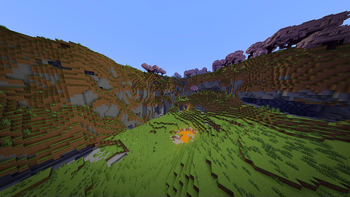
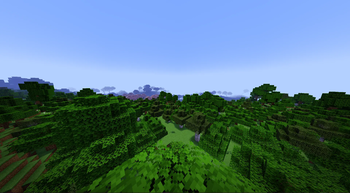
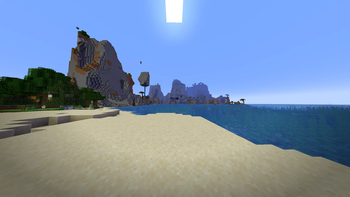
Energy Shaders is a shaderpack/resourcepack that provides a more colorful vanilla expierience. Without requiring
any mods or a frame rate drop.
If you like this pack consider supporting the development by buying me a coffee:

Features
It is best to take a look at the gallery or to
try the shaderpack out. Here is a list of some features:
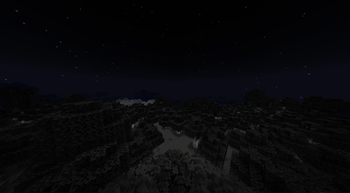
- Custom lightning (different for day, night and in caves)
- Custom fog (different for day, night and in caves)
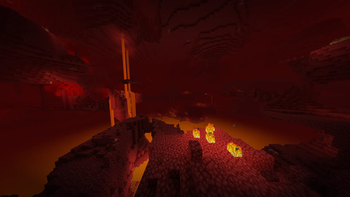
- Custom Nether
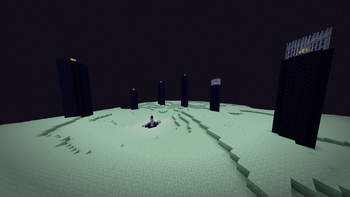
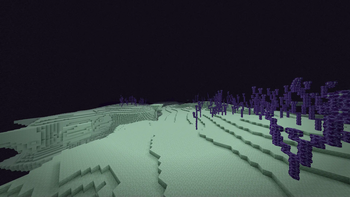
- Custom End
- Custom torch light (different for day, night and in caves)
- Vignette effect
Enabling the resourcepack
You can simply enable it as resourcepack (Copy the .zip into the resourcepack directory).
If you are using Sodium before minecraft 26.2, the Sodium Core Shader Support mod is required.
The pack does not work with Optifine!
Video
Customization (Since v. 2.8.0)
Energy Shaders also offers a lot of customization. Since this is a vanilla shader-pack, these settings have to be
manually edited.
Getting started with customizing energy shaders
First download the settings template.
Then copy the downloaded zip file to your resourcepacks directory. You can find it by pressing Open Pack Folder in
Minecraft's Resourcepack selection screen. Next extract the zip file and delete it, so that only the extracted
directory ES Settings Java remains. You can rename the directory to your liking.
Now edit ES Settings Java/pack.mcmeta with a text editor of your choosing and change YOUR_NAME to your name or your alias.
Next you should test if everything works. Activate Energy Shaders \[Java] and the ES Settings Java pack you just created. Make
sure the ES Settings Java pack is above Energy Shaders \[Java]. Open a world and Minecraft should not crash. Keep the
Now you can start to actually change some settings. Open ES Settings Java/assets/minecraft/shaders/include/es-settings.glsl
in your favorite text editor.
In there you will find a lot of lines starting with // #define. These are the settings, which can be changed. All Settings
must be enabled first (by removing the //) before its value can be changed. Some settings do not have a value. These simply enable or disable
a feature.
After changing a setting go back in game and press F3 + T, which will reload all resourcepacks. Thus, applying your changes.
The line
// #define DISABLE_SHADOW
can be changed to
#define DISABLE_SHADOW
which will disable shadows cast by blocks, trees, etc.
NOTE: The // must be removed as seen above!
The line
// #define SATURATION 1.2
can be changed to
#define SATURATION 0.0
which will make the game look grayscale.
NOTE: The // must be removed as seen above!
If you want to switch back to the default value simple add the // again:
//#define SATURATION 0.0
Some settings are explained in the es-settings.glsl. Some may be hard to explain, and you just have to try around
and find out. Generally, if a setting contains a VEC3(...), it is a setting with three values (red, green, blue).
Of course, you can always ask for help in my discord server: https://discord.gg/shVe3cR
Why are the settings in a different pack and not just contained in Energy Shaders directlyActually, the settings are contained in Energy Shaders too! But it is much more convenient if the settings are in an
additional pack, because you can update Energy Shaders without losing your settings!
Feedback
Feel free to leave any feedback on my Discord server. Please respect,
that vanilla Minecraft is very limited.
Прев’ю
Зображення товару
Середовище
Вимоги та сумісність
Сумісність і вимоги
Vanilla1.20.1 – 1.21.1126.126.1.126.1.226.2
Локальний хост
Required
Хостинг на сервісах
Unsupported
Умови
Ліцензія
Умови використання, зміни та поширення цього товару.
LicenseRef-All-Rights-ReservedModrinth
Реліз
Останній реліз
v2.9.0
21.06.2026 · Modrinth
- Updated to mc 26.2
- Changed Vignette effect to be generally less visible and especially when being close to a wall
Галерея
Зображення проєкту
Скриншоти та зображення з оригінальної сторінки Modrinth.
Day
Day
Day
Night
Nether
End
End
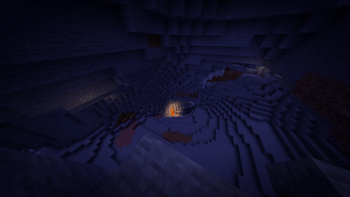
Cave



Історія
Версії проєкту
Опубліковані версії та оригінальні файли Modrinth.
v2.9.0ОстанняRelease
21.06.2026 · 4 233 завантаження
Vanilla26.2
- Updated to mc 26.2
- Changed Vignette effect to be generally less visible and especially when being close to a wall
v2.8.13Release
03.04.2026 · 7 462 завантаження
Vanilla1.21.1126.126.1.126.1.2
- Updated mc 26.1
v2.8.12Release
27.03.2026 · 837 завантаження
Vanilla1.21.1126.1
- Updated mc 26.1
v2.8.11Release
25.01.2026 · 3 889 завантаження
Vanilla1.21.11
- Updated to sodium 0.8.3
v2.8.10Release
12.12.2025 · 5 018 завантаження
Vanilla1.21.11
- Fixed: Wrong Minecraft and Sodium versions listed as supported
v2.8.9Release
11.12.2025 · 357 завантаження
Vanilla1.21.11
- Updated to mc 1.21.11
- Updated to sodium 0.8.0
v2.8.8Release
10.10.2025 · 13 795 завантаження
Vanilla1.21.61.21.71.21.81.21.91.21.10
- Updated to sodium 0.7.2
v2.8.7Release
03.10.2025 · 1 219 завантаження
Vanilla1.21.61.21.71.21.81.21.91.21.10
- Updated to sodium 0.7.0 and minecraft 1.21.9
v2.8.6Release
01.07.2025 · 5 927 завантаження
Vanilla1.21.61.21.71.21.8
- Updated supported sodium versions
v2.8.5Release
01.07.2025 · 151 завантаження
Vanilla1.21.61.21.7
- updated pack version to minecraft 1.21.7
v2.8.4Release
20.06.2025 · 1 008 завантаження
Vanilla1.21.6
- Hotfix update
v2.8.3Release
17.06.2025 · 470 завантаження
Vanilla1.21.6
- Updated to Minecraft 1.21.6
v2.8.1Release
28.04.2025 · 4 030 завантаження
Vanilla1.21.5
- fixed fog transparency on water
v2.8.0Release
26.04.2025 · 311 завантаження
Vanilla1.21.5
- fixed a vignette bug
- updated to sodium 0.6.13
v2.7.1Release
25.03.2025 · 2 079 завантаження
Vanilla1.21.5
- updated to sodium 0.6.11 and mc 1.21.5
v2.7.0Release
14.03.2025 · 176 завантаження
Vanilla1.21.5-pre2
- updated to mc 1.21.5-pre2
- does currently not work on sodium
- added custom sword texture: Rename your netherite sword to
Energy Swordto get it!
v2.6.0Release
14.03.2025 · 2 960 завантаження
Vanilla1.21.21.21.31.21.4
- updated to Sodium 0.6.10
- torch-light adjustments
- more exponential light
- more red colored in caves
v2.5.1Release
20.02.2025 · 816 завантаження
Vanilla1.21.21.21.31.21.4
- updated to Sodium 0.6.9
v2.5.0Release
27.01.2025 · 751 завантаження
Vanilla1.21.21.21.31.21.4
- removed clear glass textures. These are now available as a separate pack:
- Better Clearer Glass Modrinth
- Better Clearer Glass Curseforge
v2.4.1Release
25.12.2024 · 1 476 завантаження
Vanilla1.21.21.21.31.21.4
- updated to sodium 0.6.6
v2.4.0Release
20.12.2024 · 363 завантаження
Vanilla1.21.21.21.31.21.4
- added new glass textures
- added custom splash text (yellow text on home screen). You can submit your own splashes on my discord in the text-submission channel.
v2.3.7Release
19.12.2024 · 113 завантаження
Vanilla1.21.21.21.31.21.4
- updated to sodium 0.6.5
- slighty adjusted torch light color
v2.3.6Release
07.12.2024 · 458 завантаження
Vanilla1.21.21.21.31.21.4
- updated to sodium 0.6.3
v2.3.5Release
04.12.2024 · 212 завантаження
Vanilla1.21.21.21.31.21.4
- updated to sodium 0.6.2
v2.3.4Release
03.12.2024 · 256 завантаження
Vanilla1.21.21.21.31.21.4
- updated pack version
v2.3.3Release
03.12.2024 · 118 завантаження
Vanilla1.21.21.21.3
- updated to sodium 0.6.1
v2.3.2Release
20.11.2024 · 266 завантаження
Vanilla1.21.21.21.3
- updated to sodium 0.6.0
v2.3.1Release
14.11.2024 · 201 завантаження
Vanilla1.21.21.21.3
- updated to sodium 0.6.0-beta.5
v2.3.0Release
28.10.2024 · 609 завантаження
Vanilla1.21.21.21.3
- fixed hand/item light
- adjusted to minecraft's shadow changes
- increased enchantment glint a bit
- updated to sodium 0.6.0-beta.4
v2.2.2Release
22.10.2024 · 370 завантаження
Vanilla1.21.21.21.3
- now also works on sodium (with sodium core shader support mod)
v2.2.1Release
22.10.2024 · 97 завантаження
Vanilla1.21.2
- updated to mc 1.21.2
v2.2.0Beta
15.10.2024 · 144 завантаження
Vanilla1.21.2-pre31.21.2-pre41.21.2-pre5
- updated to mc 1.21.2-pre3
- changed torch color at night and in cave
- changes to light value
- technical: replaced custom uniform with custom defines
- currently untested on sodium!
v2.1.6Beta
16.09.2024 · 6 532 завантаження
Vanilla1.211.21.1
- updated to sodium 0.6.0-beta.2+mc1.21.1
v2.1.5Release
15.08.2024 · 5 432 завантаження
Vanilla1.211.21.1
- added versions.json for the sodium core shader support mod
v2.1.4Release
13.06.2024 · 2 486 завантаження
Vanilla1.20.51.20.61.211.21.1
- updated pack version
v2.1.3Release
23.04.2024 · 1 405 завантаження
Vanilla1.20.51.20.6
- updated pack version
v2.1.2Beta
31.03.2024 · 948 завантаження
Vanilla1.20.4
- updated pack version
- fixed crash on amd gpus
- this is a re-upload of this version because minecraft was not able to load the zip file
v2.1.0Beta
22.02.2024 · 268 завантаження
Vanilla24w05b24w06a24w07a
- fixed aplha-cut-off on armor
- minecraft:
rendertype_armor_cutout_no_cull.json - fixed inventory light on items (changed in 24w05b)
- updated pack version
- reduced night grey scale
- added
NIGHT_GREY_SCALE_PERCENTAGEsetting - updated to Sodium 0.5.8
- also works on 1.20.4, but inventory light on items will be bugged as it was changed in 24w05b
v2.0.3Release
09.12.2023 · 10 636 завантаження
Vanilla1.20.11.20.21.20.31.20.4
- updated pack version
v2.0.2Release
21.09.2023 · 1 665 завантаження
Vanilla1.20.11.20.21.20.31.20.4
- small bug fixes
- entities and particles are now rendered correctly
v2.0.1Release
18.09.2023 · 246 завантаження
Vanilla1.20.11.20.2
- added support for Sodium (requires the Sodium Shader Support mod)
v2.0.0Release
14.09.2023 · 315 завантаження
Vanilla1.20.1
- reworked completely
Гортайте товари колесом або стрілками