

Товар
Про товар
Contour Shaders
Ever watched a Minecraft trailer and wondered how the mobs got those clean, vibrant outlines? Now you can bring that exact official art style into your own game.
✦ What is Contour Shaders?
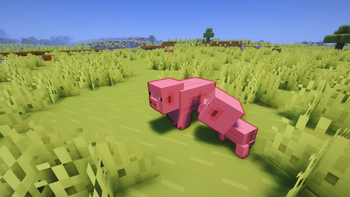
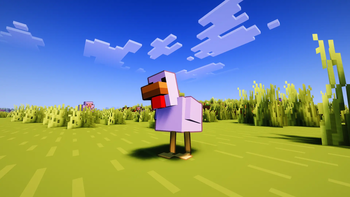
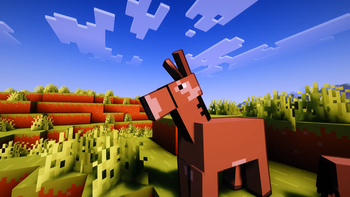
Contour Shaders introduces dynamic, color-coded entity outlines to every mob, player, and dropped item in your world.
Instead of a flat, intrusive black border, the outline color intelligently adapts to the entity itself—giving a Creeper a rich green outline and a Cow a deep brown border. It perfectly replicates the iconic aesthetic seen in official Minecraft trailers and promotional art.
✦ Key Features
-
Intelligent Outlines: Every mob naturally pops out from the environment without losing the game's immersive feel.
-
Pixel-Perfect Scaling: Outlines remain crisp, clean, and proportional at any render distance.
-
That "Trailer" Aesthetic: Experience your world as if you're playing inside official Minecraft artwork.
-
Fully Customizable: Easily tweak thickness, darkness, and distance falloff directly from the in-game shader options.
-
Rainbow Outline Mode: Make the outline cycle through rainbow colors, with support for animated or fixed hue.
-
Built on Greatness: Built on top of Complementary Shaders, ensuring the rest of your world still features industry-standard lighting, water, etc.
🛠️ Requirements
- Minecraft Java Edition
- Iris Shaders (v1.6 or higher)
- A graphics card supporting OpenGL 3.3 or higher
⚙️ Settings You Can Tweak
| Setting | What it does |
|---|---|
| Outline Thickness | How thick the outline appears |
| Outline Darkness | How dark the outline color is |
| Base Distance | Distance where thickness starts shrinking |
| Outline on Hand | Toggle outline on your held item |
| Rainbow Mode | Enable rainbow coloring on the outline |
| Rainbow Animated | Toggle animated or fixed hue |
| Rainbow Fixed Color | Pick a specific hue when animation is off |
| Rainbow Speed | How fast the rainbow cycles |
📦 Quick Installation
- Ensure Iris Shaders is installed.
- Navigate to: Options ➔ Video Settings ➔ Shader Packs ➔ Open Shader Pack Folder
- Drop the downloaded .zip file into the folder.
- Select Contour Shaders in-game and click Apply.
- Enjoy your new look!
💬 Join the Community
Got questions, want to report a bug, or just want to show off your screenshots? Join the official Discord server!
Get instant update notifications, beta testing access, and community support.
👥 Credits
Shader Base: Complementary Shaders by Emin (EminGT) and the Complementary Development team. Visit them at Complementary Dev
Modifications: The custom adaptive outline system was developed by me (Eleeter) and Edren, integrated into the Complementary codebase.
Distributed as a Modified Pack in full compliance with the Complementary License Agreement 1.6.
Прев’ю
Зображення товару
Середовище
Вимоги та сумісність
Сумісність і вимоги
IrisOptifine1.16.5 – 1.21.1126.126.1.126.1.2
Локальний хост
Required
Хостинг на сервісах
Unsupported
Умови
Ліцензія
Умови використання, зміни та поширення цього товару.
LicenseRef-Complementary-License-Agreement-1.6Modrinth
Реліз
Останній реліз
v1.0.3
23.06.2026 · Modrinth
Contour Shaders — Outline Overhaul
Finally! got around to fixing and upgrading the entire outline system. took a while but its in a much better spot now.
Fixes
Hand Outline Disappearing Behind Mobs
This one was most annoying bug for a while. The problem was that entities and the hand were both writing into the same single channel on colortex9, so when the hand was sitting behind a mob the depth check just killed it with no way to tell the two apart. Split them into separate...
Галерея
Зображення проєкту
Скриншоти та зображення з оригінальної сторінки Modrinth.
Історія
Версії проєкту
Опубліковані версії та оригінальні файли Modrinth.
v1.0.3ОстанняRelease
23.06.2026 · 3 199 завантаження
IrisOptifine1.16.51.171.17.11.181.18.11.18.21.191.19.1
Contour Shaders — Outline Overhaul
Finally! got around to fixing and upgrading the entire outline system. took a while but its in a much better spot now.
Fixes
Hand Outline Disappearing Behind Mobs
This one was most annoying bug for a while. The problem was that entities and the hand were both writing into the same single channel on colortex9, so when the hand was sitting behind a mob the depth check just killed it with no way to tell the two apart. Split them into separate channels (RG8 now instead of R8), hand gets green, entities get red, and composite2 just skips the depth check entirely when it sees a hand fragment. Completely gone now!!
Changes
Kernel now uses gaussian weights
Switched from the flat equal-weight sample loop to a gaussian falloff. Closer pixels to the edge boundary contribute more, further ones fade out. Outlines look way cleaner before TAA even runs, no more stairstepping.
Depth bias is no longer hardcoded
The old 0.005 flat bias was always a hack. Replaced it with something derived from the projection matrix so it represents an actual 5cm world-space gap at whatever depth youre at. Fixes the flickering on terrain and the weird culling when mobs stand right on the ground.
Entity separation threshold scales with FOV
The 0.4 threshold that separates overlapping entities was completely hardcoded. Zoom in with a spyglass and it falls apart. Tied it to gbufferProjection[1][1] now so it adjusts based on your actual focal length. works properly from 30 degrees.
Outline thickness is now FOV-accurate
Same problem as above. the old thickness formula would bloat at wide FOV and shrink at narrow FOV. Corrected it against a 70 degree reference focal length so what you set is what you actually see on screen regardless of your FOV.
Mask now stores alpha instead of hard 1.0
Entities and hand were just slamming a flat 1.0 into the mask no matter what. Changed both passes to write color.a instead. Slimes, Spectral arrows, anything translucent now gets a proportionally soft outline instead of a fully opaque border around a see-through mob.
v1.0.2Release
13.06.2026 · 704 завантаження
IrisOptifine1.16.51.171.17.11.181.18.11.18.21.191.19.1
Changelog
Added
- Rainbow Outline Mode (
OUTLINE_RAINBOW) — optional extra color mode that makes the outline cycle through rainbow colors OUTLINE_RAINBOW_CYCLE— toggle animated vs fixed rainbow colorOUTLINE_RAINBOW_HUE— fixed hue used when animation is off (0.00Red →0.17Yellow →0.33Green →0.50Cyan →0.67Blue →0.83Magenta)OUTLINE_RAINBOW_SPEED— animation cycle speed whenOUTLINE_RAINBOW_CYCLEis onen_US.langentries for all new Contour Outline options and screen
Fixed
- Fixed 2-column UI layout gap in
CONTOUR_OUTLINE_SETTINGSscreen —OUTLINE_DARKNESSandOUTLINE_RAINBOWnow share a row correctly instead ofOUTLINE_RAINBOWbeing orphaned to its own row due to a double<empty>token pair between them
v1.0.1Release
07.06.2026 · 583 завантаження
IrisOptifine1.16.51.171.17.11.181.18.11.18.21.191.19.1
Contour Shaders v1.0.1
A bug-fix release on top of v1.0.
What's fixed
Outlines on overlapping entities now render correctly. Previously, when two mobs overlapped on screen — or when your hand overlapped a mob — the outline would disappear at the intersection. This happened because the edge-detection pass skipped any pixel that belonged to an entity, so mob-on-mob overlap zones were silently ignored.
The outline pass now runs on every pixel. Background pixels use a lenient depth threshold to handle coplanar surfaces like feet on the ground. Entity pixels use a view-space depth comparison converted to real in-game metres, requiring a neighbour to be at least 0.4 blocks closer before drawing — this distinguishes a separate mob in front from natural surface curvature on the same mob, preventing interior self-outlining while keeping all overlap cases correct.
Known issue (carried forward, not introduced in this release)
Outlines may disappear when you are very close to a mob. This is a remaining depth precision limitation and will be addressed in a future update!
Compatibility: Iris 1.7+ · Minecraft 1.21+
v1.0.0Release
05.06.2026 · 182 завантаження
IrisOptifine1.16.51.171.17.11.181.18.11.18.21.191.19.1
Гортайте товари колесом або стрілками